
1. Introduction
Thank you for choosing the WERHY H7 Electric Scooter. This manual provides essential information for the safe operation, assembly, maintenance, and troubleshooting of your scooter. Please read this manual thoroughly before your first ride to ensure optimal performance and safety.

Image 1.1: The WERHY H7 Electric Scooter, showcasing its sleek design and integrated digital display.
2. Safety Information
Riding an electric scooter carries inherent risks. To minimize these risks, always adhere to the following safety guidelines:
- Always wear a helmet and appropriate protective gear (knee pads, elbow pads) when riding.
- Familiarize yourself with local laws and regulations regarding electric scooter use.
- Do not exceed the maximum weight limit of 265 pounds (120 kg).
- This scooter is designed for adults. Ensure riders are of appropriate age and skill level.
- Avoid riding in wet conditions, on slippery surfaces, or in heavy traffic.
- Maintain a safe speed and always be aware of your surroundings.
- Perform a pre-ride check before each use, including brakes, tires, and battery level.
3. Package Contents
Upon opening the package, verify that all items are present and in good condition:
- WERHY H7 Electric Scooter
- Power Charger
- User Manual (this document)
- Necessary Tools for Assembly (if applicable)
4. Product Overview
The WERHY H7 Electric Scooter features a robust design with key components for performance and safety.
4.1 Main Components
Key parts of the scooter include the handlebar with controls, digital display, folding mechanism, front and rear wheels, motor, battery compartment, headlight, and taillight.

Image 4.1: Overview of the WERHY H7 Electric Scooter, highlighting its main structural and functional components.
4.2 Digital Display
The integrated digital display provides real-time information about your ride:
- Speed Display: Shows current riding speed.
- 3 Speed Mode: Indicates the selected riding mode (e.g., Eco, Standard, Sport).
- Battery Level: Displays the remaining battery charge.
- Cruise Control Indicator: Shows when cruise control is active.

Image 4.2: Close-up of the Smart LED Screen, displaying speed, riding mode, battery level, and cruise control status.
5. Setup and Assembly
Follow these steps to prepare your WERHY H7 Electric Scooter for its first use:
- Unfolding the Scooter: Carefully lift the handlebar stem until it locks into the upright position. Ensure the folding mechanism is securely latched.
- Handlebar Assembly: Attach the handlebars to the stem, ensuring all connections are firm. Tighten any screws as instructed in the quick start guide (if provided separately).
- Initial Charge: Before the first ride, fully charge the scooter's battery. Connect the charger to the charging port and then to a power outlet. The charging indicator on the charger will change when fully charged (typically 4-5 hours).
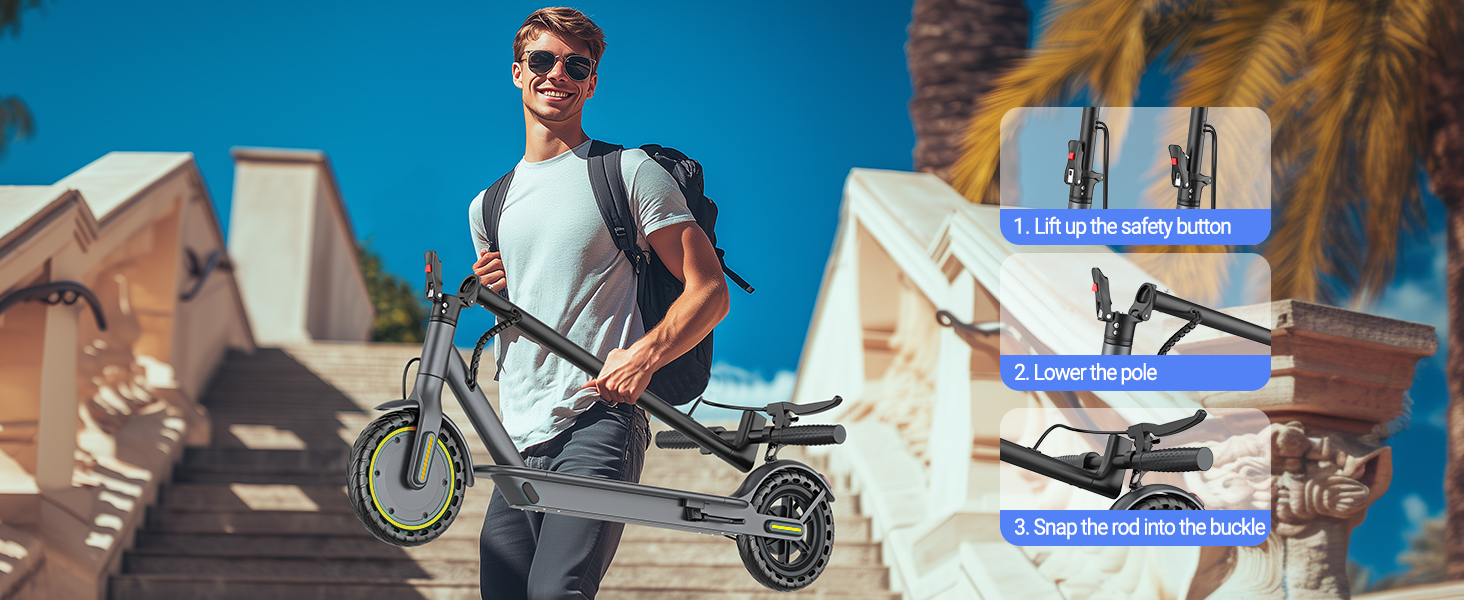
Image 5.1: Visual guide demonstrating the three-step folding process: lifting the safety button, lowering the pole, and snapping the rod into the buckle for compact storage.
6. Operating Instructions
6.1 Powering On/Off
Press and hold the power button on the digital display to turn the scooter on or off.
6.2 Riding Modes
The scooter offers multiple speed modes. Use the controls on the display or the smart app to switch between modes (e.g., Eco for energy saving, Standard for balanced performance, Sport for maximum speed).
6.3 Smart App Control
Enhance your riding experience by connecting your scooter to the dedicated smart app. The app allows you to:
- Lock/Unlock the Scooter: Secure your scooter remotely.
- Cruise Control: Activate and manage cruise control settings.
- Vehicle Setup: Customize various scooter parameters.
- Switch Riding Modes: Easily change between speed modes.
- Location Records: Track your ride history.
- Lighting System Control: Manage headlights and taillights.
- Scooter Status Display: Monitor battery, speed, and other vital statistics.

Image 6.1: The Smart APP Control interface, illustrating options for locking, riding mode selection, lighting, speed level, cruise control, and scooter status display.
6.4 Folding Mechanism
The WERHY H7 features a 3-second folding design for easy portability and storage. To fold, engage the safety button, lower the handlebar stem, and secure it into the designated buckle. This compact design allows it to fit into car trunks or under seats.

Image 6.2: A user demonstrating the lightweight folding design of the WERHY H7 Electric Scooter, showing how it can be easily carried and stored in a car trunk.
6.5 Braking System
The scooter is equipped with a dual braking system for enhanced safety:
- Mechanical Brake: Provides reliable stopping power.
- EABS Regenerative Anti-lock Brake: An electronic braking system that also helps recharge the battery during deceleration.
Always apply brakes smoothly and gradually to avoid sudden stops.

Image 6.3: Illustration of the dual braking system, featuring both electronic and mechanical brakes for improved stopping performance and safety.
6.6 Lighting
The scooter includes a bright headlight and a sensitive taillight for visibility and safety, especially during night rides. The taillight also functions as a brake warning light.

Image 6.4: The bright headlight, offering a 65 ft beam range, and the sensitive taillight with night reminder and brake flashing warning for enhanced visibility.
7. Maintenance
Regular maintenance ensures the longevity and safe operation of your scooter.
- Battery Care: Charge the battery regularly, even if not in use, to maintain its health. Avoid fully discharging the battery. Store the scooter in a cool, dry place.
- Tire Inspection: The scooter uses solid rubber tires. Regularly check them for wear, cuts, or damage.
- Cleaning: Wipe the scooter with a damp cloth. Do not use high-pressure water or immerse the scooter in water.
- Brake Check: Periodically inspect the brake levers and cables for proper function and adjustment.
- General Inspection: Check all screws and fasteners for tightness before each ride.
8. Troubleshooting
This section addresses common issues you might encounter with your WERHY H7 Electric Scooter.
| Problem | Possible Cause | Solution |
|---|---|---|
| Scooter does not power on | Low battery; Loose connections | Charge the battery; Check all cable connections. |
| Reduced range or speed | Low battery; Overload; Tire wear | Fully charge battery; Ensure rider weight is within limits; Inspect tires. |
| Brakes not responsive | Brake cable adjustment; Worn brake pads | Adjust brake cable tension; Replace worn brake pads. |
| Unusual noises during operation | Loose components; Debris in wheels | Inspect and tighten all fasteners; Clear any debris from wheels and motor area. |
If you encounter issues not listed here or require further assistance, please contact WERHY customer support.
9. Specifications
Detailed technical specifications for the WERHY H7-8.5''-19mph-350W Electric Scooter:
- Model Name: H7
- Motor Power: 350W
- Max Speed: 19 mph
- Max Range: Up to 20 miles (under certain conditions)
- Battery Capacity: 36V 7.8Ah (280.8 WH)
- Charging Time: Approximately 4-5 hours
- Wheel Size: 8.5 Inches
- Wheel Type: Solid Rubber
- Brake Style: Front Braking, Rear Braking (Mechanical and EABS Regenerative Anti-lock)
- Weight Limit: 265 Pounds (120 kg)
- Material: Aluminum
- Special Features: Digital Display, Smart APP Control, Cruise Control, Folding Design
- Included Components: Charger, Electric Scooter, Manual

Image 9.1: Visual representation of the WERHY H7 Electric Scooter's 350W motor and 19 mph max speed capabilities.
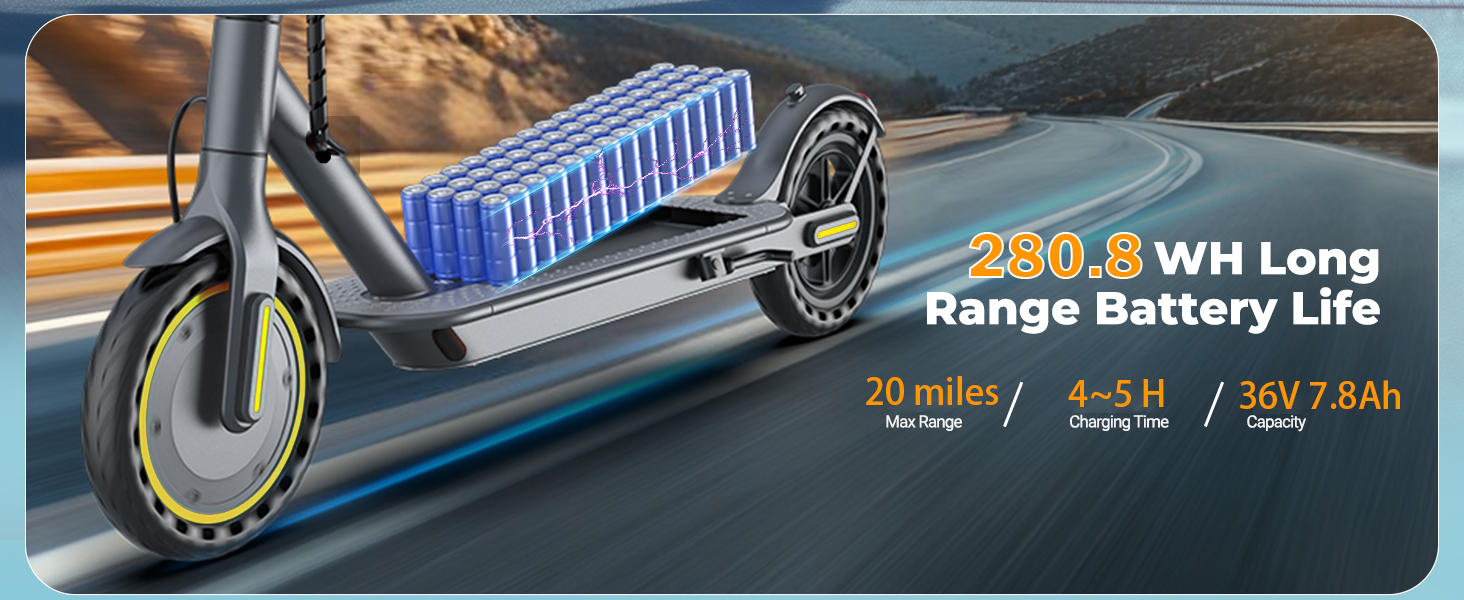
Image 9.2: Illustration detailing the 280.8 WH long-range battery life, 20 miles max range, and 4-5 hour charging time.
10. Warranty and Support
WERHY is committed to providing high-quality products. Your WERHY H7 Electric Scooter comes with the following warranty:
- E-scooter and Parts: One-year warranty.
- Battery and Motor: Six-month warranty.
For any questions, warranty claims, or technical support, please contact WERHY customer service through the official website or your purchase platform. Please have your model number and purchase date available when contacting support.