
1. Introduction
Thank you for choosing the COOSPIDER T500B-20G 20 Gallon Glass Aquarium Starter Kit. This manual provides essential information for the safe and efficient setup, operation, and maintenance of your new aquarium. Please read these instructions carefully before use and retain them for future reference.
Important Safety Note: Long-distance shipping may cause product damage. If you receive a package and find the product inside damaged or suspect damage, please do not open the package directly to avoid accidental injury. Check the information on the packaging and contact customer support immediately.
2. Product Features
- Ultra-Clear Glass: Constructed from high-definition, ultra-clear glass for a distortion-free view of your aquatic environment.
- Simple Self-Cleaning Circulation System: Features a quiet 3-in-1 pump for filtering, oxygenating, and wave making, designed to reduce maintenance and create a waterfall effect.
- 3-Color LED Lighting: Integrated LED lights offer three color modes (Natural, Warm, Cold) to support plant photosynthesis and enhance the visual appeal of your aquarium.
- Temperature Monitoring: A built-in real-time temperature system helps maintain a stable environment for sensitive aquatic species.
- User-Friendly Design: Includes a removable flip-top lid with a feeding port for easy access, setup, and cleaning.
- Quiet Operation: Designed to operate with low noise, ensuring minimal disturbance.


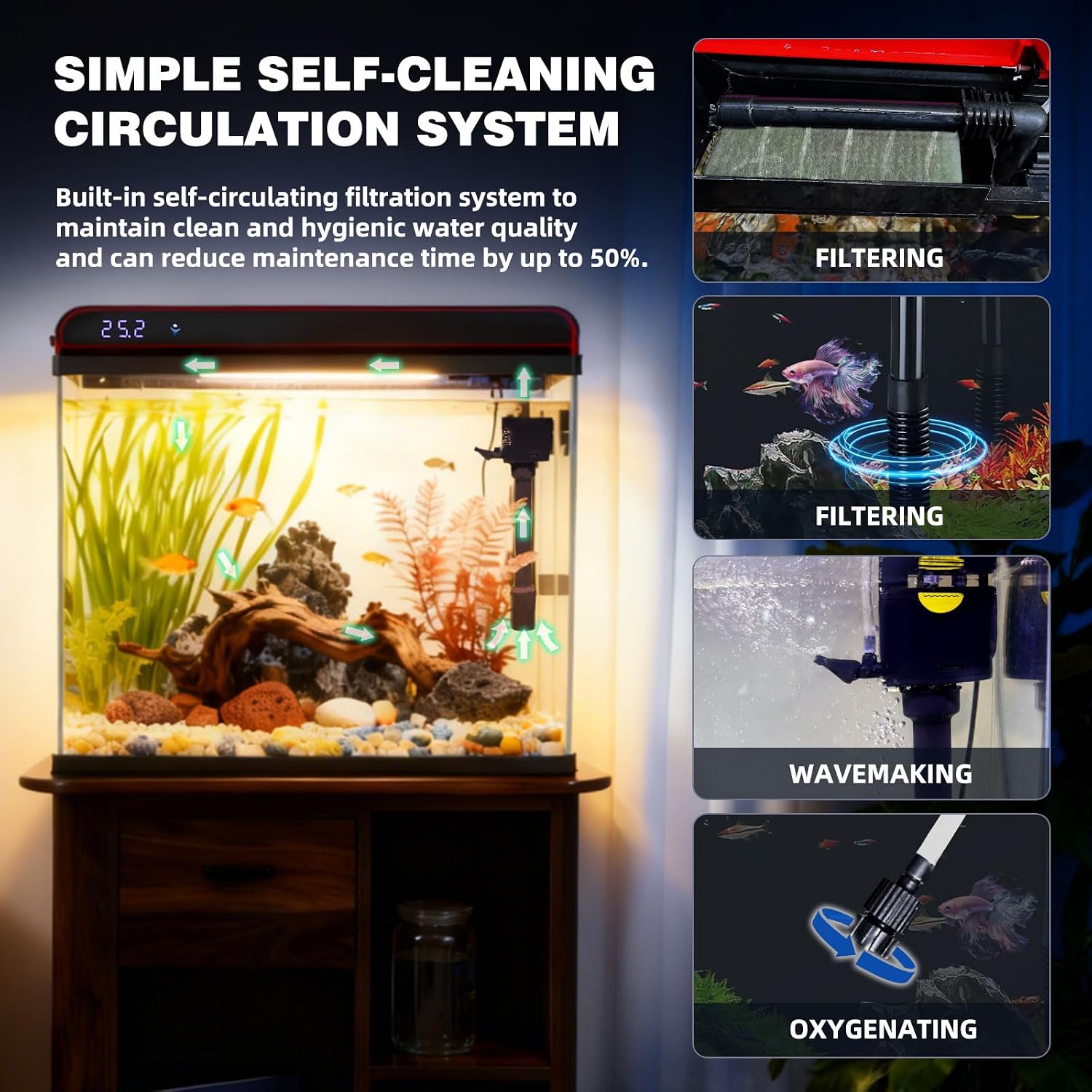


3. Setup Instructions
- Unpacking and Inspection: Carefully remove all components from the packaging. Inspect the aquarium and all accessories for any signs of damage. If any damage is found, refer to the safety note in the Introduction.
- Placement: Choose a stable, level surface away from direct sunlight, heat sources, and drafts. Ensure the location can support the weight of the filled aquarium (approximately 200 lbs for a 20-gallon tank).
- Rinsing: Rinse the aquarium glass, gravel, decorations, and filter components thoroughly with clean water. Do not use soap or detergents, as residues can be harmful to aquatic life.
- Gravel and Decorations: Add your rinsed gravel to the bottom of the tank, followed by any rinsed decorations.
- Install Filter Pump: Position the 3-in-1 filter pump inside the aquarium according to the manufacturer's guidelines, ensuring it is securely attached and submerged.
- Fill with Water: Slowly fill the aquarium with dechlorinated water. Leave a small gap from the top rim to prevent overflow.
- Install Lid and Lighting: Place the removable flip-top lid onto the aquarium. Ensure the LED lighting unit is properly seated. When installing and removing the lid, keep it at a 90-degree angle to the fish tank to prevent damage.
- Connect Power: Plug in the filter pump and LED lights to a suitable power outlet.
- Temperature Detector: Ensure the temperature detector is fully submerged in the water for accurate readings.
4. Operating Instructions
- LED Lighting: Short press the button on the lid to cycle through the three LED lighting modes: Natural Light, Warm Light, and Cold Light. Continue pressing to activate the three-color cycle mode.
- Filter Pump: The 3-in-1 pump operates continuously to filter, oxygenate, and create water movement. Ensure the water level is always above the minimum line for proper pump function.
- Temperature Monitoring: The built-in display on the lid shows the real-time water temperature. For the most accurate reading, ensure the temperature detector is fully submerged in the water.
- Feeding: Use the designated feeding port on the lid for convenient feeding without fully opening the lid.
5. Maintenance
Regular maintenance is crucial for a healthy aquatic environment. The following table outlines recommended maintenance tasks for your 20-gallon aquarium:

| Task | Frequency | Action | Notes |
|---|---|---|---|
| LED duration | Daily | 6-12 hrs | Control algae |
| Water change | Weekly | 6 Gal (30%) | Strict 30% |
| Clean filter sponge | Weekly | Use the water in the fish tank to clean and squeeze. | Must clean, no tap water |
| Wipe lid + LED | Weekly | Dry microfiber cloth wiping | Prevent scratches |
| Water pump filter basket | Weekly | Disassemble and flush | Power off |
| Test water | Weekly | pH 6.5-7.5 Ammonia <0.25 ppm | Add bacteria if abnormal |
| Clean airstone | Monthly | Soak in vinegar 5 min, rinse thoroughly | Prevent fish gasping |
| Replace carbon | Monthly | Change the activated carbon | — |
| Water pump inner impeller | Monthly | Disassemble, rinse, and dry. | — |
Weekly Routine (15 min): Power off & unplug pump → Water change → Clean sponge → Wipe lid+LED → Test water.
Note: You need to change the water and clean green algae weekly to maintain optimal water quality.
6. Troubleshooting
- Pump Not Working: Ensure the pump is properly plugged in and the water level is sufficient. Disassemble and clean the inner impeller to remove any debris that might be obstructing its operation.
- Lid or Light Damage: If the lid or LED light unit appears damaged upon arrival or during use, contact customer support for assistance. Avoid attempting repairs that could void your warranty or cause further damage.
- Inaccurate Temperature Reading: Ensure the temperature detector is fully submerged in the water. If it is partially exposed to air, the reading will not be accurate.
- Excessive Algae Growth: Increase the frequency of water changes and cleaning of the filter sponge. Reduce the daily LED duration if necessary.
- Cloudy Water: Perform a partial water change and clean the filter media. Ensure you are not overfeeding your fish.
7. Specifications
| Specification | Detail |
|---|---|
| Item Model Number | T500B-20G |
| Brand | COOSPIDER |
| Material | Glass |
| Tank Volume | 20 gallons |
| Special Feature | Self Cleaning, Temperature Monitoring |
| Specific Uses For Product | Indoor |
| Style | Modern |
| Color | Black |
| Included Components | Fish tank*1 |
| Number of Items | 1 |
| Vivarium Type | Aquarium |
| Set Name | Basic Starter Kit |
| Unit Count | 1 Count |
8. Warranty and Support
This product comes with a standard manufacturer's warranty. For specific warranty details, please refer to the documentation included with your purchase or contact COOSPIDER customer support directly. If you encounter any issues or require assistance, please reach out to the seller or manufacturer through their official channels. Always provide your model number (T500B-20G) and purchase date when contacting support.