
Introduction
This manual provides instructions for the WSTER Portable Bluetooth Speaker, model JC-810. This device is designed to deliver high-quality audio with features suitable for both indoor and outdoor environments. Please read this manual thoroughly before using the product to ensure proper operation and to maximize its lifespan.
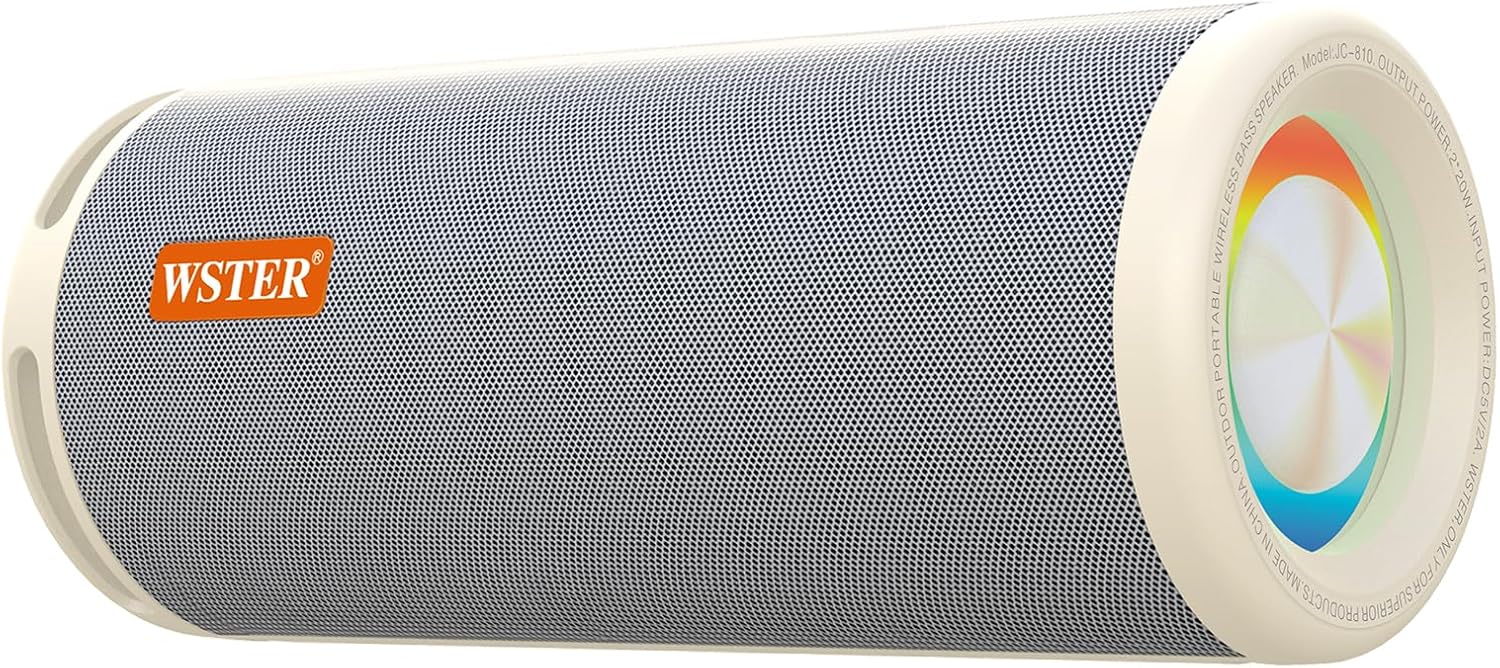
Figure 1: WSTER Portable Bluetooth Speaker JC-810 (White)
Key Features:
- 40-Watt High-Power Speaker: Delivers powerful bass and clear vocals.
- True Wireless Stereo (TWS): Connect two speakers for a stereo sound experience.
- Multiple Input Interfaces: Supports USB, TF card, and Bluetooth connectivity.
- Physical Control Buttons: For easy operation of volume, playback, and mode.
- Durable and Portable Design: Suitable for various indoor and outdoor activities.
- LED Ambient Light: Integrated lighting feature.
Package Contents
Ensure all items are present upon unboxing:
- WSTER Portable Bluetooth Speaker JC-810
- Power Cable
- Quick Start Guide
Setup
1. Charging the Speaker
- Connect the provided power cable to the charging port on the speaker.
- Plug the other end of the power cable into a compatible USB power adapter (not included) or a USB port.
- The charging indicator light will illuminate. It will turn off or change color once fully charged.
2. Powering On/Off
- To power on, press and hold the Power button until the indicator light turns on and you hear an audible prompt.
- To power off, press and hold the Power button until the indicator light turns off and you hear an audible prompt.

Figure 2: Speaker control panel showing power button and input ports.
3. Bluetooth Pairing
- Ensure the speaker is powered on and in Bluetooth pairing mode (indicated by a flashing LED).
- On your mobile device, enable Bluetooth and search for available devices.
- Select "JC-810" from the list of devices.
- Once paired, the speaker will emit an audible confirmation, and the LED indicator will stop flashing.
4. True Wireless Stereo (TWS) Pairing
To achieve a stereo sound experience, you can pair two WSTER JC-810 speakers together:
- Ensure both speakers are powered on and not connected to any Bluetooth device.
- On one speaker, press and hold the TWS button (if available, or a designated pairing button) until you hear a pairing prompt.
- Repeat the process on the second speaker.
- The speakers will automatically connect to each other. Once connected, one speaker will act as the master (left channel) and the other as the slave (right channel).
- Now, connect your mobile device to the master speaker via Bluetooth as described in step 3.
Operating Instructions
1. Basic Controls
| Button/Control | Function |
|---|---|
| Power Button | Press and hold to power on/off. |
| Play/Pause Button | Press to play or pause audio. |
| Volume Up (+) | Press to increase volume. Hold to skip to next track. |
| Volume Down (-) | Press to decrease volume. Hold to skip to previous track. |
| Mode Button (M) | Press to switch between input modes (Bluetooth, USB, TF Card). |
| LED Light Button | Press to cycle through LED light modes or turn off the light. |

Figure 3: Speaker showcasing the LED ambient light feature.
2. Using USB and TF Card Inputs
- Insert a USB flash drive or TF (Micro SD) card containing audio files into the respective port on the speaker.
- Press the Mode button (M) to switch to USB or TF Card mode.
- The speaker will automatically begin playing audio files from the inserted storage device.

Figure 4: USB and TF card input ports for direct media playback.
3. LED Ambient Light Operation
The speaker features an integrated LED ambient light. Press the LED Light button to:
- Turn the LED light on/off.
- Cycle through different light modes or colors (if multiple modes are available).
Maintenance
- Cleaning: Use a soft, dry cloth to clean the speaker's exterior. Do not use abrasive cleaners or solvents.
- Storage: Store the speaker in a cool, dry place away from direct sunlight and extreme temperatures.
- Water Exposure: This speaker is not waterproof. Avoid exposing it to water or excessive moisture.
- Battery Care: For optimal battery life, avoid fully discharging the battery frequently. Charge the speaker regularly, even if not in use for extended periods.
Troubleshooting
| Problem | Possible Solution |
|---|---|
| Speaker does not power on. | Ensure the battery is charged. Connect the power cable and try again. |
| Cannot pair via Bluetooth. |
|
| No sound or low volume. |
|
| TWS pairing fails. |
|
| USB/TF card not playing. |
|
Specifications
| Feature | Detail |
|---|---|
| Model Name | JC-810 |
| Brand | WSTER |
| Speaker Type | Portable Speaker |
| Connectivity Technology | Bluetooth |
| Wireless Communication Technology | Bluetooth |
| Bluetooth Version | 5.3 |
| Audio Output Mode | Stereo |
| Speaker Maximum Output Power | 40 Watts |
| Frequency Response | 18 KHz |
| Special Feature | LED Light, Portable |
| Material | Acrylonitrile Butadiene Styrene (ABS) |
| Color | White |
| Product Dimensions | 12.05"D x 4.8"W x 4.8"H |
| Number of Batteries | 2 Nonstandard Battery (included) |
| Included Components | Power Cable, Quick Start Guide |

Figure 5: Product dimensions of the WSTER JC-810 speaker.
Video Demonstration
Video 1: Demonstration of the WSTER Portable Bluetooth Speaker's design and sound capabilities, highlighting its suitability for outdoor use.
Warranty and Support
For warranty information or technical support, please refer to the contact details provided in the Quick Start Guide included with your product. You may also visit the official WSTER brand store on Amazon for additional resources and support options.