
1. Introduction
This manual provides essential information for the proper installation, use, and maintenance of your Puig 22468F R-Racer Screen. Please read these instructions carefully before proceeding with installation or use to ensure safety and optimal performance.
The Puig R-Racer Screen is developed in collaboration with the Kawasaki Racing Team, utilizing data from the FIM Superbike World Championship (SBK). Its precise aerodynamic design, refined through virtual wind tunnel technology, enhances the aerodynamic coefficient (Cx) for superior performance, especially in track riding conditions.
Constructed from 3mm thick impact-resistant acrylic resin, this screen offers both durability and a clear field of vision. The screen's end processing complies with German TUV regulations.
2. Installation
This R-Racer Screen is designed for vehicle-specific fitment on the Kawasaki ZX-4R Ninja and ZX-4RR Ninja models (2024-2025). The screen body and necessary mounting stays are included.
2.1 Safety Precautions
- Ensure the motorcycle is stable and turned off before beginning installation.
- Wear appropriate safety gear, such as gloves and eye protection.
- If you are unsure about any step, consult a qualified motorcycle mechanic.
2.2 Required Tools
Specific tools may vary, but generally include:
- Screwdriver set (Phillips and/or flathead)
- Hex key set
- Torque wrench (recommended for precise fastening)
2.3 Installation Steps
- Remove Original Screen: Carefully remove the existing windscreen from your motorcycle. Keep all original fasteners in a safe place.
- Position New Screen: Align the Puig R-Racer Screen with the mounting points on your motorcycle.
- Install Mounting Stays: Attach the provided mounting stays (if separate) to the screen and/or motorcycle, following the specific instructions provided with the product packaging.
- Secure Screen: Use the appropriate fasteners to secure the new screen. Tighten all screws and bolts to the manufacturer's recommended torque specifications. Do not overtighten.
- Final Check: Ensure the screen is securely mounted and does not wobble. Check for any obstructions or interference with handlebars or other components.
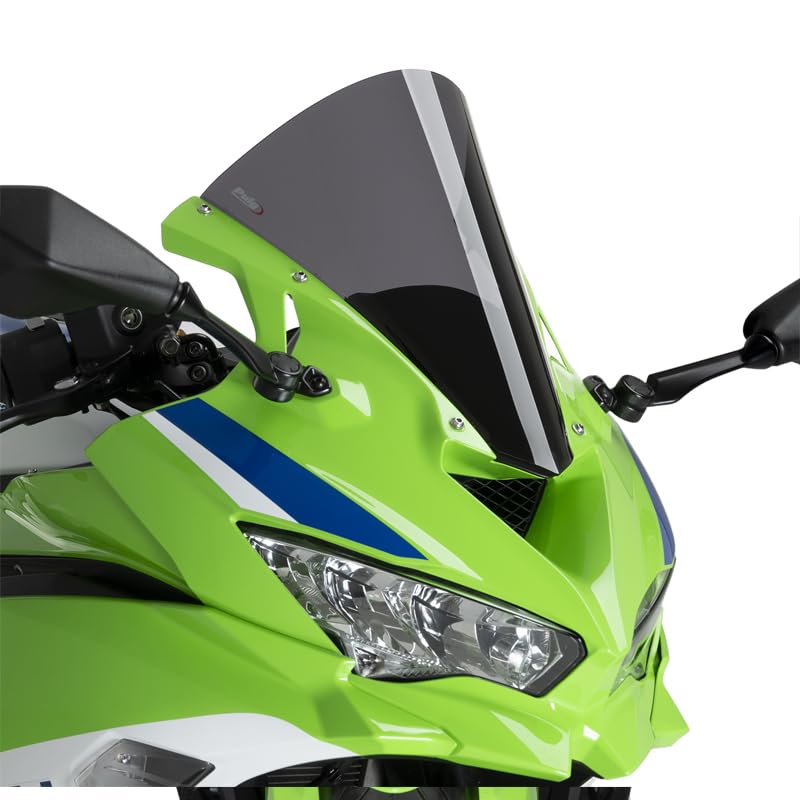
Figure 1: Puig R-Racer Screen installed on a Kawasaki ZX-4R/ZX-4RR Ninja motorcycle. This image shows the dark smoke screen seamlessly integrated with the motorcycle's fairing.

Figure 2: Front view of the Puig R-Racer Dark Smoke Screen. This image highlights the screen's curvature and dark tint.

Figure 3: Side view of the Puig R-Racer Dark Smoke Screen, highlighting its aerodynamic curve and mounting points.
3. Riding Considerations
Once installed, the Puig R-Racer Screen is designed to enhance your riding experience by improving aerodynamics and wind protection. Consider the following:
- Visibility: The dark smoke tint provides sun protection but may reduce visibility in low-light conditions. Always ensure clear visibility, especially at night or in adverse weather.
- Aerodynamics: The screen's design is optimized for high-speed riding, reducing wind pressure on the rider and improving stability.
- Initial Ride: After installation, perform a short test ride at low speeds to familiarize yourself with any changes in wind flow or visibility before riding at higher speeds.
4. Maintenance and Cleaning
Proper cleaning and maintenance are crucial for preserving the appearance and extending the lifespan of your Puig R-Racer Screen. Follow these guidelines:
- Cleaning: Use only tap water and a mild, pH-neutral detergent for cleaning. Apply with a soft cloth or sponge.
- Rinsing: Rinse thoroughly with clean water to remove all soap residue.
- Drying: Dry the screen with a soft, lint-free cloth to prevent water spots.
- Avoid Harsh Chemicals: Do NOT use alkaline or acidic liquids, or any aggressive chemical cleaners. Contact with such substances can cause cracks, hardening, or other damage, potentially shortening the product's lifespan.
- Avoid Abrasives: Do not use abrasive cleaners or rough cloths, as these can scratch the screen surface.
5. Troubleshooting
If you encounter any issues with your Puig R-Racer Screen, consider the following:
- Screen Wobbles: Ensure all mounting bolts are securely tightened. Re-check the installation steps to confirm proper fitment.
- Reduced Visibility: Clean the screen thoroughly. If visibility issues persist due to tint in specific conditions, exercise extra caution or consider alternative screens for those conditions.
- Unusual Noise: Check for any loose components or improper alignment that might cause vibrations or noise during riding.
For persistent issues not resolved by these steps, it is recommended to consult a professional motorcycle mechanic or contact Puig customer support.
6. Specifications
| Model Number | 22468F |
| Brand | Puig Hi-Tech Parts |
| Color | Dark Smoke |
| Material | 3mm thick impact-resistant acrylic resin |
| Dimensions (Height x Width) | Approx. 363 x 285 mm |
| Height vs. OEM | +80mm taller than genuine screen |
| Compatible Vehicle Type | Motorcycle (Kawasaki ZX-4R Ninja, ZX-4RR Ninja 2024-2025) |
| Mounting Type | Vehicle-specific fit |
| Included Components | Screen body, mounting stay |
| Country of Origin | Spain |
| Certifications | Complies with German TUV regulations |
7. Warranty and Support
For specific warranty information, please refer to the documentation included with your purchase or visit the official Puig website. In case of product defects or issues not covered in this manual, please contact Puig customer support or your authorized dealer for assistance.
Manufacturer: Puig Hi-Tech Parts
Website: www.puig.tv


