
1. Introduction
This manual provides essential instructions for the safe and effective use of your DNT Optics TNC335R ThermNight Thermal & Night Vision Multispectral Scope, bundled with the QDM150 Quick Detach Mount. The TNC335R is an advanced optical device designed for enhanced observation capabilities in various lighting conditions, offering both thermal and night vision functionalities. Please read this manual thoroughly before operating the device.
2. Safety Information
- Eye Safety: Never look directly at the sun or other intense light sources through the scope, as this can cause permanent eye damage.
- Battery Safety: Use only recommended battery types. Do not mix old and new batteries, or different types of batteries. Dispose of batteries according to local regulations.
- Mounting: Ensure the scope is securely mounted to your firearm using the QDM150 mount. Improper mounting can lead to injury or damage to the device.
- Environmental Conditions: Avoid exposing the device to extreme temperatures, direct impact, or corrosive substances.
- Maintenance: Do not attempt to disassemble or modify the scope. Refer all servicing to authorized DNT Optics personnel.
3. Package Contents
Verify that all items are present in your package:
- DNT Optics TNC335R ThermNight Multispectral Scope
- QDM150 Quick Detach Mount
- Lens Caps
- Rechargeable Battery
- USB Charging Cable
- Lens Cleaning Cloth
- User Manual (this document)
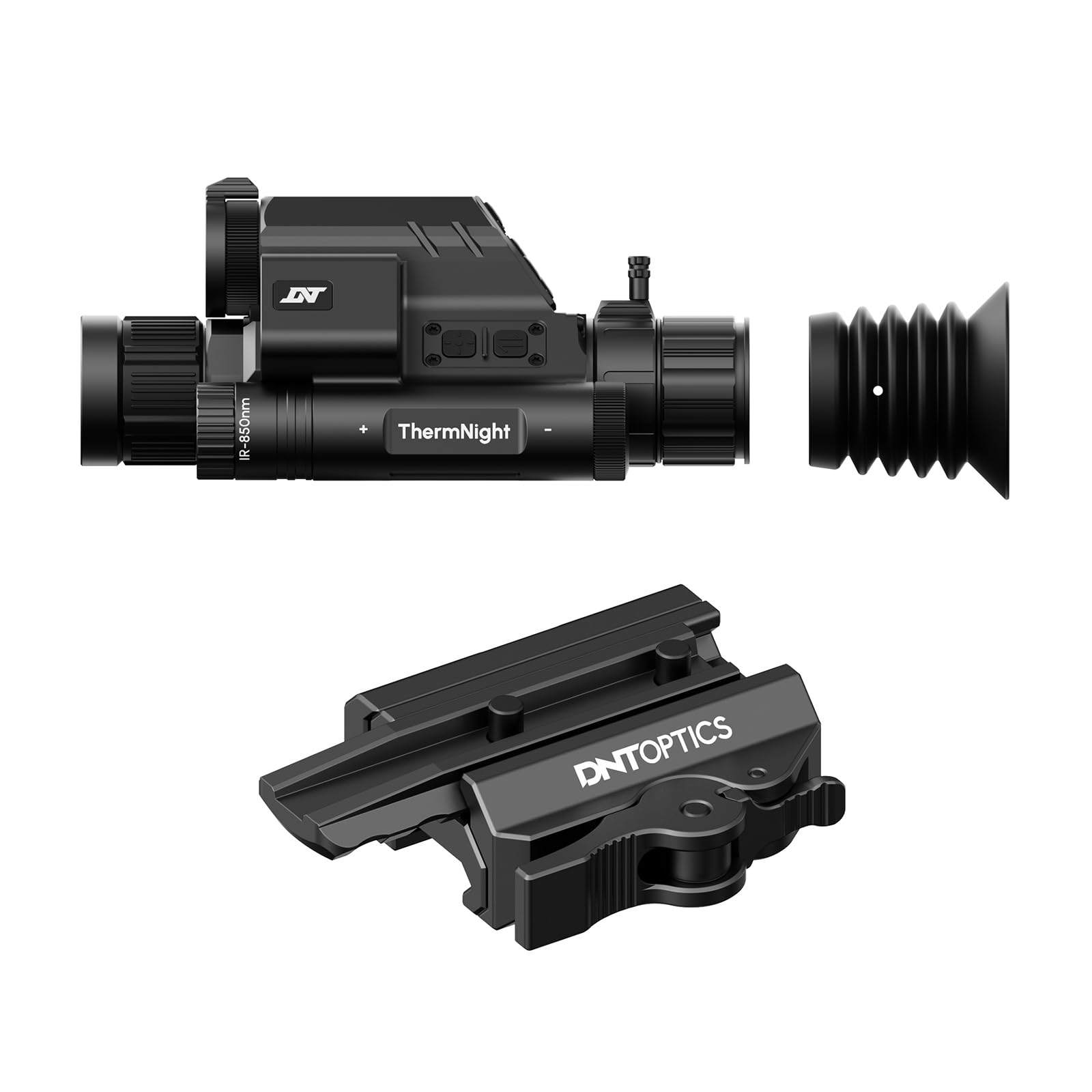
Image 1: DNT Optics TNC335R ThermNight Multispectral Scope with QDM150 mount. This image displays the main scope unit alongside its quick-detach mounting system, providing a visual reference for the product.
4. Setup
4.1 Battery Installation
- Locate the battery compartment on the scope.
- Unscrew the battery cap.
- Insert the rechargeable battery, ensuring correct polarity (+/-).
- Securely replace the battery cap.
- Charge the battery fully before first use using the provided USB cable.
4.2 Mounting the QDM150
- Attach the QDM150 mount to the scope according to the mount's specific instructions, ensuring it is firmly secured.
- Position the scope with the QDM150 mount onto your rifle's Picatinny rail.
- Engage the quick-detach levers to lock the mount onto the rail. Verify that the scope is stable and does not wobble.
4.3 Initial Power-On and Zeroing
- Press and hold the power button until the display illuminates.
- Perform initial zeroing of the scope according to standard rifle scope zeroing procedures. Refer to the detailed zeroing guide available on the DNT Optics website for comprehensive instructions.
5. Operating
5.1 Power On/Off
- Power On: Press and hold the power button for approximately 3 seconds.
- Power Off: Press and hold the power button for approximately 5 seconds until the display shuts down.
5.2 Mode Selection
The TNC335R offers multiple observation modes:
- Thermal Mode: Detects heat signatures. Ideal for low-light or obscured conditions.
- Night Vision Mode: Amplifies ambient light for clear viewing in near-darkness.
- Day Mode: Standard optical viewing for daylight conditions.
Press the 'Mode' button to cycle through the available observation modes.
5.3 Reticle Adjustment
Use the directional buttons or rotary dial (depending on model variant) to adjust the reticle's position for precise aiming. Refer to the on-screen menu for specific reticle options and adjustments.
5.4 Brightness and Contrast
Navigate to the 'Display Settings' in the main menu to adjust screen brightness and image contrast for optimal viewing in different environments.
5.5 Digital Zoom
Press the 'Zoom' button to cycle through available digital magnification levels. Note that higher digital zoom levels may reduce image clarity.
6. Maintenance
6.1 Cleaning
- Lenses: Use the provided lens cleaning cloth or a soft, lint-free cloth specifically designed for optics. Gently wipe the lens surfaces. For stubborn dirt, use a small amount of lens cleaning fluid.
- Body: Wipe the scope's body with a soft, damp cloth. Avoid abrasive cleaners or solvents.
6.2 Battery Care
- Recharge the battery regularly, even if not in frequent use, to maintain its lifespan.
- Store the device with a partially charged battery if storing for extended periods.
6.3 Storage
Store the scope in a cool, dry place, away from direct sunlight and extreme temperatures. Use the lens caps to protect the optical surfaces.
7. Troubleshooting
| Problem | Possible Cause | Solution |
|---|---|---|
| Device does not power on. | Low or depleted battery; incorrectly installed battery. | Charge the battery; ensure battery is installed with correct polarity. |
| Image is blurry or unclear. | Lens caps still on; dirty lenses; focus adjustment needed. | Remove lens caps; clean lenses; adjust the focus ring. |
| Buttons are unresponsive. | Device frozen; low battery. | Perform a soft reset (refer to DNT Optics website for specific instructions); charge battery. |
| QDM150 mount feels loose. | Levers not fully engaged; mounting screws loose. | Ensure quick-detach levers are fully locked; tighten any accessible mounting screws. |
8. Specifications
- Brand: DNT Optics
- Model Name: TNC335R
- Item Weight: 29.8 Ounces
- Material: Aluminum
- Compatible Devices: Rifle, Shotgun
- Night Vision: Yes
- Reticle Type: Cross
- Thread Type: 1/2"-28
- Color: Black
9. Warranty and Support
DNT Optics products are covered by a limited warranty. For detailed warranty information, product registration, and technical support, please visit the official DNT Optics website or contact their customer service department. Keep your purchase receipt as proof of purchase for warranty claims.
Official Website: DNT Optics Store on Amazon


