
HCOIW 2.5HP Walking Pad Incline Under Desk Treadmill
HCOIW 2.5HP Walking Pad Incline Under Desk Treadmill User Manual
Brand: HCOIW | Model: 2.5HP Walking Pad Incline Under Desk Treadmill
1. Introduction
Thank you for choosing the HCOIW 2.5HP Walking Pad Incline Under Desk Treadmill. This compact and quiet fitness device is designed to help you stay active whether you are working, watching TV, or simply moving more throughout your day. Its space-saving design and optional incline feature make it a versatile addition to any home or office environment.
This manual provides essential information for the safe and effective use of your walking pad. Please read it thoroughly before operation and retain it for future reference.
2. Important Safety Information
- Always consult with a healthcare professional before starting any new exercise program.
- Place the walking pad on a flat, stable surface with adequate clearance around it.
- Ensure the power cord is not pinched or damaged.
- Do not allow children or pets near the walking pad during operation.
- Wear appropriate athletic footwear. Avoid walking barefoot or in loose-fitting shoes.
- Do not step on or off the walking pad while the belt is moving.
- If you feel dizzy, lightheaded, or experience any pain, stop exercising immediately.
- The maximum user weight capacity for this device is 265 lbs. Do not exceed this limit.
- Unplug the walking pad from the power outlet when not in use or before cleaning/maintenance.
3. Package Contents
Please check the package to ensure all items are present and undamaged:
- HCOIW 2.5HP Walking Pad Incline Under Desk Treadmill
- Wireless Remote Control
- Power Cord
- Incline Feet (optional, for 5% incline)
- User Manual (this document)
4. Setup
Your HCOIW Walking Pad arrives fully assembled, requiring minimal setup before first use.
- Unpack: Carefully remove the walking pad from its packaging.
- Placement: Place the walking pad on a firm, level surface. Ensure there is at least 20 inches (50 cm) of clear space behind the unit and 8 inches (20 cm) on each side.
- Power Connection: Plug the power cord into the walking pad's power port, then into a grounded electrical outlet.
- Initial Power On: The LED display will illuminate, indicating the unit is ready for use.
5. Components Overview

Figure 1: A user walking on the HCOIW Walking Pad, demonstrating its compact design and the optional 5% incline feature for enhanced workout intensity.

Figure 2: The wireless remote control allows for easy adjustment of speed and other settings. The clear LED display shows real-time data including time, speed, distance, and calories burned.

Figure 3: This image showcases the powerful 2.5HP motor, designed for quiet operation (under 45dB) and supporting speeds from 1.0 to 4.0 MPH. It also indicates a maximum weight capacity of 265 lbs.

Figure 4: This image highlights the multi-layer non-slip running belt and the 8 silicone shock absorbers designed to reduce impact and protect joints during exercise. The treadmill has a 265 lbs weight capacity.
Key Components:
- Running Belt: The walking surface, featuring a 6-layer non-slip design with dual shock absorbers for joint protection.
- LED Display: Integrated into the front panel, showing real-time workout data.
- Motor: A 2.5HP motor provides power for speeds up to 4.0 MPH with low noise operation (<45dB).
- Wireless Remote Control: Used to control all functions of the walking pad.
- Incline Feet: Optional accessories to achieve a 5% incline.
6. Operating Instructions
6.1 Powering On/Off
- To power on, ensure the walking pad is plugged in. The LED display will show a standby indicator.
- To power off, press and hold the 'STOP' button on the remote control until the display turns off, or unplug the unit.
6.2 Using the Remote Control
The wireless remote control is your primary interface for operating the walking pad.
- START/STOP: Press to start or stop the walking belt. When starting, there will be a brief countdown.
- +: Increase speed.
- -: Decrease speed.
- PAUSE: Temporarily pause your workout. All current stats (time, distance, calories) will be retained. Press START to resume.
- MUTE (speaker icon): Toggle the beeping sound on/off.
6.3 Understanding the LED Display
The LED display cycles through various workout statistics:
- TIME: Duration of your current workout session.
- DIST: Distance covered during your workout.
- KCAL: Estimated calories burned.
- SPEED: Current speed of the walking belt (in MPH).
6.4 Speed Modes
The walking pad offers a speed range of 1.0 to 4.0 MPH, accommodating different activity levels.

Figure 5: This graphic depicts the three primary modes of operation: Walking Mode (1.5-3.0 mph), Running Mode (3.0-4.0 mph), and Working Mode (1.0-1.5 mph), suitable for various activity levels and tasks. The 5% incline option is also shown.
- Working Mode: Ideal for light activity while working, typically 1.0-1.5 MPH.
- Walking Mode: For a brisk walk, typically 1.5-3.0 MPH.
- Running Mode: For light jogging, typically 3.0-4.0 MPH.
7. Incline Adjustment
The HCOIW Walking Pad features an optional 5% manual incline to increase workout intensity and calorie burn.
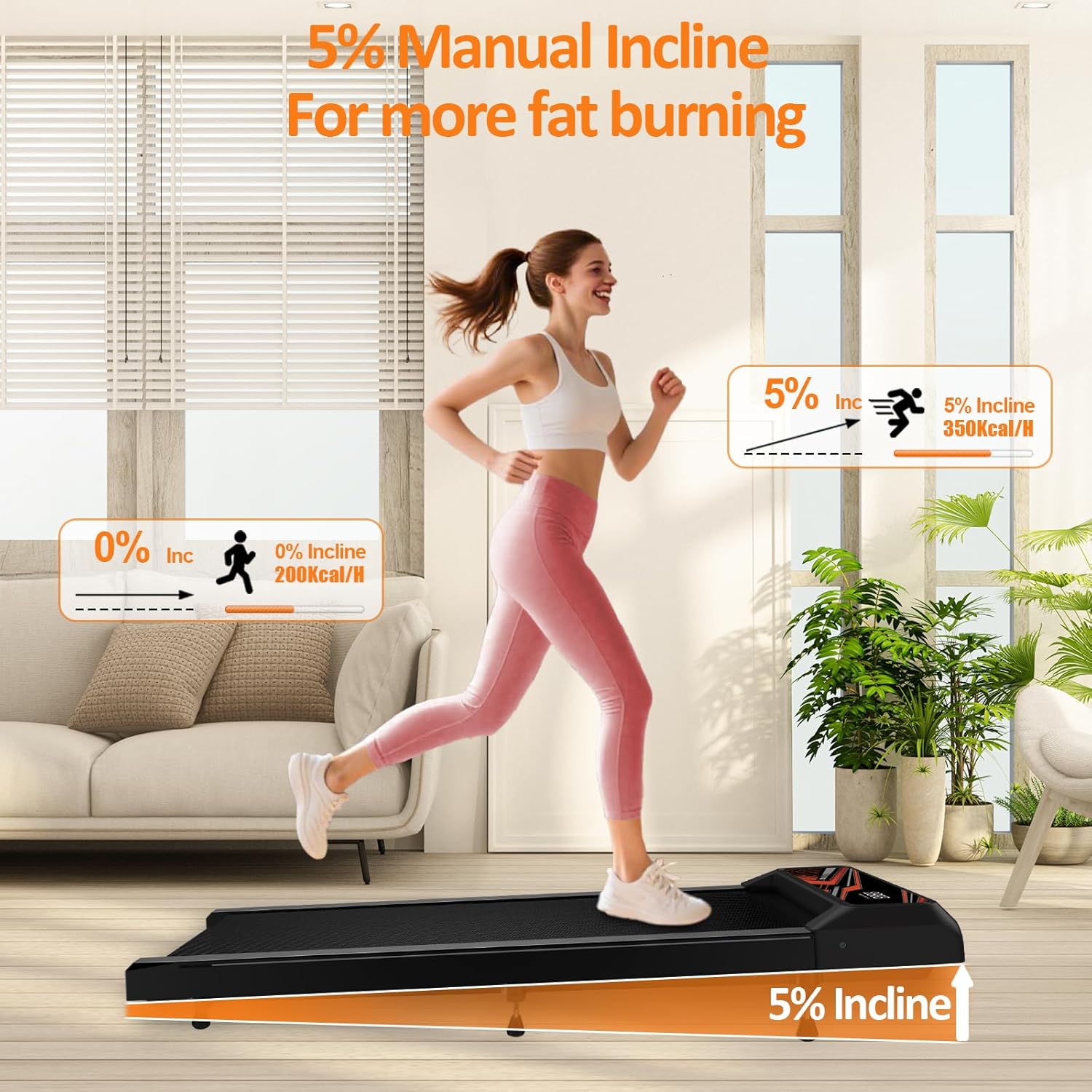
Figure 6: A visual comparison of 0% incline (200 Kcal/H) versus 5% manual incline (350 Kcal/H), demonstrating how the incline can increase fat burning and workout effectiveness.
To activate the incline, locate the designated incline feet (included in the package). These feet are designed to be placed under the rear of the walking pad to elevate it, creating a fixed 5% incline. Ensure both feet are securely in place before starting your workout.
To return to a flat surface, remove the incline feet and store them safely.
8. Maintenance
Regular maintenance ensures the longevity and optimal performance of your walking pad.
8.1 Cleaning
- Always unplug the walking pad before cleaning.
- Wipe down the display and frame with a soft, damp cloth. Avoid abrasive cleaners or solvents.
- Periodically vacuum under the walking pad to prevent dust buildup.
8.2 Belt Adjustment
The walking belt may require occasional adjustment to ensure it remains centered and properly tensioned.
- If the belt is slipping or feels loose, it may need tightening.
- If the belt drifts to one side, it needs centering.
- Refer to the adjustment points at the rear of the walking pad (typically small holes with screws) and use the provided tool to make small, quarter-turn adjustments.
- Run the walking pad at a low speed after each adjustment to check the belt's position.
8.3 Belt Lubrication
The walking belt requires lubrication every few months, depending on usage, to reduce friction and extend its lifespan. Use only silicone-based treadmill lubricant.
- Unplug the walking pad.
- Loosen the belt slightly by turning the rear adjustment screws counter-clockwise (equal turns on both sides).
- Lift the edge of the belt and apply a thin line of lubricant down the center of the deck.
- Tighten the belt by turning the adjustment screws clockwise (equal turns).
- Plug in the walking pad and run it at a low speed for 5 minutes to distribute the lubricant.
9. Storage
The compact design of the HCOIW Walking Pad allows for easy storage.

Figure 7: The compact design of the HCOIW Walking Pad makes it easy to move and store, fitting under furniture or standing upright against a wall, ideal for home or office use.
- Ensure the walking pad is powered off and unplugged.
- It can be stored flat under a bed or sofa.
- For vertical storage, carefully lift one end and lean it against a sturdy wall. Ensure it is stable and will not tip over.
10. Troubleshooting
If you encounter any issues with your walking pad, please refer to the following common problems and solutions:
| Problem | Possible Cause | Solution |
|---|---|---|
| Walking pad does not power on. | Power cord not connected; outlet issue. | Ensure power cord is securely plugged into the unit and a working electrical outlet. |
| Belt stops or slips during use. | Belt too loose; insufficient lubrication. | Adjust belt tension (see Section 8.2); lubricate belt (see Section 8.3). |
| Belt drifts to one side. | Belt out of alignment. | Adjust belt alignment (see Section 8.2). |
| Unusual noise during operation. | Loose components; lack of lubrication. | Check for loose screws; lubricate belt (see Section 8.3). If noise persists, contact customer support. |
| Remote control not responding. | Battery low; interference. | Replace remote control battery; ensure no obstructions between remote and display. |
11. Specifications
| Feature | Specification |
|---|---|
| Brand | HCOIW |
| Product Dimensions | 123.7D x 56.9W x 11.4H Centimetres |
| Item Weight | 13 kg |
| Material | Alloy Steel |
| Colour | Black/Red |
| Horsepower | 2.5 HP |
| Maximum Speed | 4 Miles per Hour |
| Special Features | 5% Incline, Compact Design, Foldable, Lightweight, Low Noise Operation (<45dB) |
| Recommended Uses | Jogging, Running training, Walking |
| Target Audience | Adult |
| Maximum User Capacity | 265 lbs |
12. Warranty and Support
The HCOIW Walking Pad comes with a 100% quality guarantee. For any questions, concerns, or technical assistance, please contact our 24/7 customer support team. Refer to your purchase documentation for specific contact details.
Ask a question about this manual
Ask about setup, troubleshooting, compatibility, parts, safety, or missing instructions. Manuals+ will review the question and use this page’s manual context to help answer it.