
1. Safety Information
Please read and understand all instructions before assembly and use of this product. Failure to follow these instructions may result in injury or damage to the product.
- Two-Person Assembly: Assembly requires two adults. Do not attempt to assemble alone.
- Weight Capacity: Do not exceed the maximum weight capacity of 900 lbs.
- Anti-Tip Kit: Always install the provided anti-tip kit to secure the unit to a wall, preventing accidental tipping.
- Stable Surface: Ensure the bed is assembled and operated on a flat, level surface. Uneven surfaces can affect stability and operation.
- Mattress Compatibility: This unit is designed for a Queen-sized mattress. A foldable mattress is recommended for easier storage. Mattress is not included.
- Electrical Safety: The integrated charging station contains electrical components. Do not expose to liquids. Ensure the power cord is not pinched or damaged during assembly or operation.
- Moving Parts: Keep hands and fingers clear of moving parts during transformation from cabinet to bed and vice-versa.
2. Package Contents
The LUXOAK Queen Murphy Bed is shipped in two separate, labeled boxes. Carefully unpack all components and verify against the parts list provided in your assembly guide. Ensure all hardware is present before beginning assembly.
- Main Cabinet Frame Components
- Bed Frame Components
- Storage Drawer Components
- Charging Station Unit
- Hardware Pack (screws, bolts, connectors, wheels, hinges, silent sponge, anti-tip kit)
- Assembly Instructions Manual

Image: Overview of product dimensions and main components, highlighting the two-box packaging.
3. Assembly Instructions
Assembly typically takes 2-3 hours with two adults. Follow the detailed step-by-step instructions provided in the included manual. Ensure you have a large, clear workspace.
- Preparation: Lay out all parts and hardware. Verify against the parts list.
- Cabinet Assembly: Begin by assembling the main cabinet structure.
- Drawer Assembly: Assemble the storage drawers, ensuring smooth operation of the two-section quiet and smooth drawer slides. Pay attention to the direction of the rail holes during installation.
- Bed Frame Integration: Attach the bed frame components to the cabinet.
- Charging Station Installation: Install the built-in charging hub into the designated slot.
- Anti-Tip Kit: Securely attach the anti-tip kit to the wall as per instructions to prevent tipping.
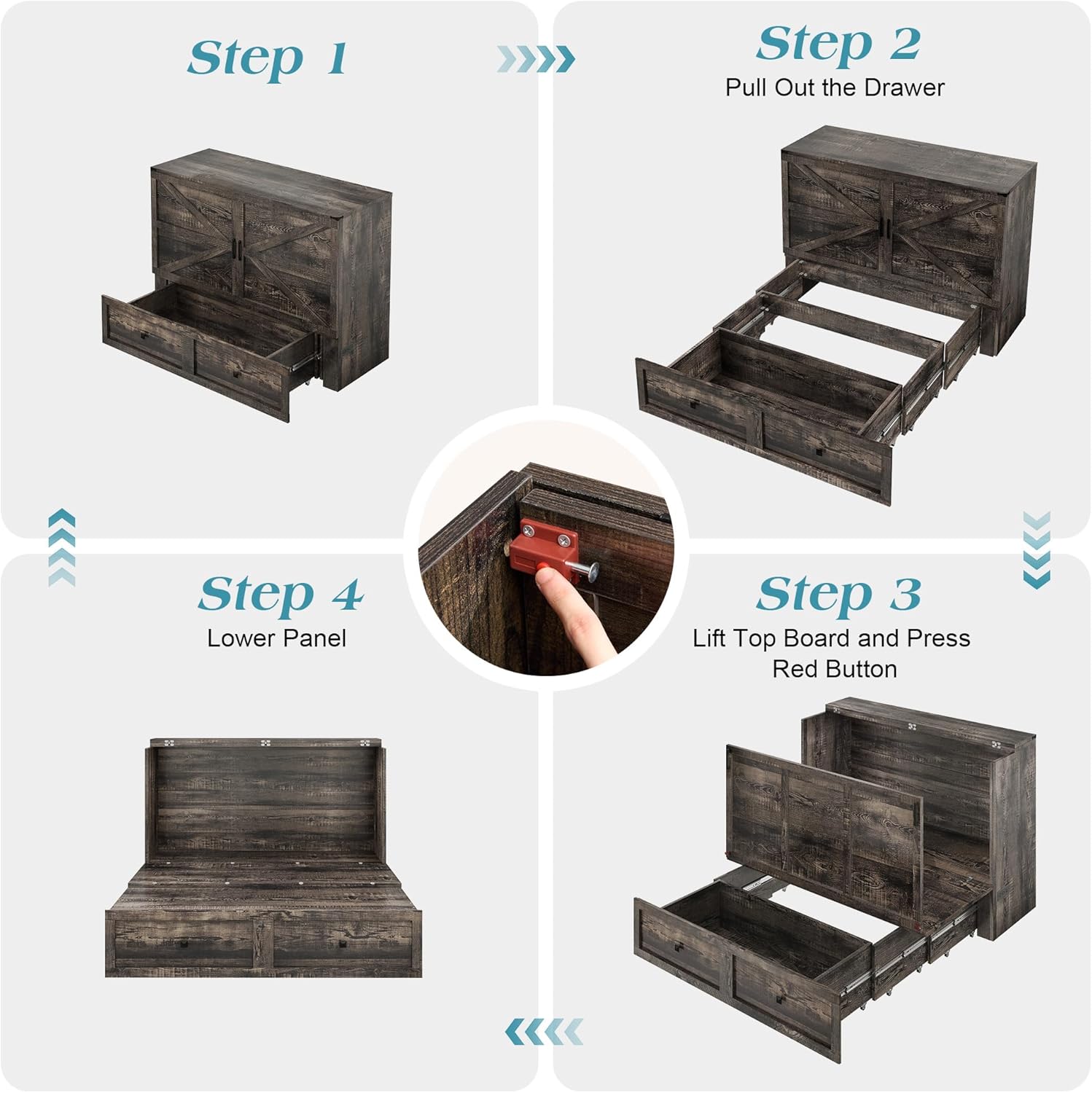
Image: Visual representation of the four main steps for transforming the cabinet into a bed.

Image: Details of sturdy connectors, silent padding, and drawer rail installation.
4. Operating Instructions
4.1 Transforming from Cabinet to Bed
- Ensure the area in front of the cabinet is clear.
- Pull out the lower storage drawer completely.
- Lift the top board of the cabinet and press the red safety button (if applicable, refer to your specific model's mechanism).
- Gently lower the bed panel until it is fully extended and rests on the floor.
- Adjust the mattress (not included) as needed.
4.2 Transforming from Bed to Cabinet
- Remove any bedding or items from the bed surface.
- Lift the bed panel from the foot end, guiding it upwards.
- Ensure the bed panel locks securely into the upright cabinet position.
- Push the lower storage drawer back into the cabinet.

Image: The Murphy bed transitioning between its compact cabinet form and extended bed form.
4.3 Using the Storage Compartments
The unit features a spacious lower drawer and an upper cabinet compartment. These are ideal for storing bedding, pillows, or a foldable mattress, helping to keep your space organized.

Image: Demonstrating the storage capacity of the lower drawer and upper cabinet for a foldable mattress.
4.4 Using the Built-in Charging Station
The integrated charging hub provides convenient power access. It includes 2 AC outlets, 1 USB port, and 1 Type-C port. Simply plug the bed's power cord into a wall outlet to activate the charging station.
- AC Outlets: 125V/12A
- USB & Type-C Ports: 5V/2A
- Features a 5-foot power cord.

Image: The charging station with 2 AC outlets, 1 USB, and 1 Type-C port, integrated into the bed frame.
5. Maintenance
- Cleaning: Wipe surfaces with a soft, damp cloth. Avoid harsh chemicals or abrasive cleaners.
- Hardware Check: Periodically check all screws and fasteners to ensure they are tight. Retighten as necessary.
- Moving Parts: Keep the tracks and hinges free of dust and debris to ensure smooth operation. Lubrication may be applied to hinges if squeaking occurs, using a silicone-based lubricant.
- Electrical Components: Inspect the charging station and power cord regularly for any signs of damage. Discontinue use if damage is found and contact customer support.
6. Troubleshooting
| Problem | Possible Cause | Solution |
|---|---|---|
| Bed does not extend or retract smoothly. | Obstruction in tracks; uneven floor; loose hardware. | Clear any debris from tracks. Ensure the unit is on a flat, level surface. Check and tighten all assembly hardware. |
| Charging station is not working. | Power cord not plugged in; faulty outlet; damaged charging unit. | Ensure the bed's power cord is securely plugged into a functional wall outlet. Test the wall outlet with another device. If issues persist, contact customer support. |
| Unit feels unstable or wobbles. | Loose hardware; anti-tip kit not installed or improperly installed. | Check and tighten all assembly hardware. Verify that the anti-tip kit is correctly installed and secured to a wall stud. |
| Difficulty with assembly. | Incorrect part orientation; missing hardware; complex step. | Review the assembly instructions carefully, paying attention to diagrams and part labels. Ensure all parts are oriented correctly. Contact customer support for assistance if a step is unclear or parts are missing. |
| Bed does not roll out on carpet. | Wheels sinking into thick carpet. | This unit is designed for optimal performance on flat, hard surfaces. If used on thick carpet, the wheels may not roll freely. Consider placing a thin, rigid mat under the rolling section or relocating to a hard floor. |
7. Specifications
| Feature | Detail |
|---|---|
| Brand | LUXOAK |
| Model Number | BPB008 |
| Size | Queen |
| Product Dimensions (Extended) | 81"L x 61.5"W x 45"H |
| Weight Capacity | 900 lbs |
| Color | Black Oak |
| Finish Type | Wood |
| Material | MDF Board |
| Special Features | Cabinet Bed, Storage Drawer, Wheeled, Built-in Charging Station |
| Charging Station | 2 AC Outlets (125V/12A), 1 USB Port (5V/2A), 1 Type-C Port (5V/2A), 5-foot Power Cord |
| Item Weight | 217 Pounds |
| Assembly Required | Yes (2-person recommended) |
| Compatible Mattress Size | Queen (Mattress not included) |

Image: Detailed product specifications table.
8. Warranty and Support
LUXOAK is committed to providing quality products and customer satisfaction. While specific warranty details are typically provided with your purchase documentation, responsive customer support is available to assist with any questions or concerns you may have regarding assembly, parts, or operation.
For assistance, please refer to the contact information provided in your purchase documentation or visit the LUXOAK brand store online.
Please retain your proof of purchase for any warranty claims or support inquiries.