
School Smart 84437
School Smart Vertical Electric Pencil Sharpener User Manual
Model: 84437
1. Introduction
Thank you for choosing the School Smart Vertical Electric Pencil Sharpener. This manual provides essential information for the safe and efficient operation, maintenance, and troubleshooting of your new pencil sharpener. Please read this manual thoroughly before use and retain it for future reference.
This electric pencil sharpener is designed for quick and precise sharpening of standard graphite pencils, featuring a heavy-duty motor, helical steel blade, and an auto-stop mechanism for a perfect tip every time. Its vertical design helps save desk space, making it suitable for various environments.
2. Safety Instructions
- Always ensure the sharpener is placed on a stable, flat surface before operation.
- Keep fingers and other objects away from the sharpening opening during operation.
- Unplug the sharpener from the power outlet before cleaning or when not in use.
- Do not immerse the sharpener in water or any other liquid.
- This appliance is not intended for use by persons (including children) with reduced physical, sensory, or mental capabilities, or lack of experience and knowledge, unless they have been given supervision or instruction concerning use of the appliance by a person responsible for their safety.
- Do not attempt to sharpen crayons, pastels, or other non-pencil items, as this may damage the blade and motor.
- Avoid sharpening colored pencils with this unit; a dual-hole sharpener is recommended for colored pencils.
- Do not operate the sharpener if the power cord or plug is damaged.
3. Package Contents
- School Smart Vertical Electric Pencil Sharpener (Model 84437)
- Integrated Power Cord
4. Setup
- Unpack the pencil sharpener and remove all packaging materials.
- Place the sharpener on a clean, dry, and stable surface. The non-skid rubber pads on the bottom will help secure it in place.
- Ensure the shaving container is properly seated in the sharpener.
- Plug the power cord into a standard electrical outlet.

Figure 1: School Smart Vertical Electric Pencil Sharpener. This image shows the sharpener from the front, highlighting its vertical design and the attached power cord.
5. Operating Instructions
- Ensure the sharpener is plugged in and the shaving container is securely in place.
- Insert a standard graphite pencil into the sharpening opening at the top of the unit.
- Apply gentle downward pressure. The motor will activate, and the helical steel blade will begin sharpening the pencil.
- The sharpener features an auto-stop mechanism. Once the pencil reaches a perfect point, the motor will automatically stop, preventing over-sharpening.
- Remove the sharpened pencil. The entire sharpening process typically takes around 2 seconds.
Note: For optimal performance and to prevent damage, only sharpen standard graphite pencils. Avoid using colored pencils, charcoal pencils, or other soft-core drawing tools.
6. Maintenance
6.1 Emptying the Shaving Container
- Unplug the sharpener from the power outlet.
- Carefully pull out the shaving container from the front of the sharpener. The sharpener will automatically stop if the container is removed during operation.
- Empty the pencil shavings into a waste bin.
- Reinsert the empty shaving container firmly back into the sharpener until it clicks into place.
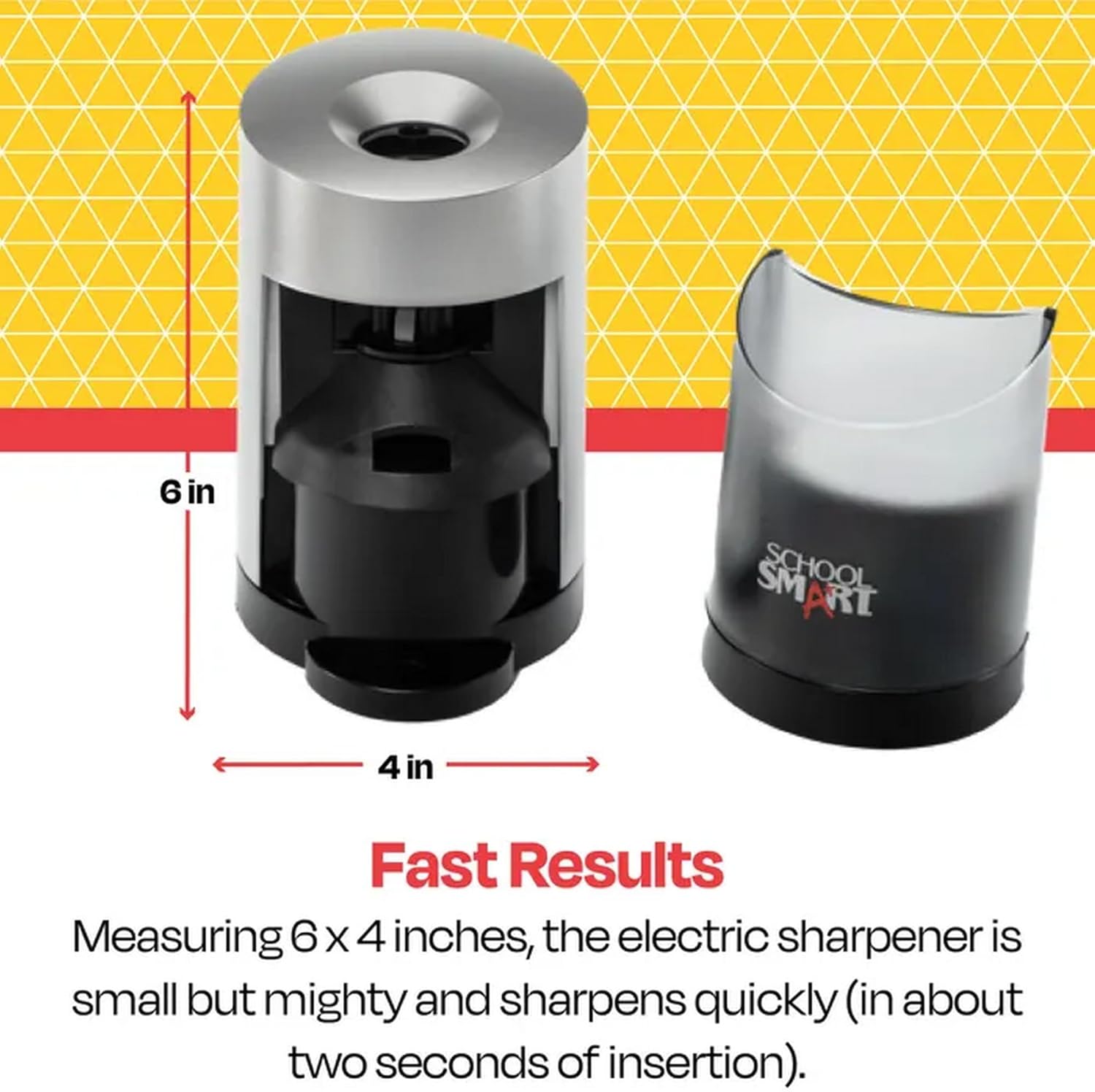
Figure 2: Sharpener with shaving container removed. This image illustrates the sharpener's dimensions (6 inches tall, 4 inches wide) and shows the transparent shaving container detached from the main unit.
6.2 Cleaning
- With the sharpener unplugged and the shaving container removed, use a soft, dry cloth to wipe down the exterior of the unit.
- Do not use abrasive cleaners or solvents.
- A small brush (not included) can be used to gently clear any pencil dust from around the blade area, ensuring the sharpener is unplugged first.
7. Troubleshooting
| Problem | Possible Cause | Solution |
|---|---|---|
| Sharpener does not turn on. | Not plugged in; power outlet not working; shaving container not properly seated. | Ensure the power cord is securely plugged into a working outlet. Check that the shaving container is fully inserted. |
| Pencil is not sharpening. | Blade is dull or jammed; incorrect pencil type; insufficient pressure. | Ensure you are using a standard graphite pencil. Apply gentle downward pressure. If the blade is dull, the unit may require servicing (contact support). |
| Pencil sharpens unevenly or breaks. | Damaged pencil lead; worn blade; pencil inserted at an angle. | Use pencils with intact lead. Insert the pencil straight into the opening. If the issue persists, the blade may be worn. |
| Motor stops during sharpening. | Auto-stop mechanism activated (pencil is sharp); shaving container removed. | This is normal if the pencil is sharp. Reinsert the shaving container if it was accidentally removed. |
8. Specifications
- Model: 84437
- Brand: School Smart
- Manufacturer: Casafoyer
- Type: Vertical Electric Pencil Sharpener
- Blade Type: Helical Steel
- Features: Auto-stop mechanism, Non-skid rubber pads, Easy-to-empty shaving container
- Dimensions (Approximate): 6 inches (Height) x 4 inches (Width)
- Color: Multicolor
- ASIN: B0FRS3FKHF
9. Warranty and Support
This School Smart Vertical Electric Pencil Sharpener is manufactured by Casafoyer. For information regarding warranty coverage, product support, or replacement parts, please contact Casafoyer customer service directly. Please have your model number (84437) and ASIN (B0FRS3FKHF) available when contacting support.
Contact information for Casafoyer can typically be found on their official website or through the retailer where the product was purchased.
Ask a question about this manual
Ask about setup, troubleshooting, compatibility, parts, safety, or missing instructions. Manuals+ will review the question and use this page’s manual context to help answer it.