
Introduction
The TFA Dostmann TFA-ID Wind Transmitter ID-A2 (Model 30.3904) is a wireless wind sensor designed to accurately measure both wind speed and wind direction. This device is an accessory compatible with the TFA.me WLAN system, enabling online monitoring of weather data. Users can access real-time and historical wind information via a mobile device or PC when connected to a compatible TFA.me weather station.
This manual provides essential information for the proper setup, operation, and maintenance of your wind transmitter. Please read it thoroughly before installation and use.
Safety Information
- Read all instructions carefully before operating the device.
- Keep the device out of reach of children and pets.
- Do not attempt to disassemble, modify, or repair the device yourself. Refer all servicing to qualified personnel.
- Ensure the device is securely mounted according to the installation instructions to prevent damage from strong winds or falling.
- Use only the specified battery types and ensure correct polarity during installation.
- Protect the device from extreme temperatures, direct sunlight for prolonged periods (beyond normal operation), and excessive moisture.
Package Contents
Verify that all items are present in the package:
- TFA-ID Wind Transmitter (Anemometer)
- Mounting Arm and Hardware
- 18650 Li-Ion Rechargeable Battery (pre-installed or separate)
- 2 x 1.5V AA Batteries (for backup power)
- Instruction Manual
Product Overview
The TFA-ID Wind Transmitter features a robust design for outdoor use, incorporating a solar panel for primary power and backup batteries for continuous operation. It measures wind speed using rotating cups and wind direction with a wind vane.
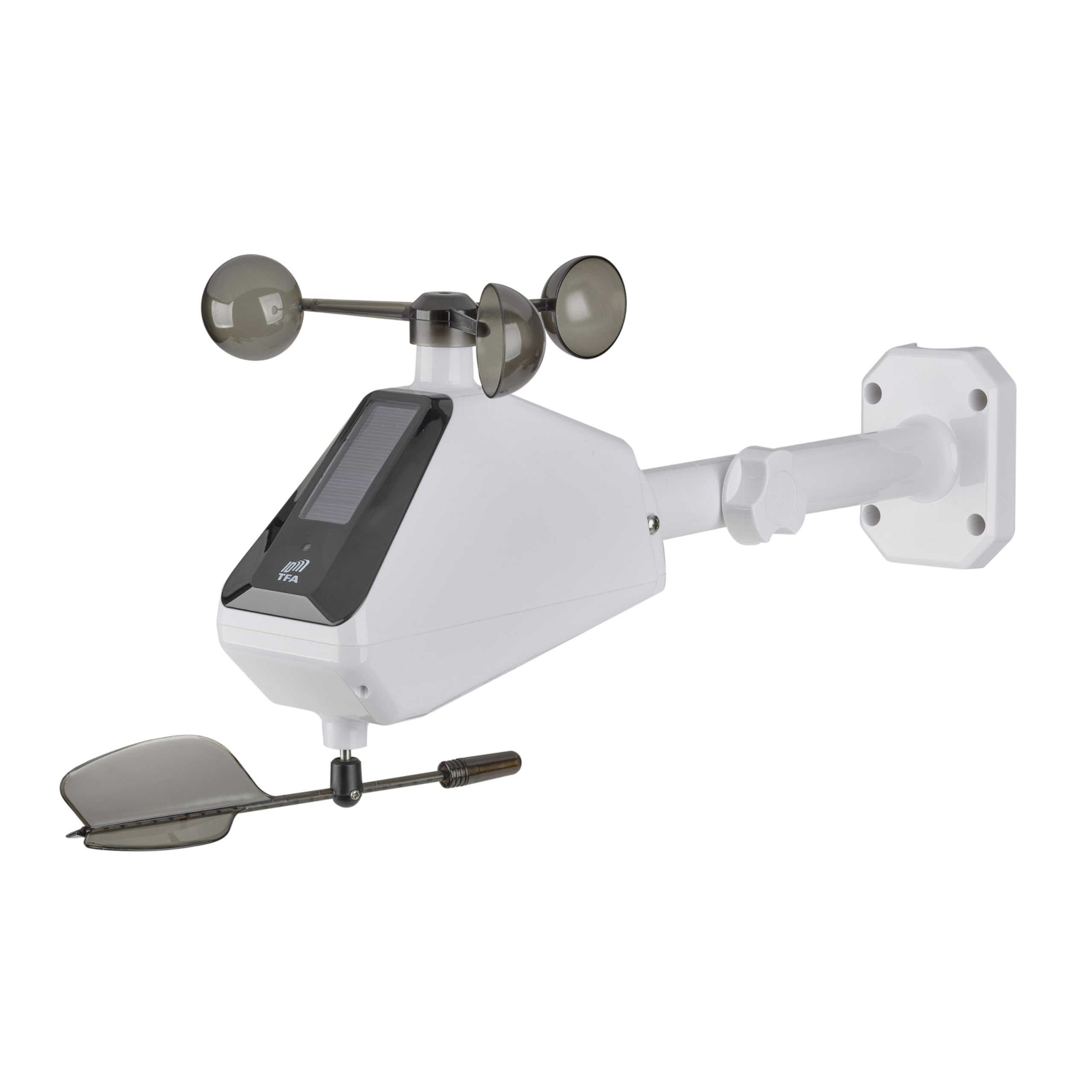
Image: Front view of the TFA-ID Wind Transmitter ID-A2, highlighting its main components including the wind cups, wind vane, solar panel, and the attached mounting arm.
Key Features:
- Wireless Transmission: Sends wind speed and direction data wirelessly to compatible TFA.me weather stations.
- Solar Powered: Equipped with a solar panel for primary power, extending battery life.
- Backup Battery: Uses 2 x 1.5V AA batteries as a backup power source.
- Wide Range: Measures wind speeds from 0 to 178 km/h.
- Long Range Transmission: Up to 100 meters in open field conditions.
- TFA.me Compatibility: Integrates seamlessly with TFA.me WLAN systems for online data monitoring and historical graphing.
Setup
1. Battery Installation
- Locate the battery compartment on the wind transmitter.
- Ensure the pre-installed 18650 Li-Ion battery is properly seated. This battery is charged by the solar panel.
- Insert the 2 x 1.5V AA backup batteries, observing the correct polarity (+/-). These batteries provide power when solar charging is insufficient.
- Close the battery compartment securely to protect against moisture.
2. Mounting the Wind Transmitter
Proper placement is crucial for accurate readings. The wind transmitter should be mounted in an open area, free from obstructions that could interfere with wind flow.
- Location: Choose a location that is as high as possible and clear of buildings, trees, or other structures that could block wind or create turbulence.
- Orientation: Mount the transmitter horizontally with the solar panel facing directly south. This ensures optimal solar charging throughout the day.
- Attachment: Use the provided mounting arm and hardware to securely attach the transmitter to a mast or suitable pole.

Image: Side view of the TFA-ID Wind Transmitter ID-A2, illustrating its horizontal mounting position and the orientation of the solar panel.
3. Connecting to TFA.me System
The wind transmitter is designed to work with specific TFA.me radio stations. Refer to your TFA.me weather station's manual for detailed instructions on how to add a new sensor.
- Ensure your TFA.me weather station is powered on and within range (up to 100m line of sight) of the wind transmitter.
- Follow the pairing procedure outlined in your TFA.me station's manual to establish a connection.
- Compatible TFA.me stations include models such as 35.8100.54, 35.8101.54, 35.8102.01, 35.8103.02, 35.8106.01, 35.8110.02, 35.8109.02, 35.8111.02, 35.8107.01, and 35.8108.02. The article reference number can usually be found on the back of your device.
Operating
Once successfully set up and connected to your TFA.me weather station, the wind transmitter will continuously measure and transmit wind data.
- Data Transmission: Wind speed and direction data are sent wirelessly to your TFA.me station at regular intervals.
- Online Monitoring: Access real-time and historical wind data through the TFA.me portal on your smartphone, tablet, or computer. The portal provides graphical representations of historical data.
- Power Management: The integrated solar panel charges the Li-Ion battery during daylight hours. The AA backup batteries provide power during periods of low light or insufficient solar charging.
Maintenance
- Cleaning: Periodically inspect and clean the wind cups, wind vane, and solar panel. Dust, dirt, or debris can affect accuracy and solar charging efficiency. Use a soft, damp cloth for cleaning. Do not use abrasive cleaners.
- Battery Check: The TFA.me system will typically indicate the battery status of connected sensors. Replace the AA backup batteries when they are low to ensure uninterrupted operation.
- Inspection: Regularly check the mounting arm and hardware for tightness and signs of wear or damage, especially after strong winds.
Troubleshooting
| Problem | Possible Cause | Solution |
|---|---|---|
| No wind data displayed on TFA.me station. |
|
|
| Inaccurate wind speed or direction readings. |
|
|
| Solar charging not working effectively. |
|
|
Specifications
| Model Number | 30.3904.02 |
| Dimensions (L x W x H) | 25.1 x 18 x 18.8 cm |
| Weight | 287 grams |
| Wind Measurement Range | 0 - 178 km/h |
| Measurement Accuracy | +/- 3 km/h |
| Wireless Transmission Frequency | 868 MHz |
| Wireless Range | Up to 100 meters (open field) |
| Power Source | Solar panel, 1x Li-Ion 18650 1200 mAh (included), 2x 1.5V AA batteries (included, backup) |
| Material | Plastic |
| Color | White |
Warranty Information
Warranty terms and conditions are typically provided with your purchase documentation or can be found on the official TFA Dostmann website. Please retain your proof of purchase for any warranty claims. Information regarding spare parts availability is not provided in the product specifications.
Support
For further assistance, technical support, or inquiries regarding your TFA-ID Wind Transmitter, please contact TFA Dostmann customer service or your retailer. You may find contact information on the official TFA Dostmann website or in your product packaging.
Website: www.tfa-dostmann.de (Please check for your regional website)


