
1. Introduction
Thank you for choosing the Redragon K585 HE Rapid Trigger Gaming Keyboard. This one-handed mechanical keyboard is engineered for high-performance gaming, featuring advanced UltraMag magnetic switches, rapid trigger technology, and an 8K hyper-polling rate for unparalleled precision and responsiveness. Its compact design and programmable keys offer a streamlined gaming experience. Please read this manual carefully to ensure proper setup and operation.
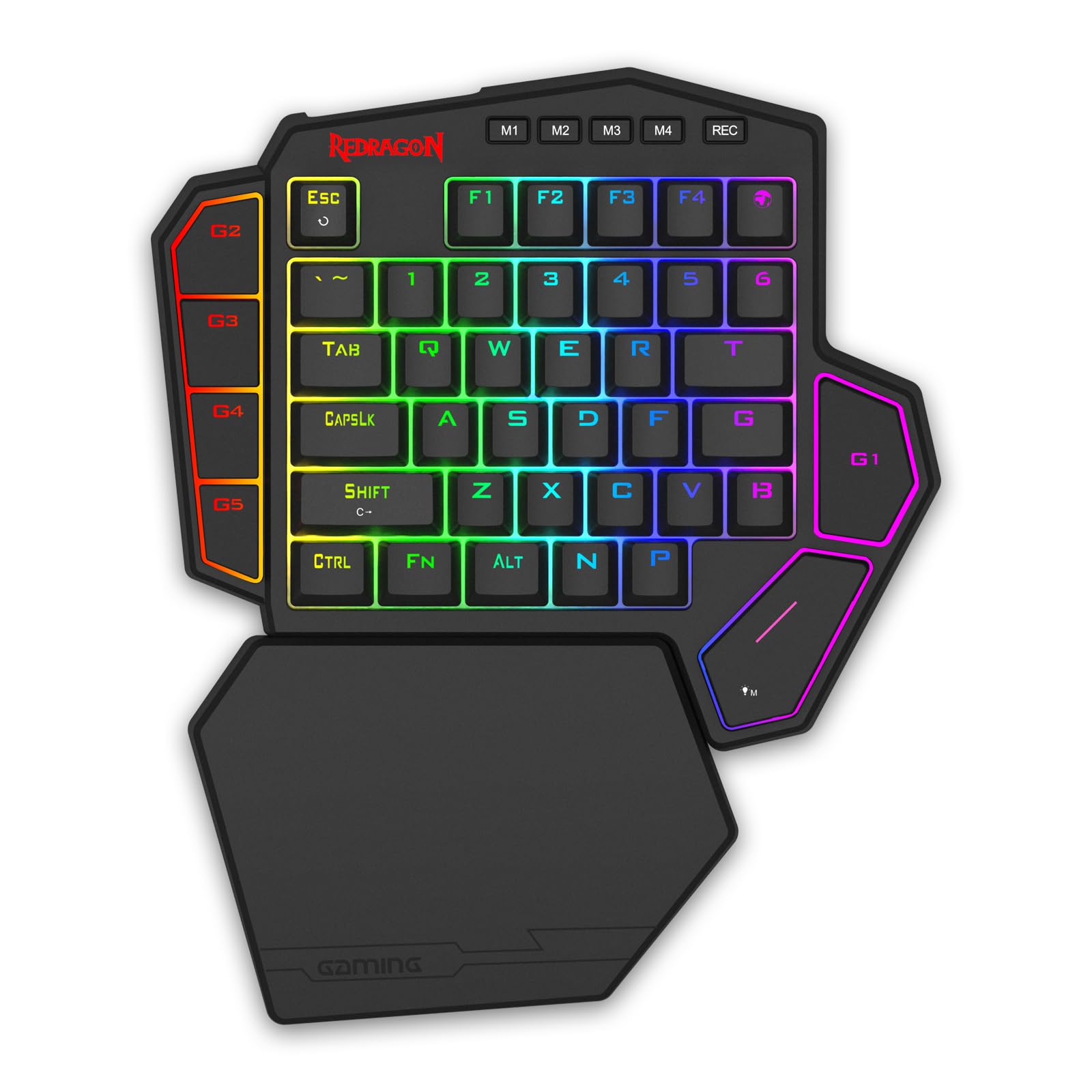
Figure 1: Redragon K585 HE Rapid Trigger Gaming Keyboard
2. Package Contents
Ensure all items are present in your package:
- Redragon K585 HE Rapid Trigger Gaming Keyboard
- Detachable Wrist Rest
- USB-A to USB-C Cable
- Keycap/Switch Puller
- Spare Switches
3. Setup
- Connect the Keyboard: Connect the detachable USB-A to USB-C cable to the keyboard and then to an available USB port on your PC. The keyboard is wired for optimal performance and an 8,000Hz hyper-polling response.
- Attach the Wrist Rest: The included wrist rest attaches magnetically to the bottom of the keyboard. Align the rest with the keyboard's base until it snaps into place. This provides ergonomic support during extended use.
- Driver Installation: The K585 HE supports dual-platform drivers. For Windows users, a standard desktop client is available. For users on other operating systems, web-based driver support allows access to all software features directly via a browser. Visit the official Redragon website for driver downloads and web-based software access.
- Initial Calibration: It is recommended to calibrate all keys for initial use to prevent potential issues. Refer to the software interface for calibration instructions.

Figure 2: Keyboard with detachable wrist rest attached
4. Features
- UltraMag Magnetic Switches: The keyboard features next-generation UltraMag magnetic switches with an anti-wobble dual-module floating structure. These full-POM switches provide smooth keystrokes and clear, Hi-Fi sound.
- Rapid Trigger Technology: Combined with Hall magnetic switches, the rapid trigger function allows for precise actuation point adjustment between 0.1-3.4 mm via software. This enables dynamic activation and deactivation for quick, responsive actions in games.
- 8K Hyper-Polling: Experience ultra-low latency with an 8,000Hz hyper-polling rate, transmitting inputs up to 8 times faster (0.125ms lowest latency) than standard keyboards.
- PRCS Technology (4 Modes): This revolutionary technology offers advanced input processing, ensuring zero redundant inputs and clean, precise actions for enhanced gaming performance.
- Compact and Tactical Design: The K585 HE is designed to be slim and portable, retaining only the most useful keys in a one-handed layout to prevent misclicks and optimize desk space.
- 7 Programmable Macro Keys: Bind multiple commands to any of the 7 dedicated macro keys for instant execution of complex actions.
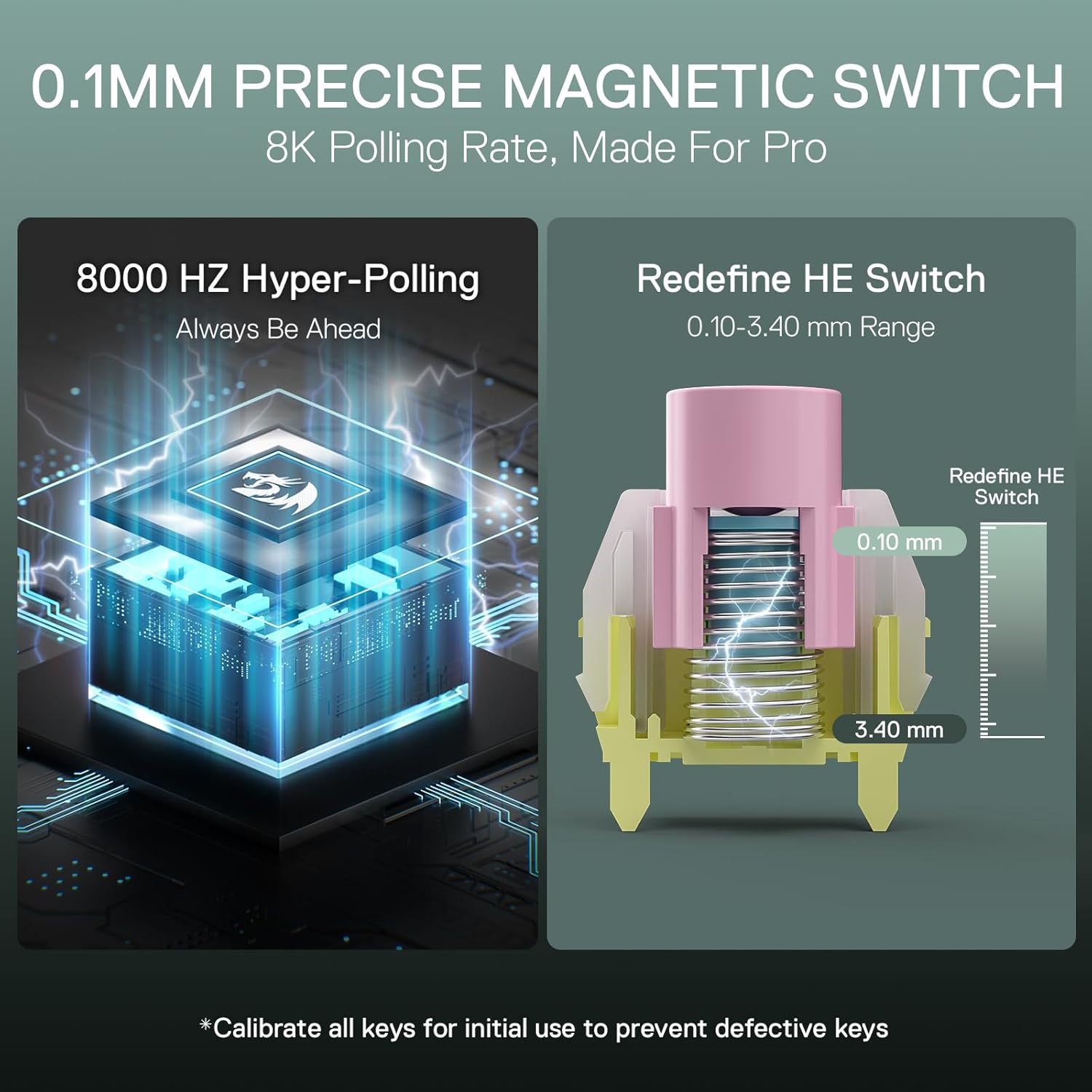
Figure 3: Diagram illustrating 0.1mm precise magnetic switch and 8K polling rate
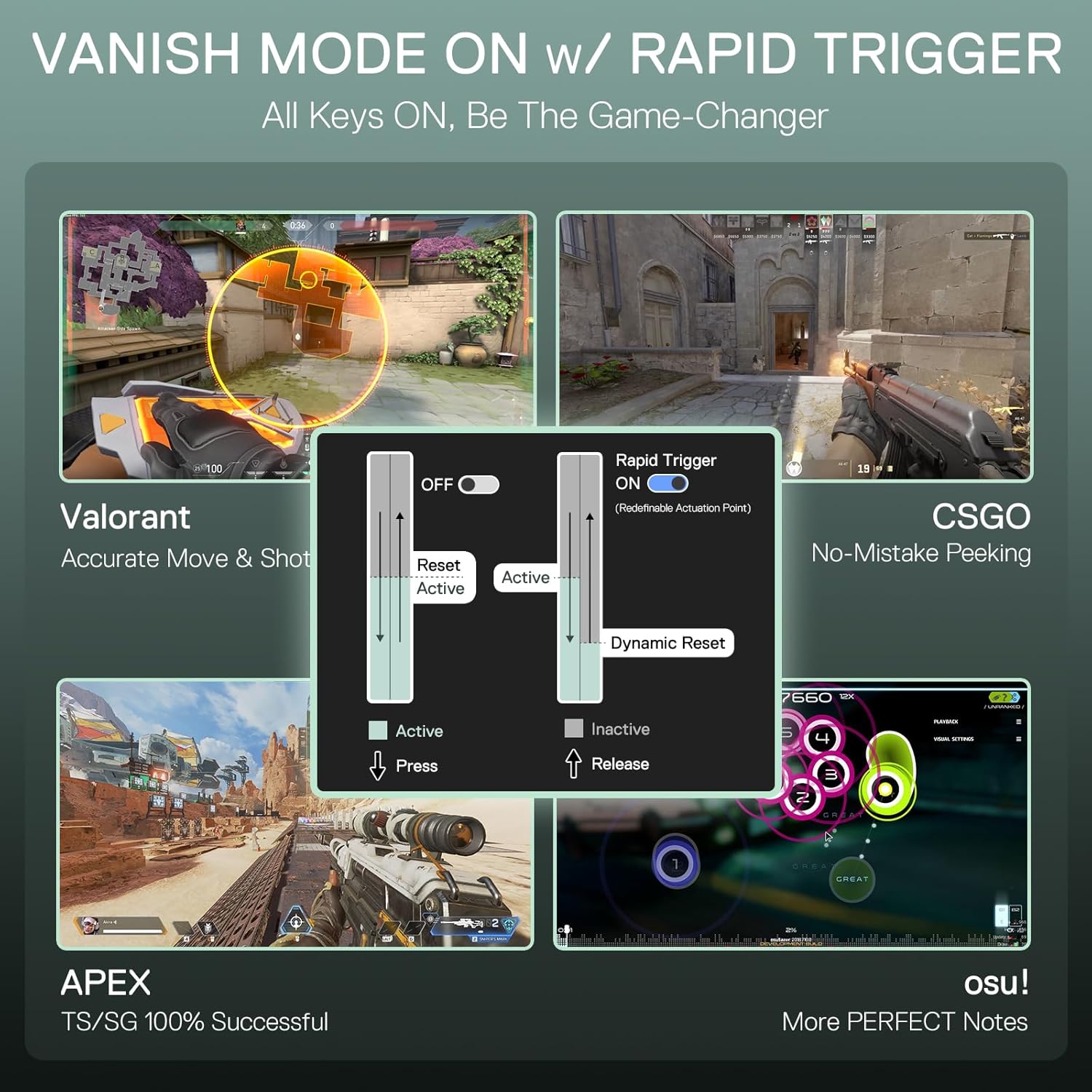
Figure 4: Visual representation of Rapid Trigger technology benefits in gaming scenarios
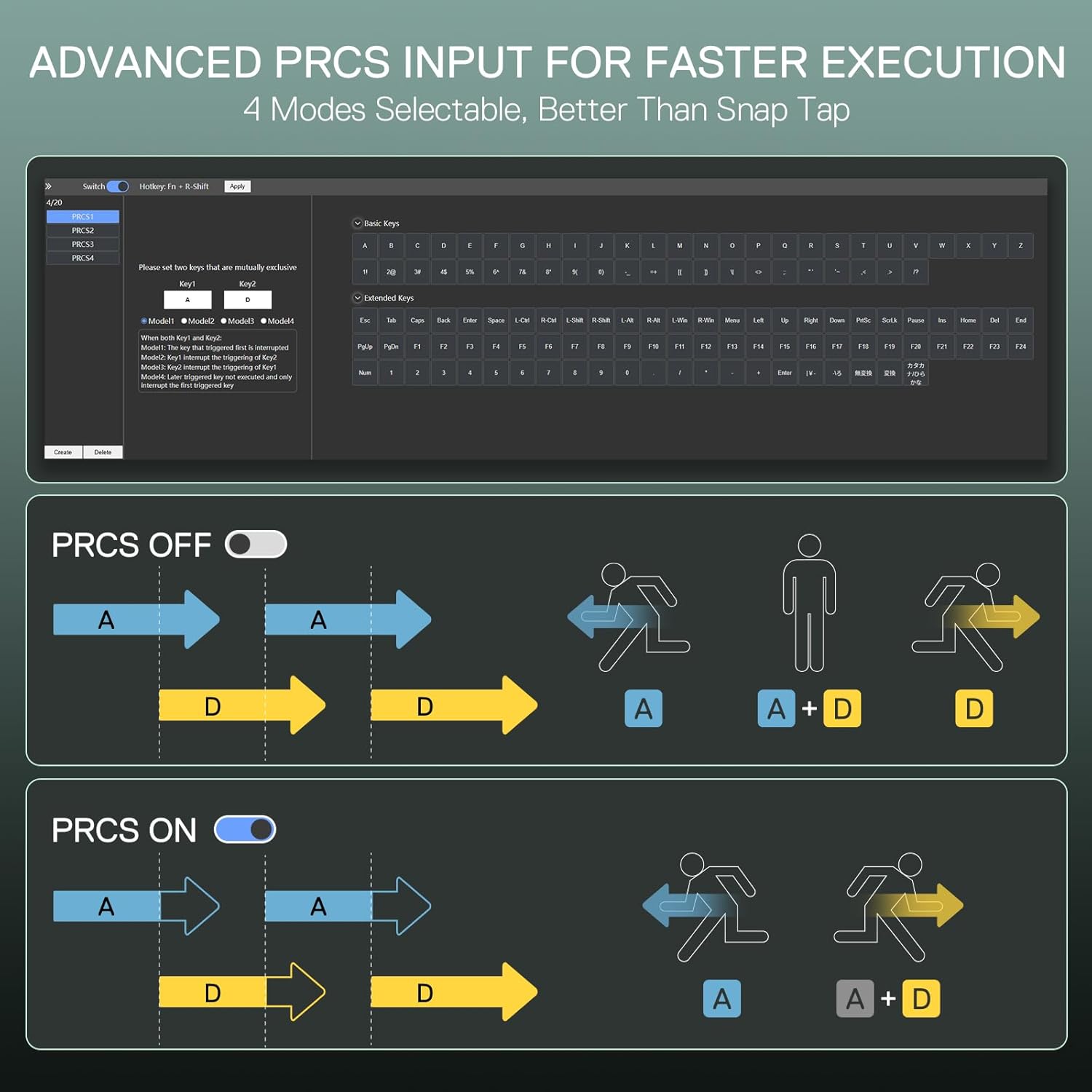
Figure 5: Explanation of PRCS technology with input diagrams
5. Operating Instructions
- Programmable G-Keys: The keyboard features G1-G5 keys on the left side and additional macro keys (M1-M4) at the top. Use the Redragon software (desktop client or web-based) to assign single or multiple keystrokes, macros, or other functions to these keys.
- RGB Lighting Control: Adjust RGB lighting effects by pressing the FN key in combination with the Spacebar. Further customization options for lighting patterns, colors, and brightness are available through the Redragon software.
- Detachable Wrist Rest: The magnetic wrist rest can be easily attached or detached as needed for comfort or to save desk space.

Figure 6: Side view of the keyboard highlighting the G-keys

Figure 7: Keyboard with the magnetic wrist rest detached
6. Maintenance
To ensure the longevity and optimal performance of your Redragon K585 HE keyboard, follow these maintenance guidelines:
- Cleaning: Use a soft, dry cloth to wipe the surface of the keyboard. For dust and debris between keycaps, use compressed air. For deeper cleaning, carefully remove keycaps using the provided keycap puller and clean the switches.
- Switch Care: The UltraMag magnetic switches are designed for durability. Avoid exposing them to excessive force or liquids. Use the provided spare switches and switch puller for replacement if necessary.
- Cable Management: Keep the USB-C cable untangled and avoid sharp bends to prevent damage.
7. Troubleshooting
If you encounter issues with your Redragon K585 HE keyboard, refer to the following common solutions:
- Keys Not Responding: Ensure the USB-C cable is securely connected to both the keyboard and your PC. Try connecting to a different USB port. If specific keys are unresponsive, consider replacing the switch using the provided spare switches and puller.
- Software Issues / G-Keys Not Programmable: Verify that you are using the correct and most up-to-date Redragon software for the K585 HE model. For Windows users, ensure the desktop client is compatible with your operating system (e.g., Windows 11). For other OS users, ensure you are accessing the web-based driver correctly. If issues persist, contact Redragon support.
- RGB Lighting Not Working: Check the FN + Spacebar combination to cycle through lighting modes. Ensure no software settings are overriding the lighting. Reinstalling the software might resolve the issue.
- Intermittent Connectivity: Ensure the USB-C cable is not damaged. Try a different cable if available. Update your PC's USB drivers.
8. Specifications
| Attribute | Detail |
|---|---|
| Brand | Redragon |
| Model Name | DITI HE |
| Model Number | K585 HE |
| Compatible Devices | PC |
| Connectivity Technology | USB-C (Wired) |
| Keyboard Description | One-handed HE UltraMag Magnetic Switch Rapid Trigger Gaming Keyboard |
| Recommended Uses For Product | Gaming |
| Special Feature | 42 Keys One-Handed, Extra Onboard G Keys, UltraMag Magnetic Switch, Wrist Rest |
| Color | Black K585 |
| Material | Acrylonitrile Butadiene Styrene |
| Included Components | Keycap/Switch Puller, Spare Switches, USB Cable |
| Number of Keys | 42 (main keys) + 8 (macro/function keys) |
| Power Source | USB Powered |
| Switch Type | Linear (UltraMag Magnetic) |
| Keyboard Layout | QWERTY (partial) |
| Hand Orientation | Left |
| Button Quantity | 5 (G-keys) |
| Mechanical Keyboard Switch Model | UltraMag |
| Theme | Gaming |
| Enclosure Material | Acrylonitrile Butadiene Styrene |
| Item Weight | 610 Grams |
9. Warranty and Support
The Redragon K585 HE Rapid Trigger Gaming Keyboard comes with a 1-year warranty from the date of purchase. This warranty covers manufacturing defects and malfunctions under normal use. For warranty claims, technical support, or any product-related inquiries, please contact Redragon customer service through their official website or the retailer where the product was purchased. Keep your proof of purchase for warranty validation.