
1. Introduction
The PETGUGU PF2 Smart Automatic Cat Feeder and PF5 Multi-Cat Identifiers bundle provides an advanced solution for pet feeding and health monitoring. This system is designed to offer personalized feeding, track individual eating and drinking habits, and ensure food and water freshness for your cats or small dogs. The integrated camera and app control allow for remote management and real-time insights into your pet's well-being.

Image: The PETGUGU PF2 Smart Automatic Cat Feeder with two PF5 Multi-Cat Identifiers.
2. Package Contents
Carefully unpack all items and ensure everything listed below is present. The packaging box itself can be folded into a cat house for your pet's enjoyment.
- PETGUGU PF2 Automatic Cat Feeder (3.5L capacity)
- Two (2) PETGUGU PF5 Multi-Cat Identifiers
- Power Adapter
- User Manual (this document)
- Filter Element
- Ceramic Feeding Bowl
Video: Unboxing and initial setup of the PETGUGU Smart Feeder.
3. Setup
3.1. App Download & WiFi Configuration
- Scan the QR code provided in the Quick Guidance sheet or search for "petgugu" in your device's app store (iOS or Android).
- Download and install the PETGUGU app.
- Register and log in according to the app guidance.
- Ensure your mobile phone is connected to a 2.4GHz WiFi network for initial setup and pairing. The device supports 2.4GHz WiFi only.

Image: The PETGUGU app interface showing remote control and data monitoring.
3.2. Feeder Assembly
- Rinse the filter cartridge with water for 2 minutes before installation.
- Install the water pump cartridge into the designated slot.
- Place the device on a stable and hard horizontal surface. Maintain a distance of more than 3 cm from other objects to ensure proper operation.
- Connect the power adapter to the feeder and a power outlet. The machine will start working.
3.3. PF5 Multi-Cat Identifier Setup
- Each PF5 identifier requires a CR2032 battery (included). Install the battery as per the instructions.
- Follow the in-app instructions to pair each PF5 identifier with your PETGUGU account and assign it to a specific cat profile.
- Attach the PF5 identifier to your cat's collar.

Image: A PETGUGU PF5 Multi-Cat Identifier collar and a weekly health report generated by the app.
4. Operating Instructions
4.1. Scheduled & Manual Feeding (PF2 Feeder)
- Scheduled Feeding: Use the PETGUGU app to set a daily feeding schedule, including portion sizes and feeding times. This ensures your pet receives consistent meals.
- Manual Feeding: The feeder also supports manual dispensing via the app or a physical button on the device for immediate food release.
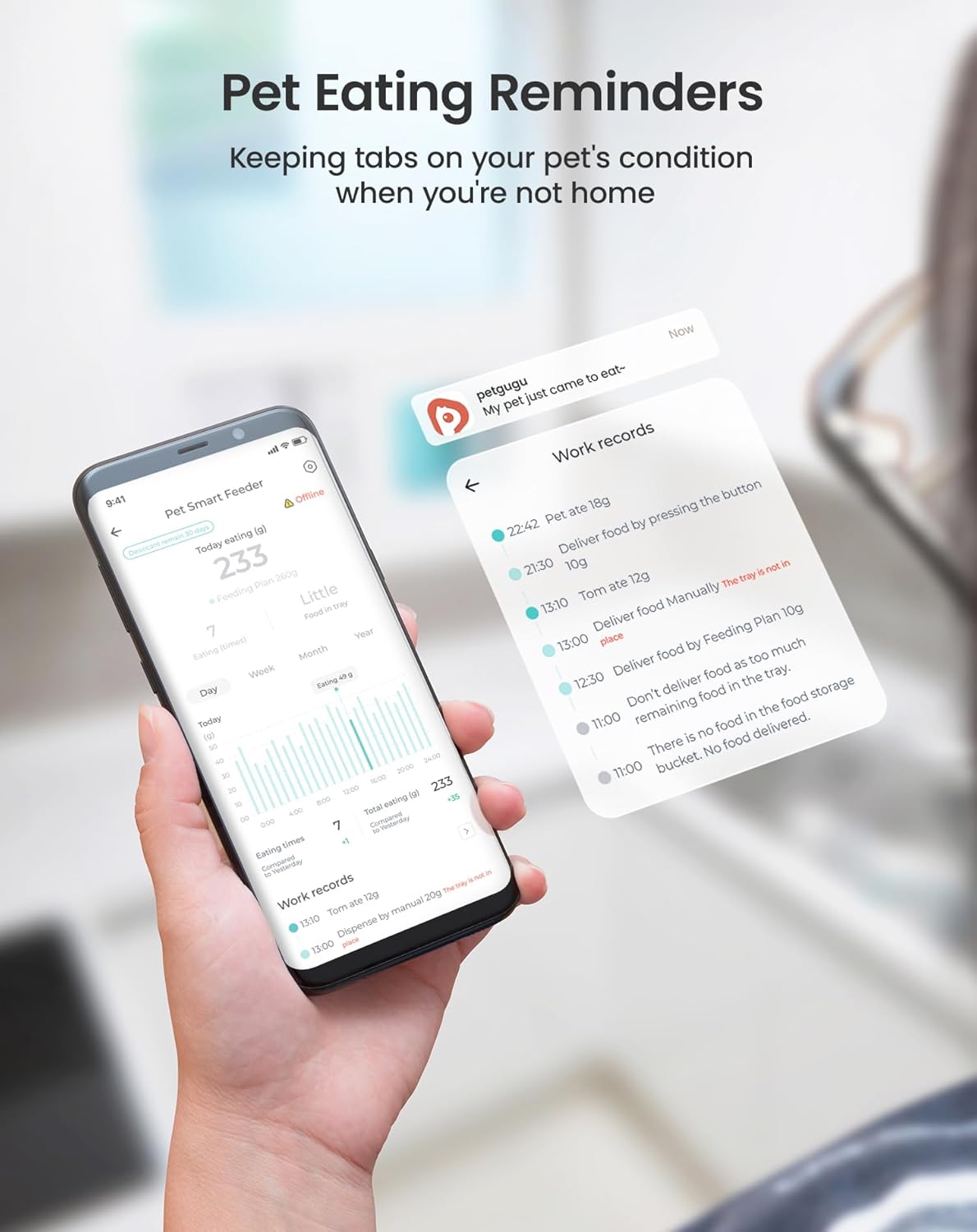
Image: A dog eating from the PETGUGU feeder, with the app displaying a daily feeding schedule.
4.2. Water Fountain Operation
- The water fountain provides a continuous waterfall-like flow, which encourages pets to drink more water.
- The app allows you to switch between continuous and intermittent water dispensing modes.

Image: A cat drinking from the PETGUGU water fountain, with the app showing daily water consumption data.
4.3. Remote Monitoring & Voice Call
- The PF2 feeder features a 1080p HD rotating camera, allowing you to view your pet remotely through the app.
- Two-way audio enables you to talk to your pet and hear them, providing comfort and interaction even when you're away.
4.4. Health Data Tracking (PF5 Identifiers)
- Each PF5 identifier assigns a unique profile to your cat, enabling the feeder and app to record individual eating and drinking data.
- The app provides daily and weekly reports on your pet's food intake, water consumption, and even bathroom patterns (if integrated with other PETGUGU products).
- Receive alerts if your pet's intake is unusually low, helping to identify potential health issues early.

Image: A cat eating from the PETGUGU feeder, with the app displaying daily eating records.

Image: A phone displaying pet eating reminders and work records from the PETGUGU app.
5. Maintenance
5.1. Cleaning
- The feeder and fountain are designed for easy disassembly into three main pieces for thorough cleaning.
- The ceramic feeding bowl is removable and dishwasher-safe for hygienic feeding.
- Regular cleaning helps prevent slime buildup and odors, ensuring fresh water and food for your pet.
5.2. Filter Replacement
- The water fountain utilizes a multi-layer filtration system to purify water.
- Replace the filter element regularly (refer to app notifications or product guidelines for recommended frequency) to maintain water quality.
5.3. Food Freshness
- The PF2 feeder features a sealed lid, drying compartment, and sealed outlet to keep pet food fresh and prevent moisture.
6. Troubleshooting
- Connectivity Issues: Ensure your device is connected to a 2.4GHz WiFi network. 5GHz networks are not supported. Restart your router and the feeder if connection problems persist.
- App Not Responding: Close and reopen the PETGUGU app. Check for app updates in your app store.
- Water Flow Problems: Check if the water pump cartridge is correctly installed and free from obstructions. Ensure the water tank has sufficient water. Clean the filter element.
- Inaccurate Data: Ensure PF5 identifiers are securely attached to your pet's collar and are properly paired with the app.
7. Specifications
- Feeder Capacity: 3.5 Liters
- Camera: 1080p HD rotating camera
- Connectivity: 2.4GHz WiFi
- PF5 Identifier Battery: CR2032 (approx. 1 month battery life)
- Filtration System: Multi-layer (e.g., 8-layer filter element for water fountain)
- Pump: Nano ceramic pump for quiet operation
- Design: Triple freshness food storage, removable ceramic bowl
8. Warranty and Support
For warranty information, product support, or to purchase replacement parts and accessories, please visit the official PETGUGU website or contact customer service. Keep your purchase receipt for warranty claims.
Online Support: Visit the PETGUGU Store on Amazon