
Introduction
This manual provides comprehensive instructions for the installation, operation, and maintenance of your SIXWIN 9-inch Android 15 Car Radio. Please read this manual thoroughly before using the product to ensure proper functionality and to prevent damage. Keep this manual for future reference.
Compatibility
This multimedia player is designed for a wide range of Volkswagen models, including Touran, Golf 5, Golf 6, Polo, Tiguan, Caddy, and Passat. It features a 9-inch IPS touchscreen with a 1024x600 resolution. Ensure your vehicle's dashboard configuration matches the compatible examples provided to guarantee a straightforward installation and optimal performance.

This graphic provides a crucial compatibility check, displaying various car radio slots and wiring configurations. Green checkmarks indicate compatible setups, while red crosses mark incompatible ones, helping users verify their vehicle's suitability before installation.

This image displays a grid of car dashboards, categorizing compatible models for Seat, VW, and Skoda vehicles. It visually confirms the wide range of Volkswagen Group cars that can accommodate this multimedia player.
Package Contents
Verify that all items listed below are included in your package:
- 1 x Android Player Unit
- 1 x CANBUS Decoder
- 2 x Power Cables
- 1 x USB Cable
- 1 x RCA Cable
- 1 x Radio Antenna
- 1 x GPS Antenna
- 1 x Rear Camera Input Cable
- 1 x User Manual

This image displays all components included in the product package: the main Android player unit, CANBUS decoder, power cables, USB cables, RCA cable, radio antenna, GPS antenna, rear camera input cable, and the user manual.
Setup and Installation
Professional installation is recommended. Ensure the vehicle's power is disconnected before beginning installation.
Installation Steps:
- Remove Original Radio: Carefully remove your vehicle's existing radio unit. Refer to your vehicle's specific service manual for detailed instructions on dashboard disassembly.
- Connect Wiring Harness: Connect the provided power cables, RCA cables, and other necessary wiring harnesses to the car radio and your vehicle's wiring. Ensure all connections are secure.
- CANBUS Connection: If your vehicle has original factory controls or a large screen display, connect the CANBUS protocol box. Refer to the troubleshooting section for specific instructions on CANBUS wiring and protocol settings.
- GPS Antenna Installation: Mount the GPS antenna in a location with a clear view of the sky, typically on the dashboard or under the windshield, to ensure optimal signal reception.
- Radio Antenna Connection: Connect the radio antenna to the designated port on the unit.
- Rear Camera (Optional): If installing a rear camera, connect its video input cable to the 'Rear Camera Input' port on the car radio. Route the camera cable safely to the rear of the vehicle.
- Test Functionality: Before fully reassembling the dashboard, temporarily connect the unit and test all functions (power, audio, radio, GPS, Bluetooth, touchscreen, steering wheel controls, and camera if installed).
- Secure Unit: Once all functions are verified, secure the car radio into the dashboard opening and reassemble any removed trim pieces.

This image illustrates the visual transformation of the car's dashboard, showing the original radio setup ('Before') and the sleek, integrated appearance of the SIXWIN 9-inch Android 15 car radio after installation ('After').
Operating Instructions
System Performance
The unit operates on Android 15 with an 8-core chipset, 6GB of RAM, and 128GB of ROM, ensuring smooth and responsive performance. This configuration supports multitasking, quick app loading, and a personalized user experience with various UI options.

This visual emphasizes the core specifications of the car radio, showcasing the 8-core processor, 6GB RAM, and 128GB ROM, which contribute to its smooth and efficient operation under the Android 15 system.
Wireless CarPlay and Android Auto
Connect your iPhone or Android smartphone wirelessly using CarPlay or Android Auto. This allows you to control calls, music, and navigation via voice commands or the touchscreen, enhancing convenience and safety while driving. Mirror Link functionality is also supported for screen mirroring your smartphone.

This image demonstrates the seamless integration of wireless Apple CarPlay and Android Auto, displaying their respective user interfaces with common applications like music, navigation, and messaging, accessible directly from the car radio screen.

This graphic highlights the Mirror Link feature, allowing smartphone content to be displayed on the car radio screen, and the voice control capability for hands-free operation, including navigation commands.
GPS Navigation and WiFi
The unit features integrated GPS with support for both offline and online maps. Built-in WiFi connectivity enables real-time navigation updates, streaming services, and access to various applications like YouTube and Spotify, ensuring a connected and entertaining driving experience.

This image visually represents the integrated GPS navigation system with online/offline map capabilities and the built-in WiFi for internet access, enabling real-time navigation, streaming, and app updates.
Bluetooth 5.0
Utilize Bluetooth 5.0 for stable hands-free calling and audio streaming. The system supports automatic phone book loading and clear audio quality for calls and music playback.

This graphic illustrates the Bluetooth 5.0 functionality, demonstrating hands-free calling with a dial pad on the screen and stable music streaming capabilities from connected devices.
FM/RDS Radio
The advanced FM/RDS radio provides access to news, music, and traffic updates. It features 18 preset stations and supports the Radio Data System (RDS) for enhanced information display.

This image shows the FM/RDS radio interface, highlighting features such as frequency display, preset station buttons, and the Radio Data System (RDS) for receiving additional information like station names and traffic updates.
Digital Sound Processor (DSP) and Equalizer
The built-in Digital Sound Processor (DSP) and 32-band adjustable equalizer allow for precise audio customization. Choose from various sound styles like Flat, Rock, Pop, Jazz, and Classic to optimize your listening experience.

This graphic illustrates the advanced audio customization options available through the built-in Digital Sound Processor (DSP) and the 32-band equalizer, allowing users to fine-tune sound output for various audio styles.
Touchscreen and Split Screen
The responsive IPS touchscreen allows for intuitive control. The split-screen function enables simultaneous use of multiple applications, such as navigation and music, enhancing versatility and entertainment on the road.

This image showcases the responsive 9-inch IPS touchscreen, demonstrating its split-screen capability where two applications, such as navigation and a music player, can be viewed simultaneously for enhanced multitasking.
Steering Wheel Control
The unit supports integration with your vehicle's steering wheel controls, allowing you to manage functions like volume, track changes, and calls directly from your steering wheel for added convenience and safety.

This image highlights the steering wheel control integration, showing the car radio's interface for learning and assigning functions to the vehicle's existing steering wheel buttons, enabling convenient control without taking hands off the wheel.
Rear Camera Support
The car radio supports an optional external AHD rear view camera and DVR for recording journeys. This feature enhances safety by providing a clear view when reversing.

This image displays the rear panel of the car radio, indicating the specific port for connecting an optional rear view camera, which provides visual assistance for parking and reversing.
Maintenance
To ensure the longevity and optimal performance of your SIXWIN car radio, follow these maintenance guidelines:
- Cleaning: Use a soft, dry cloth to clean the touchscreen and exterior surfaces. Avoid abrasive cleaners or solvents that could damage the screen or finish.
- Software Updates: Periodically check for software updates to ensure you have the latest features and performance enhancements. Follow the on-screen instructions for any available updates.
- Temperature: Avoid exposing the unit to extreme temperatures. Prolonged exposure to direct sunlight or very cold conditions can affect performance and lifespan.
- Connections: Ensure all cables and connections remain secure. Loose connections can lead to intermittent issues.
Troubleshooting
Power Consumption Issues
If your car multimedia player experiences power consumption issues, consider the following solutions:
- Confirm CANBUS and Power Port Connection: Verify that the CANBUS and the A&B ports of the power line are not connected simultaneously. Do not connect them at the same time.
- Test CANBUS Disconnection: If the CANBUS is connected, try unplugging it to see if the issue persists. This helps determine if the problem is related to the CANBUS.
- Check ACC Red Wire: After turning off the engine, test whether the ACC red wire of the power supply still has electricity. Confirm if there is a wiring error. If the ACC red wire still has electricity after turning off the engine, it is necessary to reconnect it separately.
- Replace CANBUS: If your CANBUS is not from Simple soft, consider replacing it with a Simple soft CANBUS.
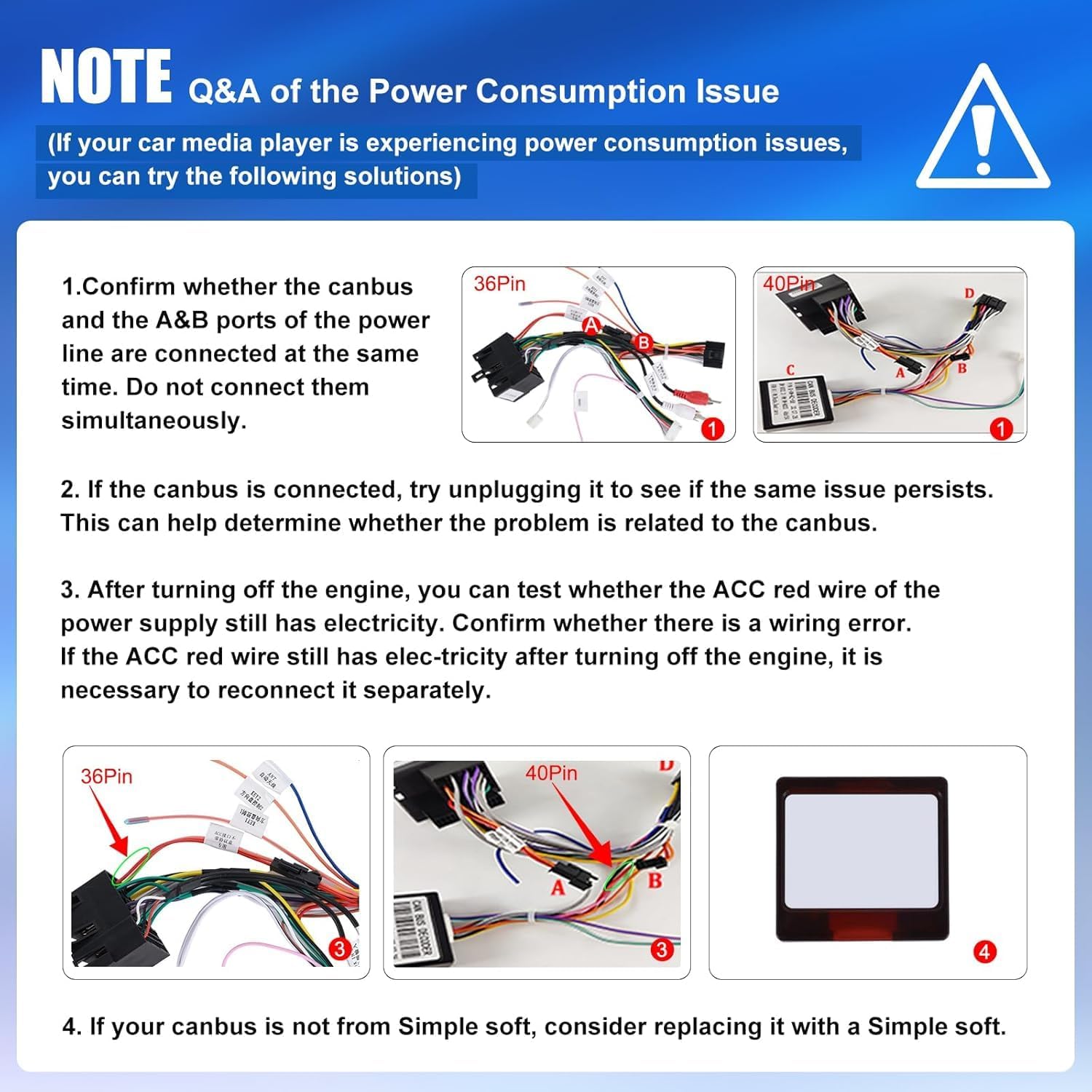
This troubleshooting guide provides visual aids and steps to diagnose and resolve common power consumption issues, detailing how to check CANBUS connections and power line wiring for correct installation.
Specifications
| Brand | SIXWIN |
| Model Number | 1 |
| Operating System | Android 15 |
| Processor | 8 Core |
| RAM | 6GB |
| ROM | 128GB |
| Screen Size | 9 Inches |
| Display Resolution | 1280*720 |
| Display Type | IPS Touchscreen |
| Connectivity Technology | Wifi, Bluetooth 5.0 |
| Special Features | Android Auto, Apple CarPlay, Built-in DSP, Built-in GPS, FM/RDS Radio |
| Compatible Devices | Smartphone |
| Audio Output Mode | Stereo, Surround |
| Number of Channels | 4 |
| Output Wattage | 180 Watts |
| Package Dimensions | 1 x 1 x 1 cm; 1 kg |
Warranty and Support
Your SIXWIN car radio comes with a 2-year warranty and a 30-day return policy. We offer 24-hour service for any inquiries or assistance you may need.
For further support or to request a user manual, please contact us at: SixWinVip126.com

This image features a customer service representative and provides the contact email for support: SixWinVip126.com, for any assistance or user manual inquiries.

