
Introduction
Thank you for choosing the MANKIW T20 Bone Sound Headphones. These open-ear bone conduction headphones are designed to provide a unique audio experience while keeping you aware of your surroundings. Featuring IP68 waterproofing and Bluetooth 6.0 connectivity, they are ideal for various activities including swimming, fitness, running, driving, and hiking.
Safety Information
- Do not disassemble, repair, or modify the headphones. This may cause fire, electronic breakdown, or even complete product damage.
- Keep the headphones away from fire, liquids, and high voltage equipment.
- Do not use the headphones at excessively high volumes for extended periods to prevent hearing damage.
- Ensure the charging port is dry before charging to prevent damage.
- Dispose of batteries according to local regulations. Do not expose to excessive heat.
Package Contents
Please check the package for the following items:
- MANKIW T20 Bone Sound Headphones
- Charging Cable
- User Manual (this document)
Product Overview
The MANKIW T20 headphones feature an ergonomic open-ear design with a flexible neckband. The main components include the bone conduction transducers that rest on your cheekbones, control buttons, and a charging port.
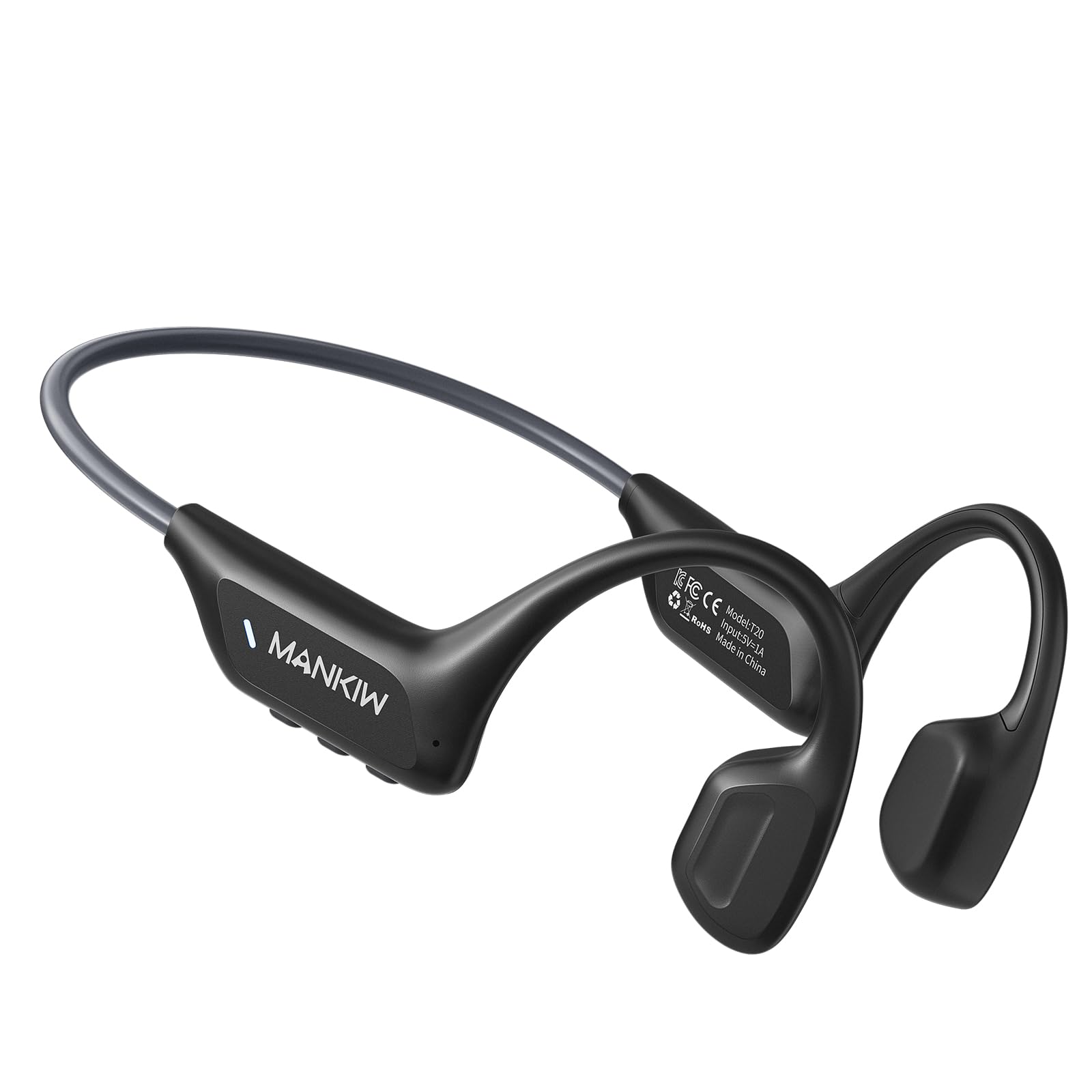
Image: General view of the MANKIW T20 Bone Sound Headphones, showing the open-ear design and flexible neckband.
Component Identification:
- Bone Conduction Transducers: These rest on your cheekbones, transmitting sound vibrations directly to your inner ear.
- Control Buttons: Typically located on one side, these buttons manage power, volume, playback, and calls. (Specific button functions detailed in Operating section).
- Charging Port: A waterproof port for charging the device.
- Microphone: For hands-free calling.
Setup
1. Charging the Headphones
Before first use, fully charge the headphones. Ensure the charging port is dry before connecting the charging cable.
- Locate the charging port on the headphones.
- Connect the charging cable to the headphones and a USB power source (e.g., computer USB port, wall adapter).
- The LED indicator will show the charging status. It typically turns solid red during charging and blue or off when fully charged.
- A full charge provides up to 8-10 hours of playback time.

Image: Close-up view of the charging port on the MANKIW T20 headphones, showing where to connect the charging cable.
2. Pairing with a Bluetooth Device
The MANKIW T20 headphones use Bluetooth 6.0 for a stable and fast connection.
- Power On: Press and hold the Power button for 3-5 seconds until the LED indicator flashes red and blue, indicating pairing mode.
- Activate Bluetooth: On your smartphone, tablet, or other Bluetooth-enabled device, go to the Bluetooth settings and turn on Bluetooth.
- Select Device: Look for "MANKIW T20" (or similar name) in the list of available devices and select it to connect.
- Confirmation: Once successfully paired, the LED indicator will typically turn solid blue or flash blue slowly, and you may hear an audible confirmation.
- If pairing fails, turn off the headphones and your device's Bluetooth, then repeat the steps.
Operating Instructions
Basic Functions (Touch Control)

Image: Diagram showing the location and function of control buttons on the MANKIW T20 headphones.
- Power On/Off: Press and hold the Power button for 3-5 seconds.
- Play/Pause: Single press the Multi-function button (often the Power button or a dedicated play/pause button).
- Volume Up: Single press the Volume + button.
- Volume Down: Single press the Volume - button.
- Next Track: Press and hold the Volume + button for 2 seconds.
- Previous Track: Press and hold the Volume - button for 2 seconds.
- Answer/End Call: Single press the Multi-function button.
- Reject Call: Press and hold the Multi-function button for 2 seconds.
- Activate Voice Assistant: Triple press the Multi-function button.
Wearing the Headphones
Position the bone conduction transducers on your cheekbones, just in front of your ears. The flexible neckband should rest comfortably behind your head.

Image: Illustration demonstrating the correct way to wear the MANKIW T20 headphones, with transducers resting on the cheekbones.
Maintenance
- Cleaning: Wipe the headphones with a soft, damp cloth. Do not use harsh chemicals or abrasive cleaners.
- Drying: After use in water (e.g., swimming), ensure the headphones are thoroughly dry, especially the charging port, before charging.
- Storage: Store in a cool, dry place away from direct sunlight and extreme temperatures.
- Battery Care: For optimal battery life, avoid fully discharging the headphones frequently. Charge regularly.
Troubleshooting
| Problem | Solution |
|---|---|
| Headphones won't turn on. | Ensure the headphones are fully charged. Press and hold the Power button for 5 seconds. |
| Cannot pair with device. |
|
| No sound or low volume. |
|
| Sound quality is poor. |
|
Specifications
- Model: T20
- Connectivity: Bluetooth 6.0
- Water Resistance: IP68 (Fully waterproof and dustproof)
- Battery Life: Up to 8-10 hours (playback time)
- Charging Time: Up to 8 hours (as per specifications)
- Weight: 28 Grams
- Material: Acrylnitril-Butadien-Styrol (ABS), Silicone
- Control Method: Touch
- Compatible Devices: Smartphones, tablets, laptops, car audio systems
Warranty and Support
MANKIW products are designed and manufactured to the highest quality standards. For warranty information and customer support, please refer to the warranty card included in your package or visit the official MANKIW website. If you encounter any issues not covered in this manual, please contact our customer service for assistance.
Website: www.mankiw.com
Email: support@mankiw.com