
1. Introduction
This manual provides essential instructions for the safe and efficient operation of your WISCENT Bluetooth Stereo System WTB-799. Please read this manual thoroughly before using the product and retain it for future reference.
The WISCENT WTB-799 is a compact home audio system featuring a CD player, Bluetooth 5.0 wireless streaming, FM radio, USB playback, and a 3.5mm AUX-in port. It delivers 40W peak power (2 x 20W RMS) through its two-way speaker system, designed for balanced sound reproduction.
2. Safety Information
- Power Source: Ensure the power supply voltage matches the rating indicated on the unit.
- Ventilation: Do not block ventilation openings. Allow adequate space around the unit for proper airflow.
- Water and Moisture: Do not expose the unit to rain, moisture, or dripping/splashing liquids. Do not place objects filled with liquids, such as vases, on the unit.
- Heat: Keep the unit away from heat sources such as radiators, heat registers, stoves, or other apparatus (including amplifiers) that produce heat.
- Cleaning: Unplug the unit from the wall outlet before cleaning. Use a soft, dry cloth. Do not use liquid cleaners or aerosol cleaners.
- Servicing: Do not attempt to service this product yourself. Refer all servicing to qualified service personnel.
- CD Player: This product contains a laser. Do not open the CD compartment while a disc is playing. Avoid direct exposure to the laser beam.
3. Package Contents
Carefully unpack all items and ensure you have received the following:
- Main Unit (Stereo System)
- 2 x Bookshelf Speakers
- Remote Control (AAA batteries not included)
- AC Power Cable
- 3.5mm AUX Cable
- User Manual (this document)

4. Product Overview
4.1 Front Panel Controls

- POWER Button: Turns the unit on or off.
- PLAY/PAUSE Button: Starts or pauses playback for CD, USB, or Bluetooth.
- SKIP/TUNE Buttons (◀◀ / ▶▶): Skips tracks on CD/USB, navigates radio frequencies, or fast forwards/rewinds.
- SCAN Button: Initiates automatic scanning for FM radio stations.
- RPT (REPEAT) Button: Cycles through repeat modes (one, all, random) for CD/USB.
- VOLUME Knob: Adjusts the master volume level.
- EQ/FUN Button: Selects sound equalizer presets or switches input functions (CD, Bluetooth, FM, USB, AUX).
- USB Port: For connecting USB storage devices for MP3 playback.
- AUX-IN Jack: For connecting external audio devices via a 3.5mm cable.
- Headphone Jack: For private listening with headphones.
4.2 Rear Panel Connections
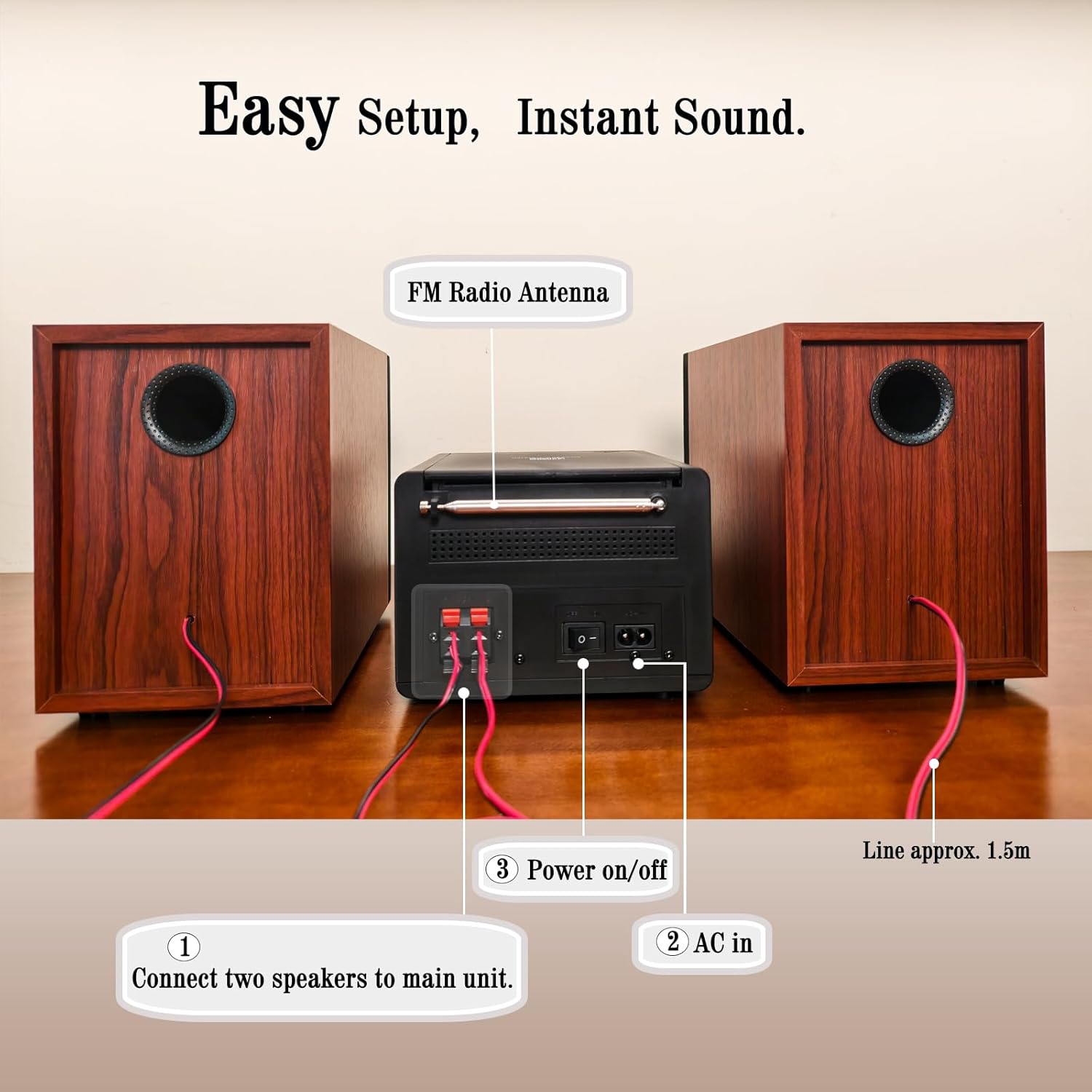
- Speaker Terminals: Connect the included bookshelf speakers.
- FM Radio Antenna: Extend for optimal FM signal reception.
- AC IN: Connect the AC power cable.
- Power On/Off Switch: Main power switch for the unit.
5. Setup
5.1 Connecting the Speakers
- Identify the speaker wires. Each speaker has two wires, typically red (+) and black (-).
- Connect the red wire from each speaker to the red (+) terminal on the main unit.
- Connect the black wire from each speaker to the black (-) terminal on the main unit.
- Ensure a secure connection for both speakers.
5.2 Connecting the FM Antenna
Extend the FM wire antenna located at the rear of the main unit for improved radio reception. Position it for the best possible signal.
5.3 Connecting Power
- Plug the AC power cable into the AC IN port on the rear of the main unit.
- Plug the other end of the AC power cable into a standard wall outlet.
- Ensure the main Power On/Off switch on the rear panel is in the 'ON' position.
6. Operating Instructions
6.1 Power On/Off
Press the POWER button on the front panel or the remote control to turn the unit on or off (standby mode).
6.2 Source Selection
Press the EQ/FUN button repeatedly on the front panel or the FUNCTION button on the remote control to cycle through available input sources: CD, Bluetooth, FM Radio, USB, AUX-in.
6.3 CD Playback

- Open the CD compartment cover on top of the main unit.
- Place a CD (CD, CD-R, CD-RW, or MP3 CD) onto the spindle with the label side facing up.
- Close the CD compartment cover.
- Select 'CD' mode using the EQ/FUN button.
- Playback should start automatically. If not, press the PLAY/PAUSE button.
- Use the SKIP/TUNE buttons to navigate tracks.
- Press the RPT button to select repeat modes (Repeat One, Repeat All, Random Play).
6.4 Bluetooth Pairing
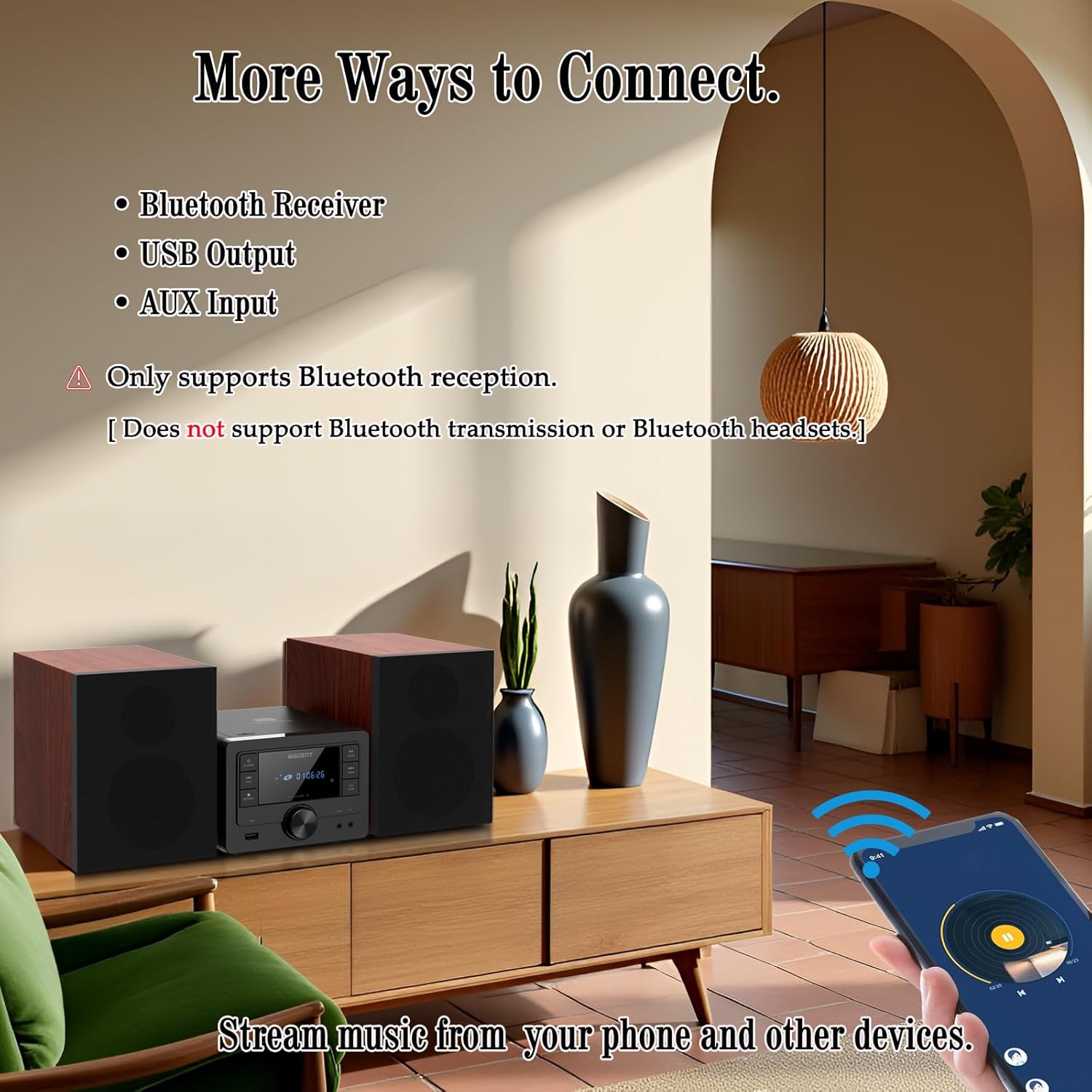
- Select 'Bluetooth' mode using the EQ/FUN button. The display will show 'BT' and flash, indicating it's in pairing mode.
- On your Bluetooth-enabled device (smartphone, tablet), go to its Bluetooth settings and enable Bluetooth.
- Search for available devices and select 'WTB-799' from the list.
- Once paired, the display will stop flashing and show 'BT' steadily.
- You can now stream audio from your device to the stereo system.
- Note: This system supports Bluetooth reception only. It cannot transmit audio to Bluetooth headphones or other Bluetooth speakers.
6.5 FM Radio Operation
- Select 'FM' mode using the EQ/FUN button.
- Press the SCAN button to automatically scan and save available FM stations.
- Use the SKIP/TUNE buttons to manually tune to a specific frequency or navigate through saved stations.
6.6 USB Playback
- Insert a USB flash drive (formatted with MP3 files) into the USB port on the front panel.
- Select 'USB' mode using the EQ/FUN button.
- Playback should start automatically. If not, press the PLAY/PAUSE button.
- Use the SKIP/TUNE buttons to navigate tracks.
- Press the RPT button to select repeat modes (Repeat One, Repeat All, Random Play).
6.7 AUX-in Connection
- Connect one end of the 3.5mm AUX cable to the AUX-IN jack on the front panel of the stereo system.
- Connect the other end of the AUX cable to the headphone jack or audio output of your external audio device (e.g., smartphone, MP3 player).
- Select 'AUX' mode using the EQ/FUN button.
- Control playback and volume from your external device.
6.8 Sound Settings (EQ Modes)
Press the EQ/FUN button (or EQ button on the remote) repeatedly to cycle through the available equalizer presets:
- Flat: Neutral sound profile.
- Rock: Enhanced bass and treble.
- Pop: Slightly boosted bass and vocals.
- Classic: Emphasizes mid-range frequencies.
- Jazz: Slightly boosted bass and treble with a warm tone.
6.9 Remote Control Usage
The included remote control allows for convenient operation from a distance. Insert two AAA batteries (not included) into the remote control before use. Point the remote control towards the main unit's front panel sensor.
7. Maintenance
- Cleaning: Use a soft, dry cloth to clean the unit's exterior. Do not use abrasive cleaners, waxes, or solvents.
- CD Player Lens: If CD playback issues occur, use a commercially available CD lens cleaner disc.
- Storage: When not in use for extended periods, unplug the unit and store it in a cool, dry place.
8. Troubleshooting
| Problem | Possible Cause | Solution |
|---|---|---|
| No power | Power cable not connected; Rear power switch off; Wall outlet not active. | Check power cable connection; Ensure rear power switch is ON; Test wall outlet with another device. |
| No sound | Volume too low; Incorrect input source; Speakers not connected properly; Mute function active. | Increase volume; Select correct input source; Check speaker wire connections; Deactivate mute. |
| CD not playing | CD inserted incorrectly; CD dirty/scratched; Incorrect source selected. | Reinsert CD label side up; Clean or replace CD; Select 'CD' source. |
| Bluetooth not pairing | Unit not in pairing mode; Bluetooth on device off; Device too far. | Select 'Bluetooth' source (display flashes); Enable Bluetooth on your device; Move device closer to the unit. |
| Poor FM reception | Antenna not extended/positioned correctly. | Fully extend and reposition the FM antenna. |
| USB not recognized | USB drive not formatted correctly; Incompatible file types; USB drive damaged. | Ensure USB is FAT32 formatted with MP3 files; Try a different USB drive. |
| Remote control not working | Batteries depleted/incorrectly inserted; Obstruction between remote and unit. | Replace batteries (AAA); Ensure correct battery polarity; Remove obstructions. |
9. Specifications
- Brand: WISCENT
- Model: WTB-799
- Connectivity Technology: Auxiliary, Bluetooth 5.0, USB
- Speaker Type: Stereo, 2-way (Woofer & Tweeter)
- Output Power: 40W Peak (2 x 20W RMS)
- CD Compatibility: CD, CD-R, CD-RW, MP3 CD
- FM Radio Frequency: 87.5~108MHz
- USB Port: USB 2.0 (for MP3 playback)
- Product Dimensions (Main Unit): 6.3" x 7.5" x 4.7" (160x190x120 mm)
- Product Dimensions (Each Speaker): 5.3" x 8.1" x 7.5" (135x205x190 mm)
- Item Weight: Approximately 3.3 pounds
- Color: Black
10. Warranty and Support
For warranty information and technical support, please refer to the warranty card included with your product or contact the retailer where you purchased the WISCENT Bluetooth Stereo System WTB-799. You may also visit the official WISCENT website for further assistance.
Manufacturer: WISCENT

