
1. Introduction
This manual provides essential instructions for the safe and efficient operation, setup, and maintenance of your Spectra Precision HV1305C-BCC Laser Level. Please read this manual thoroughly before using the product to ensure proper functionality and to prevent injury or damage.
The Spectra Precision HV1305C-BCC is a robust, automatic horizontal and vertical self-leveling laser level designed for various construction and leveling applications, offering high accuracy and a wide working range.
2. Safety Information
WARNING: Laser Radiation. Avoid direct eye exposure to the laser beam. Class 2 Laser Product.
- Always wear appropriate safety glasses when operating the laser level, especially in bright conditions.
- Do not stare into the laser beam or direct it at other people.
- Ensure the work area is clear of obstructions and potential hazards.
- Keep the device out of reach of children.
- Use only the specified battery pack and charger.
- Do not attempt to disassemble or modify the laser level. Refer all servicing to qualified personnel.
- Protect the device from extreme temperatures, moisture, and strong vibrations.
3. Package Contents
Verify that all items listed below are present in your package:
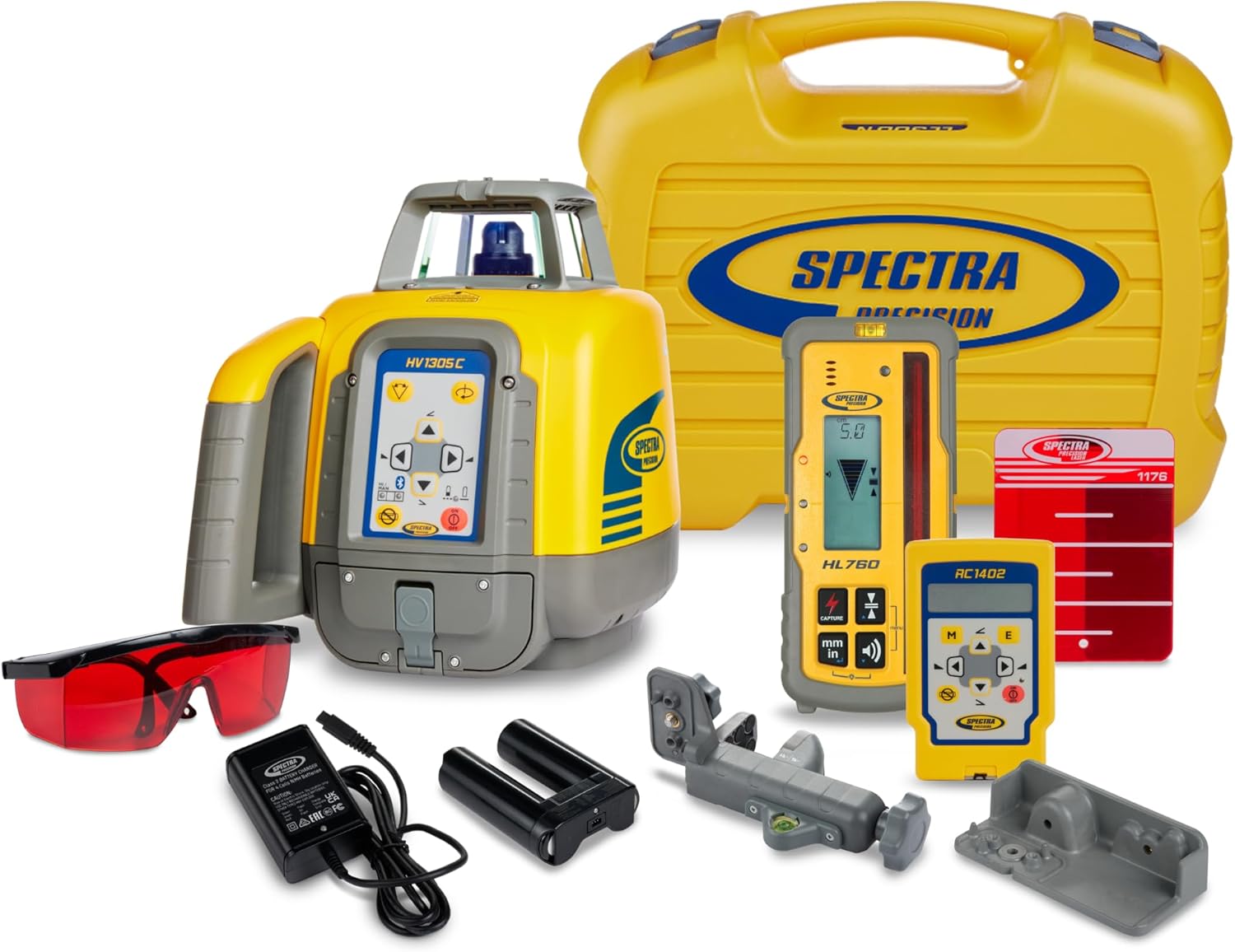
- Spectra Precision HV1305C-BCC Laser Level Base Unit
- B10 NiMH Battery Pack
- CH10 Charger
- Medium Carrying Case (Part Number: 100981-00)
- Red Laser Enhancement Glasses (as shown in image)
- HL760 Laser Receiver (optional, may be included in some kits)
- RC1402 Remote Control (optional, may be included in some kits)
- Mounting Brackets/Accessories (as shown in image)
4. Product Overview
The HV1305C-BCC laser level features a durable housing and an intuitive control panel. Key components include:
- Laser Head: Emits the rotating laser beam.
- Control Panel: Contains buttons for power, mode selection, and manual adjustments. (Refer to Figure 1 for visual reference of the control panel on the main unit).
- Battery Compartment: Located at the base for the B10 NiMH battery pack.
- Mounting Points: For tripod or wall mount attachment.
The HL760 Laser Receiver (if included) is used to detect the laser beam over long distances, providing digital readout of elevation. The RC1402 Remote Control (if included) allows for convenient operation of the laser level from a distance.
5. Setup and Charging
5.1. Battery Installation and Charging
- Open the battery compartment cover on the laser level.
- Insert the B10 NiMH battery pack, ensuring correct polarity.
- Close the battery compartment cover securely.
- To charge the battery, connect the CH10 charger to the charging port on the laser level and then to a power outlet. The charging indicator light will illuminate.
- Allow sufficient time for a full charge before first use. Refer to the charger's instructions for specific charging times.
5.2. Mounting the Laser Level
For stable and accurate operation, mount the HV1305C-BCC on a stable tripod or a wall mount. Ensure the mounting surface is level and secure.
- Attach the laser level to a tripod using the threaded mounting point at its base.
- Alternatively, use appropriate wall mounting brackets (if included) to secure the unit to a vertical surface.
6. Operating Instructions
6.1. Powering On and Self-Leveling
- Press the ON/OFF button on the control panel.
- The laser level will automatically begin its self-leveling process. This typically takes a few seconds.
- Once leveled, the laser beam will start rotating, indicating it is ready for use.
- The HV1305C-BCC supports both horizontal and vertical self-leveling. Select the desired mode using the mode button on the control panel.
6.2. Using the HL760 Laser Receiver
For outdoor use or when the laser beam is difficult to see, the HL760 receiver extends the working range up to 1200m (4,000 ft) diameter.
- Turn on the HL760 receiver.
- Hold the receiver in the path of the rotating laser beam.
- The display on the receiver will indicate the position of the laser beam relative to the on-grade mark.
- Adjust the receiver or the laser level until the on-grade indicator is achieved.
6.3. Using the RC1402 Remote Control
The RC1402 remote control allows you to operate various functions of the laser level from a distance, including changing rotation speed, scanning modes, and manual slope adjustments.
- Ensure the remote control has fresh batteries.
- Point the remote control towards the laser level's sensor.
- Press the desired function buttons on the remote to control the laser level.
6.4. High-Visibility Beam
The HV1305C-BCC features a high-visibility laser beam, making it easily visible even in brightly lit conditions. For enhanced visibility, especially in very bright environments or over longer distances, use the provided red laser enhancement glasses.
7. Maintenance
- Cleaning: Use a soft, damp cloth to clean the exterior of the laser level. Do not use harsh chemicals or abrasive cleaners. Keep the laser aperture clean and free of dust.
- Storage: When not in use, store the laser level and its accessories in the provided carrying case in a dry, temperature-controlled environment. Remove batteries if storing for extended periods.
- Calibration: Regular calibration checks are recommended to ensure continued accuracy. Refer to a qualified service center for professional calibration.
8. Troubleshooting
| Problem | Possible Cause | Solution |
|---|---|---|
| Laser not turning on | Low or dead battery; incorrect battery installation. | Charge the battery pack or ensure it is correctly installed. |
| Laser not self-leveling | Unit is on an unstable surface; unit is outside its self-leveling range. | Place the unit on a stable, level surface. Manually adjust the unit closer to level if necessary. |
| Laser beam not visible | Too much ambient light; too far from the unit. | Use the HL760 receiver for outdoor or long-distance applications. Wear red laser enhancement glasses. |
| Remote control not working | Dead batteries in remote; obstruction between remote and laser. | Replace remote batteries. Ensure a clear line of sight to the laser level. |
9. Technical Specifications
- Model: HV1305C-BCC
- Manufacturer: Spectra Precision
- Automatic Leveling: Horizontal and Vertical
- Accuracy: 1.5mm @ 30 m (1/16 inch @ 100 ft)
- Working Range: Up to 1200m (4,000 ft) diameter with HL760 receiver
- Beam Visibility: High-visibility beam
- Power Source: B10 NiMH Battery Pack
- Charger: CH10
- Item Weight: 19.2 pounds
- Product Dimensions: 22.4 x 18.5 x 18.5 inches
- Color: Yellow
10. Warranty and Customer Support
Spectra Precision products are designed for durability and performance. For information regarding the warranty period and terms for your HV1305C-BCC Laser Level, please refer to the warranty card included with your product or visit the official Spectra Precision website.
For technical support, service, or to purchase replacement parts, please contact your authorized Spectra Precision dealer or customer service department. Contact information can typically be found on the manufacturer's website or in your product documentation.
Online Resources: Visit the Spectra Precision Store on Amazon


