
Introduction
The Ehaho 35 Inch 8 Speaker UTV Sound Bar (Model EH2003) is designed to provide a powerful and immersive audio experience for UTVs, ATVs, golf carts, and marine crafts. This system features a newly upgraded speaker configuration, Bluetooth 6.0 connectivity with Auracast technology, dynamic RGB lighting, and robust IP66 weatherproofing for all-terrain durability.
This manual provides essential information for the proper installation, operation, and maintenance of your sound bar to ensure optimal performance and longevity.
What's in the Box
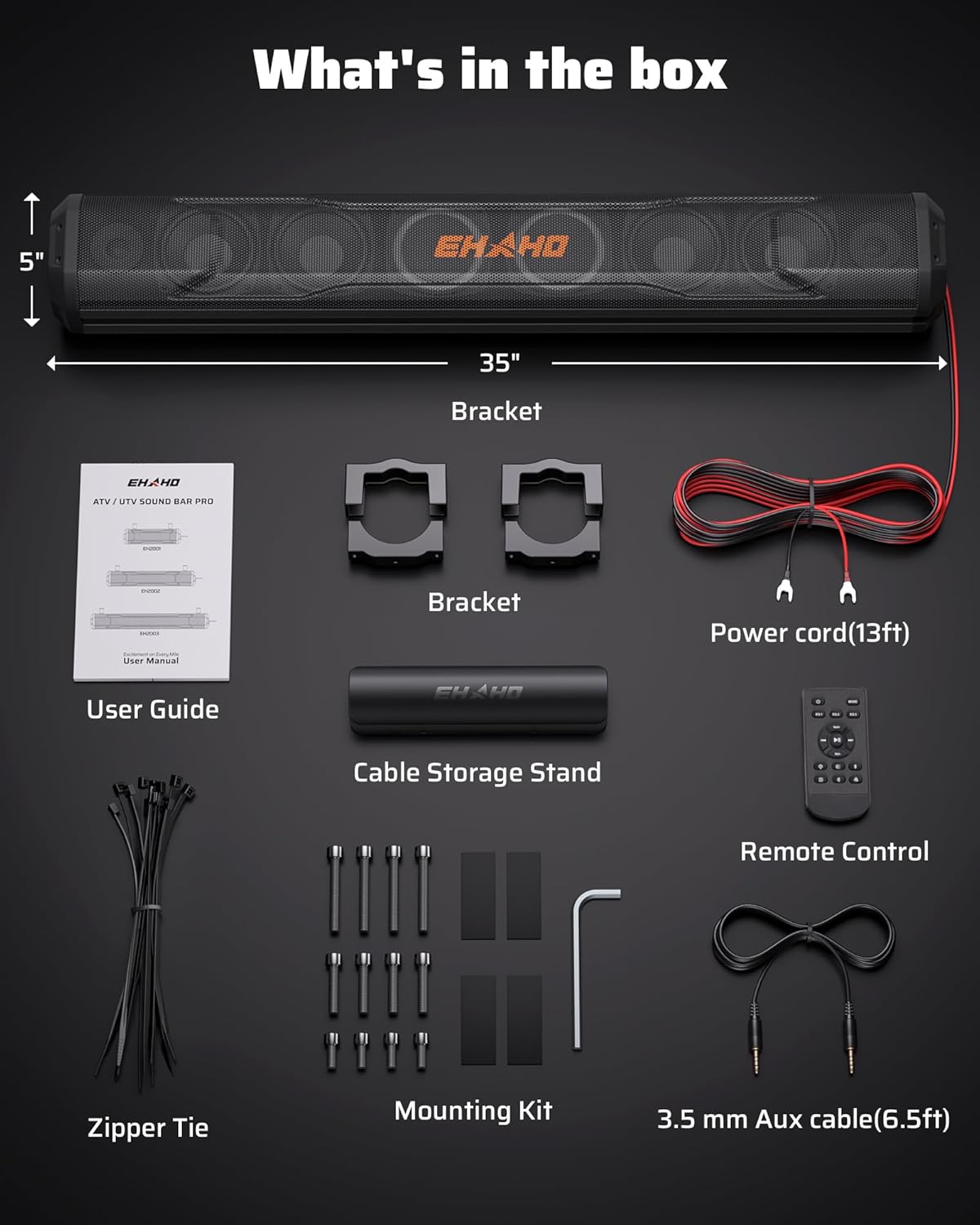
Image: All components included in the Ehaho UTV Sound Bar package.
- UTV Sound Bar
- Remote Control
- Quick Start Guide
- Power Cable (13ft)
- Installation Accessories (Brackets, Mounting Kit, Zipper Ties, 3.5 mm Aux cable (6.5ft))
Specifications
| Brand | Ehaho |
| Model Number | EH2003 |
| Speaker Maximum Output Power | 600 Watts |
| Frequency Response | 20 KHz |
| Connectivity Technology | Auxiliary, Bluetooth 6.0 |
| Audio Output Mode | Stereo |
| Mounting Type | Speaker (for 1" to 2" roll cages) |
| Enclosure Material | Metal (High-strength aluminum alloy) |
| Speaker Type | Soundbar (2x 1.5" tweeters, 4x 4" subwoofers, 2x 4" low-frequency radiators) |
| Additional Features | Bass Boost, Dustproof, Dynamic RGB Lighting & Exclusive Strobe Light, Multi Room Audio (Auracast), Shockproof, Stereo Pairing, Waterproof (IP66) |
| Bluetooth Range | 33 Feet |
| Control Method | Push Button, Wireless RF Remote |
| Input Voltage | 12 Volts (DC) (8-18V range) |
| Signal-to-Noise Ratio | 120 dB |
Installation
The Ehaho UTV Sound Bar is designed for quick and easy installation, typically within 20 minutes, without the need for drilling. It is compatible with 1" to 2" roll cages found on most UTV, ATV, and golf cart models.
Mounting

Image: Easy installation of the sound bar using heavy-duty clamps on a roll cage.
- Select the appropriate heavy-duty clamps from the installation accessories that fit your vehicle's 1" to 2" roll cage.
- Attach the clamps securely to the sound bar and then to the roll cage. Ensure a rock-solid grip to prevent movement during operation.
- The sound bar can be mounted for either bottom-facing or top-facing speakers depending on your preference and vehicle design.
Wiring
The kit includes clearly labeled wiring for a plug-and-play experience. Connect the power cable directly to your vehicle's 12V DC power source (8-18V range).
Important Power Note:
For vehicles with higher voltage (e.g., electric golf carts), a voltage converter is required to prevent damage to the sound bar. Ensure all connections are secure and properly insulated.
Video: A user demonstrating the installation process and wiring of the Ehaho UTV Sound Bar on a side-by-side vehicle.
Operation
Power On/Off & Bluetooth Pairing

Image: Overview of the sound bar's control panel and connectivity options.
- Press and hold the power button on the sound bar's control panel or the remote control to power on the device.
- The sound bar will automatically enter Bluetooth pairing mode. Look for 'EHAHO EH2003' on your device's Bluetooth settings.
- Select the sound bar to connect. A voice prompt will confirm successful pairing.
Audio Control
Control volume, skip tracks, and switch between input sources (Bluetooth, AUX) using the onboard buttons or the wireless RF remote control. The remote is designed to be glove-friendly for convenience on the trail.
EQ Modes
Utilize the three intelligent EQ modes (Voice, Bass, Normal) to optimize your audio experience for different environments. Switch modes via the remote or control panel to adapt to wind noise or enhance bass for gatherings.
Dynamic RGB Lighting & Strobe Light

Image: The sound bar showcasing its vibrant RGB lighting and strobe effects.
Choose from 6 dynamic RGB modes (music sync, solid, fading, jump, breathing, or off) to match your preference. The sound bar also features 4 exclusive strobe lights for enhanced visibility and atmosphere. Control lighting modes using the remote or the dedicated light button on the unit.
Video: A seller demonstrating how to use the Party Mode feature on the Ehaho UTV Sound Bar.
Auracast Party Mode

Image: Multiple Ehaho sound bars connected wirelessly in Party Mode.
The sound bar features Bluetooth 6.0 Auracast technology, allowing you to wirelessly sync 3 to 50+ compatible Ehaho EH200 series speakers (Models EH2001, EH2002, EH2003) with zero latency. Simply tap "Party Mode" to create a unified, high-octane sound system for large outdoor events or convoys. Multi-speaker syncing requires all units to support Auracast.
Video: A seller demonstrating the Ehaho UTV Sound Bar's live performance and features, including RGB lighting.
Durability & Weatherproofing

Image: The sound bar being hosed down, highlighting its IP66 waterproof and dustproof capabilities.
The Ehaho UTV Sound Bar is housed in high-strength aluminum alloy with a rigorous IP66 rating, making it mud, water, and dust proof. Internal components are completely sealed against ingress, ensuring durability in harsh elements. Reinforced speaker mounts with anti-vibration damping materials provide shockproof engineering, protecting against constant rattling and hard landings.
Thanks to its saltwater-resistant coating and sealed design, the EH200 is also Marine-Grade, suitable for wakeboard boats, pontoon boats, and other marine crafts.
Maintenance
To ensure the longevity and optimal performance of your Ehaho UTV Sound Bar, follow these maintenance guidelines:
- Cleaning: Use a soft, damp cloth to wipe down the exterior. Avoid harsh chemicals or abrasive cleaners. The IP66 rating allows for hosing down, but ensure all ports are securely closed.
- Connection Check: Periodically inspect all wiring connections to ensure they are secure and free from corrosion.
- Mounting Security: Regularly check the mounting clamps and screws for tightness, especially after off-road use, to prevent vibration-related damage.
- Storage: When not in use for extended periods, store the sound bar in a cool, dry place.
Troubleshooting
If you encounter issues with your Ehaho UTV Sound Bar, refer to the following common troubleshooting steps:
- No Power: Ensure the power cable is securely connected to the 12V DC source and that the vehicle's battery has sufficient charge. Check for any blown fuses in the power line (if installed).
- No Sound: Verify that the sound bar is powered on and properly paired via Bluetooth or connected via AUX. Check the volume levels on both the sound bar and your connected device. Ensure the correct input source is selected.
- Bluetooth Disconnection: Move your connected device closer to the sound bar to ensure it's within the 33-foot range. Disconnect and re-pair the device. Ensure no other devices are interfering with the Bluetooth signal.
- Distorted Sound: Reduce the volume on both the sound bar and your connected device. Check the audio source for quality issues. Ensure the sound bar is securely mounted to minimize vibration.
- RGB Lights Not Working: Check if the lights are turned off via the remote or control panel. Cycle through the lighting modes to see if they respond.
For further assistance, please refer to the full user manual or contact Ehaho customer support.
Warranty & Support
The Ehaho 35 Inch 8 Speaker UTV Sound Bar (Model EH2003) comes with an 18 Month Warranty. Please retain your proof of purchase for warranty claims.
For technical support, warranty inquiries, or replacement parts, please visit the official Ehaho website or contact their customer service department. Contact information can typically be found in the full user manual or on the product packaging.


