
1. Introduction and Overview
The PWAY Wireless HDMI Transmitter and Receiver system provides a convenient solution for extending HDMI signals wirelessly. This plug-and-play device eliminates the need for long cables, offering high-quality video and audio transmission up to 328 feet (100 meters). It supports 4K decoding and 1080P Full HD output, making it suitable for various applications including streaming, presentations, and expanding your workspace.

Figure 1: PWAY Wireless HDMI system demonstrating plug-and-play functionality between a laptop and a display.
2. Package Contents
Verify that all items listed below are included in your package:
- 1x Wireless HDMI Transmitter (TX)
- 1x Wireless HDMI Receiver (RX)
- 2x USB-C Power Cables
- 1x USB-C to HDMI 4K Adapter
- 1x Micro HDMI 8K Adapter
- 1x Mini HDMI 8K Adapter
- 1x User Manual

Figure 2: Complete package contents of the PWAY Wireless HDMI Transmitter and Receiver.
3. Product Features
- Plug and Play: No software, Bluetooth, or Wi-Fi required for operation.
- Extended Wireless Range: Transmits signals up to 328 feet (100 meters) using advanced 2.4G/5G technology.
- High-Resolution Output: Supports 4K decoding and 1080P Full HD output for clear visuals.
- Dual Operating Modes: Offers both Mirror Mode (duplicate display) and Extended Mode (larger workspace).
- Versatile Connectivity: Includes USB-C to HDMI 4K, Micro HDMI 8K, and Mini HDMI 8K adapters for broad device compatibility.
- Compact and Portable: Lightweight design for easy transport and setup in various environments.

Figure 3: Visual representation of 4K Ultra HD decoding and 1080P output capabilities.

Figure 4: Illustration of the internal 2.4G/5G dual-band chip for intelligent signal switching.

Figure 5: Compatibility of the transmitter (TX) with multiple HDMI source devices.

Figure 6: Explanation of Mirror Mode and Extended Mode for display versatility.

Figure 7: Demonstration of the 328ft (100m) long-range wireless transmission capability.
4. Setup Instructions
The PWAY Wireless HDMI system is designed for simple plug-and-play setup. Follow these steps to get started:
- Connect the Receiver (RX): Plug the receiver unit into an HDMI input port on your monitor, TV, or projector. Connect a 5V/1A power adapter to the receiver using one of the provided USB-C cables.
- Connect the Transmitter (TX): Plug the transmitter unit into the HDMI output port of your source device (e.g., laptop, TV box, camera). If your source device has a USB-C port that supports video output, the transmitter may draw power directly from it, eliminating the need for an additional power cable. Otherwise, connect a 5V/1A power adapter to the transmitter using a USB-C cable.
- Verify Connection: Once both units are powered and connected, they will automatically pair. The indicator lights on both units will show a stable green light when a connection is established.
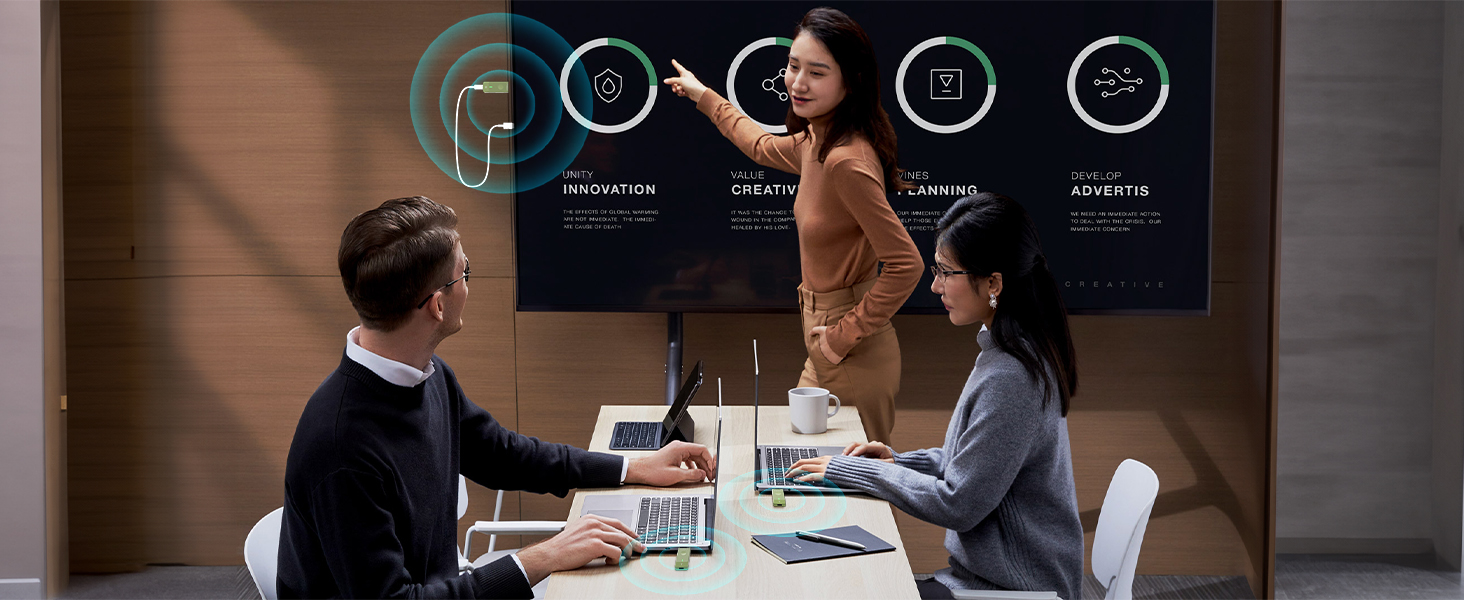
Figure 8: Step-by-step guide for easy setup.
Note: For optimal performance, ensure both the transmitter and receiver are powered with a 5V/1A power adapter, especially for extended use or when the source device cannot provide sufficient power to the TX unit.
Video 1: A demonstration of the PWAY Wireless HDMI Transmitter and Receiver setup and functionality. This video illustrates the plug-and-play process and various use cases.
5. Operating Instructions
5.1. Mirror Mode and Extended Mode
The system supports two display modes:
- Mirror Mode: Duplicates the content from your source device onto the connected display. Ideal for presentations or sharing content with an audience.
- Extended Mode: Extends your desktop across both your source device and the connected display, providing a larger workspace for multitasking.
The mode can typically be switched via your computer's display settings (e.g., Windows Display Settings or macOS System Preferences).
5.2. Multiple Transmitters (Optional)
The receiver unit can support connections from up to four different transmitters. This feature is particularly useful in meeting rooms or collaborative environments where multiple users need to share their screens with a single display.
To switch between different active transmitters, simply press the button on the desired transmitter unit. The receiver will automatically switch to display the signal from that transmitter.

Figure 9: Multiple transmitters can connect to one receiver for seamless switching in collaborative settings.
6. Troubleshooting
- No Signal/Intermittent Connection: Ensure both the transmitter (TX) and receiver (RX) are properly powered with a 5V/1A adapter. Check that all HDMI and USB-C connections are secure. Reduce the distance between the TX and RX units and minimize obstacles.
- Poor Video Quality: Verify that your source device is outputting at a compatible resolution (up to 4K decode, 1080P output). Ensure the display device supports the incoming resolution.
- Audio Issues: Check audio settings on your source device and display. Ensure the HDMI connection is fully seated.
- Lag/Delay: While designed for low latency, environmental factors (e.g., strong Wi-Fi interference, thick walls) can affect performance. Try to minimize interference and ensure a clear line of sight if possible.
7. Specifications
| Feature | Specification |
|---|---|
| Product Dimensions | 2.83 x 0.94 x 0.47 inches |
| Item Weight | 5.9 ounces |
| Item Model Number | DT276W-B |
| Connector Type | HDMI |
| Brand | PWAY |
| Compatible Devices | Television, Laptop, Projector, Monitor, HDTV, PC, Camera, Phone/iPad, TV Box |
| Wireless Transmission Range | Up to 328 feet (100 meters) |
| Video Resolution Support | 4K Decode, 1080P Output |
| Wireless Frequency | 2.4G/5G Dual-Band |
| Power Input | 5V/1A (recommended) |
8. Warranty and Support
PWAY provides a 2-year replacement support for this product. For any questions, concerns, or technical assistance, please do not hesitate to contact our customer support team. Refer to the warranty card included in your package for specific contact details or visit the official PWAY website for further information.