
1. Introduction
The BrickSoul RC Light Kit is designed exclusively for the Lego Captain Jack Sparrow’s Pirate Ship 10365 Building Set. This kit enhances your model with upgraded wireless ON/Off functionality, dimming capabilities, multi-zone control, and various flash modes. High-quality LEDs provide a soft, glare-free glow, and the hidden cable design ensures a clean, integrated look, highlighting every detail of your model.
2. Package Contents
Please verify that all components listed below are included in your package:
- LED Light Kit components
- Remote Control
- USB Power Cable
- Battery Box (requires 3 AAA batteries, not included)
- Instruction Manual (digital access)
- Tweezers (for precise installation)

Figure 2.1: Contents of the BrickSoul RC Light Kit package.
3. Setup Instructions
Installation of the BrickSoul light kit is designed to be straightforward. For detailed, step-by-step guidance, please refer to the online video or PDF instructions. These resources provide clear, numbered steps corresponding to the light bags included in your kit.
- Access Digital Instructions: Scan the QR code provided in your package or visit the BrickSoul website to access the comprehensive online video and PDF installation guides.
- Prepare Your Model: Ensure your Lego Captain Jack Sparrow’s Pirate Ship 10365 set is ready for light integration. Some disassembly may be required as per the digital instructions.
- Install Light Components: Follow the numbered steps in the digital guide. Utilize the included tweezers for precise placement of the small connectors and wires. The kit features intuitive snap-on connectors and a logical layout to simplify the DIY process.
- Integrate Wiring: Our upgraded cable-hiding technology is precision-engineered for the Lego 10365 structure. Wires are designed to be routed through internal channels, making them virtually invisible once installed. This ensures a clean display without distracting cables.
- Connect Power: Once all lights are installed, connect the power source as described in the operating instructions.

Figure 3.1: Example of integrated LED lights and hidden cabling within the model.

Figure 3.2: Comparison of BrickSoul's clean wiring and illumination.
Setup Video Guide:
Video 3.1: Demonstrates the adjustable lighting modes for the Lego 10365 set.
4. Operating Instructions
The BrickSoul RC Light Kit offers versatile control over your illuminated model using the included remote control.
4.1 Powering the Light Kit
The light kit offers dual power options:
- USB Cable: Connect the included USB cable to a 5V USB power adapter (not included) or a USB port.
- Battery Box: For cord-free operation, insert 3 AAA batteries (not included) into the battery box and connect it to the light kit.
4.2 Remote Control Functions
The remote control allows for wireless adjustment of your light kit:
- ON/OFF: Press the designated buttons to turn the lights on or off.
- Dimming: Adjust the brightness levels to your preference.
- Multi-Zone Control: Control different sections of the model independently for dynamic lighting effects.
- Flash Modes: Select from various pre-programmed flash modes to add animation to your display.

Figure 4.1: Remote control functions and brightness levels.
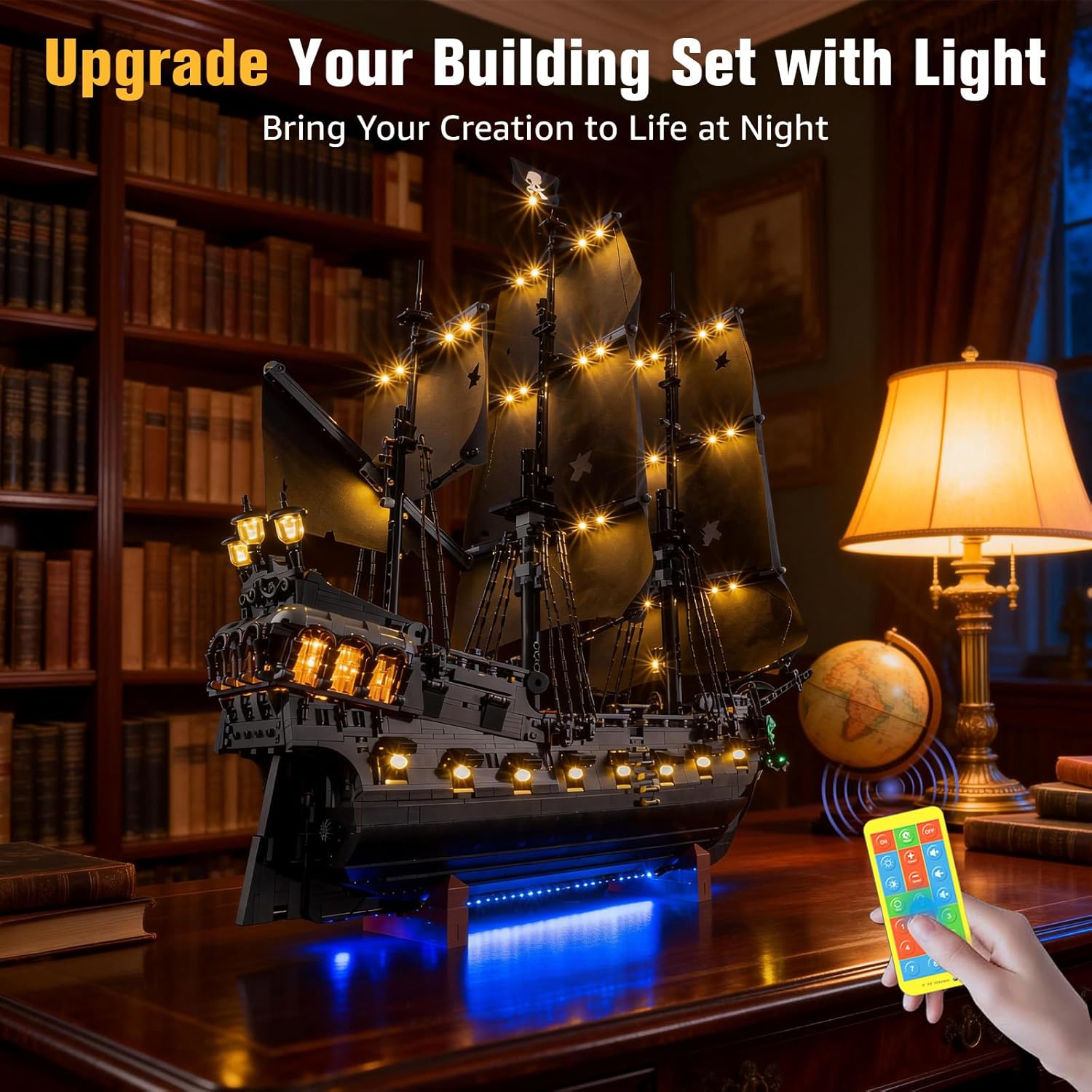
Figure 4.2: Operating the light kit with the remote control.
5. Maintenance
To ensure the longevity and optimal performance of your BrickSoul RC Light Kit, follow these maintenance guidelines:
- Cleaning: Gently wipe the LED components and wires with a dry, soft cloth to remove dust. Avoid using liquid cleaners directly on the electrical components.
- Handling: Handle the light kit and your Lego model with care to prevent damage to the delicate wires and LEDs.
- Storage: If storing the model for an extended period, disconnect the power source (remove batteries from the battery box or unplug the USB cable).
- Battery Replacement: Replace AAA batteries in the battery box when the lights dim or cease to function. Ensure correct polarity when inserting new batteries.
6. Troubleshooting
If you encounter issues with your BrickSoul RC Light Kit, please refer to the following common troubleshooting steps:
- Lights Not Turning On:
- Check if the power source (USB cable or battery box) is securely connected.
- If using the battery box, ensure batteries are correctly inserted and have sufficient charge. Replace if necessary.
- Verify that the remote control has fresh batteries and is pointed directly at the receiver.
- Some Lights Not Working:
- Inspect the connections for the non-working lights. Ensure all connectors are firmly seated.
- Check for any pinched or damaged wires.
- Remote Control Not Responding:
- Replace the batteries in the remote control.
- Ensure there are no obstructions between the remote and the light kit's receiver.
- Lights Dim or Flicker:
- This may indicate low battery power. Replace batteries in the battery box or ensure the USB power source is stable.
- Check for loose connections.
If these steps do not resolve the issue, please contact BrickSoul customer support for further assistance.
7. Specifications
| Feature | Specification |
|---|---|
| Brand | BrickSoul |
| Model Number | 10365-rc |
| Material | Plastic |
| Item Weight | 4.8 ounces (0.3 Pounds) |
| Product Dimensions | 6.36 x 4.32 x 1.33 inches |
| Power Input | 5V (USB cable) or 3x AAA batteries (not included) |
| Recommended Age | 14 years and up |
| Control Method | Remote Control (Wireless ON/Off, Dimming, Zonal Lighting) |
8. Warranty and Support
BrickSoul is committed to customer satisfaction. Your light kit comes with comprehensive support:
- 1-Year Hassle-Free Support: We provide responsive customer support to swiftly resolve any questions or issues you may encounter.
- Safety and Durability Tested: Our products are crafted with high-quality, safety-tested materials and stable 5V low-voltage components for enhanced safety and lasting performance.
- Free & Fast Replacement: In the event of a defect or issue covered under warranty, we offer free and fast replacement of components.
- Efficient Problem-Solving: Our support team is dedicated to providing efficient solutions to ensure your experience with the BrickSoul light kit is positive.
For support, please refer to the contact information provided on the BrickSoul website or your purchase documentation.