
Introduction
This manual provides essential information for the assembly, operation, and maintenance of your Jojoka Makeup Vanity Desk with Lights and Mirror. Please read these instructions carefully before beginning assembly or use to ensure proper function and longevity of your product.
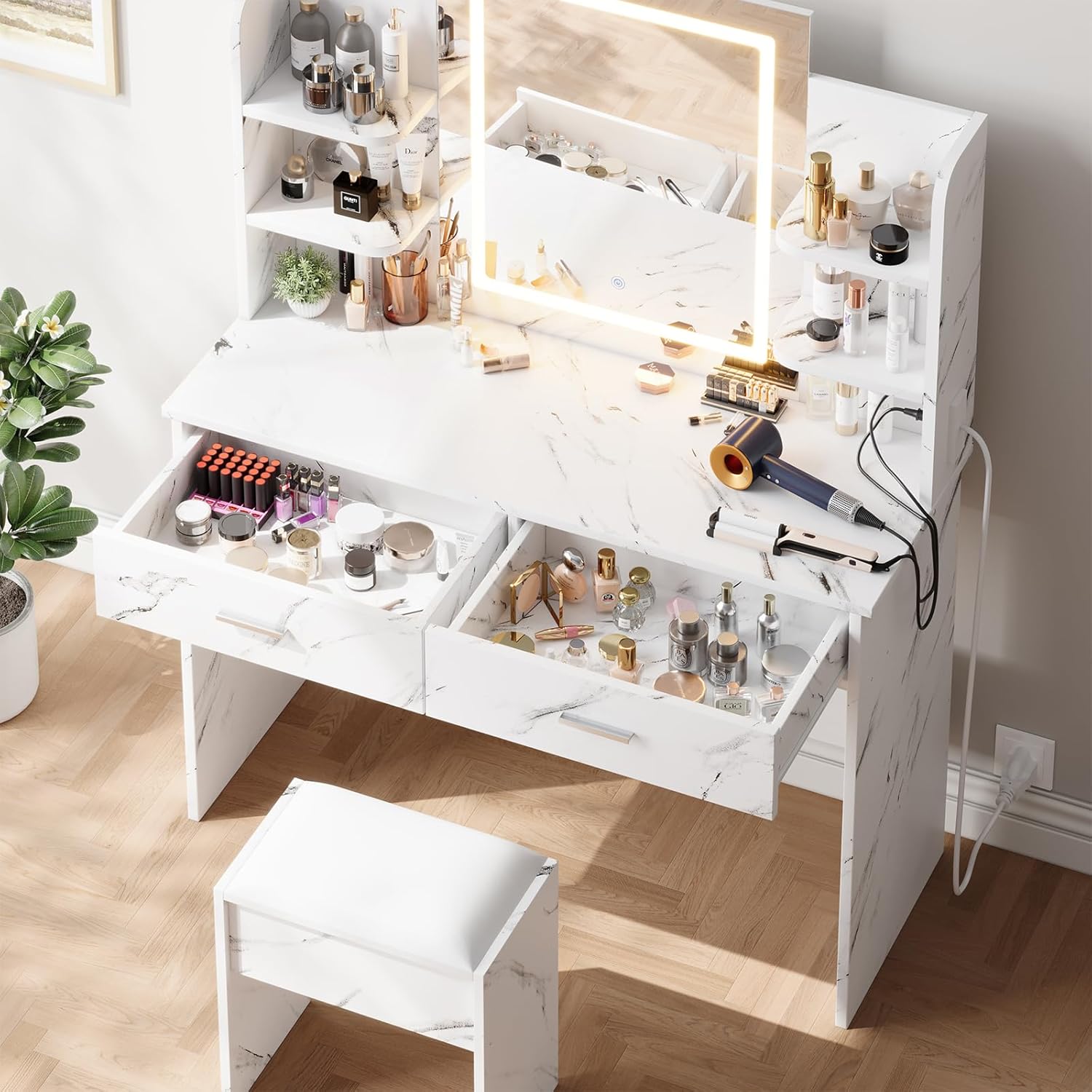
Image 1: Overview of the Jojoka Makeup Vanity Desk in Marble White.
Key Features:
- Adjustable Lighting: The mirror features three smart lighting modes (warm white, cool white, warm yellow) to simulate various environments for optimal makeup application.
- Ample Storage: Includes a large countertop, six open shelves, and two spacious drawers for organizing beauty products, jewelry, and accessories.
- Integrated Charging Station: Equipped with 2 AC outlets and 2 USB ports for convenient charging of electronic devices and powering styling tools.
- Durable Construction: Constructed from solid wood with strong metal handles for lasting stability and smooth drawer operation.
- Comfortable Stool: Comes with a stool featuring a soft, easy-to-clean leather-like cushion.
Setup Instructions
Your Jojoka Makeup Vanity Desk requires assembly. All necessary tools and detailed instructions are included in the packaging. Please follow the step-by-step guide provided to ensure correct and safe assembly.

Image 2: Product dimensions for planning placement and assembly.
Assembly Tips:
- Unpack all components and verify against the parts list before starting.
- Assemble on a soft, clean surface to prevent scratches.
- Ensure all screws and fasteners are tightened securely, but do not overtighten.
- For mirror installation, ensure it is securely mounted to the desk structure.
Operating Instructions
Mirror Lighting Modes:
The integrated mirror features touch controls to adjust lighting. A short press on the touch button cycles through three distinct lighting modes:
- Warm White: Ideal for indoor or office makeup application.
- Cool White: Suitable for outdoor or casual makeup looks.
- Warm Yellow: Best for evening events or party makeup.
Press and hold the touch button to adjust the brightness within the selected mode.

Image 3: Visual representation of the three adjustable lighting modes.
Charging Station:
The vanity desk includes a built-in charging station for your convenience. It features 2 standard AC outlets (125V/12A) and 2 USB ports (5V/2.1A). Simply plug in your devices or styling tools into the appropriate ports.

Image 4: Detail of the convenient charging station.
Maintenance
Regular maintenance will help preserve the appearance and functionality of your vanity desk.
- Cleaning Surfaces: Wipe down all surfaces with a soft, damp cloth. Avoid abrasive cleaners or harsh chemicals that may damage the finish.
- Mirror Care: Use a glass cleaner specifically designed for mirrors and a lint-free cloth to clean the mirror surface. Do not spray cleaner directly onto the mirror; apply it to the cloth first.
- Stool Cushion: The leather-like cushion is easy to wipe clean with a damp cloth and mild soap if necessary.
- Drawer Slides: Periodically check drawer slides for smooth operation. If they become stiff, a small amount of silicone lubricant can be applied.
Troubleshooting
If you encounter any issues with your vanity desk, please refer to the following common solutions:
- Lights Not Working:
- Ensure the vanity desk is properly plugged into a working power outlet.
- Check if the power switch for the lights is turned on.
- Verify that the touch control on the mirror is functioning by gently pressing it.
- Charging Station Not Functioning:
- Confirm the main power cord for the vanity is securely plugged in.
- Test the outlets and USB ports with different devices to rule out device-specific issues.
- Check for any tripped circuit breakers in your home.
- Drawers Sticking:
- Ensure drawers are not overloaded.
- Check for any obstructions in the drawer slides.
- Apply a small amount of silicone lubricant to the slides if needed.
If these steps do not resolve the issue, please contact customer support for further assistance.
Specifications
| Feature | Detail |
|---|---|
| Brand | Jojoka |
| Model | Makeup Vanity Desk with Lights and Mirror |
| Color | Marble White |
| Material | Wood |
| Product Dimensions (D x W x H) | 15.7"D x 41.3"W x 55.9"H |
| Item Weight | 85.27 Pounds |
| Number of Drawers | 2 |
| Lighting Modes | Warm White, Cool White, Warm Yellow (Dimmable) |
| Charging Station | 2 AC Outlets (125V/12A), 2 USB Ports (5V/2.1A) |
| Assembly Required | Yes |
| UPC | 199809096472 |
| ASIN | B0FRFQRRP6 |
Warranty and Support
Jojoka products are designed for quality and durability. For information regarding product warranty, returns, or to receive assistance with any issues not covered in this manual, please refer to your purchase documentation or contact Jojoka customer service directly. Our team is available to help with assembly questions, missing parts, or operational concerns.
Please have your product model and purchase date ready when contacting support to ensure efficient service.