
1. Setup
1.1 Package Contents
Verify that all items are present in the package:
- Smartwatch (1 unit)
- Black Silicone Band (1 unit)
- Camouflage Silicone Band (1 unit)
- USB Magnetic Charging Cable (1 unit)
- English User Manual (1 unit)

Figure 1: Package contents of the Mingdaln Military Smart Watch.
1.2 Charging the Smart Watch
Before initial use, fully charge the smartwatch using the provided USB magnetic charging cable. Align the magnetic pins of the charger with the charging points on the back of the watch. Connect the USB end to a compatible power source.
1.3 App Installation and Pairing
To unlock the full functionality of your Mingdaln Smart Watch, install the companion application on your smartphone.
- Download the DaFit app from your smartphone's app store (compatible with iOS 13.0+ and Android 9.0+).
- Ensure Bluetooth is enabled on your smartphone.
- Open the DaFit app and follow the on-screen instructions to 'Add a Device'.
- Select 'KC93' (or the model number displayed on your watch) from the list of available devices.
- Confirm the pairing request on both your smartphone and the smartwatch.

Figure 2: Visual guide for connecting the smartwatch to the DaFit app.
1.4 Strap Installation
The smartwatch comes with two silicone strap options (black and camouflage). To change or install a strap, locate the quick-release pins on the underside of the strap. Slide the pin to detach or attach the strap to the watch body.
2. Operating the Smart Watch
2.1 Basic Navigation
The smartwatch features a 1.56-inch AMOLED touchscreen display. Swipe left, right, up, or down to navigate through menus, notifications, and features. Use the physical buttons on the side for quick access to specific functions or to return to the home screen.
2.2 Customizing Watch Faces
The Mingdaln Smart Watch supports AI-powered, creative watch faces. You can customize the watch face directly from the DaFit app, turning your photos or preferred landscapes into unique displays.

Figure 3: Examples of customizable AI watch faces.
2.3 GPT Voice Assistant
Engage with the GPT Voice Assistant by tapping the GPT interface on the smartwatch. Speak your commands or questions, and the watch will process and deliver instant answers. This feature requires a connection to the DaFit app.
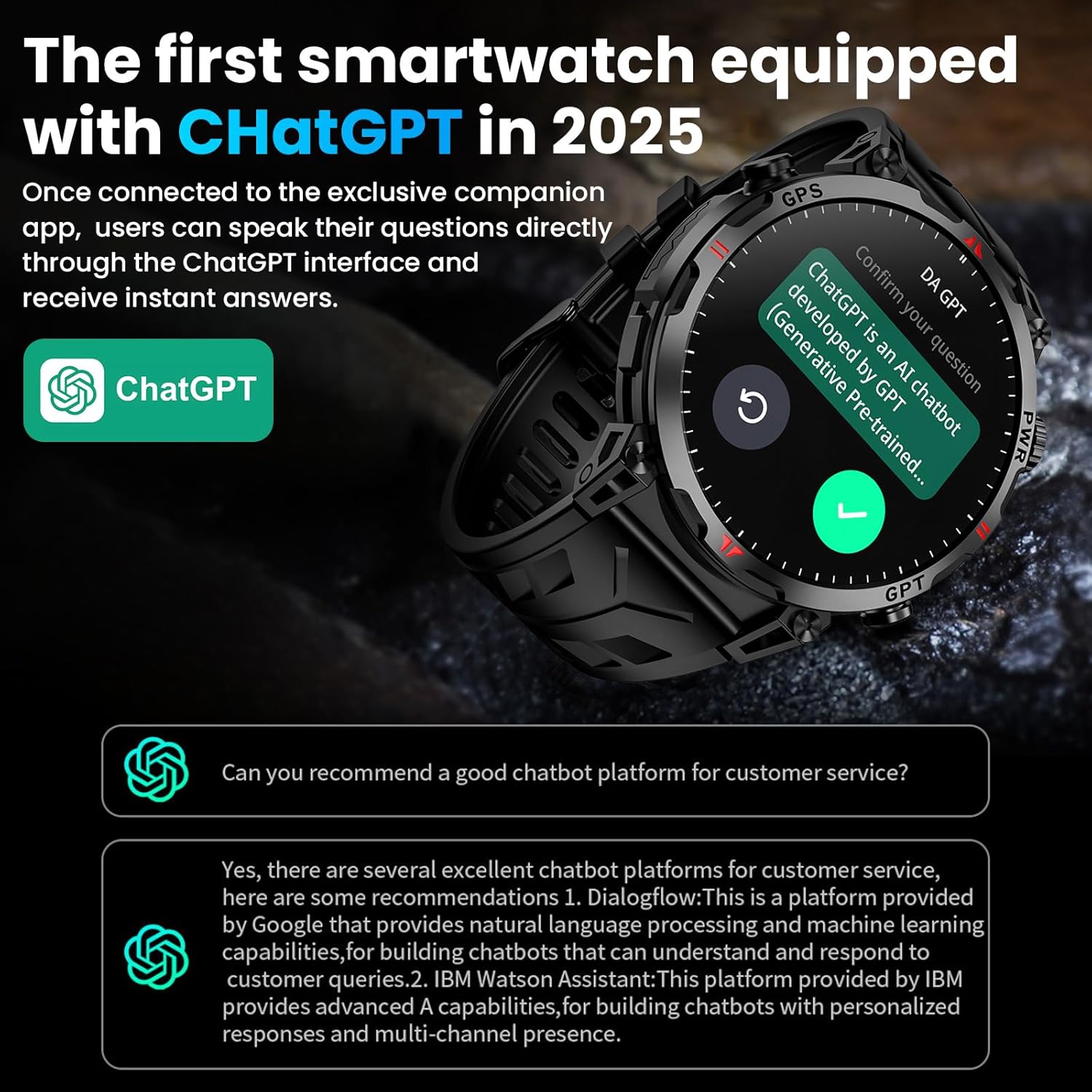
Figure 4: Interacting with the GPT Voice Assistant on the smartwatch.
Video 1: Demonstrates the GPT Voice Assistant and other features of the Military Smart Watch with GPS/Compass.
2.4 Bluetooth Calls and Message Alerts
Pair your smartwatch with your smartphone via Bluetooth to make and answer calls directly from your wrist. Receive instant notifications from social media apps (Facebook, Instagram, etc.) and text messages, ensuring you stay connected without needing to check your phone constantly.
2.5 Flashlight and Water Draining Mode
- Flashlight: The smartwatch includes a built-in flashlight function for convenience in low-light conditions.
- Water Draining Mode: After exposure to water (e.g., swimming, rain), activate the water draining mode to expel any water from the watch's crevices, ensuring optimal performance and longevity.
3. Health Monitoring and Sports Modes
3.1 24/7 Health Tracking
The Mingdaln Smart Watch provides real-time health data tracking:
- Heart Rate: Monitors your heart rate 24 hours a day.
- Blood Oxygen: Measures blood-oxygen levels on demand.
- Sleep Monitoring: Tracks your sleep patterns around the clock, analyzing sleep quality and identifying potential sleep problems.

Figure 5: Overview of health monitoring features including heart rate, blood oxygen, and sleep tracking.
3.2 Multi-Sport Modes
The fitness tracker supports over 100 sports modes, including running, cycling, skiing, and more. It captures every session with high precision and accuracy, recording data such as calories burned, steps taken, and distance traveled. Note: This device is not intended for swimming.

Figure 6: The smartwatch tracking a cycling activity with various metrics.
3.3 GPS and Outdoor Features
Equipped with built-in GPS and a military-grade, single-band six-satellite positioning system (GPS, GLONASS, BeiDou, Galileo, NAVIC, QZSS), the watch offers pinpoint accuracy for outdoor activities. It also integrates a compass, barometric altimeter, and barometer to provide real-time position, elevation, and air pressure data.
- GPS Motion Trail: Track your outdoor routes and view your motion path directly on the watch or in the app.
- Compass: Navigate confidently with the integrated digital compass.
- Altitude & Air Pressure: Monitor your current altitude and atmospheric pressure, essential for mountaineering and other outdoor adventures.

Figure 7: GPS motion path tracking on the smartwatch.

Figure 8: Digital compass feature on the smartwatch.

Figure 9: Altitude and air pressure readings on the smartwatch.
Video 2: Highlights the built-in GPS capabilities of the military smart watch.
4. Maintenance
4.1 Durability and Water Resistance
The smartwatch features an all-zinc-alloy frame, engineered for rugged durability and designed to withstand extreme heat, low-pressure operation, and dust. It is IP68 waterproof, offering protection against immersion in water up to 1.5 meters for 30 minutes. However, it is not intended for swimming.

Figure 10: The smartwatch's robust construction and resistance features.
4.2 Cleaning and Care
To maintain the appearance and functionality of your smartwatch:
- Wipe the screen and body with a soft, damp cloth.
- Avoid using harsh chemicals or abrasive materials.
- Regularly clean the charging contacts to ensure efficient charging.
4.3 Battery Life
The smartwatch is equipped with a high-capacity 650 Amp Hours battery. It provides up to 3 days of typical usage on a single charge. In power-saving mode, standby time can extend to approximately 5 days, making it suitable for short trips without frequent recharging.

Figure 11: Battery life and power-saving features.
5. Troubleshooting
- Watch not turning on: Ensure the watch is fully charged. Connect it to the magnetic charging cable and a power source for at least 30 minutes.
- Unable to pair with smartphone:
- Ensure Bluetooth is enabled on your phone.
- Make sure the DaFit app is installed and open.
- Keep the smartwatch within close proximity to your phone during pairing.
- Restart both your phone and the smartwatch.
- Inaccurate GPS readings: Ensure you are in an open area with a clear view of the sky for optimal GPS signal reception. Avoid magnetic or steel watch bands, as they can interfere with GPS precision.
- Notifications not appearing: Check the notification settings within the DaFit app to ensure all desired app notifications are enabled. Verify that your phone's notification permissions are granted to the DaFit app.
- Short battery life: Adjust screen brightness to a lower setting. Disable unnecessary features or background app refreshes. Activate power-saving mode when not actively using advanced features.
6. Specifications
| Feature | Detail |
|---|---|
| Model Number | 619704314797 |
| Display | 1.56 Inches AMOLED HD Display |
| GPS | Built-in GPS (GPS, GLONASS, BeiDou, Galileo, NAVIC, QZSS) |
| Connectivity | Bluetooth |
| Operating System Compatibility | Android 9.0 and above, iOS 13.0 and above |
| Battery Capacity | 650 Amp Hours |
| Typical Battery Life | Up to 3 days |
| Power-Saving Standby | Up to 5 days |
| Water Resistance | IP68 (Not intended for swimming) |
| Special Features | GPT Voice Assistant, Compass, Barometric Altimeter, Barometer, Bluetooth Calls, Activity Tracking, Music & Camera Control, Multiple Sports Modes, Calorie Tracking, Step Distance Tracking |
| Manufacturer | Mingdaln |
7. Warranty & Support
For any questions or assistance regarding your Mingdaln Military Smart Watch, please contact our professional service team. We are committed to providing the best solution and will reply to you within 24 hours.
Refer to the product packaging or official website for specific warranty details and contact information.