
Introduction
The TRAUSI TG08 Smartwatch combines elegance and advanced functionality. It features a vibrant 1.8-inch IPS display and customizable watch faces, allowing for personal expression while maintaining connectivity through Bluetooth calls and music control. This smartwatch is compatible with both iPhone (iOS 9.0+) and Android (5.0+) devices. It includes 120 sport modes, comprehensive heart rate monitoring, and sleep tracking, making it an ideal companion for fitness enthusiasts. The IP67 water-resistant rating ensures durability, and the 350mAh battery provides up to 5-7 days of active use or 30 days of standby time. Enjoy smart notifications for calls, messages, and social media apps in 15 languages, keeping you informed and connected throughout the day. The TRAUSI TG08 Smartwatch is designed for those who appreciate both style and smart connectivity.
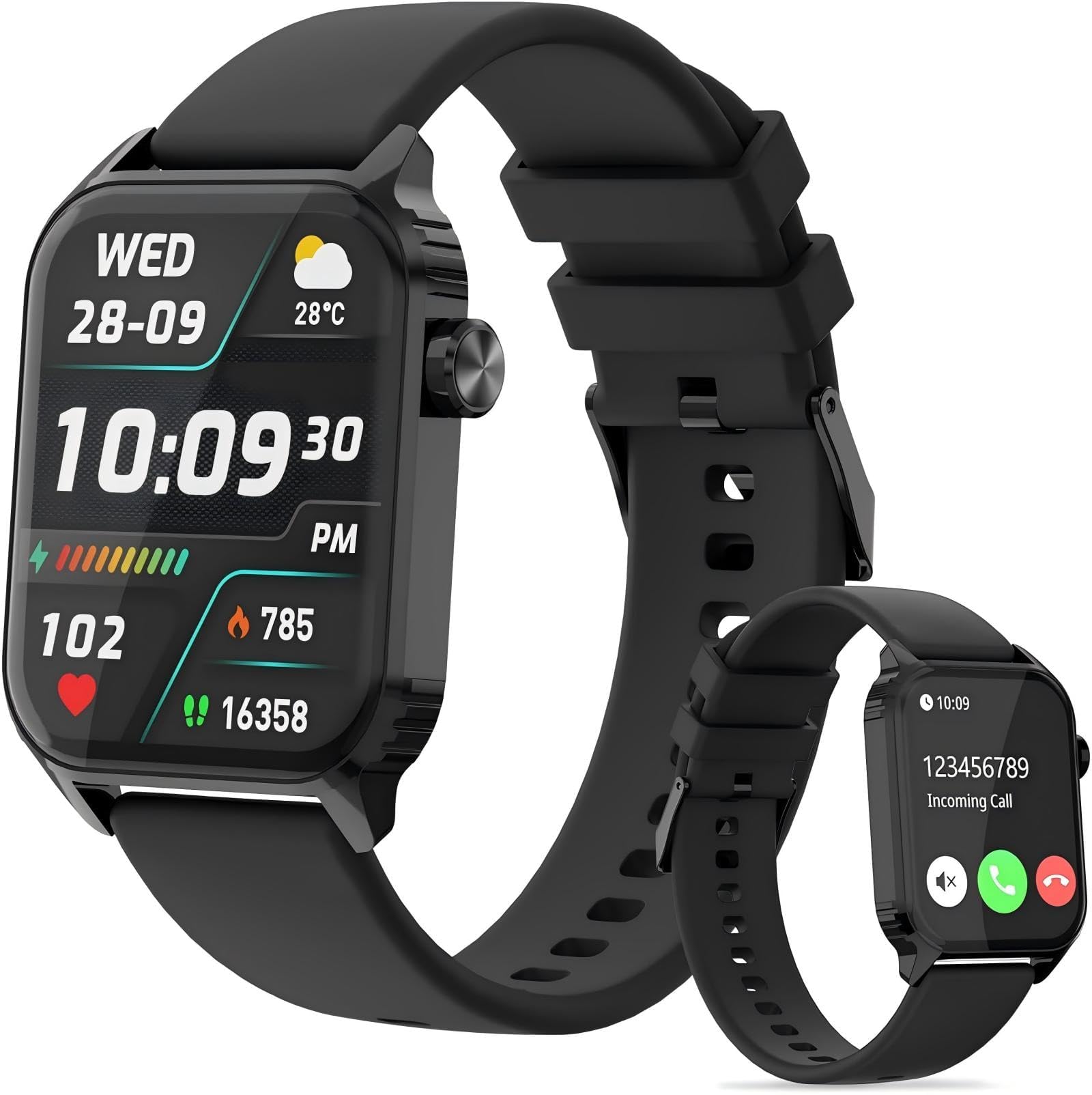
Image: TRAUSI TG08 Smartwatch, showcasing its sleek design and digital display.
Setup Guide
1. Initial Charging
Before first use, fully charge your TRAUSI TG08 smartwatch. Connect the magnetic charging cable to the charging points on the back of the watch and plug the USB end into a standard USB power adapter (not included). The watch display will indicate charging status. A full charge typically takes approximately 2 hours.
2. Download the Companion App
Search for and download the DA Fit app from your smartphone's app store (Apple App Store for iOS or Google Play Store for Android). Ensure your smartphone meets the compatibility requirements (iOS 9.0+ or Android 5.0+).
3. Pairing the Smartwatch
- Ensure Bluetooth is enabled on your smartphone.
- Open the DA Fit app.
- Follow the in-app instructions to add your device. The app will search for available smartwatches. Select 'TG08' or a similar identifier from the list.
- Confirm the pairing request on both your smartphone and the smartwatch if prompted.
- Once paired, the app will synchronize data with your watch and allow for further customization.
Operating Instructions
Basic Navigation
- Touchscreen: Swipe left/right, up/down to navigate through menus and features. Tap to select.
- Side Button: Press to wake the screen, return to the home screen, or access the main menu.
Key Features
- Bluetooth Calls: Once paired, you can answer, reject, or make calls directly from your watch. Access the call function via the main menu.
- Music Control: Control your smartphone's music playback (play, pause, skip tracks) from the watch.
- Sport Modes: The watch supports 120 sport modes. Navigate to the 'Sport' section, select your activity (e.g., walking, running, cycling, swimming), and start tracking. Data will be recorded and synchronized with the DA Fit app.
- Heart Rate Monitoring: Access the heart rate function to measure your current heart rate. The watch continuously monitors heart rate throughout the day.
- Sleep Tracking: Wear the watch during sleep to monitor sleep patterns. Data, including deep sleep, light sleep, and wake times, will be available in the DA Fit app.
- Notifications: Receive real-time notifications for calls, messages, and social media apps (e.g., Facebook, WhatsApp, Twitter, Instagram). Ensure notification permissions are enabled in the DA Fit app and your phone settings.
- Other Functions: The watch includes features such as camera control, weather forecasts, voice assistant, calculator, sedentary reminder, 'find my phone' function, and female cycle tracking. Explore these options through the watch's menu.
Maintenance
Cleaning
Regularly clean your smartwatch and strap to prevent skin irritation and maintain functionality. Use a soft, lint-free cloth. If necessary, slightly dampen the cloth with water. Avoid using harsh chemicals, abrasive cleaners, or solvents.
Water Resistance (IP67)
The TRAUSI TG08 smartwatch has an IP67 water resistance rating. This means it is protected against dust ingress and can withstand immersion in water up to 1 meter for up to 30 minutes. It is suitable for daily use, such as hand washing, rain, and splashes. It is not recommended for swimming, showering with hot water, or diving, as prolonged exposure to water pressure or steam may compromise the seal.
Battery Care
- Charge the watch using the provided magnetic charging cable.
- Avoid extreme temperatures during charging and storage.
- Do not leave the watch fully discharged for extended periods.
Troubleshooting
Watch Not Turning On
- Ensure the watch is fully charged. Connect it to the charger for at least 30 minutes.
- Press and hold the side button for 10-15 seconds to attempt a forced restart.
Cannot Pair with Smartphone
- Ensure Bluetooth is enabled on your smartphone and the watch is within range.
- Verify that the DA Fit app is installed and has necessary permissions.
- Restart both your smartphone and the smartwatch.
- If previously paired, try unpairing the device from your phone's Bluetooth settings and then re-pairing through the DA Fit app.
Inaccurate Step Count
The step counter begins recording after approximately 20 steps to filter out incidental movements. Ensure the watch is worn snugly on your wrist. If issues persist, try restarting the watch.
Notifications Not Appearing
- Check notification settings within the DA Fit app to ensure desired apps are enabled.
- Verify that your smartphone's system settings allow notifications for the DA Fit app and that the app has access to your notifications.
- Ensure the watch is connected via Bluetooth.
Sleep Tracking Not Working
Ensure the watch is worn comfortably during sleep. Verify that the sleep tracking feature is enabled in the DA Fit app settings.
Specifications
| Feature | Detail |
|---|---|
| Model Name | TG08 |
| Model Number | B0FRFMZGL2 |
| Brand | TRAUSI |
| Display Size | 1.83 inches |
| Display Type | IPS HD Color Screen (240x284 resolution) |
| Battery Capacity | 350 mAh |
| Battery Life | 5-7 days (active use), up to 30 days (standby) |
| Water Resistance | IP67 |
| Connectivity | Bluetooth |
| Compatibility | iOS 9.0+, Android 5.0+ |
| Sport Modes | 120 |
| Health Monitoring | Heart Rate, Sleep Tracking |
| Special Features | Bluetooth Calls, Message Reminders, Fitness Tracker, Stopwatch, Alarm Clock, Find Phone, Sedentary Reminder, Music/Camera Control, Weather Forecasts, Female Cycle Tracking, Voice Assistant, Calculator |
| Dimensions | 14.2 x 8.3 x 1.9 cm |
| Weight | 70 grams |
Warranty and Support
For warranty information and customer support, please refer to the documentation included with your purchase or contact TRAUSI customer service through their official website or the retailer where the product was purchased. Keep your proof of purchase for warranty claims.