
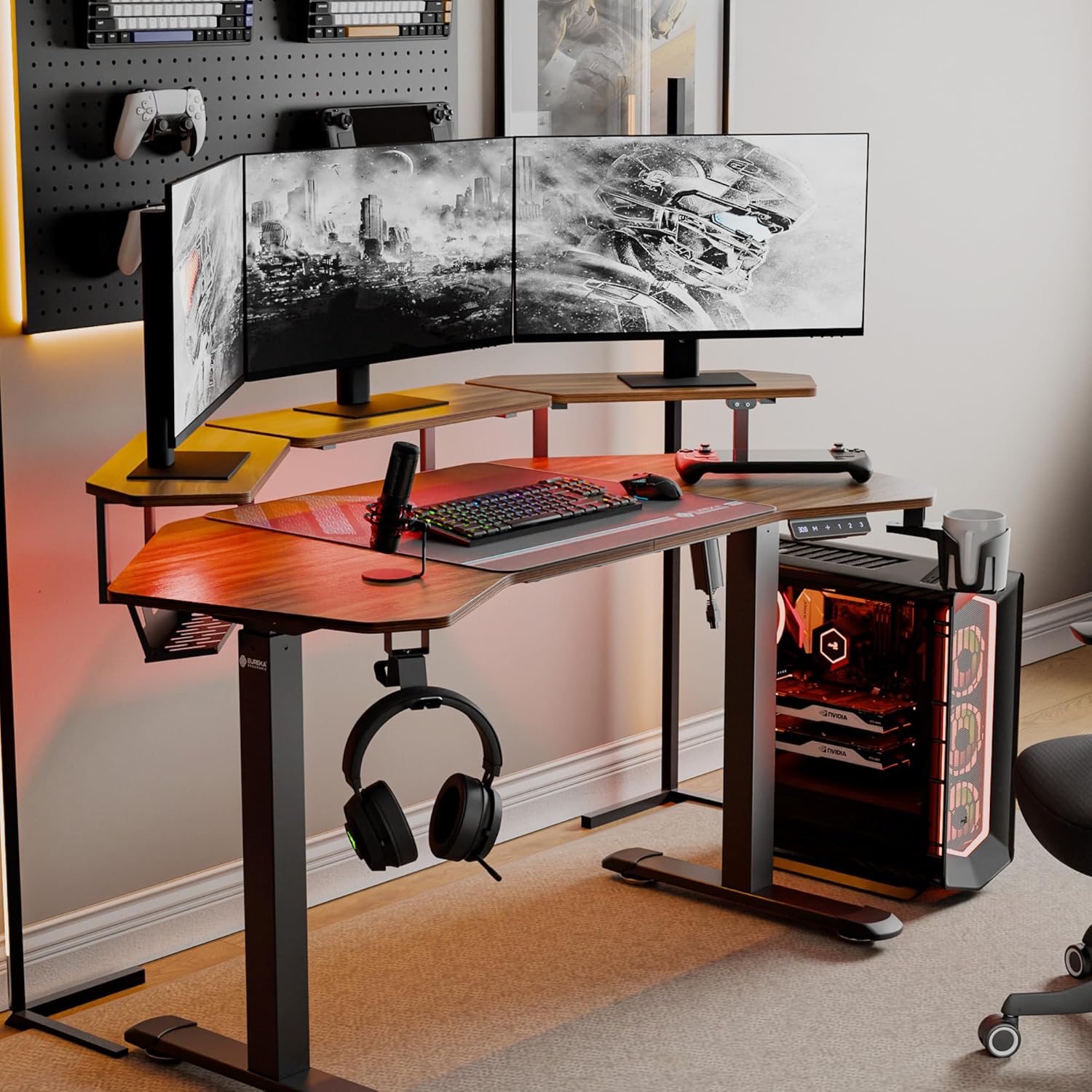
Image: The EUREKA ERGONOMIC Aero 55 Inch Electric Standing Desk in a gaming setup, showcasing its W-shaped desktop, monitor shelves, LED lighting, and accessories like headphone hook and cup holder.
1. Important Safety Information
Please read this manual carefully before assembly and use to ensure safe and correct operation of your EUREKA ERGONOMIC Aero Electric Standing Desk. Keep this manual for future reference.
- Ensure all components are present and undamaged before assembly. Do not use if any parts are missing or damaged.
- This desk is designed to support a maximum weight of 176 lbs (80 kg). Do not exceed this limit.
- Keep children and pets away from the desk during operation to prevent injury.
- Ensure there are no obstructions in the desk's path during height adjustment to avoid damage or injury. The desk is equipped with Smart Anti-Collision Technology, but caution is still advised.
- Use only the provided power adapter. Disconnect power before cleaning or maintenance.
- Do not sit or stand on the desk.
2. Package Contents
Verify that all items listed below are included in your package. If any parts are missing or damaged, please contact customer support.
- Desktop (W-shaped)
- Desk Frame (Legs and Crossbar)
- Convertible Monitor Shelves (3 units)
- Control Panel with Digital Display
- Power Adapter and Cable
- Full-Desk Mouse Pad
- Headphone Hook
- Cup Holder
- Cable Management Tray
- Assembly Hardware (screws, bolts, etc.)
- Instruction Manual
Note: Assembly tools are not included. Please prepare a screwdriver and wrench for assembly.
3. Setup and Assembly
Follow these steps to assemble your EUREKA ERGONOMIC Aero Electric Standing Desk. It is recommended to have two people for assembly.
- Unpack Components: Carefully remove all parts from the packaging and lay them out on a clean, soft surface to prevent scratches.
- Assemble Desk Frame: Attach the desk legs to the crossbar using the provided hardware. Ensure all connections are secure.
- Attach Desktop: Place the W-shaped desktop onto the assembled frame. Align the pre-drilled holes and secure the desktop to the frame using the appropriate screws.
- Install Control Panel: Mount the control panel to the underside of the desktop in a convenient location using the provided screws. Connect the control panel cable to the motor.
- Connect Power: Plug the power adapter into the desk's control box, then plug the power cable into a wall outlet.
- Install Monitor Shelves: The three convertible shelves can be installed in various configurations (center, left/right, or side extensions). Choose your preferred layout and secure them to the desktop using the provided brackets and screws.

Image: Various installation methods for the convertible monitor shelves, showing options for left/right, by the side, and sides and edges configurations.
- Attach Accessories: Install the headphone hook and cup holder to the desired locations on the desk frame. Place the full-desk mouse pad on the desktop.

Image: Close-up view of the desk accessories including the convertible shelf with RGB lights, cable management tray, flexible headphone hook, desk mouse pad, and flexible cup holder.
- Organize Cables: Use the integrated cable management tray and power socket holders to neatly route and secure all cables.
4. Operating Instructions
Your EUREKA ERGONOMIC Aero Electric Standing Desk offers advanced features for a customized workspace.
4.1 Height Adjustment

Image: The electric standing desk shown at its minimum and maximum adjustable heights (29 inches to 47 inches), illustrating the range of motion.
- Up/Down Buttons: Use the + and - buttons on the control panel to raise or lower the desk. The digital display will show the current height.
- The desk can be adjusted smoothly from 29 inches to 48 inches.
4.2 Memory Presets
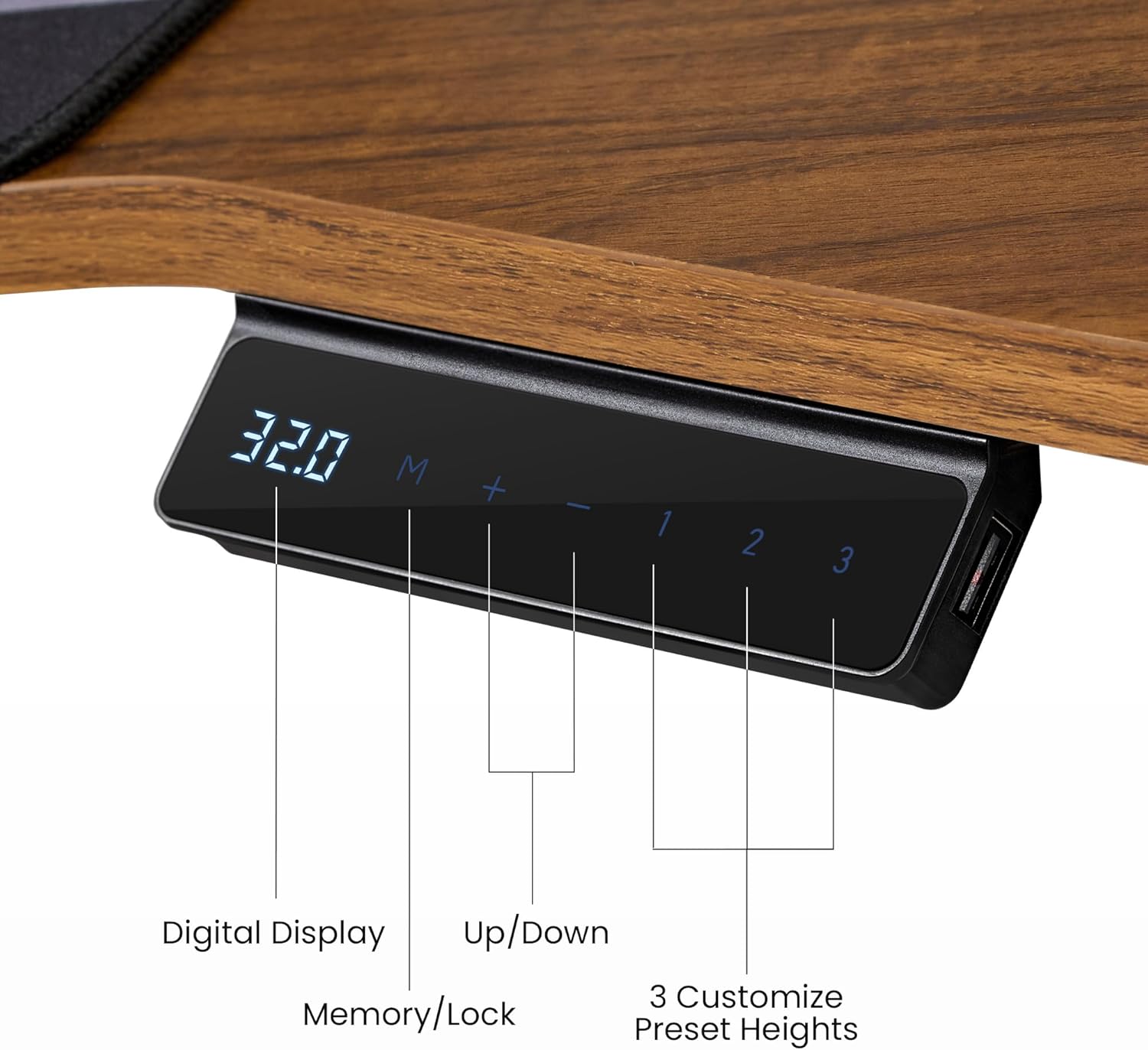
Image: Close-up of the desk's control panel, showing the digital height display, up/down buttons, memory/lock button, and three customizable preset height buttons (1, 2, 3).
- Your desk can store up to 3 favorite height settings.
- To Set a Memory Preset: Adjust the desk to your desired height. Press the M button, then press one of the number buttons (1, 2, or 3) within 3 seconds. The height is now saved.
- To Use a Memory Preset: Simply press the corresponding number button (1, 2, or 3), and the desk will automatically move to the saved height.
4.3 Smart Anti-Collision Technology
- The desk features a built-in Hall Sensor that detects obstacles during height adjustment.
- If an obstruction is detected, the desk will automatically stop and reverse slightly to prevent damage.
- Always ensure the area around the desk is clear during movement, even with this safety feature.
4.4 RGB LED Ambient Lighting
- The convertible shelves include integrated RGB LED lighting.
- Use the intuitive light controller (located on the desk) to switch between 6 vibrant colors and 1 neutral white mode.
- Adjust the lighting to suit your work or gaming atmosphere.
4.5 Accessories Usage
- Headphone Hook: The rotatable hook keeps your headphones conveniently stored and within reach.
- Cup Holder: Use the cup holder to keep beverages secure and prevent spills on your desktop.
- Mouse Pad: The full-desk mouse pad provides a smooth and consistent surface for precise mouse control.
4.6 Product Video Overview
Video: An overview of the EUREKA ERGONOMIC Aero 55 Inch Electric Standing Desk, demonstrating its features, design, and functionality in a workspace setting.
5. Maintenance
Proper maintenance ensures the longevity and optimal performance of your standing desk.
- Cleaning: Wipe the desktop and frame with a soft, damp cloth. Avoid harsh chemicals or abrasive cleaners that could damage the surface.
- Regular Checks: Periodically check all screws and bolts to ensure they are tight. Re-tighten if necessary.
- Cable Management: Ensure cables are neatly organized and not pinched or strained, which could affect desk movement or damage wiring.
- Power Cord: Inspect the power cord for any signs of damage. If damaged, discontinue use and contact customer support.
6. Troubleshooting
If you encounter issues with your desk, refer to the following common problems and solutions:
| Problem | Possible Cause | Solution |
|---|---|---|
| Desk does not move. | Power cable disconnected, power outage, motor malfunction. | Check if the power cable is securely plugged into the wall outlet and the desk's control box. Verify the power outlet is functional. If the issue persists, contact support. |
| Desk moves unevenly or makes unusual noises. | Loose connections, uneven weight distribution, damaged motor. | Ensure all assembly screws are tightened. Redistribute weight evenly on the desktop. If noises persist, contact support. |
| Anti-collision feature triggers too easily or not at all. | Sensor obstruction, sensitivity setting (if adjustable). | Ensure no objects are near the desk's legs or frame. If the desk has adjustable sensitivity, refer to the control panel instructions (not detailed in this manual, but a general point). |
| Digital display shows an error code. | System fault, overload, or specific component issue. | Note the error code and refer to the full product manual (if available) or contact customer support with the code. Try unplugging the desk for 10 seconds and plugging it back in to reset. |
If these solutions do not resolve the issue, please contact EUREKA ERGONOMIC customer support.
7. Specifications

Image: Detailed diagram showing the dimensions of the EUREKA ERGONOMIC Aero 55 Inch W Shaped Electric Standing Desk, including desktop width, depth, and shelf measurements, along with the 176 lbs max load capacity.
| Feature | Detail |
|---|---|
| Brand | EUREKA ERGONOMIC |
| Model Number | ERK-SM02-WN |
| Desk Design | Computer Desk, Standing Desk |
| Shape | Wing Shape |
| Product Dimensions (D x W x H) | 18"D x 55"W x 35"H |
| Adjustable Height Range | 29 Inches (Min) to 48 Inches (Max) |
| Maximum Weight Recommendation | 176 Pounds (80 kg) |
| Top Material Type | Wood (Laminated Walnut) |
| Base Material | Metal (Carbon Steel) |
| Number Of Shelves | 3 (Convertible Monitor Shelves) |
| Special Features | Adjustable Height, RGB Ambient Lighting, Memory Presets, Anti-Collision Technology, Headphone Hook, Cup Holder, Cable Management |
| Item Weight | 93 Pounds |
| Required Assembly | Yes |
8. Warranty Information
EUREKA ERGONOMIC provides a 1-Year Limited Service Warranty for this product. This warranty covers manufacturing defects and workmanship under normal use.
The warranty does not cover damage caused by misuse, accidents, unauthorized modifications, or failure to follow the instructions in this manual. Please retain your proof of purchase for warranty claims.
9. Customer Support
For any questions, concerns, or assistance with your EUREKA ERGONOMIC Aero Electric Standing Desk, please contact our customer support team.
- Website: Visit the official EUREKA ERGONOMIC website for FAQs and support resources.
- Email: [Insert Customer Support Email Here, if available]
- Phone: [Insert Customer Support Phone Number Here, if available]
Our dedicated team is available to provide timely assistance.

