
Genérico KA-6388
Genérico 4-in-1 Electric Epilator User Manual
Model: KA-6388
1. Introduction
Thank you for choosing the Genérico 4-in-1 Electric Epilator. This versatile device is designed for efficient and comfortable hair removal across various body areas, including a body epilator, body shaver, facial hair remover, and foot file. Please read this manual carefully before use to ensure proper operation and maintenance.
Package Contents:
- 1x Main Epilator Unit
- 1x Epilator Head
- 1x Shaver Head
- 1x Facial Hair Remover Head
- 1x Foot File Head
- 1x USB Charging Cable
- 1x Cleaning Brush
- 1x User Manual

Figure 1: Package contents including the main unit, four heads, USB cable, and cleaning brush.
2. Safety Instructions
- Keep the device out of reach of children.
- Do not use the device if it is damaged or malfunctioning.
- Ensure the charging port is dry before connecting the USB cable.
- Do not immerse the main unit in water. The heads are removable and washable, but the main body is not waterproof.
- Avoid using the device on irritated, infected, or broken skin. Consult a doctor if you have skin conditions.
- Do not share the device with others for hygiene reasons.
- Use only the provided USB cable for charging.
3. Product Overview
Familiarize yourself with the main unit and its interchangeable heads.

Figure 2: Main unit features including the on/off button, charging light, charging port, and anti-slip grip.

Figure 3: Overview of the four interchangeable heads and their primary uses.
4. Setup
4.1 Initial Charging
- Before first use, fully charge the device for approximately 8 hours.
- Connect the USB charging cable to the charging port at the bottom of the main unit.
- Plug the other end of the USB cable into a compatible USB power source (e.g., wall adapter, computer, power bank).
- The charging indicator light will illuminate during charging. It remains on while charging.
- Once fully charged, disconnect the device from the power source.

Figure 4: Charging port and indicator light. The light is always on during charging.
4.2 Attaching and Detaching Heads
- To attach a head: Align the desired head with the main unit and gently push it down until it clicks into place.
- To detach a head: Hold the main unit firmly and pull the head upwards to remove it.
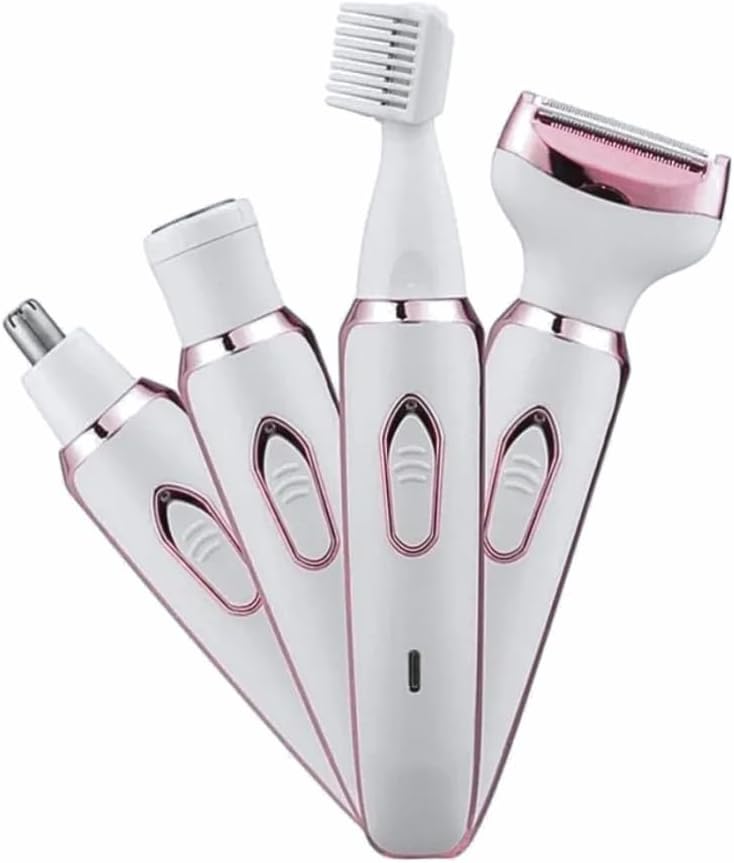
Figure 5: Attaching different heads to the main unit.
5. Operating Instructions
Press the On/Off button to power on the device. Press again to power off.
5.1 Epilator Head (for Body)
- Attach the epilator head to the main unit.
- Ensure your skin is clean and dry. For best results, exfoliate your skin a day before epilation.
- Hold the device at a 90-degree angle to your skin.
- Gently glide the epilator against the direction of hair growth.
- Do not press too hard. Move the device slowly and steadily.
- Suitable for legs, arms, and underarms.
5.2 Shaver Head (for Body)
- Attach the shaver head.
- Can be used on dry skin or with shaving foam/gel for a smoother experience.
- Hold the device flat against your skin and move it gently against the direction of hair growth.
- Ideal for quick trims and sensitive areas like the bikini line.

Figure 6: Detail of the body shaver head.
5.3 Facial Hair Remover Head
- Attach the facial hair remover head.
- Use on clean, dry skin.
- Gently move the device in small, circular motions over the desired area (e.g., upper lip, chin, cheeks).
- Avoid pressing too hard to prevent irritation.
5.4 Eyebrow Trimmer Head
- Attach the eyebrow trimmer head.
- Carefully trim unwanted eyebrow hairs by guiding the trimmer along the desired shape.
- Use short, controlled strokes.
5.5 Nose Trimmer Head
- Attach the nose trimmer head.
- Gently insert the trimmer tip into the nostril or ear canal.
- Move it in a circular motion to trim unwanted hairs.
- Do not insert too deeply.
5.6 Foot File Head
- Attach the foot file head.
- Use on dry skin.
- Gently glide the foot file over areas with calluses or rough skin.
- Do not apply excessive pressure or use on broken skin.
- Stop if you experience any discomfort.
6. Cleaning and Maintenance
Regular cleaning ensures optimal performance and hygiene.
- Always turn off the device and detach the head before cleaning.
- Use the provided cleaning brush to remove any hair residue from the heads.
- The interchangeable heads are removable and washable. Rinse them under running water. Ensure they are completely dry before reattaching or storing.
- Do not rinse the main unit under water. Wipe the main unit with a damp cloth.
- Store the device and its accessories in a dry place, away from direct sunlight and extreme temperatures.
7. Troubleshooting
| Problem | Possible Cause | Solution |
|---|---|---|
| Device does not turn on. | Low battery. | Charge the device fully. |
| Poor hair removal performance. | Heads are dirty or worn out. Incorrect usage angle. | Clean the heads thoroughly. Ensure correct usage angle (90 degrees for epilator). Consider replacing heads if worn. |
| Skin irritation after use. | Pressing too hard. Skin not prepared. | Use gentle pressure. Ensure skin is clean and dry. Exfoliate before epilation. |
| Device stops during use. | Low battery. Hair clogging the head. | Recharge the device. Clean the head thoroughly. |
8. Technical Specifications
- Model: KA-6388
- Functions: 4-in-1 (Epilator, Shaver, Facial Hair Remover, Foot File)
- Power Source: Rechargeable Lithium-Ion Battery
- Charging: USB Cable (included)
- Material: High-quality ABS Plastic, Hypoallergenic Stainless Steel
- Weight: Approximately 200g
- Color: White and Rose Gold
- Special Features: High efficiency, Ergonomic design, Portable
9. Disposal
Do not dispose of the device with general household waste. This product contains a rechargeable battery and electronic components that should be recycled responsibly. Please take it to an authorized collection point for electronic waste recycling in your area.
10. Warranty and Support
This product comes with a standard manufacturer's warranty against defects in materials and workmanship. Please refer to the warranty card included in your package for specific terms and conditions. For technical support or warranty claims, please contact your retailer or the manufacturer's customer service.
Ask a question about this manual
Ask about setup, troubleshooting, compatibility, parts, safety, or missing instructions. Manuals+ will review the question and use this page’s manual context to help answer it.