
Introduction
This manual provides detailed instructions for installing and operating your BrickSoul Light Kit, designed specifically for the Lego Captain Jack Sparrow's Pirate Ship 10365 building set. This kit enhances your model with adjustable lighting modes and original sound effects, transforming it into a dynamic display piece. Please note: The Lego model is not included with this lighting kit.
What's in the Box
Verify that all components are present before beginning installation.
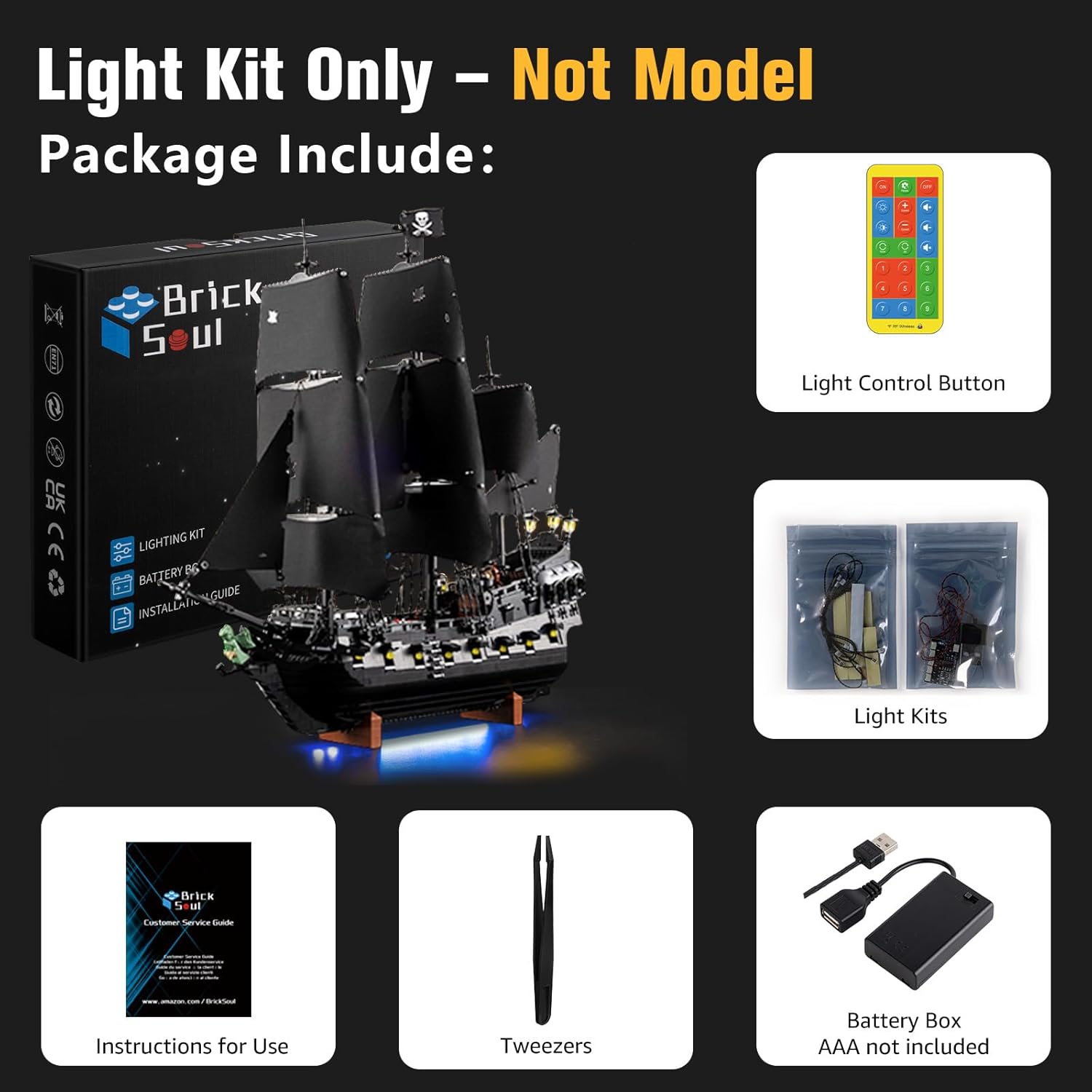
Image: The BrickSoul Light Kit package contents, including the lighting kit box, remote control, light kits in bags, instructions, tweezers, and a battery box (AAA batteries not included).
- LED Light Kit components
- Remote Control
- Battery Box (AAA batteries not included)
- Instructions for Use
- Tweezers (for handling small components)
Setup and Installation
The BrickSoul LED kit is designed for straightforward setup. No specialized skills are required. Follow the detailed digital instructions for best results.
Accessing Digital Instructions
This product utilizes digital instructions (PDF/Video guides) for a clear, step-by-step installation process. These guides are accessible online.

Image: A tablet screen showing the digital instructions interface for the 10365 light kit, indicating that no paper manual is included.
- Scan the Code: Locate the QR code provided in the package or on the product information card.
- Input Model Query: Follow the on-screen prompts to input the product model number (10365).
- Preview Guides: Access the PDF and video installation guides.
General Installation Tips
- Work in a well-lit area.
- Use the included tweezers for precise handling of small wires and connectors.
- Carefully remove and reattach Lego bricks as instructed in the guides.
- Ensure wires are neatly routed and not pinched to prevent damage.
- The kit is powered via USB with a safe 3-5V input.
Operating Instructions
Your BrickSoul Light Kit features an upgraded remote control for convenient operation of lighting and sound effects.

Image: An illustration demonstrating the remote control's capabilities, including turning lights on/off, selecting from four lighting modes, and adjusting brightness levels from 0% to 100%.
Remote Control Functions
- Power On/Off: Use the designated button to turn the lights and sound on or off.
- Lighting Modes: Cycle through multiple flash modes to create different visual effects.
- Brightness Adjustment: Precisely adjust the brightness of the lights to suit your preference.
- Sound Mode: Activate original sound effects to complement the lighting.
Visual and Audio Demonstration
The following video demonstrates the adjustable lighting modes and original sound features of the BrickSoul Light Kit for the Lego 10365 set.
Video: A demonstration of the BrickSoul Light Kit for the Lego 10365 Captain Jack Sparrow's Pirate Ship, showcasing various adjustable lighting modes and integrated original sound effects controlled via the remote.

Image: Detailed close-up shots of the Lego 10365 model with the BrickSoul light kit installed, highlighting the illuminated lanterns, interior sections, and the glowing figurehead.
Maintenance
To ensure the longevity and optimal performance of your BrickSoul Light Kit, follow these maintenance guidelines:
- Cleaning: Gently dust the lights and wires with a soft, dry cloth. Avoid using liquid cleaners directly on the electrical components.
- Handling: Handle the wired components with care. Avoid excessive bending or pulling of wires.
- Storage: If disassembling the kit for storage, carefully disconnect all components and store them in a dry, cool place away from direct sunlight.
- Power Source: Always use a compatible USB power source (3-5V). Do not use power sources with higher voltage.
Troubleshooting
If you encounter any issues with your BrickSoul Light Kit, refer to the following common solutions:
- Lights Not Turning On:
- Check the power connection to the USB port and ensure the battery box (if used) has fresh AAA batteries.
- Verify all connectors are securely plugged in.
- Inspect wires for any visible damage or pinches.
- Lights Flickering or Dim:
- Ensure the power source provides sufficient and stable power (3-5V).
- Check for loose connections.
- Adjust brightness settings using the remote control.
- Remote Control Not Responding:
- Replace the battery in the remote control.
- Ensure there are no obstructions between the remote and the receiver.
- Sound Issues:
- Verify the sound mode is activated on the remote.
- Check for any physical obstructions or damage to the speaker component.
For persistent issues or damaged components (e.g., bent connectors, broken wires), please contact BrickSoul customer support for assistance. We offer quick, hassle-free replacements for accidental damage.
Specifications
| Feature | Detail |
|---|---|
| Product Dimensions | 6.36 x 4.32 x 1.33 inches |
| Item Weight | 4.8 ounces |
| Item Model Number | 10365-rc-sound |
| Manufacturer Recommended Age | 14 years and up |
| Manufacturer | BrickSoul |
| Power Input | USB, 3-5V |
| Material | Durable ABS plastic and copper wire |
Warranty and Support
BrickSoul provides a worry-free warranty for your light kit. If you experience any issues such as bent connectors or broken wires, we offer quick, hassle-free replacements for accidental damage.
Our dedicated support team is available to ensure a smooth and stress-free lighting experience. For assistance, please visit the official BrickSoul store or contact us through the platform where you purchased the product.
BrickSoul Store: Visit the BrickSoul Store