Introduction
Thank you for choosing the Sweetcrispy Kitchen Bakers Rack. This manual provides essential information for the safe assembly, operation, and maintenance of your new kitchen storage solution. Please read these instructions carefully before assembly and retain them for future reference.

Image: The Sweetcrispy Kitchen Bakers Rack, showcasing its four tiers, built-in power outlet, and various kitchen items.
Safety Information
To ensure safe use of your Sweetcrispy Kitchen Bakers Rack, please observe the following precautions:
- Anchoring: Ensure the shelf is securely anchored to the wall using the included anti-tip kit. This prevents accidental tipping, especially in households with children or pets.
- Weight Capacity: Do not exceed the maximum weight capacity of 80 pounds per shelf. Overloading can compromise the structural integrity and lead to collapse.
- Stability: Adjust the feet to stabilize the shelf on uneven surfaces. A stable rack is crucial for preventing wobbling and potential accidents.
- Power Outlet: The built-in power outlet is rated for 120V/15A with a maximum power of 1875 Watts. Do not exceed these electrical limits. Always ensure appliances are properly plugged in and the power switch is used for control.
- Placement: Place the rack on a flat, stable surface. Avoid placing it in high-traffic areas where it could be easily bumped.

Image: Key safety and stability features of the rack, including the anti-tip device, X-shaped crossbar, and adjustable feet.
Product Features
- Built-In Power Outlet: Equipped with 3 AC outlets (120V/15A) and a reset switch, providing convenient power for kitchen appliances directly on the rack. Maximum power output is 1875 Watts.
- Flexible & Adjustable Storage: Features a removable middle shelf with 2 height adjustments, allowing customization for various appliance sizes and storage needs.
- Multi-Use Design: Versatile functionality, suitable for use as a kitchen baker's rack, coffee bar, snack station, bookshelf, or plant stand.
- Stable & Secure Construction: Constructed with a heavy-duty steel frame and premium P2 particleboard for durability. Includes an X-shaped crossbar for enhanced stability and adjustable feet for leveling on uneven floors. An anti-tip kit is provided for wall anchoring.
- Durable Materials: Features solid 12mm one-piece wooden boards for superior strength and load-bearing capacity compared to joined boards.

Image: Built-in power outlet with 3 AC outlets and a reset switch.
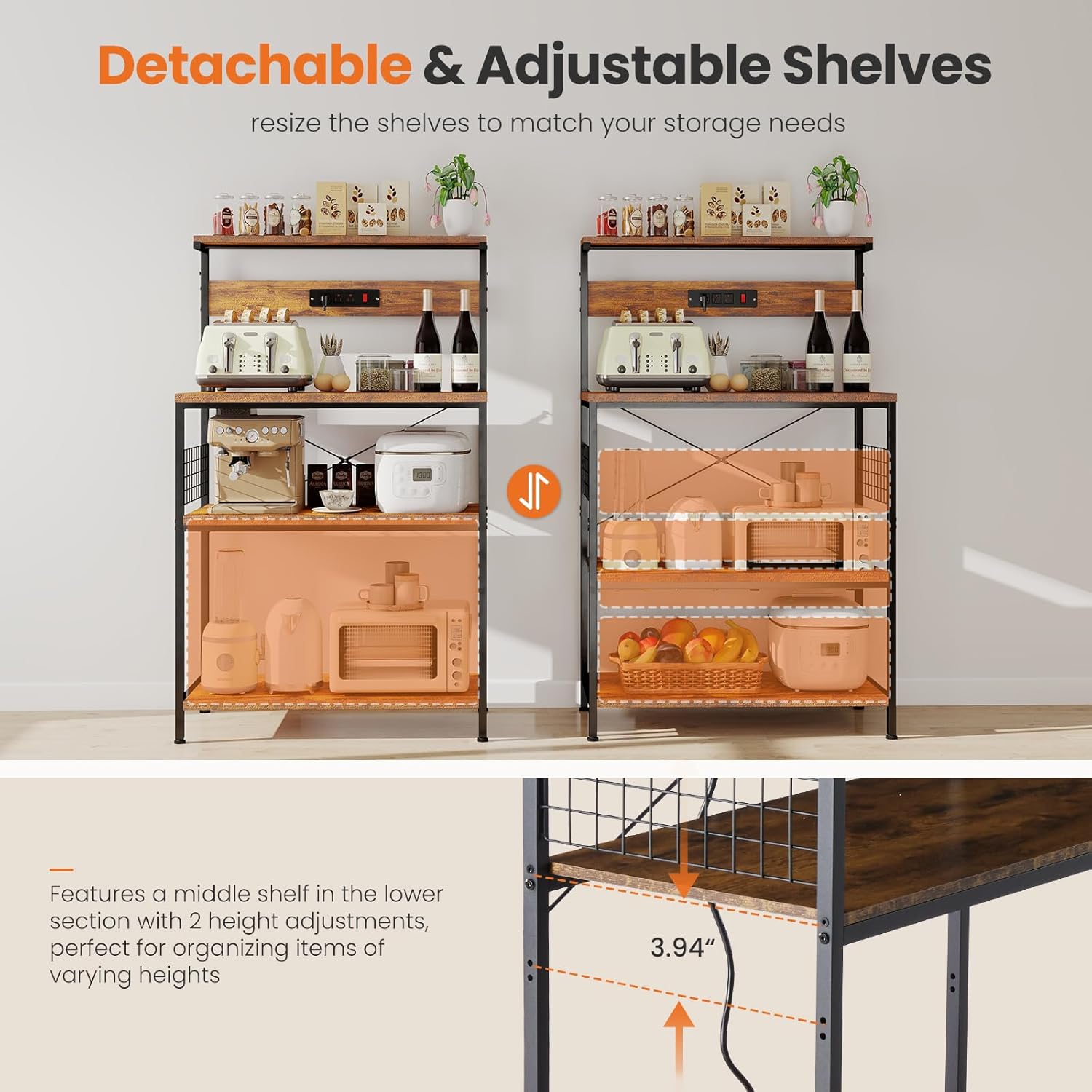
Image: Detachable and adjustable shelves for customized storage.

Image: Multi-tiered layout for versatile storage of kitchen items.
Specifications
| Feature | Detail |
|---|---|
| Brand | Sweetcrispy |
| Model Name | Sweetcrispy Kitchen Bakers Rack with Power Outlet, Coffee Bar Table 4 Tiers Rustic Brown |
| Model Number | SWFK-HBJ6230-31D5RT |
| Product Dimensions | 15.75"D x 31.5"W x 52.36"H |
| Item Weight | 32.5 pounds |
| Weight Limit | 80 Pounds per shelf |
| Number of Shelves | 4 |
| Material | Alloy Steel, Wood (P2 Particleboard) |
| Color | Rustic Brown |
| Special Features | Adjustable, Heavy Duty, Space Saving, Built-in Power Outlet (3 AC outlets, 120V/15A, Max 1875W, with reset switch) |
| Installation Type | Freestanding |
| Assembly Required | Yes |

Image: Product dimensions for planning placement.
Setup and Assembly
The Sweetcrispy Kitchen Bakers Rack is designed for quick and hassle-free assembly. Follow the step-by-step instructions provided in the packaging. All parts are clearly labeled to simplify the process.
- Unpack Components: Carefully unpack all parts and hardware. Verify that all components listed in the assembly guide are present.
- Assemble Frame: Begin by assembling the main steel frame according to the diagrams. Ensure all screws are tightened securely.
- Install Shelves: Attach the wooden shelves to the frame. Note that the middle shelf is adjustable; choose the desired height before fully securing.
- Attach Power Outlet: Secure the built-in power outlet unit to the designated section of the rack.
- Install Accessories: Attach any additional accessories such as the side mesh storage rack or hooks.
- Leveling: Adjust the four adjustable feet at the base of the rack to ensure it stands level and stable on your floor.
- Secure with Anti-Tip Kit: For safety, especially in homes with children or pets, attach the anti-tip kit to the top of the rack and secure it to a wall stud.
Assembly typically requires basic tools, which are usually included or commonly available. If you encounter any difficulties, refer to the detailed diagrams in your packaged instruction manual.
Operating Instructions
Using the Built-in Power Outlet
The rack features a convenient built-in power strip with three AC outlets and a reset switch. This allows you to power small kitchen appliances directly on the rack, reducing cord clutter.
- Plug In: Connect the rack's main power cord to a grounded wall outlet.
- Power On/Off: Use the red reset switch on the power strip to turn power to the outlets on or off. The switch will illuminate when power is active.
- Connect Appliances: Plug your coffee maker, toaster, microwave, or other small appliances into the available outlets. Ensure the total wattage does not exceed 1875 Watts.
- Safety Reset: In case of an overload, the reset switch will trip, cutting power to the outlets. Disconnect some appliances and press the switch to reset.
Adjusting Shelf Height
The middle shelf of the rack can be adjusted to accommodate items of varying heights.
- Empty Shelf: Ensure the shelf you wish to adjust is empty of all items.
- Loosen Fasteners: Locate the fasteners securing the shelf to the frame. Loosen them sufficiently to allow movement.
- Reposition Shelf: Carefully lift or lower the shelf to one of the available height settings.
- Secure Fasteners: Once the shelf is at the desired height, tighten all fasteners firmly to ensure stability.
Maintenance
Regular maintenance will help keep your Sweetcrispy Kitchen Bakers Rack in optimal condition.
- Cleaning: Wipe down the wooden surfaces with a soft, damp cloth. For the metal frame, use a mild detergent if necessary, then wipe dry. Avoid harsh chemicals or abrasive cleaners that could damage the finish.
- Dusting: Regularly dust all surfaces to prevent buildup.
- Check Connections: Periodically check all screws and fasteners to ensure they remain tight. Retighten if any feel loose.
- Power Outlet Care: Keep the power outlets clean and free of debris. Do not expose the power strip to water or excessive moisture.
Troubleshooting
If you encounter any issues with your Sweetcrispy Kitchen Bakers Rack, consider the following common solutions:
- Rack is Wobbly:
- Ensure all assembly screws are tightened.
- Adjust the leveling feet at the bottom of the rack to compensate for uneven floors.
- Verify the X-shaped crossbar is correctly installed and tightened.
- Power Outlets Not Working:
- Check if the rack's main power cord is securely plugged into a functional wall outlet.
- Press the red reset switch on the power strip to ensure it is in the 'ON' position.
- Ensure the total wattage of connected appliances does not exceed 1875 Watts, which could trip the circuit breaker.
- Difficulty Adjusting Shelf:
- Ensure the shelf is completely empty before attempting to adjust.
- Loosen the fasteners sufficiently to allow the shelf to move freely.
If these steps do not resolve your issue, please contact customer support.
Warranty and Support
For warranty information, please refer to the documentation included with your purchase or visit the official Sweetcrispy website. If you require assistance with assembly, parts, or have any questions regarding your product, please contact Sweetcrispy customer support.
Contact Information:
- Website: Visit the Sweetcrispy Store on Amazon
- Refer to your product packaging for direct customer service contact details.


