
1. Introduction
Thank you for choosing the ZYHKON V9 Rotary Bluetooth Shower Speaker. This manual provides essential information for setting up, operating, and maintaining your speaker. Please read these instructions carefully before use to ensure optimal performance and longevity of your device.
2. What's in the Box
- ZYHKON V9 Shower Speaker (1)
- Power Cable (USB-C) (1)
- Quick Start Guide (1)
3. Product Overview
The ZYHKON V9 speaker features a compact design with intuitive controls and a strong suction cup for versatile placement. It includes RGB lights and a built-in microphone for hands-free calls.
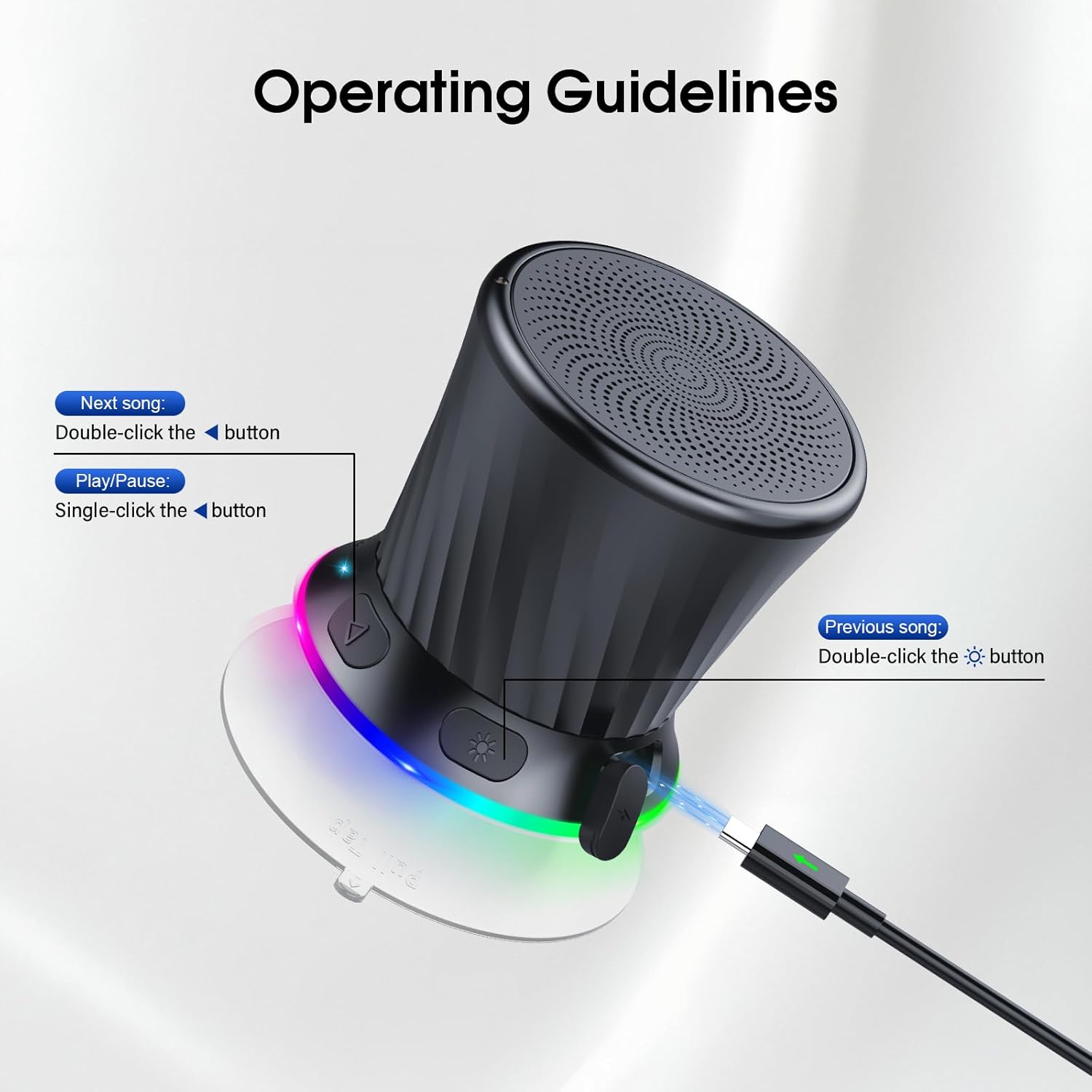
Image: Overview of the ZYHKON V9 speaker, highlighting the rotary control, playback buttons, light button, and USB-C charging port.
Controls and Indicators:
- Rotary Knob: Rotate to adjust volume. Press and hold to power on/off.
- Play/Pause Button: Single-click to play or pause music. Single-click to answer/end calls.
- Next Song Button: Double-click for the next track.
- Previous Song Button: Double-click for the previous track.
- Light Button: Single-click to cycle through RGB light modes. Press and hold to reject an incoming call.
- USB-C Charging Port: For charging the speaker.
- LED Indicator: Shows power status, charging status, and Bluetooth connection status.
4. Setup
4.1 Charging the Speaker
Before first use, fully charge the speaker. Connect the provided USB-C cable to the speaker's charging port and the other end to a USB power adapter (not included) or a computer's USB port. The LED indicator will show charging status and turn off when fully charged.
4.2 Attaching the Suction Cup
The speaker comes with a detachable suction cup for easy mounting on smooth, non-porous surfaces like bathroom tiles, mirrors, or glass. Ensure the surface is clean and dry before attaching. Press the speaker firmly against the surface to create a strong seal.

Image: The ZYHKON V9 speaker securely mounted on a shower wall using its suction cup, demonstrating its waterproof capability.
5. Operating Instructions
5.1 Power On/Off
- To Power On: Press and hold the rotary knob for approximately 3 seconds until you hear an audible prompt and the LED indicator lights up.
- To Power Off: Press and hold the rotary knob for approximately 3 seconds until you hear an audible prompt and the LED indicator turns off.
5.2 Bluetooth Pairing
- Ensure the speaker is powered on and in pairing mode (LED indicator will flash).
- On your device (smartphone, tablet, computer), enable Bluetooth.
- Search for available Bluetooth devices and select "ZYHKON V9" from the list.
- Once connected, the LED indicator will stop flashing and remain solid, and you will hear a confirmation sound.
5.3 Volume Control
Rotate the rotary knob clockwise to increase volume and counter-clockwise to decrease volume. The speaker has 5 volume levels indicated by small dots around the base.

Image: A hand demonstrating the rotation of the speaker's base to control volume, with illuminated indicators.
5.4 Music Playback
- Play/Pause: Single-click the Play/Pause button.
- Next Track: Double-click the Next Song button.
- Previous Track: Double-click the Previous Song button.
5.5 Hands-free Calling
- Answer Call: Single-click the Play/Pause button when a call comes in.
- End Call: Single-click the Play/Pause button during a call.
- Reject Call: Press and hold the Light button for 2 seconds.
5.6 RGB Light Control
Single-click the Light button to cycle through different RGB light modes. The lights can dance to the rhythm of the music or display static colors.
5.7 True Wireless Stereo (TWS) Pairing
To achieve a true stereo sound experience, you can pair two ZYHKON V9 speakers together:
- Ensure both speakers are powered on and not connected to any other Bluetooth device.
- On one speaker, press and hold the Play/Pause button for 3 seconds. You will hear a pairing tone.
- The two speakers will automatically search and pair with each other. Once paired, you will hear a confirmation sound.
- Connect your device to one of the paired speakers via Bluetooth as described in section 5.2. Both speakers will now play audio in stereo.

Image: Two ZYHKON V9 speakers connected wirelessly to a laptop, illustrating the True Wireless Stereo (TWS) pairing feature for enhanced audio.
6. Maintenance
To ensure the longevity and optimal performance of your ZYHKON V9 speaker, follow these maintenance guidelines:
- Cleaning: Wipe the speaker with a soft, damp cloth. Do not use harsh chemicals or abrasive cleaners.
- Water Exposure: While the speaker is IPX5 waterproof, avoid submerging it in water for extended periods. Ensure the charging port cover is securely closed when exposed to water.
- Storage: Store the speaker in a cool, dry place away from direct sunlight and extreme temperatures.
- Battery Care: To preserve battery life, charge the speaker regularly, even if not in frequent use. Avoid fully depleting the battery for long periods.
7. Troubleshooting
| Problem | Possible Cause | Solution |
|---|---|---|
| Speaker does not power on. | Low battery. | Charge the speaker using the provided USB-C cable. |
| Cannot pair with Bluetooth device. | Speaker is not in pairing mode. Bluetooth is off on your device. Speaker is already connected to another device. | Ensure speaker is powered on and LED is flashing. Turn on Bluetooth on your device. Disconnect from other devices or restart the speaker. |
| No sound or low volume. | Volume too low on speaker or device. Speaker not connected. | Increase volume on both the speaker and your connected device. Re-establish Bluetooth connection. |
| TWS pairing fails. | Speakers are too far apart. One speaker is already connected to a device. | Ensure speakers are within close proximity. Disconnect both speakers from any Bluetooth devices before initiating TWS pairing. |
8. Specifications
| Feature | Detail |
|---|---|
| Model Number | V9 |
| Brand | ZYHKON |
| Connectivity Technology | Bluetooth 5.3 |
| Speaker Maximum Output Power | 5 Watts |
| Audio Output Mode | Stereo (with TWS pairing) |
| Waterproof Rating | IPX5 |
| Battery Average Life | Up to 8 Hours |
| Charging Port | USB-C |
| Control Method | Rotary Knob, Touch Buttons |
| Additional Features | RGB LED Light, Built-in Microphone, Portable, Suction Cup |
| Item Dimensions (D x W x H) | 2"D x 1.6"W x 1.6"H |
9. Warranty and Support
9.1 Warranty Information
This ZYHKON V9 speaker comes with a 2-Year Limited Warranty from the date of purchase. This warranty covers manufacturing defects and workmanship under normal use. It does not cover damage caused by misuse, accidents, unauthorized modifications, or normal wear and tear. Please retain your proof of purchase for warranty claims.
9.2 Customer Support
For technical assistance, warranty claims, or any questions regarding your ZYHKON V9 speaker, please contact our customer support team. Refer to the contact information provided with your purchase or visit the official ZYHKON website for support details.