
1. Product Overview
The lvifloae AKS Metal Detector is a sophisticated device designed for locating underground metals such as gold, silver, copper, and jewelry. It features a remote search system with a detection range of up to 1200 meters and a depth capability of 30 meters. This manual provides essential instructions for the proper setup, operation, and maintenance of your metal detector.
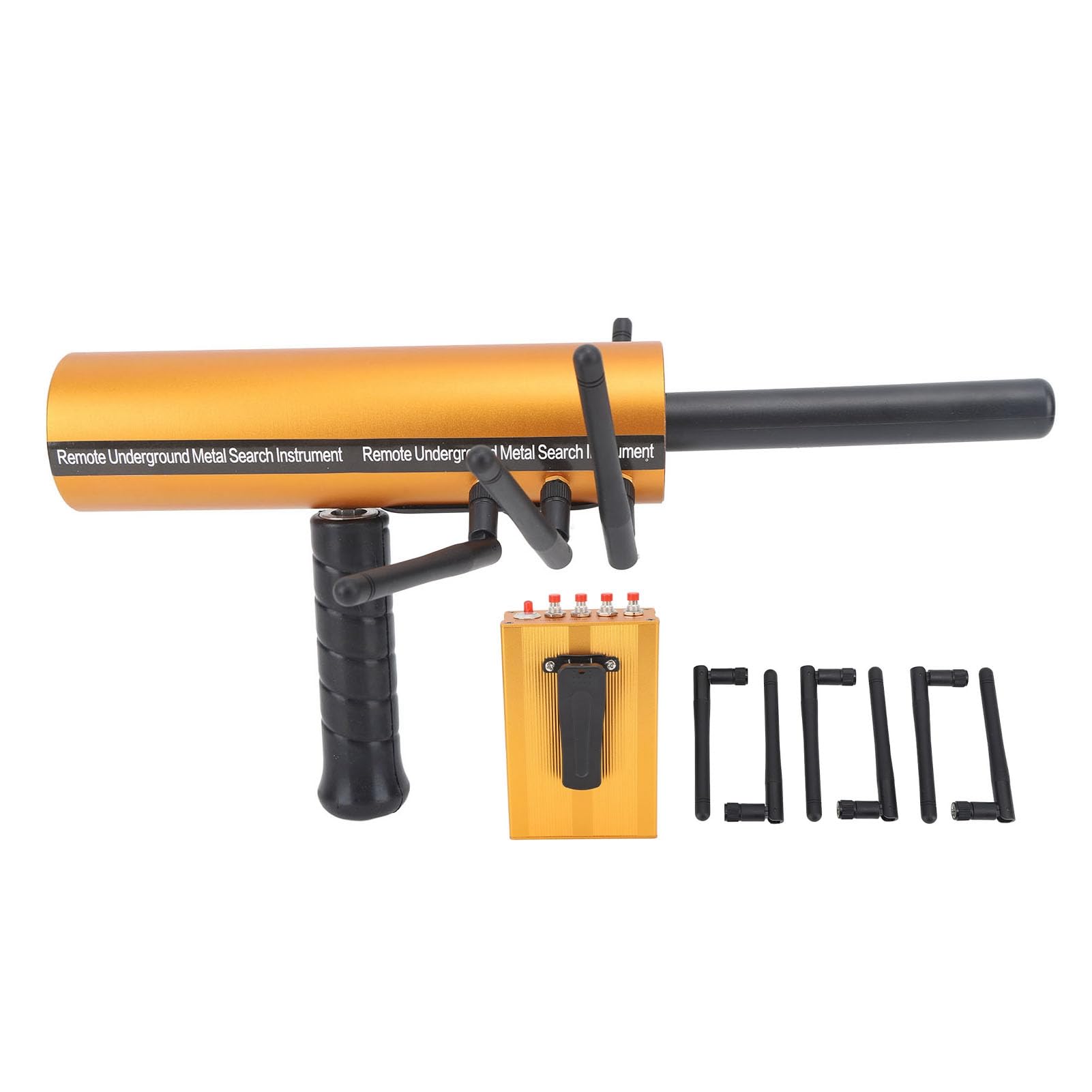
Image 1.1: The lvifloae AKS Metal Detector main unit, showing its overall design.
Package Contents:
- 1 x Main Unit
- 1 x Detector (Transmitter)
- 6 x Accessory Rods (Antennas)
- 1 x English Manual

Image 1.2: The main unit of the lvifloae AKS Metal Detector shown with its accessory rods and the separate transmitter unit.
2. Setup Instructions
2.1 Battery Installation
The main unit and the detector (transmitter) each require one 9V battery (not included). For long-term use, rechargeable 9V batteries are recommended.
- Locate the battery compartment on the back of the transmitter unit.
- Open the battery compartment cover.
- Insert a 9V battery, ensuring correct polarity (+/-).
- Close the battery compartment cover securely.
- Repeat the process for the main unit if it also has a separate battery compartment (refer to product specifics, as some models might integrate power).

Image 2.1: The transmitter unit showing the 9V battery compartment. Ensure correct battery insertion.
2.2 Assembling Accessory Rods
Attach the six accessory rods (antennas) to the designated ports on the main unit. Ensure they are securely fastened.

Image 2.2: The main unit with all six accessory rods (antennas) properly attached.
3. Operating Instructions
3.1 Power On/Off
To begin detection, ensure both the main unit and the transmitter are fully charged or have fresh batteries. Turn on both devices simultaneously using their respective power switches.

Image 3.1: Close-up of the main unit's control panel, showing the central power switch and selection buttons for different metal types.
3.2 Selecting Detection Type
On the main unit's control panel, press the corresponding button for the specific metal you wish to detect: Gold, Silver, Copper, or Diam (Diamonds/Precious Stones). The selected indicator light will illuminate.
3.3 Adjusting Depth and Range
The device allows for adjustment of depth and range search functions. While specific controls for these adjustments are not detailed on the visible panel, the system is designed to optimize detection based on the selected metal type. For best results, operate in an open, interference-free environment.
3.4 Detection Process
Hold the main unit stably. As you move, the detector will sway around when it identifies the specified items. The amplitude of the swaying action will increase when detecting larger items. Maintain a steady pace and avoid sudden movements for accurate readings.

Image 3.2: Illustration of the metal detector in operation, indicating its ability to detect various items underground.
Important Note: The host and transmitter must be turned on and off together for proper detection functionality. Operation must be conducted in a field or jungle environment free from significant electromagnetic interference to ensure stability and accuracy.
4. Maintenance
4.1 Cleaning
Wipe the device with a soft, dry cloth after each use to remove dirt and moisture. Do not use abrasive cleaners or solvents, as these can damage the finish and internal components.
4.2 Battery Care
Remove batteries if the device will not be used for an extended period to prevent leakage. If using rechargeable batteries, follow the manufacturer's charging instructions. Always ensure batteries are fully charged before a detection session.
4.3 Storage
Store the metal detector in a cool, dry place, away from direct sunlight and extreme temperatures. Keep it in its original packaging or a protective case to prevent damage.
5. Troubleshooting
5.1 Device Not Powering On
- Check if both the main unit and transmitter have fresh or fully charged 9V batteries.
- Ensure batteries are inserted with correct polarity.
- Verify that both power switches are in the "ON" position.
5.2 Inaccurate or Erratic Detection
- Ensure you are operating in an environment free from significant electromagnetic interference (e.g., power lines, large metal structures).
- Confirm that the correct metal type is selected on the control panel.
- Maintain a stable grip and steady movement during detection.
- Check if accessory rods are securely attached.
5.3 No Swaying Action
- Confirm both the main unit and transmitter are powered on.
- Ensure the selected detection type matches the target you are searching for.
- You may be outside the detection range or depth for the target.
6. Specifications
| Feature | Detail |
|---|---|
| Item Type | Metal Detector |
| Material | Aluminium |
| Main Unit Weight | Approx. 1185g / 41.8oz |
| Main Unit Size | 32.5 x 16.5 cm / 12.8 x 6.5 in |
| Transmitter Size (without accessory) | 11.3 x 7.5 x 3.5 cm / 4.4 x 3 x 1.4 in |
| Detection Range | 1200 meters |
| Detection Depth | 30 meters |
| Battery (Main Unit & Transmitter) | 1 x 9V battery each (excluded) |
| Transmitter Frequency | 5.6 to 6 KHz |
| Signal Frequency | 360 to 440 MHz |
| Detection Types | Gold, Silver, Copper, Jewelry (Diam) |
| Model Number | lvifloaeos3hg4wui0 |
| Product Dimensions (L x W x H) | 12.99" x 10.23" x 3.54" |
| Power Source | AC/DC (Battery operated for portability) |
7. Warranty Information
Specific warranty details for the lvifloae AKS Metal Detector are typically provided at the point of purchase or within separate documentation. Please refer to your purchase receipt or contact the seller directly for information regarding warranty coverage and terms.
8. Customer Support
For technical assistance, troubleshooting not covered in this manual, or inquiries about your lvifloae AKS Metal Detector, please contact the seller or manufacturer's customer support. Have your model number (lvifloaeos3hg4wui0) and purchase details ready when contacting support.