
Introduction
Thank you for choosing the MOMAX Magnetic Power Bank 5000mAh. This ultra-slim, Magsafe-compatible portable charger is designed to provide convenient and fast charging for your iPhone 12/13/14/15/16/17 series and other compatible devices. Please read this manual carefully to ensure proper use and optimal performance of your power bank.
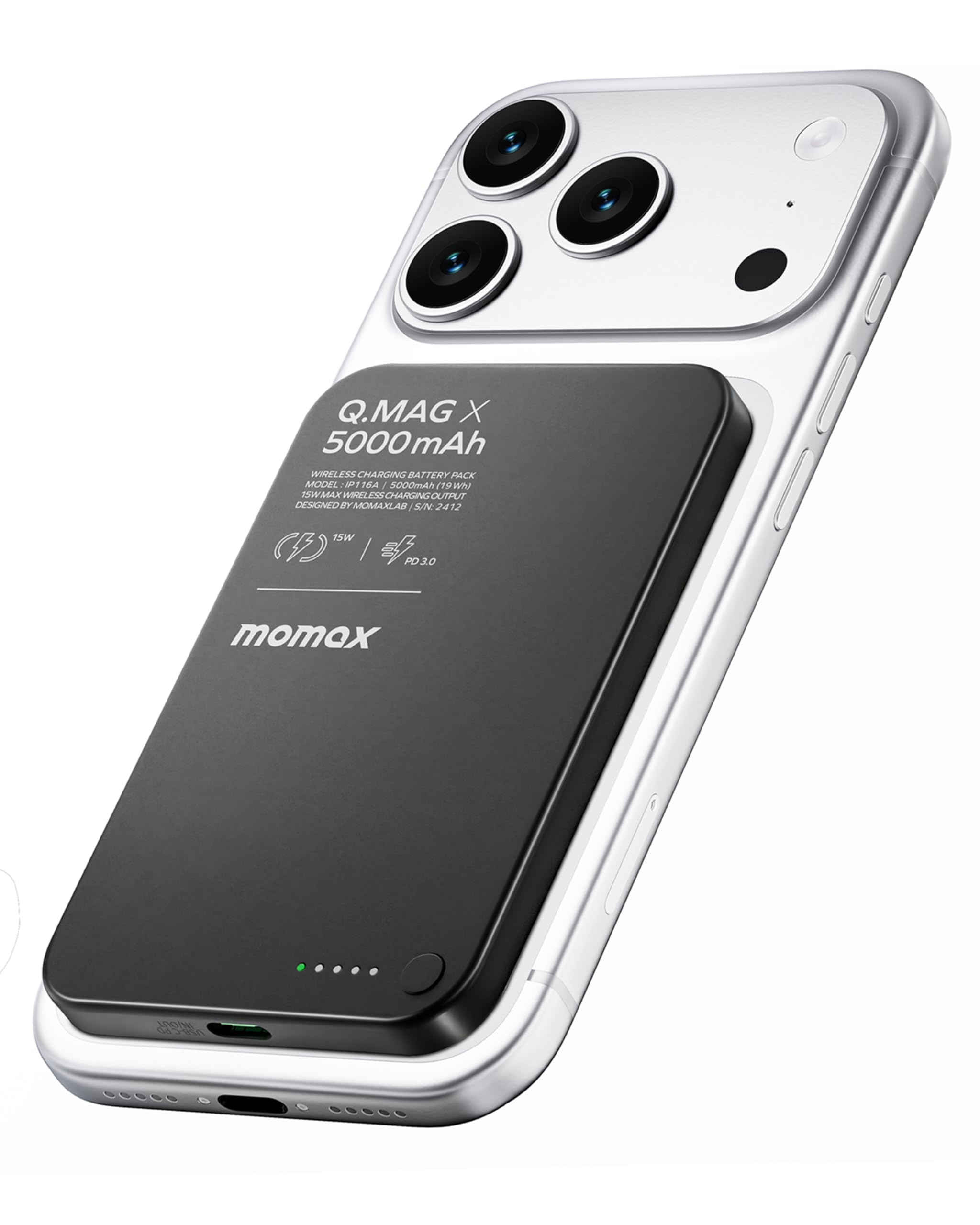
Figure 1: MOMAX Magnetic Power Bank 5000mAh attached to a smartphone.
Product Features
- Ultra-Slim Design: At only 0.3 inches (8.3mm) thick, this power bank is designed for portability and comfort, fitting easily in your hand or pocket.
- 5000mAh Capacity: Provides substantial power, capable of charging an iPhone 12/13/14/15/16/17 Pro up to 1.7 times.
- Strong Magnetic Attraction: Equipped with N52 magnets for secure attachment and precise alignment, ensuring efficient wireless charging.
- Fast Wired & Wireless Charging: Supports up to 15W wireless charging (max. 7.5W for iPhone) and 20W PD USB-C wired charging, allowing simultaneous charging of two devices.
- Advanced Safety Protection: Features built-in safeguards against overcharging, short circuits, and temperature fluctuations for reliable use.

Figure 2: The MOMAX power bank offers quick magnetic attachment and is flight-approved.

Figure 3: Demonstrating the ultra-slim design of the power bank.

Figure 4: Visual representation of the 5000mAh capacity and internal safety features.

Figure 5: Illustration of the strong magnetic alignment for efficient charging.
Package Contents
Please check the package for the following items:
- MOMAX Magnetic Power Bank 5000mAh (Model: IP116A)
- USB-C to USB-C Charging Cable
- User Manual
Setup
- Initial Charge: Before first use, fully charge your MOMAX Magnetic Power Bank. Connect the provided USB-C cable to the power bank's USB-C port and the other end to a compatible USB power adapter (not included). The LED indicators on the power bank will show the charging status.
- Full Charge Indication: All LED indicators will be solid when the power bank is fully charged.
Operating Instructions
Charging the Power Bank
To recharge the power bank:
- Connect the USB-C cable to the power bank's input port.
- Connect the other end of the cable to a USB wall charger or computer USB port.
- The LED indicators will illuminate to show the charging progress.
Charging Your Devices
The MOMAX Magnetic Power Bank offers both wireless and wired charging options.
Wireless Charging (MagSafe Compatible)
- Ensure your device is MagSafe compatible (iPhone 12 series or later) or has a magnetic case.
- Align the power bank with the back of your device. The strong magnets will automatically snap it into place.
- Wireless charging will begin automatically. The LED indicators on the power bank will show its remaining charge.

Figure 6: Wireless charging compatibility with MagSafe iPhones and magnetic cases.
Wired Charging (USB-C)
- Connect one end of a USB-C cable to the power bank's USB-C output port.
- Connect the other end of the cable to your device's charging port.
- Wired charging will begin. The power bank supports up to 20W Power Delivery (PD) for fast charging compatible devices.

Figure 7: Wired charging via USB-C for fast power delivery.
Safety Information
To ensure safe operation, please observe the following:
- Do not expose the power bank to extreme temperatures, direct sunlight, or fire.
- Do not disassemble, modify, or repair the device yourself.
- Keep the power bank away from water and other liquids.
- Use only certified charging cables and adapters.
- Avoid dropping or subjecting the power bank to strong impacts.
- Keep out of reach of children.
Maintenance
- Clean the power bank with a soft, dry cloth. Do not use harsh chemicals or abrasive materials.
- Store the power bank in a cool, dry place when not in use.
- If the power bank will not be used for an extended period, charge it to about 50% every three months to prolong battery life.
Troubleshooting
- Q1: Why is my power bank providing fewer charges than expected?
- During use, some energy is lost due to voltage conversion (3.7V - 5V) and internal heat. This is typical across the industry, resulting in a usable capacity of approximately 60-80% of the stated capacity. For specific parameters, please refer to the specifications section.
- Q2: How can I estimate the number of charges for my device?
- You can estimate the number of charges using the formula: (Power Bank Capacity × 0.5) ÷ Device Battery Capacity = Number of Charges. For instance, charging a 3,000mAh device using a 5,000mAh wireless power bank would offer approximately 0.83 charges.
- Q3: Can I take it on a plane? Why is my phone overheating?
- Yes, this power bank has passed the UN38.3 test and is generally airline approved. Always check airline and FAA policies before flying. It's normal for wireless charging to warm up slightly, especially during intensive use. To minimize overheating, reduce phone usage and close high-power apps while charging.

Figure 8: Common questions and answers regarding power bank usage.
Specifications
| Model Number | IP116A |
| Battery Capacity | 5000 Milliamp Hours (Total battery capacity) |
| Rated Capacity | 3000mAh (Usable capacity after energy loss and efficiency) |
| Weight | 4.4oz / 0.27lb / 125g |
| Thickness | 0.3in / 8.3mm |
| Wireless Output | 5W / 7.5W / 10W / 15W (Max. 7.5W for iPhone) |
| USB-C Output | 5V-2.4A / 9V-2.22A / 12V-1.67A (PD 20W Max) |
| USB-C Input | 5V-3A / 9V-2A |
| Material | Al-Alloy + Glass + PC + ABS |
| Battery Cell Type | Lithium Ion |
| Special Feature | Wireless Charging, MagSafe Compatible |
| Certifications | UN38.3, FCC, CE, PSE |

Figure 9: Detailed specifications and certifications for the power bank.
Official Product Video
Video 1: An overview of the MOMAX 5000mAh Portable Charger, highlighting its ultra-slim design, magnetic charging, and fast charging capabilities.
Warranty and Support
The MOMAX Magnetic Power Bank 5000mAh comes with a 1-year limited warranty from the date of purchase. This warranty covers manufacturing defects and workmanship under normal use.
For warranty claims, technical support, or any inquiries, please contact MOMAX customer service through the retailer where you purchased the product or visit the official MOMAX website for contact information.
Please retain your proof of purchase for warranty service.


