
1. Setup and Installation
This section provides instructions for installing your Leadfan 9-inch car radio in compatible Toyota Tundra models (2014-2021).
1.1 Package Contents
Before beginning installation, verify that all components are present in the package:

Image: The packing list includes the main unit (9-inch screen), backup camera, radio antenna, original USB cable, GPS antenna, CAN bus, two USB cables, RCA cable, power cables, microphone, user manual, WiFi antenna, Bluetooth antenna, and camera input cable.
1.2 Compatibility Check
Ensure your vehicle is a Toyota Tundra manufactured between 2014 and 2021. Confirm the dimensions and shape of your vehicle's center console match the unit's design for proper fitment.
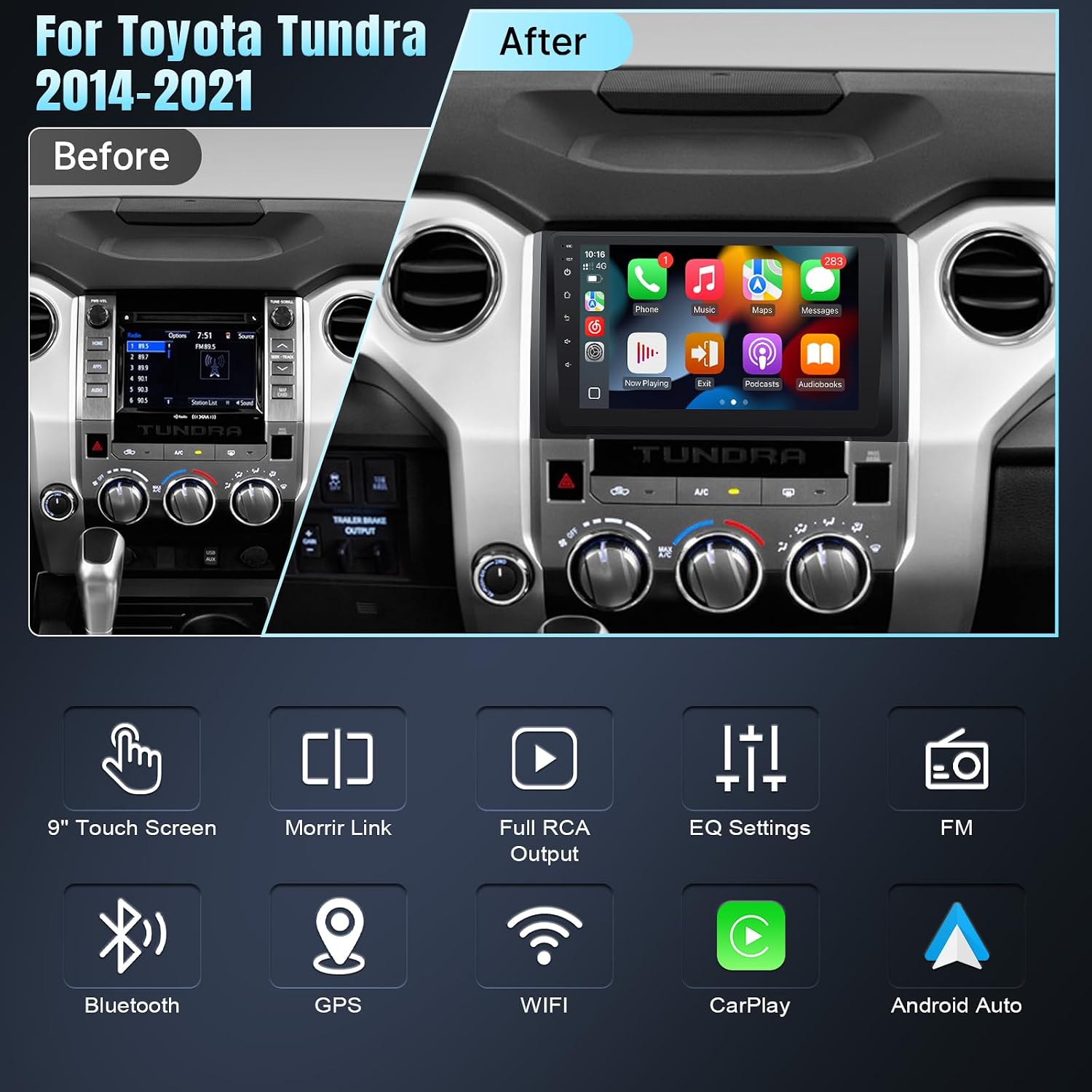
Image: A comparison showing the original Toyota Tundra dashboard radio (left) and the Leadfan 9-inch car radio installed (right), highlighting the integrated appearance.
1.3 Installation Steps
Refer to the following video for a visual guide on the installation process. It is recommended to disconnect the vehicle's battery before starting any electrical work.
Video: This video demonstrates the installation method for the Leadfan car radio in a Toyota Tundra (2014-2021), showing steps like connecting cables and mounting the unit.
General Installation Overview:
- Carefully remove the original car radio and trim panels.
- Connect the provided wiring harnesses to the vehicle's existing connectors. Ensure all connections are secure.
- Connect the video input cable for the backup camera.
- Connect the USB cables, GPS antenna, and WiFi/Bluetooth antennas to the new head unit.
- Mount the backup camera (if included and desired) and route its cable to the head unit.
- Secure the new Leadfan car radio into the dashboard opening.
- Reinstall all trim panels.
- Reconnect the vehicle's battery and test all functions.

Image: A collage showing the Leadfan car radio installed in a Toyota Tundra dashboard, along with various interface screens demonstrating different functions like radio, navigation, and media playback.
2. Operating Instructions
This section details the primary functions and features of your Leadfan car radio.
2.1 Wireless CarPlay & Android Auto
Connect your smartphone wirelessly via Bluetooth and Wi-Fi to access CarPlay (for iOS devices) or Android Auto (for Android devices). This allows for hands-free calling, navigation, music streaming, and messaging through the car radio's interface.
- Connection: Pair your phone via Bluetooth, then enable Wi-Fi for the full wireless experience.
- Voice Control: Use voice commands (e.g., "Hey Siri" or "Hey Google") for safe operation while driving.

Image: Illustrates the wireless CarPlay and Android Auto connections via Bluetooth and WiFi, and the Mirror Link function displaying phone content on the car radio screen.
2.2 Bluetooth 5.1 & FM Radio
- Bluetooth: Built-in Bluetooth 5.1 supports hands-free calling and wireless audio streaming. The integrated microphone ensures clear call quality.
- FM Radio: Tune into FM radio stations. The system supports automatic station search and saving favorite stations.

Image: Displays the Bluetooth interface for phone calls and music playback, and the FM radio tuning screen with station presets.
2.3 GPS Navigation & WiFi Connection
- GPS Navigation: The unit includes built-in GPS navigation. You can download offline maps or use online mapping applications by connecting to Wi-Fi or your phone's hotspot.
- WiFi: Connect to a Wi-Fi network or mobile hotspot to access online features, download apps, and stream content.

Image: Shows the GPS navigation interface with map display and search functions, alongside icons representing various apps accessible via WiFi connection.
2.4 Mirror Link
The Mirror Link function allows you to display your smartphone screen directly onto the car radio's 9-inch display. Connect via hotspot or USB cable to mirror content like YouTube, TikTok, or other videos.
2.5 Rear View Camera Input
When the vehicle is shifted into reverse gear, the car radio automatically switches to display the feed from the connected AHD 1080P backup camera. The camera features a 170° ultra-wide angle, high-transparency glass, and night vision for enhanced safety.

Image: Depicts the rear view camera display with parking guidelines and icons for HD, wide angle, waterproof, and night vision. Also shows the steering wheel control interface and a hand operating steering wheel buttons.
2.6 Steering Wheel Control
The unit supports connection to your vehicle's steering wheel controls, allowing you to quickly switch songs, adjust volume, and answer calls without taking your hands off the wheel. This feature enhances driving safety.
2.7 Full RCA Output & Built-in EQ Setting
- Full RCA Output: Share audio and video content with external displays, such as rear seat monitors. Supports external microphone and subwoofer output.
- Built-in EQ Setting: Customize audio output with the built-in Equalizer (EQ) settings. Adjust various frequency bands to achieve your preferred sound profile. Supports subwoofer output control.

Image: Shows the full RCA output feature with a video playing on a rear seat screen. Also displays the built-in EQ settings interface with adjustable frequency bands and sound profiles.
3. Maintenance
Proper maintenance ensures the longevity and optimal performance of your car radio.
- Screen Cleaning: Use a soft, lint-free cloth to gently wipe the screen. For stubborn smudges, slightly dampen the cloth with water or a screen-safe cleaner. Avoid abrasive materials or harsh chemicals.
- Software Updates: Periodically check the manufacturer's website or the device settings for available software updates to ensure you have the latest features and bug fixes.
- Environmental Conditions: Avoid exposing the unit to extreme temperatures, direct sunlight for prolonged periods, or excessive moisture.
4. Troubleshooting
This section addresses common issues you might encounter with your Leadfan car radio.
| Problem | Possible Cause | Solution |
|---|---|---|
| Unit does not power on | Incorrect wiring; Blown fuse; Vehicle battery disconnected. | Check all power connections and fuses. Ensure the vehicle battery is properly connected. Consult the installation video for wiring verification. |
| No sound or poor sound quality (e.g., only front speakers) | Incorrect speaker wiring; EQ settings misconfigured; Compatibility issue with vehicle's audio system. | Verify speaker wiring connections. Adjust EQ settings. Ensure the unit is compatible with your vehicle's specific audio system (e.g., JBL vs. non-JBL versions). |
| CarPlay/Android Auto not connecting wirelessly | Bluetooth or Wi-Fi not enabled; Incorrect pairing; Phone software issue. | Ensure Bluetooth and Wi-Fi are active on both the car radio and your smartphone. Re-pair the devices. Restart both the phone and the car radio. |
| GPS not acquiring signal or inaccurate | GPS antenna not properly connected or positioned; Outdated maps. | Ensure the GPS antenna is securely connected and placed in an unobstructed location (e.g., on the dashboard). Update maps if necessary. |
| Backup camera not displaying image | Camera not powered; Video input cable loose; Reverse trigger wire not connected. | Check power supply to the camera. Verify the video input cable connection to the head unit. Ensure the reverse trigger wire is correctly connected to the vehicle's reverse light circuit. |
5. Specifications
Key technical specifications for the Leadfan 9-inch car radio.
| Feature | Detail |
|---|---|
| Brand | Leadfan |
| Model Name | For Toyota Tundra 2014-2021 |
| Screen Size | 9 inches |
| Display Type | LED |
| Human-Interface Input | Touchscreen |
| Control Method | Touch, Voice |
| Operating System | Android, iOS (via CarPlay/Android Auto) |
| Memory Storage Capacity | 32 GB |
| Connectivity Technology | Bluetooth, USB, Wi-Fi |
| Bluetooth Version | 5.1 |
| Special Features | Wireless CarPlay & Android Auto, Voice Control, Touchscreen, Waterproof (Backup Camera) |
| Supported Navigation System | GPS |
| Map Type | North America (pre-installed/supported) |
| Included Components | Backup Camera |
| Audio Output Mode | Stereo |
6. Warranty & Support
6.1 Product Warranty
The Leadfan car radio comes with a 1-year warranty from the date of purchase. This warranty covers manufacturing defects and malfunctions under normal use. Please retain your proof of purchase for warranty claims.
6.2 Customer Support
For technical assistance, installation queries, or warranty claims, please refer to the contact information provided in your product packaging or visit the official Leadfan website. When contacting support, please have your product model and purchase details available.


