
1. Introduction
Thank you for purchasing the VASAGLE Custos Collection Nightstand. This modern nightstand features a built-in charging station, adjustable LED lighting, two spacious drawers, and an open shelf, designed to enhance convenience and style in your living space. This manual provides detailed instructions for assembly, operation, maintenance, and troubleshooting to ensure optimal use of your new furniture.

Image: The VASAGLE Custos Collection Nightstand, showcasing its modern design and illuminated open shelf in a bedroom environment.
2. Safety Information
Please read and understand all safety instructions before assembling and using this product. Failure to follow these instructions may result in injury or damage to the product.
- Electrical Safety: Ensure the charging station is connected to a properly grounded electrical outlet. Do not overload the outlets. Keep liquids away from electrical components.
- Weight Capacity: The top surface supports a maximum of 99 lb (45 kg). Each drawer supports a maximum of 22 lb (10 kg). Do not exceed these weight limits to prevent structural damage or tipping.
- Assembly: Assemble the product on a soft, clean surface to prevent scratches. Ensure all screws and fasteners are securely tightened before use. Do not use power tools for assembly unless explicitly instructed, as this may overtighten and damage components.
- Stability: For added stability, consider securing the nightstand to a wall using anti-tip hardware if available (not included unless specified).
- Children: Keep small parts and packaging materials away from children during assembly.
3. Package Contents
Before beginning assembly, please verify that all components listed below are present and undamaged. If any parts are missing or damaged, contact customer support.
- 1 x Nightstand (disassembled components)
- 1 x Assembly Kit (includes screws, dowels, and other fasteners)
- 1 x Instructions Manual (this document)
4. Assembly Instructions
Follow these steps carefully to assemble your nightstand. It is recommended to have two people for assembly.
- Unpack and Identify Parts: Lay out all components on a clean, soft surface. Refer to the included parts list (usually a diagram in the assembly kit) to identify each piece.
- Assemble the Frame: Begin by connecting the side panels to the base and top panels using the provided screws and dowels. Ensure all connections are snug but do not overtighten.
- Install Drawer Glides: Attach the drawer glides to the inner side panels of the nightstand frame according to the diagrams.
- Assemble Drawers: Construct the two drawers by connecting the front, back, and side panels. Insert the drawer bottoms and attach the metal handles.
- Insert Drawers: Carefully slide the assembled drawers onto the glides within the nightstand frame.
- Install Charging Station: Place the charging station unit into its designated slot on the top surface or rear panel, ensuring it is flush and secure.
- Attach LED Strip: Adhere the LED light strip to the designated area within the open shelf, ensuring the cable can reach the power source.
- Final Checks: Verify that all connections are secure and the nightstand is stable.

Image: An illustrative diagram detailing the assembly process of the nightstand components.
5. Operating Instructions
5.1. Charging Station
The integrated charging station provides convenient power access for your electronic devices.
- Power Connection: Plug the nightstand's main power cord into a standard wall outlet.
- AC Outlets: Use the two AC outlets (230V/13A) for larger electronics like lamps or laptops.
- USB Ports: Utilize the two USB-A ports (5V/2A, one at the rear) and one USB-C port (5V/2A) to charge smartphones, tablets, and other USB-powered devices.

Image: Detail of the built-in charging station, highlighting the AC outlets and USB ports.
5.2. LED Lights
The LED lights offer customizable ambient lighting for your room.
- Power On/Off: Use the dedicated button on the nightstand or the mobile application to turn the LED lights on or off.
- Color Selection: Choose from 29+ colors using the app or cycle through preset colors with the button.
- Brightness Adjustment: Dim or brighten the lights via the app to suit your preference.
- Dynamic Modes: Explore various dynamic modes, including music sync and mic sync, which allow the lights to react to sound.
- App Control: Download the recommended mobile application (refer to the quick start guide in your assembly kit for app details) to unlock full customization features, including timers and advanced color settings.

Image: The nightstand's open shelf illuminated with blue LED lights, creating an ambient glow.

Image: A smartphone screen demonstrating the mobile application interface for controlling the LED lights, including color selection and dynamic modes.
Video: A demonstration of the VASAGLE Custos Collection Nightstand's LED lights, showcasing various color changes and dynamic effects.
5.3. Storage Features
The nightstand provides ample storage with two drawers and an open shelf.
- Drawers: Pull the sleek metal handles to open the drawers. Use them to store personal items, books, or other bedside essentials. Ensure items are within the 22 lb (10 kg) weight limit per drawer.
- Open Shelf: The open shelf is ideal for displaying decorative items, keeping frequently used items accessible, or housing the LED lighting.

Image: The nightstand with its two spacious drawers pulled open, demonstrating the available storage capacity.
6. Maintenance and Care
Proper care will extend the life and appearance of your nightstand.
- Cleaning: Wipe surfaces with a soft, damp cloth. Avoid using harsh chemicals, abrasive cleaners, or polishes that may damage the finish.
- Spills: Immediately wipe up any spills to prevent staining or water damage.
- Heat and Moisture: Avoid placing hot items directly on the surface. Use coasters or protective pads. Keep the nightstand away from excessive moisture or direct sunlight to prevent warping or fading.
- Inspections: Periodically check all fasteners and tighten them if necessary to maintain structural integrity.
7. Troubleshooting
If you encounter issues with your nightstand, refer to the following common problems and solutions.
7.1. Power Outlets/USB Ports Not Working
- Check Power Connection: Ensure the nightstand's main power cord is securely plugged into a functional wall outlet. Test the outlet with another device.
- Reset Breaker: If the outlet has a reset button, press it. Check your home's circuit breaker if multiple outlets are affected.
- Device Compatibility: Ensure your device is compatible with the charging station's voltage and current specifications (230V/13A for AC, 5V/2A for USB).
- Cable Integrity: Try a different charging cable to rule out a faulty cable.
7.2. LED Lights Not Functioning
- Check Power: Verify that the nightstand is plugged in and receiving power.
- App Connection: If using the app, ensure your device is properly paired with the LED lights via Bluetooth or Wi-Fi (depending on the system). Restart the app and try reconnecting.
- Remote/Button Check: If using a physical button or remote, ensure batteries are functional (if applicable) and the signal is not obstructed.
- Reset: Disconnect the nightstand from power for a few minutes, then plug it back in to perform a soft reset.
7.3. Drawers Not Sliding Smoothly
- Check Assembly: Ensure the drawer glides were installed correctly and are aligned.
- Obstructions: Remove the drawer and check for any objects or debris obstructing the glides.
- Lubrication: Apply a small amount of silicone-based lubricant to the drawer glides if friction is present.
8. Specifications
Key technical specifications for the VASAGLE Custos Collection Nightstand.
| Feature | Detail |
|---|---|
| Model Name | CUSTOS Collection - 23.6 Inch Wide Nightstand with Charging Station |
| Model Number | ULET639BC01S |
| Product Dimensions (D x W x H) | 13.8" x 23.6" x 24.1" (35 x 60 x 61.2 cm) |
| Item Weight | 33.7 Pounds (15.3 kg) |
| Maximum Top Load Capacity | 99 lb (45 kg) |
| Maximum Drawer Load Capacity | 22 lb (10 kg) per drawer |
| Frame Material | MDF (Medium Density Fiberboard), Particleboard |
| Color | Ink Black |
| Charging Station | 2 AC Outlets (230V/13A), 2 USB-A Ports (5V/2A), 1 USB-C Port (5V/2A) |
| LED Features | Tunable Colors (29+), Dimmable Brightness, Music Sync, Mic Sync, App Control, Timer |
| Assembly Required | Yes |
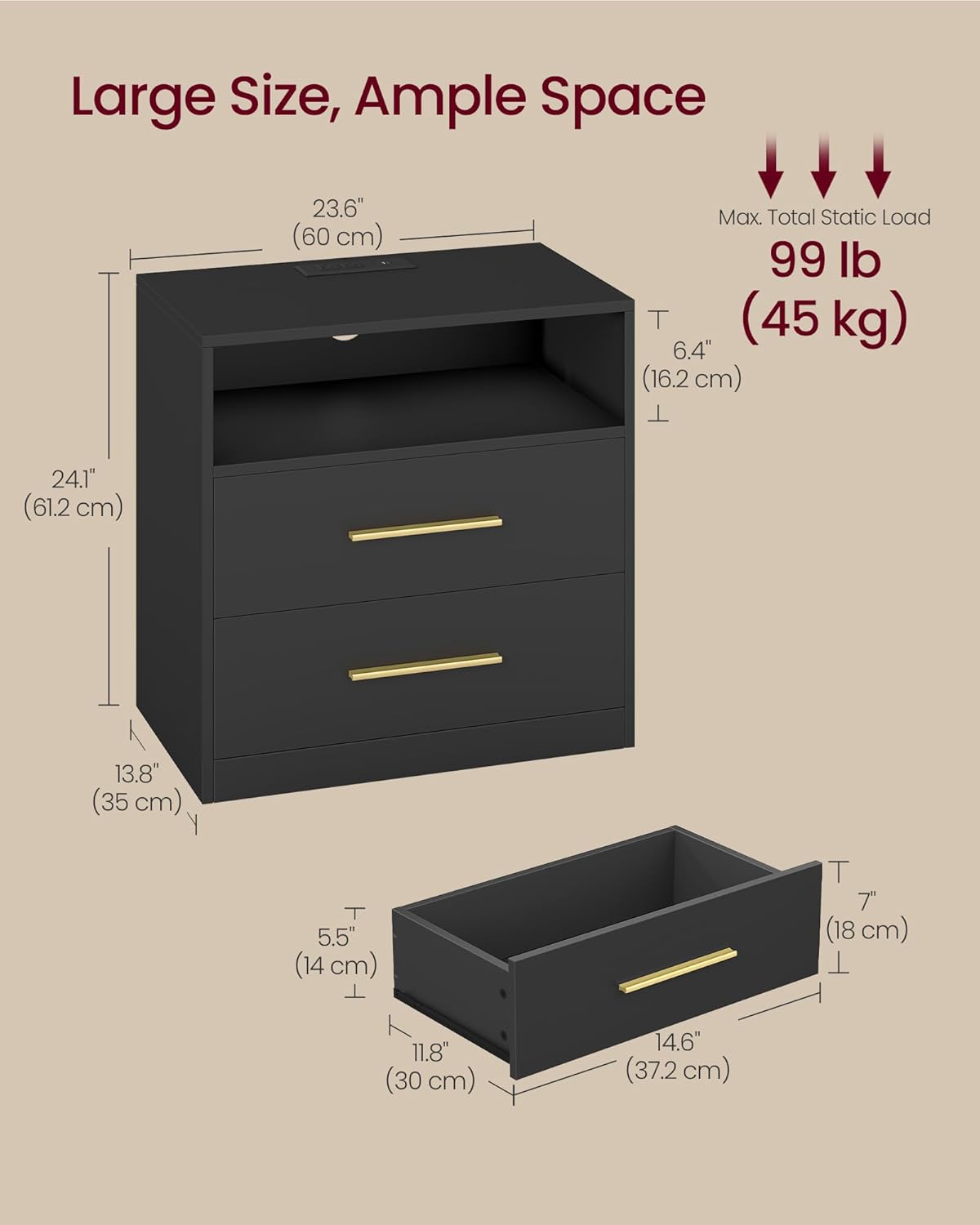
Image: A detailed diagram illustrating the dimensions of the nightstand and its components, including the maximum weight capacity.
9. Warranty and Support
For warranty information, product support, or to report missing/damaged parts, please contact VASAGLE customer service. Refer to the contact information provided in your purchase documentation or visit the official VASAGLE website.
Please have your model number (ULET639BC01S) and proof of purchase ready when contacting support.


