
1. Introduction
Thank you for choosing the Ultrean AI Nutrition Scale K40H. This digital kitchen scale is designed to provide precise weight measurements for food items and integrate with a smart application to offer detailed nutritional analysis. It assists in tracking dietary intake and managing health goals effectively. Please read this manual thoroughly before using the scale to ensure proper operation and maintenance.
2. Safety Information
- Do not immerse the scale in water or other liquids.
- Clean the scale with a damp cloth. Do not use abrasive cleaners or harsh chemicals.
- Place the scale on a hard, flat, and stable surface for accurate measurements. Avoid carpets or soft surfaces.
- Do not overload the scale beyond its maximum capacity of 10 kg (22 lbs).
- Keep the scale away from extreme temperatures and direct sunlight.
- This scale is intended for household use only, not for commercial or medical purposes.
- Dispose of used batteries according to local regulations. Do not mix old and new batteries.
3. Package Contents
- Ultrean AI Nutrition Scale K40H
- 3 x AAA Batteries
- User Manual
4. Product Features
- High Precision Sensors: Measures with an accuracy of 0.1g / 0.01oz / 1ml.
- Large Capacity: Supports weights up to 10 kg (22 lbs).
- Multiple Unit Options: Easily switch between grams (g), ounces (oz), pounds and ounces (lb:oz), and milliliters (ml).
- Tare Function: Allows you to weigh multiple ingredients in the same container.
- AI Nutrition Tracking: Connects to a smartphone app for comprehensive nutritional analysis, including calories, fat, protein, and more.
- Durable Design: Features a sleek stainless steel weighing platform.

The Ultrean AI Nutrition Scale provides precise measurements and detailed nutritional data for your meals.

Track your health and nutrition progress comprehensively with the dedicated Ultrean app.
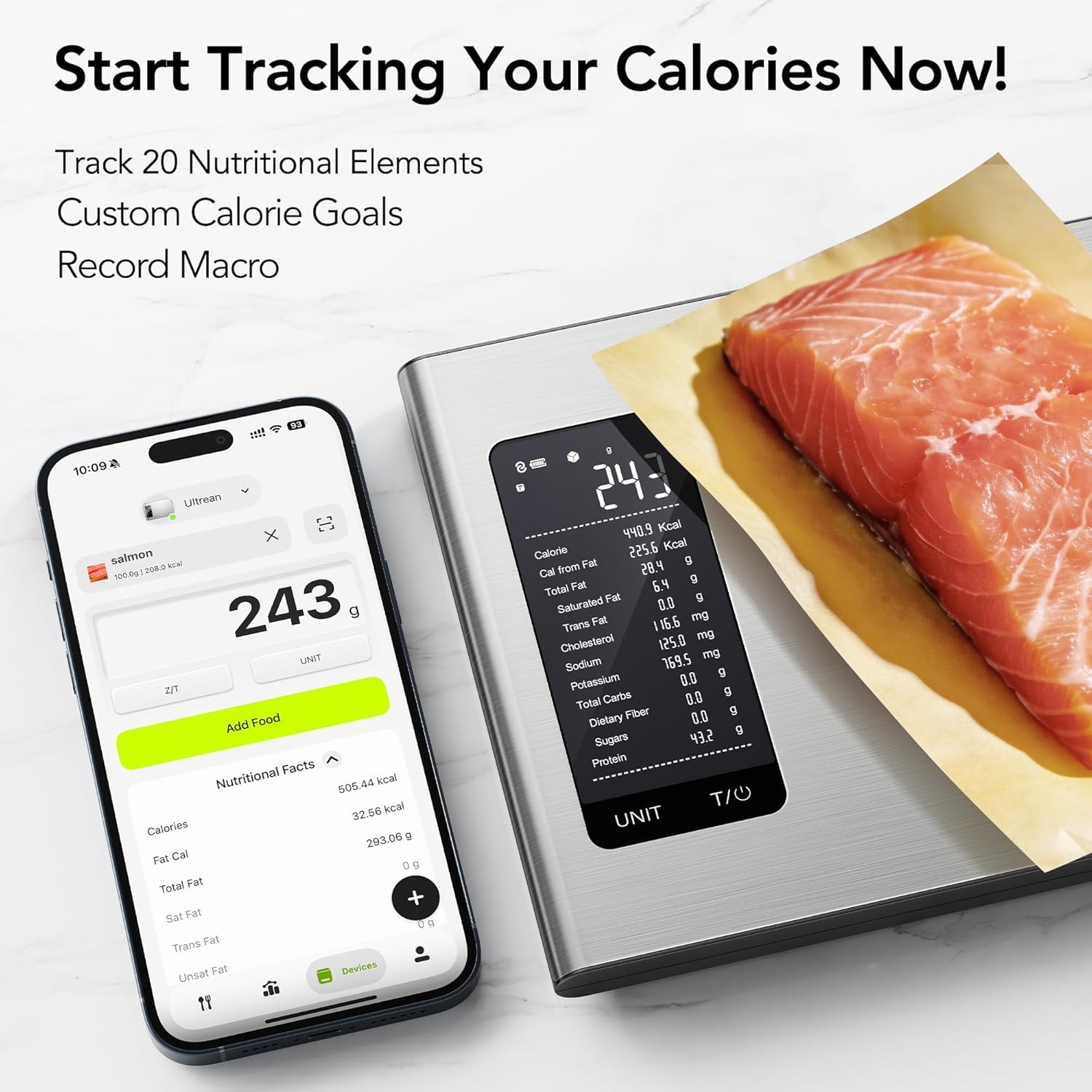
Easily track calories and nutritional elements for various foods using the scale and its integrated app.
5. Setup
5.1 Battery Installation
- Open the battery compartment cover on the underside of the scale.
- Insert 3 AAA batteries, ensuring the correct polarity (+/-) as indicated inside the compartment.
- Close the battery compartment cover securely.
5.2 Initial Placement
Place the scale on a firm, flat, and level surface. Uneven surfaces can affect accuracy. Avoid placing it near strong electromagnetic fields or vibrating equipment.
5.3 App Download and Pairing
- Scan the QR code provided in the package or search for the "Ultrean Smart" app (or similar name as indicated in the packaging) on your smartphone's app store (iOS or Android).
- Download and install the app.
- Enable Bluetooth on your smartphone.
- Open the Ultrean app and follow the on-screen instructions to pair your scale. Ensure the scale is turned on during the pairing process.
6. Operating Instructions
6.1 Basic Weighing
- Press the power button (usually labeled 'ON/OFF' or 'UNIT/T') to turn on the scale. The display will show '0' or '0.0'.
- Place the item to be weighed gently on the center of the weighing platform.
- Read the weight displayed on the screen.
- The scale will automatically turn off after a period of inactivity to save battery.
6.2 Unit Conversion
With the scale turned on and displaying '0', press the 'UNIT' button repeatedly to cycle through the available units: grams (g), ounces (oz), pounds and ounces (lb:oz), and milliliters (ml).
6.3 Tare Function
The tare function allows you to subtract the weight of a container or previous ingredients, so you can weigh subsequent items accurately.
- Place an empty container on the scale. The display will show its weight.
- Press the 'T/0' (Tare/Zero) button. The display will reset to '0'.
- Add the first ingredient to the container. Read its weight.
- To add another ingredient, press 'T/0' again to reset the display to '0', then add the next ingredient.
6.4 AI Nutrition Tracking (with App)
For detailed nutritional analysis, ensure your scale is paired with the Ultrean app.
- Open the Ultrean app on your smartphone.
- Place the food item on the scale. The weight will be transmitted to the app.
- In the app, you can search for the food item, scan its barcode (note: barcode scanning functionality may be region-specific and might not cover all products globally), or manually input the food type.
- The app will display comprehensive nutritional information, including calories, protein, fats, carbohydrates, and more.
- Utilize the app's features to track your daily intake, set custom calorie goals, and monitor your health progress over time.
7. Maintenance
7.1 Cleaning
Wipe the scale with a slightly damp cloth. For stubborn stains, use a mild detergent. Do not use abrasive cleaners, alcohol, or corrosive chemicals. Ensure the scale is completely dry before storage or next use.
7.2 Storage
Store the scale in a cool, dry place. Avoid placing heavy objects on the scale when not in use, as this can affect its calibration over time. If the scale will not be used for an extended period, remove the batteries to prevent leakage.
7.3 Battery Replacement
When the battery indicator appears on the display (usually 'Lo'), replace all three AAA batteries with new ones. Follow the battery installation steps in Section 5.1.
8. Troubleshooting
- Scale not turning on: Check if batteries are installed correctly and are not depleted. Replace batteries if necessary.
- Inaccurate readings: Ensure the scale is on a flat, stable surface. Recalibrate by turning it off and on again. Avoid placing it near electronic devices that may cause interference.
- "Lo" displayed: Batteries are low. Replace with new AAA batteries.
- "Err" displayed: The scale is overloaded. Remove the item immediately to prevent damage.
- App not connecting: Ensure Bluetooth is enabled on your phone and the scale is on. Try restarting both the app and the scale. Make sure the app is updated to the latest version.
- Barcode scanning issues: The barcode database may be region-specific. If a barcode is not recognized, try manually searching for the food item in the app or entering its nutritional data.
9. Specifications
| Feature | Specification |
|---|---|
| Model | K40H |
| Capacity | 10 kg / 22 lbs |
| Accuracy | 0.1 g / 0.01 oz / 1 ml |
| Units | g, oz, lb:oz, ml |
| Power Source | 3 x AAA Batteries |
| Platform Material | Stainless Steel |
| Color | Grey |
| Dimensions (L x W x H) | 9.25 in x 6.26 in x 0.79 in |

Physical dimensions and key specifications of the Ultrean AI Nutrition Scale K40H.
10. Warranty and Support
Ultrean products are manufactured to the highest quality standards. For warranty information, technical support, or customer service inquiries, please refer to the contact information provided on the product packaging or visit the official Ultrean website. Please have your model number (K40H) and purchase details ready when contacting support.


