
1. Introduction and Overview
The PUWU ARC-200 is a compact and portable 2-in-1 welding machine designed for both Stick (MMA) and Lift TIG welding. It incorporates advanced IGBT inverter and Synergic Control technology to deliver stable arcs and smooth welding results. This welder is suitable for various applications, including home repairs, farm maintenance, and workshop projects. It operates on a standard 110V power supply and is compatible with a range of electrodes.
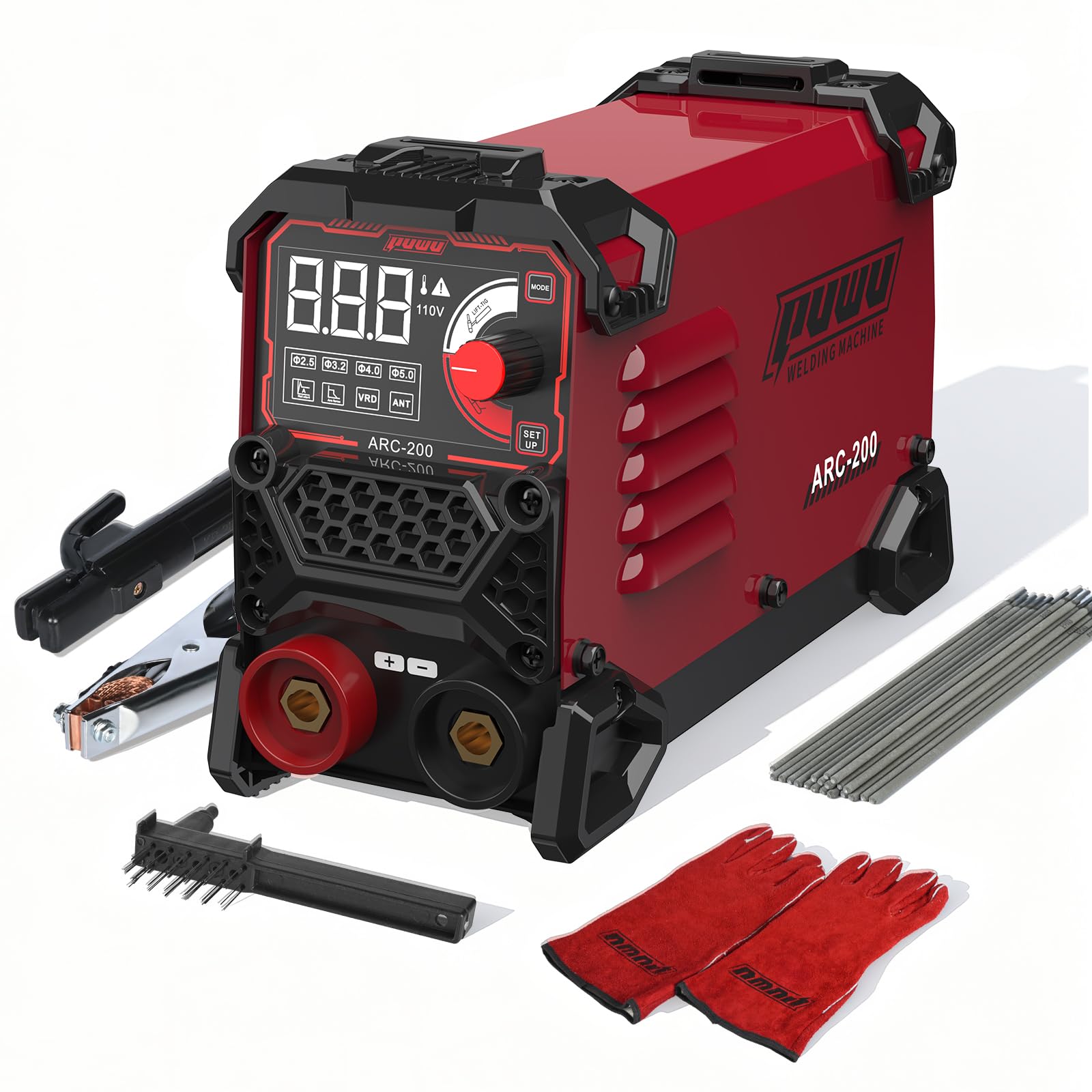
Image 1: Front view of the PUWU ARC-200 110V Stick Welder, showing the digital display and control knob.
2. Safety Information
Welding involves inherent risks. Always prioritize safety by following these guidelines:
- Personal Protective Equipment (PPE): Always wear appropriate PPE, including a welding helmet with a suitable shade, welding gloves, protective clothing, and safety shoes.
- Ventilation: Ensure adequate ventilation in your work area to disperse welding fumes.
- Electrical Safety: The welder operates on 110V AC. A dedicated 40A to 50A circuit breaker is recommended. Ensure all electrical connections are secure and dry.
- VRD (Voltage Reduction Device): The integrated VRD feature reduces the open-circuit voltage for enhanced safety, especially in damp or confined environments.
- Fire Hazards: Keep flammable materials away from the welding area. Have a fire extinguisher readily available.
- Grounding: Always connect the work clamp securely to the workpiece to ensure proper grounding.
3. Package Contents
Upon receiving your PUWU ARC-200 welder, please verify that all the following items are included:
- ARC-200 Welder Unit
- Electrode Holder
- Work Clamp
- Steel Brush
- Welding Gloves
- 20PCS E6013 Electrodes (2.5mm)
- Red and Black 10-25 Quick Connectors
- 2-meter Welding Cable
- 2-meter Ground Cable
- PUWU Instruction Manual
Note: The Lift TIG torch (WP-17V) is sold separately and is not included in this kit.
4. Product Features
The PUWU ARC-200 welder is equipped with several features designed for efficient and reliable welding:
- 2-in-1 Welding Capability: Supports both Stick (MMA) and Lift TIG welding processes.
- Adjustable Current Range: Offers a welding current range of 20-200A for versatile applications.
- Material Thickness: Capable of welding materials up to 0.2 inches (5mm) thick, including mild steel, stainless steel, and cast iron.
- Electrode Compatibility: Works with AWS E6013, E6011, and E6010 electrodes in sizes 1/16"-1/8" (1.6mm-3.2mm).
- Synergic Control IGBT Inverter Technology: Automatically adjusts welding parameters for optimal performance, simplifying operation.
- Hot Start: Provides an instant boost of current to ensure easy arc ignition.
- VRD (Voltage Reduction Device): Reduces the open-circuit voltage to a safe level, minimizing the risk of electric shock.
- Anti-Stick: Prevents the electrode from sticking to the workpiece, making it easier to restart the arc.
- ARC Force: Automatically increases the current when the arc length becomes too short, preventing the arc from extinguishing and ensuring deeper penetration.
- Portable & Lightweight Design: With dimensions of 9.1 × 3.9 × 6.1 inches and a weight of 4.4 lbs (2.0 kg), it includes an adjustable shoulder strap for easy transport.
- LED Display: A bright LED display provides clear and accurate real-time readings of welding parameters.
- Comprehensive Protection Systems: Includes Overload, Over-voltage, and Over-current safeguards for enhanced durability and user safety.
- Certifications: Certified by CE, ETL, and UL standards for reliability and safety.

Image 2: The PUWU ARC-200 welder showcasing its advanced features.

Image 3: The compact size and light weight of the PUWU ARC-200 welder.

Image 4: Illustration of the 2-in-1 Stick and Lift TIG welding capabilities.
5. Setup
Follow these steps to set up your PUWU ARC-200 welder:
- Connect Cables: Insert the quick connectors of the electrode holder cable and the work clamp cable into the corresponding terminals on the front panel of the welder. Ensure they are securely twisted into place.
- Power Connection: Plug the welder's power cord into a standard 110V AC outlet. It is recommended to use a circuit protected by a 40A to 50A breaker.
- Turn On: Locate the power switch on the back of the welder and turn it to the 'ON' position. The digital display will illuminate.
- Attach Work Clamp: Securely attach the work clamp to the workpiece you intend to weld. Ensure good electrical contact.
- Insert Electrode: Clamp the appropriate welding electrode (e.g., E6013) into the electrode holder.
- Adjust Current: Use the current adjustment knob on the front panel to set the desired welding current. The Synergic Control will assist in matching parameters based on electrode size.
6. Operating Instructions
Once the welder is set up and safety precautions are in place, you can begin welding:
- Wear PPE: Always wear your welding helmet, gloves, and protective clothing before striking an arc.
- Strike the Arc: Gently tap the tip of the electrode against the workpiece to initiate the arc. The Hot Start feature will aid in quick ignition.
- Maintain Arc Length: Once the arc is established, maintain a consistent arc length (typically equal to the electrode diameter) and a steady travel speed.
- Welding Angle: Hold the electrode at an appropriate angle (usually 10-30 degrees from vertical in the direction of travel) to ensure proper penetration and bead formation.
- Observe Weld Pool: Watch the weld pool to ensure proper fusion and penetration. Adjust travel speed and angle as needed.
- Finish Weld: When the weld is complete, lift the electrode quickly to break the arc.
- Remove Slag: After the weld cools, use the steel brush to remove any slag covering the weld bead.
7. Maintenance
Regular maintenance ensures the longevity and optimal performance of your welder:
- Cleaning: Keep the welder clean and free from dust, metal particles, and moisture. Use compressed air to blow out internal dust periodically.
- Cable Inspection: Regularly inspect all cables, connectors, and the electrode holder for any signs of damage, fraying, or loose connections. Replace damaged components immediately.
- Ventilation Grilles: Ensure the ventilation grilles on the welder are clear and unobstructed to prevent overheating.
- Storage: Store the welder in a dry, clean, and well-ventilated area when not in use.
8. Troubleshooting
Here are some common issues and their potential solutions:
| Problem | Possible Cause | Solution |
|---|---|---|
| Welder does not power on | No power supply, loose connection, tripped breaker | Check power cord, outlet, and circuit breaker. Ensure connections are secure. |
| Arc is difficult to strike or maintain | Incorrect current setting, damp electrode, poor ground connection, dirty workpiece | Adjust current, use dry electrodes, ensure solid ground connection, clean workpiece surface. |
| Electrode sticks frequently | Low current, incorrect electrode type, Anti-Stick feature not active | Increase current, use appropriate electrode, ensure Anti-Stick is functioning. |
| Welder overheats (protection light on) | Exceeded duty cycle, poor ventilation, high ambient temperature | Allow the machine to cool down. Ensure clear ventilation and proper airflow. |
9. Specifications
| Specification | Detail |
|---|---|
| Manufacturer | PUWU |
| Part Number | ARC200 |
| Model Number | ARC-200 |
| Power Source | AC 110V |
| Adjustable Current | 20-200A |
| Welding Type | Stick (MMA) / Lift TIG |
| Max Weld Thickness | 0.2 inches (5mm) |
| Electrode Compatibility | AWS E6013, E6011, E6010 (1/16"-1/8" / 1.6mm-3.2mm) |
| Item Weight | 4.08 kg (4.4 lbs) |
| Product Dimensions | 9.1 × 3.9 × 6.1 inches (23.1 x 9.9 x 15.5 cm) |
| Material | Metal Plastic |
| Certifications | CE, ETL, UL |
10. Warranty and Support
The PUWU ARC-200 welder comes with the following support and warranty:
- 30-Day Refund Policy: If you are not satisfied with your purchase, you may be eligible for a refund within 30 days.
- 60-Day Replacement Policy: In case of product defects or issues, a replacement may be provided within 60 days of purchase.
- 24/7 Customer Service Support: For any questions, technical assistance, or warranty claims, please contact our customer service team available 24 hours a day, 7 days a week.