
1. Product Overview
The EF ECOFLOW DELTA 3 Ultra Portable Power Station is a high-capacity, high-output solar generator designed for reliable power in various scenarios, including home backup, camping, RV use, and emergencies. This package includes the DELTA 3 Ultra Power Station and a 400W Foldable Solar Panel, delivered in separate packages.
Key features include a 3072Wh LiFePO4 battery, 3600W continuous output (7200W surge) with X-Quiet 3.0 technology for quiet operation, and a UPS function for uninterrupted power supply. It supports multiple charging methods and is built with durable, automotive-grade components for long-lasting performance.
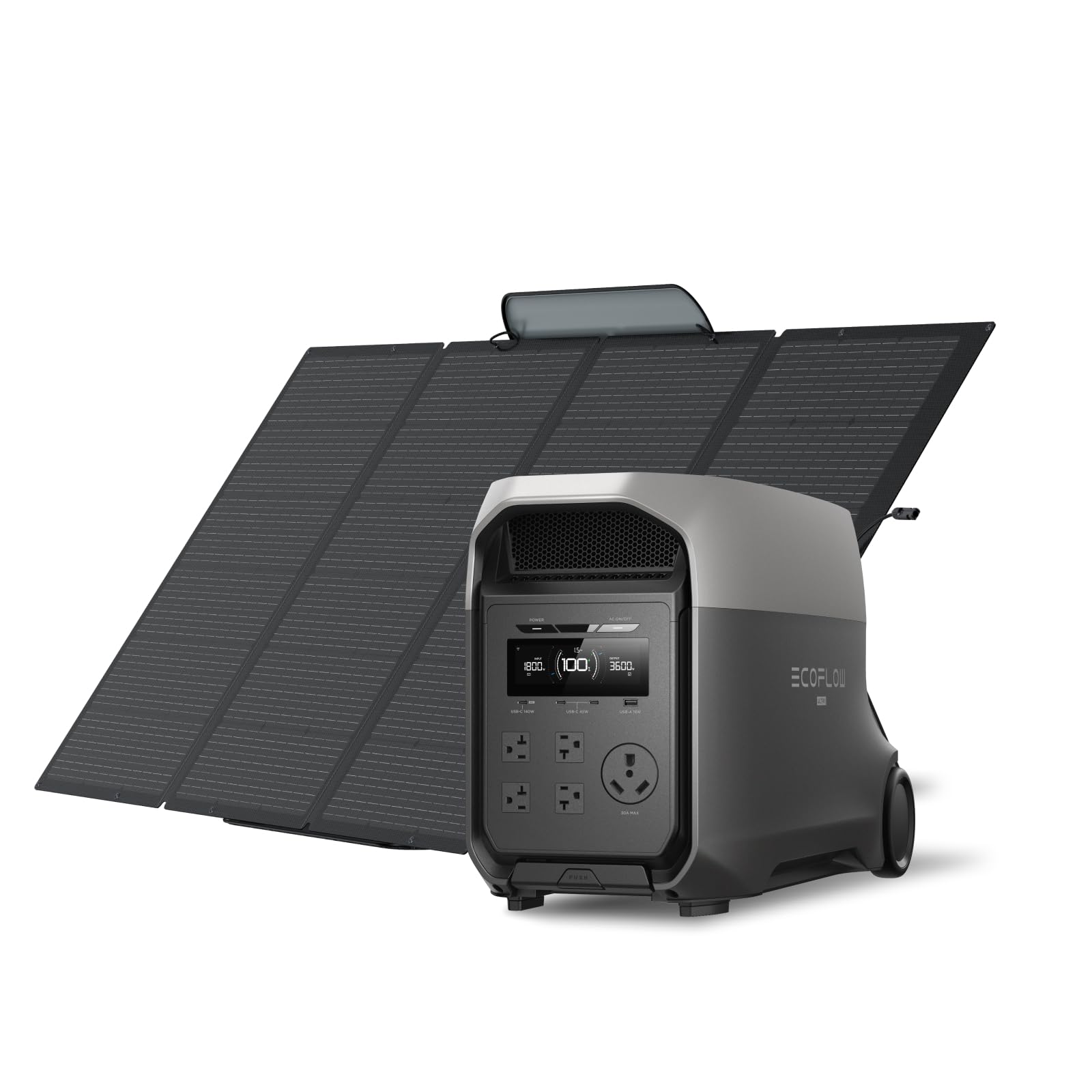
Image: The EF ECOFLOW DELTA 3 Ultra Portable Power Station shown with its accompanying 400W solar panel, highlighting its compact design and portability.
2. Setup Guide
2.1 Unboxing and Initial Inspection
- Carefully unpack the DELTA 3 Ultra Power Station and the 400W Solar Panel from their separate packages.
- Inspect all components for any signs of damage. Contact customer support immediately if any damage is found.
- Ensure all accessories, including charging cables, are present.
2.2 Initial Charging
Before first use, fully charge the DELTA 3 Ultra Power Station. It supports four fast charging options:
- Wall Outlet: Connect the AC charging cable to a standard wall outlet. The X-Stream technology allows for rapid charging.
- Solar Panels: Connect the 400W Solar Panel to the power station using the appropriate solar charging cable. Position the solar panel in direct sunlight for optimal charging efficiency.
- Car Input: Use the car charging cable to charge from your vehicle's 12V cigarette lighter port.
- EcoFlow Smart Generator: For extended backup, connect to an EcoFlow Smart Generator.

Image: Illustration showing the four versatile charging methods for the DELTA 3 Ultra: wall outlet, generator, solar panels, and car alternator, with charging times.
2.3 Connecting the Solar Panel
To connect the 400W Solar Panel:
- Unfold the 400W Solar Panel and position it to face the sun directly.
- Connect the solar charging cable from the solar panel to the solar input port on the DELTA 3 Ultra Power Station.
- The display on the power station will indicate the incoming solar wattage.

Image: The DELTA 3 Ultra Power Station connected to several solar panels in a sunny outdoor environment, demonstrating fast solar charging capabilities.
3. Operating Instructions
3.1 Powering On/Off
- To power on the DELTA 3 Ultra, press and hold the main power button for 3 seconds. The display will light up.
- To power off, press and hold the main power button again for 3 seconds.
- To activate AC output, press the AC ON/OFF button. Repeat to turn off.
3.2 Connecting Devices
The DELTA 3 Ultra offers a variety of output ports:
- AC Outlets: 4 x AC Output (120V, 20A) for standard household appliances.
- USB Ports: 1 x USB-A Port (18W Max) and 3 x USB-C Ports (140W Max) for charging mobile devices, laptops, and other USB-powered electronics.
- RV Port: TT-30 RV Port (120V, 30A) for RV power needs.
- Cigarette Lighter Port: 12V, 10A for car accessories.

Image: The DELTA 3 Ultra Power Station connected to various devices in a kitchen setting, illustrating its multiple output ports and 7200W surge capability.
3.3 Silent Operation (X-Quiet 3.0)
The DELTA 3 Ultra features X-Quiet 3.0 technology, ensuring a whisper-quiet operation at just 25dB under loads (when powering under 600W). This makes it suitable for use in quiet environments like bedrooms or RVs.

Image: The DELTA 3 Ultra Power Station operating silently in a bedroom, emphasizing its quiet performance for overnight use.
3.4 Uninterruptible Power Supply (UPS)
In the event of a power outage, the DELTA 3 Ultra automatically switches to battery mode in under 10 milliseconds, providing uninterrupted power to connected devices. This feature is crucial for sensitive electronics like computers, Wi-Fi routers, and medical equipment.

Image: The DELTA 3 Ultra Power Station ensuring zero interruption to a user's computer setup, highlighting its fast UPS switching capability.
3.5 Monitoring and Control via App
Utilize the EcoFlow app for deeper insights and easier control. Monitor energy usage, solar generation, and set timed charging/discharging schedules to optimize costs and manage power efficiently.
Image: Screenshots of the EcoFlow mobile application, demonstrating features for monitoring output, solar generation, and scheduling tasks for efficient power management.
3.6 Usage Scenarios
The DELTA 3 Ultra is versatile for various applications:
- Home Backup: Power essential appliances like refrigerators, microwaves, and lights during outages.
- RV & Camping: Ideal for off-grid adventures, powering RVs, electric kettles, mini-fridges, and heated blankets.
- Work & Office: Keep laptops, Wi-Fi routers, PCs, and NAS devices running without interruption.
- Workshop: Operate power tools such as circular saws, electric drills, cutting machines, and water pumps.

Image: The DELTA 3 Ultra Power Station providing power to camping and RV essentials like a heated blanket, electric grill, and mini-fridge.

Image: The DELTA 3 Ultra Power Station powering entertainment devices like a 50" TV, PS5, speaker, and projector in a home living room.
4. Maintenance and Care
4.1 Battery Longevity
The DELTA 3 Ultra is equipped with a durable LiFePO4 battery, designed for 10 years of daily use. To maximize battery life:
- Avoid extreme temperatures during storage and operation.
- Store the unit with a charge level between 30% and 80% if not used for extended periods.
- Recharge the unit every 3-6 months to prevent deep discharge.

Image: Detailed view of the automotive-grade full-tab LFP cells within the DELTA 3 Ultra, emphasizing their durability and readiness for emergencies.
4.2 Durable Construction
The power station features an EV-grade CTC (Cell-to-Chassis) structure, making it drop-resistant (0.8 ft) and protecting against condensation and off-road bumps. This ensures stable power even in demanding conditions.
Image: The DELTA 3 Ultra Power Station on rugged terrain, illustrating its EV-Grade CTC structure for enhanced durability.
4.3 Smart Battery Protection
An advanced BMS (Battery Management System) with a high-performance ARM Cortex chipset and intelligent algorithms continuously monitors the battery. It tracks SOC (State of Charge), SOH (State of Health), temperature, and more, ensuring peak performance and extended battery life.
Image: A visual representation of the Smart, 24/7 Battery Protection system (BMS) with its ARM Cortex chipset, ensuring reliable performance.
4.4 Environmental Resistance
The DELTA 3 Ultra is designed to operate reliably in extreme conditions, including freezing cold, scorching heat, humid environments (up to 95% humidity tolerance), and coastal air.
Image: The DELTA 3 Ultra Power Station in a snowy landscape, highlighting its resilience to extreme environmental conditions.
5. Troubleshooting
If you encounter issues with your DELTA 3 Ultra, please refer to the following common troubleshooting steps:
- No Power Output: Ensure the main power button is pressed and held for 3 seconds to turn on the unit. Verify that the specific output port (AC, USB) is activated. Check the display for any error messages.
- Charging Issues: Confirm that the charging cable is securely connected to both the power station and the power source. For solar charging, ensure panels are in direct sunlight and free from obstructions. Check the input wattage displayed on the screen.
- Overload Protection: If the unit shuts down unexpectedly, it might be due to an overload. Disconnect some devices and restart the power station. Ensure the total wattage of connected devices does not exceed the rated output (3600W continuous, 7200W surge).
- Unusual Noise/Heat: While the unit is designed for quiet operation, prolonged high loads may cause the cooling fans to run. If you notice excessive or unusual noise/heat, ensure ventilation ports are clear and not obstructed.
- App Connectivity: Ensure Bluetooth is enabled on your mobile device and the EcoFlow app is updated to the latest version. Follow the in-app instructions for pairing.
For persistent issues, please refer to the detailed user manual included with your product or contact customer support.
6. Specifications
| Feature | Detail |
|---|---|
| Brand | EF ECOFLOW |
| Model Name | DELTA 3 Ultra with 400W Solar Panel |
| Model Number | EF-DL-H01-3U |
| Battery Type | LiFePO4 |
| Battery Capacity | 3072Wh |
| Continuous AC Output | 3600W |
| Surge AC Output | 7200W |
| Number of AC Outlets | 3 (standard outlets, plus TT-30 RV port) |
| USB-A Output | 1 x 18W Max |
| USB-C Output | 3 x 140W Max |
| RV Port | TT-30 (120V, 30A) |
| Cigarette Lighter Port | 12V, 10A |
| Solar Panel Included | 400W Foldable Solar Panel |
| UPS Function | <10ms automatic switch |
| Noise Level | 25dB under load (<600W) |
| Dimensions | 24.6 x 12.9 x 15.6 inches |
| Power Source | Solar Powered |
| Recommended Uses | Camping, Commercial, Residential |
7. Warranty and Support
7.1 Manufacturer Warranty
The EF ECOFLOW DELTA 3 Ultra Portable Power Station comes with a 5-year manufacturer warranty. Please retain your proof of purchase for warranty claims.
7.2 Customer Support
For any questions, technical assistance, or warranty claims, please contact EF ECOFLOW customer support. Refer to the contact information provided in your product packaging or visit the official EF ECOFLOW website.
8. Product Videos
8.1 DELTA 3 Ultra Power Station Overview
Video: A 30-second overview of the DELTA 3 Ultra Power Station, showcasing its features and benefits for various uses.
8.2 Off-Grid Ready with DELTA 3 Ultra
Video: A 32-second video demonstrating the DELTA 3 Ultra Power Station's capabilities for off-grid living and outdoor adventures.
8.3 Detailed Features of DELTA 3 Ultra
Video: A 5-minute, 12-second video providing an in-depth look at the DELTA 3 Ultra's features, ports, and functionalities.
8.4 Solar Charging Guide for EcoFlow Generators
Video: A 3-minute, 8-second guide on how to effectively use solar panels with EcoFlow generators, including tips on choosing the right size.


