
1. Introduction
Thank you for choosing the taopodo P114 Smartwatch. This device is designed to enhance your daily life with features such as health monitoring, communication capabilities, and various practical functions. This manual provides detailed instructions on how to set up, operate, and maintain your smartwatch to ensure optimal performance and longevity. Please read this manual thoroughly before using the product.
2. Package Contents
Please check the package contents upon unboxing. If any items are missing or damaged, please contact customer support.
- taopodo P114 Smartwatch (with strap)
- Charging Cable
- User Manual
3. Setup
3.1 Charging the Smartwatch
Before initial use, fully charge your smartwatch. The device features magnetic fast charging.
- Connect the magnetic charging cable to the charging contacts on the back of the smartwatch.
- Connect the USB end of the charging cable to a standard USB power adapter (5V/1A recommended) or a computer's USB port.
- The watch display will indicate charging status. A full charge typically takes approximately 2 hours.

Image: Magnetic Fast Charging and Battery Life. The image shows the smartwatch being charged magnetically, highlighting its IP68 waterproof rating and battery specifications (30 days standby, 7 days battery life, 2 hours charging time).
3.2 App Installation
To unlock the full functionality of your smartwatch, you need to install the companion application on your smartphone. Search for the official app (e.g., "FitCloudPro" or similar, refer to packaging for exact app name) in your smartphone's app store (App Store for iOS, Google Play Store for Android) and install it.
3.3 Device Pairing
After installing the app, follow these steps to pair your smartwatch with your smartphone:
- Ensure your smartwatch is charged and powered on.
- Enable Bluetooth on your smartphone.
- Open the companion app on your smartphone.
- Follow the in-app instructions to add a new device. The app will search for available smartwatches.
- Select "P114" or the corresponding device name from the list.
- Confirm the pairing request on both your smartphone and smartwatch if prompted.
- Once paired, the app will synchronize data with your smartwatch.
4. Operating Instructions
4.1 Basic Navigation
- Touchscreen: Swipe left, right, up, or down to navigate through menus and screens. Tap to select an item.
- Side Button: Press the side button to return to the home screen or wake up the display. Long press may access power options or specific functions.
4.2 Bluetooth Calling
The P114 Smartwatch supports Bluetooth calls, allowing you to make and answer calls directly from your wrist when connected to your smartphone.
- Making Calls: Access the "Call" or "Phone" function on your watch. You can dial numbers, access contacts synced from your phone, or view call history.
- Answering Calls: When a call comes in, the watch will display the caller ID. Tap the green icon to answer or the red icon to reject.

Image: Bluetooth Making Calls and Answer. This image illustrates the smartwatch's capability for Bluetooth calls, showing options for contacts, call history, and a built-in microphone. It also displays text and message notifications from social media apps and the voice assistant feature.
4.3 Text & Message Notifications
Receive notifications for incoming calls, text messages, and alerts from various social media applications directly on your smartwatch. Ensure notification permissions are enabled in the companion app on your smartphone.
4.4 All-Day Health Monitoring
The smartwatch continuously monitors key health metrics throughout the day.
- Sleep Monitoring: Tracks your sleep patterns, including deep sleep, light sleep, and wake times.
- Heart Rate Monitoring: Measures your heart rate in real-time.
- Blood Oxygen (SpO2) Monitoring: Estimates your blood oxygen saturation levels.
Note: This device is not a medical device. Health data is for reference only and should not be used for medical diagnosis or treatment.

Image: All-Day Health Monitoring. This image shows the smartwatch's ability to monitor sleep, heart rate, and blood oxygen, with a visual representation of sleep tracking.
4.5 120+ Sport Modes
The smartwatch offers over 120 sport modes to track your workouts. Select your desired activity from the "Sports" menu to record data such as steps, distance, calories burned, and heart rate during exercise.

Image: 120+ Sport Modes and Health Data Monitoring. The image highlights the smartwatch's extensive sport tracking capabilities and detailed health data monitoring, such as steps, distance, calories, and heart rate.
4.6 Rich and Practical Functions
The P114 Smartwatch integrates several convenient features to assist your daily routine:
- Music Control: Control music playback on your smartphone (play, pause, skip tracks) directly from your watch.
- Remote Camera: Use your watch as a remote shutter button for your smartphone's camera.
- Weather Forecast: View current weather conditions and forecasts for your location (requires app synchronization).
- Stopwatch: A built-in stopwatch for timing activities.
- Voice Assistant: Activate your smartphone's voice assistant (e.g., Siri, Google Assistant) through the watch.
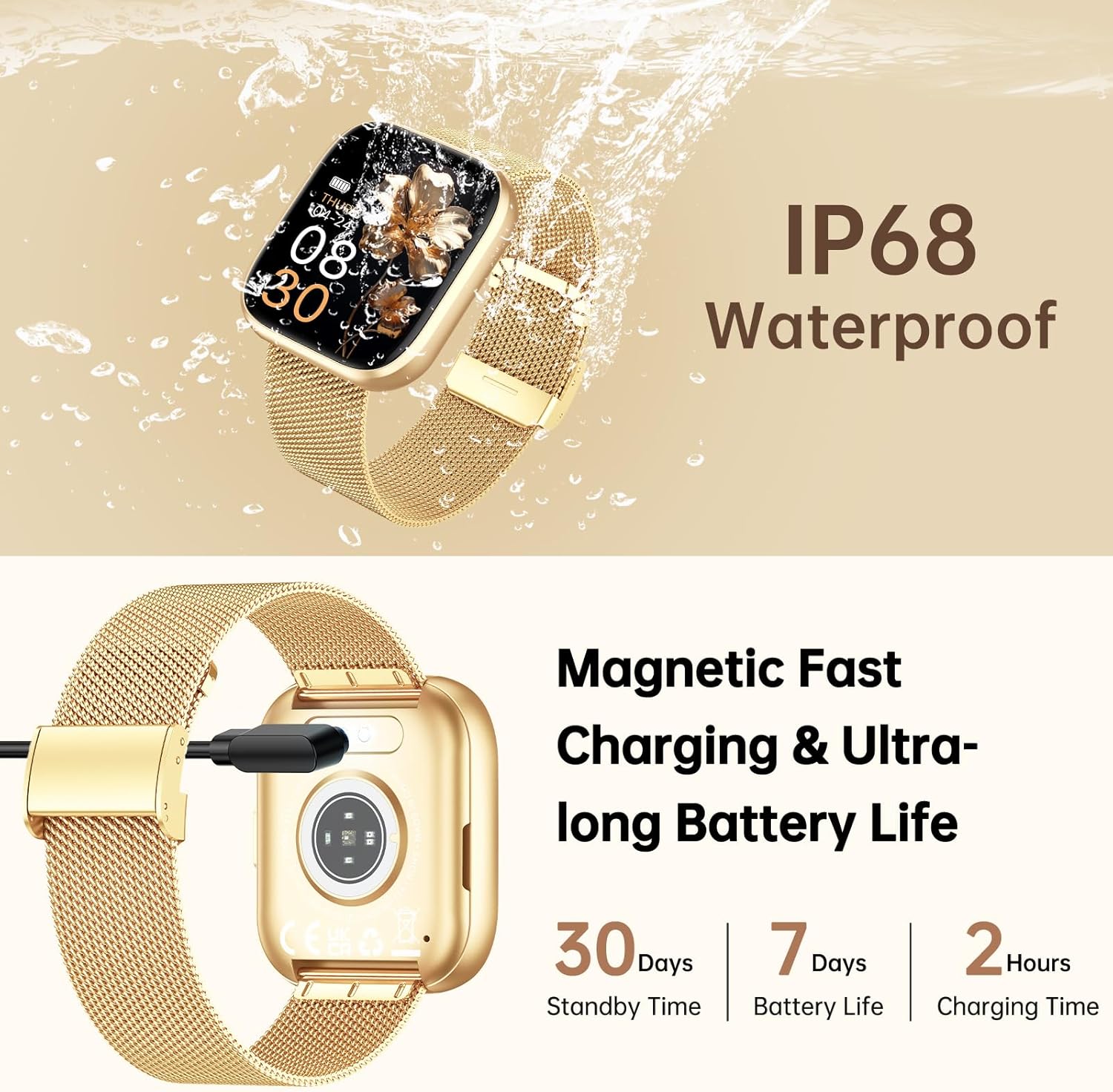
Image: Rich and Practical Functions. This image demonstrates the smartwatch's additional features, including music control, remote camera operation, weather display, and a stopwatch.
4.7 Customizable Watch Faces
Personalize your smartwatch with over 200 stylish dials or create your own DIY watch faces through the companion app.
Image: 200+ Stylish Dials and DIY Dials. The image displays the smartwatch on a wrist, highlighting the extensive collection of customizable watch faces available.
5. Maintenance
5.1 Water Resistance (IP68)
The taopodo P114 Smartwatch is rated IP68 for water resistance, meaning it is protected against dust ingress and can withstand immersion in water up to 1.5 meters for 30 minutes. It is suitable for daily use, such as hand washing, rain, and shallow swimming. However, it is not recommended for hot showers, saunas, or diving, as steam and high water pressure can compromise the seals.
5.2 Cleaning and Care
- Regularly clean the watch screen and strap with a soft, dry cloth.
- If the watch or strap gets wet, dry it thoroughly before charging or prolonged use.
- Avoid exposing the watch to extreme temperatures, direct sunlight for extended periods, or corrosive liquids.
6. Troubleshooting
| Problem | Possible Cause | Solution |
|---|---|---|
| Watch does not turn on | Low battery | Charge the watch for at least 30 minutes. |
| Cannot pair with smartphone | Bluetooth off, app issue, watch too far | Ensure Bluetooth is on, restart phone/watch, reinstall app, keep devices close. |
| No notifications | App permissions, Bluetooth disconnected | Check app notification permissions, ensure watch is paired and app is running in background. |
| Inaccurate health data | Improper fit, movement, sensor obstruction | Ensure watch is worn snugly on the wrist, clean sensors, avoid excessive movement during measurement. |
7. Specifications
| Feature | Detail |
|---|---|
| Brand | taopodo |
| Model | P114 |
| Screen Size | 1.85 Inches |
| Connectivity | Bluetooth |
| Compatible Devices | Smartphone |
| Human Interface Input | Buttons, Touchscreen |
| Water Resistance | IP68 |
| Battery Life (Typical) | Up to 7 days |
| Standby Time | Up to 30 days |
| Charging Time | Approx. 2 hours |
| GPS | No GPS |
| Item Weight | 140 g (Package dimensions: 27.7 x 26.4 x 1.9 cm) |
8. Warranty and Support
For warranty information and customer support, please refer to the warranty card included in your package or visit the official taopodo website. If you encounter any issues not covered in this manual, please contact our customer service team for assistance.