
1. Introduction
Thank you for choosing the JELENS JT01 Treadmill. This manual provides essential information for the safe and effective use of your new fitness equipment. The JELENS JT01 Treadmill is designed for home use, offering a powerful 3.0HP motor, 0-15% automatic incline, a foldable design for space-saving, and app connectivity for enhanced workout tracking and enjoyment. Please read this manual thoroughly before assembly or operation and retain it for future reference.
2. Important Safety Instructions
To reduce the risk of serious injury, read all instructions before using this treadmill. The manufacturer assumes no responsibility for personal injury or property damage sustained by or through the use of this product.
- Consult a Physician: Before starting any exercise program, consult your physician, especially if you have pre-existing health conditions.
- Read All Warnings: Adhere to all warnings and instructions marked on the treadmill and in this manual.
- Supervision: This appliance is not intended for use by persons with reduced physical, sensory, or mental capabilities, or lack of experience and knowledge, unless they have been given supervision or instruction concerning use of the appliance by a person responsible for their safety. Children should be supervised to ensure that they do not play with the appliance.
- Clear Area: Ensure a minimum clearance of 6 feet (1.8 meters) behind the treadmill and 2 feet (0.6 meters) on each side.
- Emergency Stop: Always attach the safety key clip to your clothing before beginning a workout. In case of an emergency, the safety key will detach, stopping the treadmill.
- Proper Footwear: Always wear appropriate athletic footwear while using the treadmill.
- Stable Surface: Place the treadmill on a solid, level surface. Do not place it on thick carpet, which may interfere with ventilation.
- Power Cord: Keep the power cord away from heated surfaces. Do not operate the treadmill if the cord or plug is damaged.
- Weight Capacity: Do not exceed the maximum user weight of 330 pounds (150 kg).
- Unplug When Not in Use: Always unplug the treadmill from the electrical outlet when not in use, before cleaning, and before performing maintenance.
- Children and Pets: Keep children and pets away from the treadmill at all times, especially during operation.
3. Package Contents
Carefully unpack your JELENS JT01 Treadmill and verify that all components are present and undamaged. If any items are missing or damaged, please contact customer support.
- JELENS JT01 Treadmill Main Unit
- Power Cord
- Safety Key
- User Manual
- Assembly Tools (if applicable)
4. Setup and Assembly
The JELENS JT01 Treadmill comes largely pre-assembled. Follow these steps for final setup.
4.1 Unpacking and Placement
- Remove all packaging materials and place the treadmill on a flat, stable surface.
- Ensure adequate clearance around the treadmill as specified in the safety instructions.
4.2 Unfolding the Treadmill
The JELENS JT01 features a hydraulic slow-down folding technology for easy unfolding.
- Gently lift the running deck until the hydraulic system engages.
- Slowly lower the running deck until it is fully flat and locked into position. Ensure it is stable before use.

Image: The treadmill in its folded position, showcasing the hydraulic soft-drop system and transport wheels for easy storage and movement.
4.3 Initial Power-Up
- Plug the power cord into a grounded electrical outlet.
- Locate the power switch, usually near the front base of the treadmill, and turn it ON.
- Attach the safety key to the designated slot on the console. The display should illuminate.

Image: The JELENS JT01 Treadmill shown in both its unfolded and folded configurations, illustrating its compact, space-saving design and dimensions.
5. Operating Instructions
Familiarize yourself with the control panel and functions before starting your workout.
5.1 Control Panel Overview
The JELENS JT01 features a multifunctional LCD display and intuitive controls.

Image: A close-up view of the JELENS JT01 Treadmill's multi-functional control panel, displaying metrics such as time, pulse, scan, calories, distance, speed, and incline.
- LCD Display: Shows time, speed, distance, calories, incline level, and heart rate.
- Start/Stop Buttons: Initiate and end your workout.
- Speed +/- Buttons: Adjust the running speed from 0.6 to 7.5 MPH.
- Incline +/- Buttons: Adjust the automatic incline from 0% to 15%.
- Mode Button: Cycle through display modes or workout programs.
- Pulse Sensors: Integrated into the handlebars to monitor heart rate.
5.2 Starting a Workout
- Stand on the side rails of the treadmill.
- Attach the safety key clip to your clothing and insert the safety key into the console.
- Press the START button. The belt will begin to move at a low speed after a short countdown.
- Carefully step onto the running belt and begin walking.
- Adjust speed and incline using the respective +/- buttons on the console or handlebars.

Image: A woman running on the JELENS JT01 Treadmill, demonstrating the 15% automatic incline feature for an enhanced workout.
5.3 Adjusting Incline
The JELENS JT01 offers 0-15% automatic incline adjustment.
- During your workout, press the INCLINE + or INCLINE - buttons to change the slope.
- The treadmill will automatically adjust to the desired incline level.
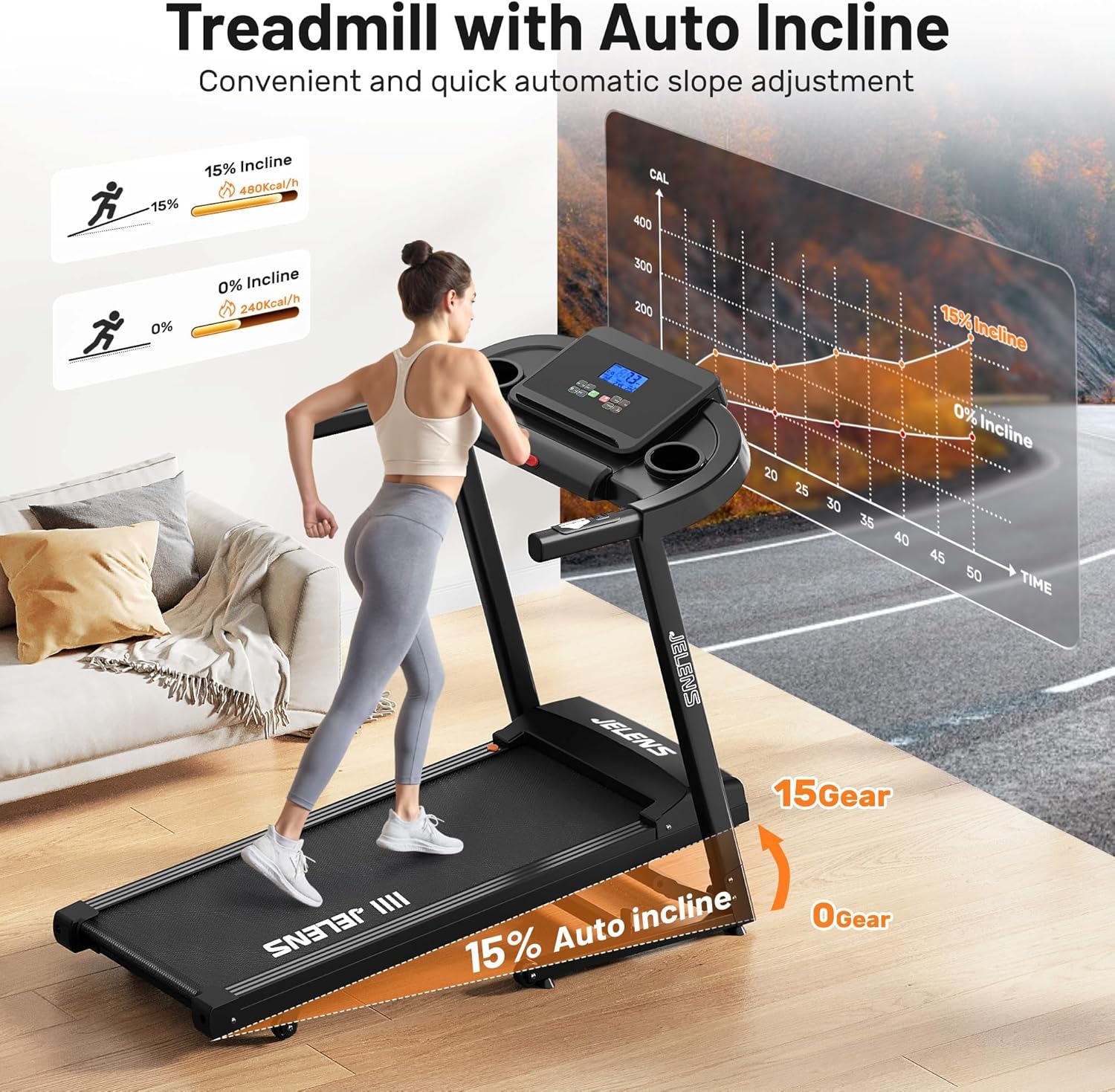
Image: A user on the JELENS JT01 Treadmill, illustrating the automatic incline feature and its impact on calorie expenditure compared to a flat surface.
5.4 Heart Rate Monitoring
To measure your heart rate, grip the pulse sensors on the handlebars with both hands. Your heart rate will be displayed on the LCD screen after a few seconds.
5.5 Using the FITSHOW App
Enhance your workout experience by connecting your treadmill to the FITSHOW app via Bluetooth.
- Download the "FITSHOW" app from your device's app store or scan the QR code provided in the manual or on the product.
- Enable Bluetooth on your smartphone or tablet.
- Open the FITSHOW app and follow the on-screen instructions to connect to your JELENS JT01 Treadmill.
- Once connected, the app will display your workout data and allow access to various exercise courses and tracking features.
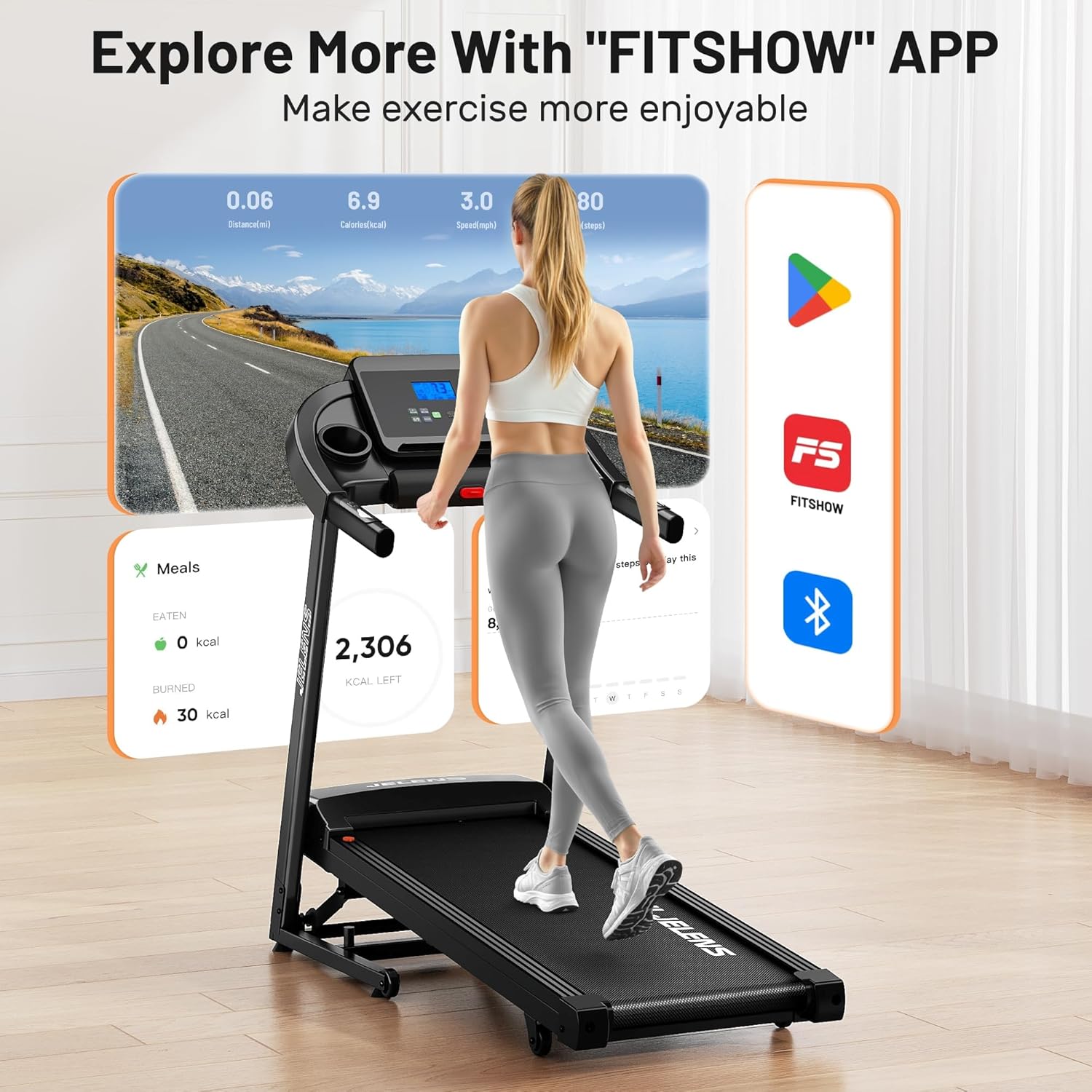
Image: A user interacting with the JELENS JT01 Treadmill, with screens illustrating the FITSHOW app interface for tracking exercise data and accessing workout programs.
Download the FITSHOW App: http://fitshow.com/qr
5.6 Stopping a Workout
- Press the STOP button. The treadmill belt will gradually slow down and stop.
- Alternatively, pull the safety key from the console for an immediate stop.
- Once the belt has completely stopped, step off the treadmill.
6. Maintenance
Regular maintenance ensures the longevity and optimal performance of your JELENS JT01 Treadmill.
6.1 Cleaning
- General Cleaning: Wipe down the treadmill surfaces with a damp cloth after each use to remove sweat and dust. Avoid abrasive cleaners or solvents.
- Running Belt: Periodically clean the running belt and deck area to prevent debris buildup.
6.2 Lubrication
The running deck requires periodic lubrication to reduce friction and extend the life of the motor and belt. Refer to the specific instructions provided with your treadmill's lubricant or contact customer support for guidance on the correct type and frequency of lubrication.
6.3 Running Belt Adjustment
Over time, the running belt may become loose or shift to one side. Refer to the detailed instructions in the full manual for how to adjust belt tension and centering using the provided tools.
6.4 Storage
The JELENS JT01 Treadmill features a foldable design for convenient storage.
- Ensure the treadmill is turned off and unplugged.
- Lift the running deck until it locks into the upright, folded position.
- Utilize the transport wheels at the base to easily move the treadmill to a suitable storage location.
7. Troubleshooting
If you encounter issues with your treadmill, refer to the following common problems and solutions. If the problem persists, contact customer support.
| Problem | Possible Cause | Solution |
|---|---|---|
| Treadmill does not power on | Power cord not plugged in; Power switch off; Circuit breaker tripped | Check power connection; Turn power switch ON; Reset circuit breaker |
| Running belt stops suddenly | Safety key removed; Motor overload | Re-insert safety key; Reduce user weight or speed |
| Belt slips or hesitates | Belt too loose; Lack of lubrication | Adjust belt tension (refer to full manual); Lubricate running deck |
| Incline not adjusting | Incline motor issue; Obstruction | Check for obstructions; Contact customer support |
| Display not working correctly | Loose cable connection; Console malfunction | Check cable connections; Power cycle treadmill; Contact customer support |
8. Product Specifications
The following table outlines the key specifications for the JELENS JT01 Treadmill:
| Feature | Specification |
|---|---|
| Model Name | JT01 |
| Brand | JELENS |
| Motor Horsepower | 3.0 HP |
| Speed Range | 0.6 - 7.5 MPH |
| Incline Range | 0 - 15% Automatic Incline |
| Running Belt Dimensions (L x W) | 43.31" x 15.75" |
| Maximum Weight Recommendation | 330 Pounds |
| Product Dimensions (Unfolded) | 53.07"D x 23.15"W x 37.57"H |
| Item Weight | 79.81 Pounds |
| Material | Alloy Steel |
| Special Features | Auto Incline, Compact Design, Foldable, Heart Rate Monitor, Shock Absorbent |
| Metrics Measured | Calories Burned, Distance, Heart Rate, Incline, Speed |
| Power Source | Corded Electric |

Image: A detailed view of the JELENS JT01 Treadmill's running belt, highlighting its generous dimensions of 15.75 inches wide by 43.31 inches long.

Image: An illustration of the JELENS JT01 Treadmill's advanced 6-layer anti-slip and shock-absorbing running belt, designed to protect knees and enhance comfort.

Image: A cutaway view of the JELENS JT01 Treadmill's powerful 3.0HP motor, emphasizing its quiet operation (below 40 decibels) and robust support for up to 330 pounds.
9. Warranty and Support
The JELENS JT01 Treadmill comes with a 1-year warranty from the date of purchase. This warranty covers manufacturing defects and ensures the product meets our quality standards.
For technical guidance, troubleshooting assistance, or to inquire about returns and exchanges, please contact our professional after-sales service team. We are committed to providing excellent support for your JELENS product.
Contact Information: Please refer to the contact details provided on your purchase receipt or the official JELENS website for customer service.