
1. Introduction
Thank you for choosing the UEQ T12 3-in-1 Wireless Charging Station. This device is designed to provide a convenient and efficient charging solution for your Apple iPhone (12-17 series), Apple Watch (S2-S11/SE/Ultra), and AirPods (2/3/4/Pro with wireless charging case). Its foldable design makes it ideal for both home and travel use.
Please read this manual carefully before using the product to ensure proper operation and to maximize its lifespan.
2. What's in the Box
- 1 x UEQ T12 3-in-1 Wireless Charging Station
- 1 x 20W USB-C Power Adapter
- 1 x USB-C to USB-C Charging Cable (3.3 ft/1m)
- 1 x User Manual
3. Product Overview
The UEQ T12 charging station features a compact, foldable design for portability and adjustable viewing angles. It includes dedicated charging areas for your iPhone, Apple Watch, and AirPods.
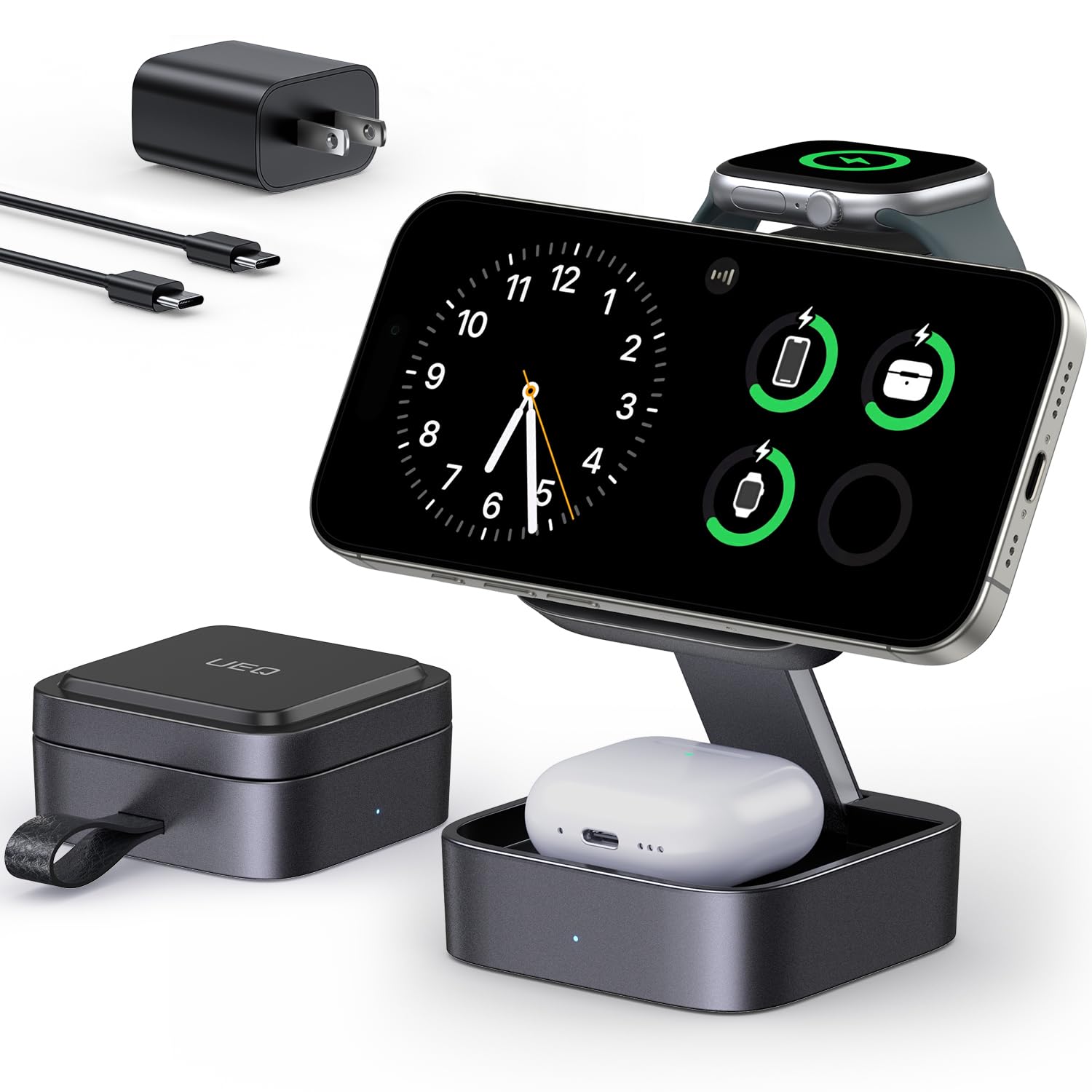
Figure 1: Compact design of the UEQ T12 charging station.

Figure 2: Folded and unfolded dimensions of the charging station.

Figure 3: The charging station's foldable design for easy travel.
4. Setup Instructions
- Connect Power: Connect the provided USB-C to USB-C cable to the charging station's USB-C port and the 20W USB-C power adapter. Plug the adapter into a wall outlet.
- Unfold the Station: Gently unfold the charging station to your desired angle. The magnetic phone charging pad and the Apple Watch charging module can be adjusted.
- Placement: Place the charging station on a stable, flat surface.
Video 1: Demonstration of the 3-in-1 Wireless Charging Station for Apple Devices, showing its setup and use.
5. Operating Instructions
5.1 Charging Your Devices
- iPhone: Place your MagSafe-compatible iPhone (12-17 series) onto the magnetic charging pad. The strong N52 magnets will auto-align your device for optimal charging. You can charge your iPhone horizontally for media viewing or vertically for video calls. Ensure your iPhone is not in a thick, non-MagSafe case, as this may hinder charging efficiency.
- Apple Watch: Place your Apple Watch (S2-S11/SE/Ultra) onto the dedicated watch charging module.
- AirPods: Place your AirPods (2/3/4/Pro) with a wireless charging case into the base charging area.
The charging station supports simultaneous charging of all three devices.

Figure 4: Charging an iPhone, Apple Watch, and AirPods.

Figure 5: Fast charging performance of the UEQ T12.

Figure 6: Strong magnetic connection for secure charging.
Video 2: A brief overview of the Foldable 3-in-1 Wireless Charging Station for Apple Devices.
5.2 LED Indicator
The LED indicator light on the charging station is designed to be dim during charging, ensuring it does not disturb your sleep or environment.

Figure 7: Sleep-friendly design with dim LED indicator.
6. Safety Information and Protection Features
The UEQ T12 Wireless Charging Station is equipped with intelligent protection technology to ensure a safe and secure charging experience for your devices. This includes:
- Over-Voltage Protection: Prevents damage from excessive voltage input.
- Over-Current Protection: Safeguards against excessive current flow.
- Temperature Control: Keeps your devices cool during charging to prevent overheating.
- Short-Circuit Protection: Provides enhanced safety against electrical shorts.
- Intelligent Chip Protection: Monitors and regulates charging for optimal battery health.

Figure 8: Multi-intelligent protection system.
7. Troubleshooting
- Device not charging:
- Ensure the charging station is properly connected to the 20W USB-C power adapter and a working power outlet.
- Verify that your device is correctly placed on its designated charging area and is MagSafe compatible (for iPhone).
- Remove any thick or non-MagSafe compatible phone cases that might interfere with wireless charging.
- Ensure your AirPods case supports wireless charging.
- Slow charging:
- Confirm you are using the provided 20W USB-C power adapter. Lower wattage adapters may result in slower charging.
- Ensure no foreign objects are between the device and the charging pad.
- Avoid charging in excessively hot environments.
- LED indicator not lighting up:
- The LED indicator is designed to be dim. Check in a darker environment or ensure the device is properly connected and charging.
- If no devices are placed, the LED may not illuminate.
8. Specifications
| Feature | Specification |
|---|---|
| Model Number | T12 |
| Brand | UEQ |
| Connectivity Technology | Wireless |
| Wireless Charging Standard | MagSafe |
| Compatible Devices (iPhone) | iPhone 17/Air/17 Pro/17 Pro Max, iPhone 16/16 Plus/16 Pro/16 Pro Max, iPhone 15/15 Plus/15 Pro/15 Pro Max, iPhone 14/14 Plus/14 Pro/14 Pro Max, iPhone 13/13 mini/13 Pro/13 Pro Max, iPhone 12/12 mini/12 Pro/12 Pro Max |
| Compatible Devices (Apple Watch) | iWatch S11/S10/9/8/7/6/5/4/3/2/SE/Ultra 3 2 (Apple Watch only) |
| Compatible Devices (AirPods) | AirPods 2/3/4/Pro/Pro 3 2 (requires wireless charging case) |
| Input Voltage | 9V AC |
| Amperage | 3A |
| Output Voltage | 9V |
| Output Current | 1.67A |
| Wattage | 23W |
| Total USB Ports | 1 (USB-C) |
| Color | Gray |
| Item Weight | 270g |
| Material | Plastic |

Figure 9: Device compatibility overview.
9. Maintenance
- Cleaning: Disconnect the charger from the power source before cleaning. Use a soft, dry cloth to wipe the surface. Do not use liquid cleaners or aerosols.
- Storage: When not in use, store the charging station in a cool, dry place, away from direct sunlight and extreme temperatures. Its foldable design allows for compact storage.
- Handling: Avoid dropping or subjecting the device to strong impacts. Do not attempt to disassemble or modify the product.
10. Warranty and Support
The UEQ T12 3-in-1 Wireless Charging Station comes with a 1-Year Warranty from the date of purchase. This warranty covers manufacturing defects and malfunctions under normal use.
For warranty claims, technical support, or any inquiries regarding your product, please contact our customer service team through the retailer where you purchased the product or visit the official UEQ website for contact information.