
1. Introduction
Thank you for choosing the DeerRun Walking Pad Treadmill Model AA-1. This manual provides essential information for the safe and efficient use of your new fitness equipment. Please read all instructions carefully before assembly and operation. Keep this manual for future reference.

Figure 1: DeerRun Walking Pad Treadmill in its upright position, with a user walking.
2. Important Safety Information
Before using the treadmill, please review the following safety guidelines:
- Always place the treadmill on a flat, stable surface.
- Ensure adequate clearance around the treadmill during operation.
- Keep children and pets away from the treadmill during operation.
- Use the safety key at all times. Attach the clip to your clothing. If the safety key detaches, the treadmill will stop immediately.
- Do not step on or off the treadmill while the belt is moving.
- Consult a physician before starting any new exercise program.
- Maximum user weight: 300 lbs (136 kg).
3. Package Contents
Verify that all components are present and undamaged upon unboxing:

Figure 2: All items included in the DeerRun Walking Pad Treadmill package.
- DeerRun Walking Pad Treadmill (Main Unit)
- Phone Stand x 1
- User Manual x 1
- Remote Controller x 1 (with battery)
- L-Shaped Wrench x 1
- Safety Rope x 1
- Power Cord (5.9ft) x 1
- Screwdriver x 1
- Lubricating Oil x 1
4. Setup
4.1 Unboxing and Initial Placement
Carefully remove the treadmill and all accessories from the packaging. Place the machine on a level ground. Inspect the packaging for any damage. If any, please contact customer service promptly. Cut the tape and packaging rope with a small knife while being cautious about safety. Lift the machine and place it flat on the ground. Remove the plastic wrapping from the machine.
Video 1: Unboxing and initial setup of the DeerRun 3-in-1 Folding Treadmill. This video demonstrates how to safely unbox the treadmill, remove packaging materials, and prepare it for use.
4.2 Assembling the Handlebar and Phone Holder
Lift the handlebar column to the upright position. Secure it by pressing the wrench inward to fix the column. Insert the cell phone holder into the designated slot on the console. Ensure the safety lock is placed in its designated position on the console.

Figure 3: Illustration of the adjustable handlebar mechanism, showing how to raise and secure it.
4.3 Power Connection
Plug the power cord into the treadmill's power input, then into a standard electrical outlet. Turn on the main power switch located at the base of the treadmill.
4.4 Remote Control Setup
Take out the remote control. Pull out the insulation piece from the remote control to activate the battery. The remote control can be used to control the machine's speed and start/stop functions.
5. Operating Instructions
5.1 Control Panel and Display
The LED display shows time, speed, distance, and calories burned. The control panel features buttons for starting, stopping, adjusting speed, and selecting programs.
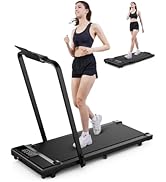
Figure 4: Detailed view of the treadmill's LED display and touch-sensitive control panel.
5.2 Starting and Adjusting Speed
To start, ensure the safety key is in place. Press the 'Start/Pause' button. The treadmill will begin with a 3-second countdown before the belt starts moving at a low speed. Use the '+' and '-' buttons on the console or remote control to adjust the speed. The treadmill supports speeds from 0.6 MPH to 7.5 MPH.
5.3 Incline Feature
The treadmill features a manual incline of 5.4 degrees. To activate the incline, locate the red tabs at the base of the treadmill. Flip these tabs upwards to raise the front of the treadmill, creating an incline. Ensure both tabs are securely in place before use.

Figure 5: View of the treadmill's manual incline mechanism at the base.
5.4 Folding and Storage
The treadmill is designed for easy folding and storage. To fold, release the handlebar locking mechanisms and gently lower the handlebar until it rests flat against the deck. The treadmill can then be stored upright or slid under furniture. It features smooth-rolling wheels for effortless mobility.

Figure 6: Illustration of the treadmill's folding mechanism for compact storage.

Figure 7: The DeerRun treadmill folded and stored vertically in a compact space.
5.5 PitPat App Integration
The DeerRun treadmill integrates with the PitPat APP, a global intelligent sports community platform. The app provides four running competition modes: multiplayer race, one-on-one PK, milestone race, and ranking race. It tracks your data, allowing you to monitor progress and participate in virtual races.

Figure 8: Screenshots of the PitPat App interface, displaying various fitness tracking and competitive features.
6. Maintenance
6.1 Lubrication
Regular lubrication of the running belt is essential for optimal performance and longevity. Use the provided lubricating oil. Apply a small amount under the belt as instructed in the user manual. Frequency of lubrication depends on usage, typically every few months.
6.2 Cleaning
Wipe down the treadmill with a damp cloth after each use to remove sweat and dust. Avoid using abrasive cleaners or solvents.
6.3 Belt Adjustment
If the running belt becomes misaligned or feels loose, refer to the detailed instructions in the user manual for proper adjustment using the provided L-shaped wrench.
7. Troubleshooting
If you encounter any issues with your DeerRun treadmill, please refer to the following common solutions:
- Treadmill not starting: Ensure the power cord is securely plugged in, the main power switch is on, and the safety key is correctly inserted into the console.
- App connectivity issues: Ensure your Wi-Fi network name or password does not contain spaces or special characters. Try restarting the app and your device.
- Unsteady handlebar: Ensure the locking knobs for the handlebar are fully tightened.
- Belt slipping or uneven: Refer to the belt adjustment section in the user manual and apply lubrication if necessary.
For further assistance, please contact customer service.
8. Specifications
| Feature | Specification |
|---|---|
| Brand | DeerRun |
| Model Name | treadmill (AA-1) |
| Product Dimensions | 50"D x 17"W x 39"H |
| Folded Size | 54.17 x 25.51 x 5 inches |
| Item Weight | 62 Pounds |
| Maximum Weight Recommendation | 300 Pounds |
| Material | Alloy Steel, Plastic |
| Maximum Speed | 7.5 Miles per Hour |
| Minimum Speed | 0.6 Miles per Hour |
| Maximum Horsepower | 3 Horsepower |
| Maximum Incline Percentage | 1 (manual 5.4 degrees) |
| Deck Length | 43 Inches |
| Deck Width | 16 Inches |
| Display Type | LED |
| Connectivity Technology | Power Cord, Bluetooth (for app) |
9. Warranty & Support
DeerRun offers a 1-year warranty on our treadmills, including all accessories. If you have any questions about our products or encounter any problems during use, you can contact us via Amazon/email/phone. Our professional customer service team is available 24/7 online to provide you with a satisfactory solution.