
Introduction
Thank you for choosing the Fenamx MJX Hyper Go 14207 1/14 4WD Brushless RC Truck. This high-performance remote-controlled vehicle is designed for enthusiasts seeking speed and durability across various terrains. This manual provides essential information for the safe and effective operation, maintenance, and troubleshooting of your RC truck. Please read it thoroughly before use.
Safety Information
Operating remote-controlled vehicles requires attention to safety. Always operate the RC truck in open areas, away from people, pets, and obstacles. Avoid operating near public roads, water bodies, or in adverse weather conditions. Keep fingers and loose clothing away from moving parts. Adult supervision is recommended for users under 14 years of age. Ensure all components are securely fastened before each use.
Battery Safety: Use only the specified batteries. Do not overcharge or short-circuit batteries. Store batteries in a cool, dry place. Dispose of used batteries responsibly.
What's in the Box
Upon unboxing, verify that all components are present:
- MJX Hyper Go 14207 RC Truck
- 2.4GHz Transmitter (Remote)
- Product Manual
- 1 AAAA Battery (for Transmitter)
- Charging Cable (for vehicle battery)
- Additional PC Body Shells (x2)
- Chromium Steel Motor Teeth
- Other accessories as specified by packaging
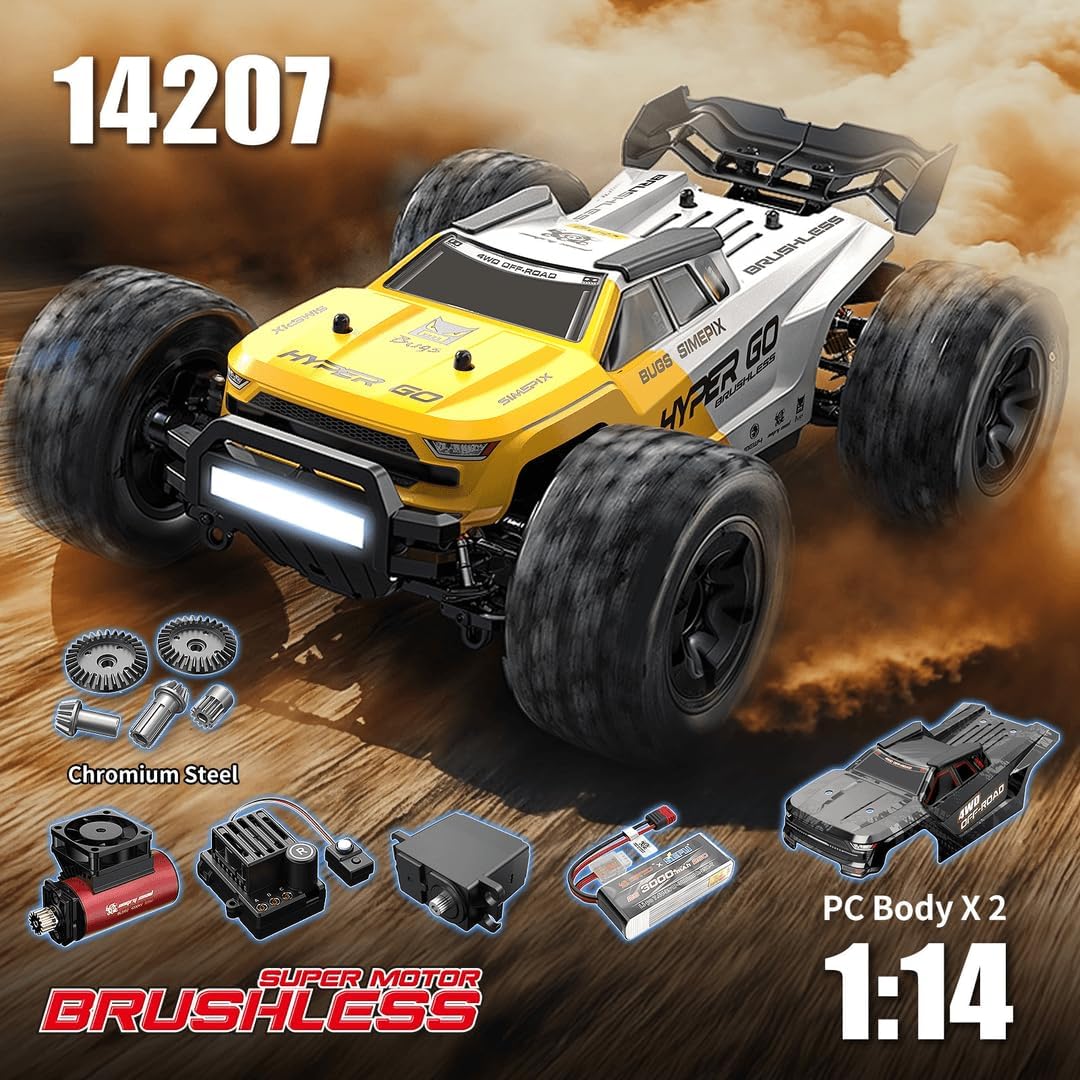
Image: Fenamx MJX Hyper Go 14207 RC Truck with its main components and accessories.
Setup
- Charge Vehicle Battery: Connect the vehicle's battery to the provided charging cable and a suitable power source. Ensure the battery is fully charged before first use. Refer to the battery's specific charging instructions for details.
- Install Transmitter Battery: Open the battery compartment on the 2.4GHz transmitter and insert the included AAAA battery, observing correct polarity. Close the compartment securely.
- Power On: First, turn on the transmitter. Then, turn on the RC truck. The truck and transmitter should automatically bind. If not, refer to the troubleshooting section.
- Throttle Limit Adjustment: For beginners, the transmitter allows setting the throttle limit to 70%. Locate the throttle limit switch or dial on the transmitter and adjust as desired. This helps in controlling speed during initial learning phases.

Image: The 2.4GHz transmitter with labeled controls for the RC truck.
Operating Instructions
Familiarize yourself with the transmitter controls before operating the vehicle at high speeds.
- Throttle Control: Use the trigger on the transmitter to control forward and reverse movement. Pull for forward, push for reverse/brake.
- Steering Control: Use the steering wheel on the transmitter to turn the vehicle left or right.
- Trim Adjustments: Use the steering trim and throttle trim dials to fine-tune the vehicle's straight-line tracking and neutral throttle position.
- Driving on Various Terrains: The 111mm diameter multi-terrain airless tires are suitable for grass, gravel roads, dirt paths, ice, snow, sand, and mud. The hydraulic shock absorbers help maintain control over uneven surfaces.
- Speed Modes: The vehicle is equipped with a powerful 2850 4200KV Brushless Motor and 50A ESC. With a 2S battery (included), it offers significant speed. For experienced users, upgrading to a 3S battery (sold separately) can increase the top speed to approximately 78 km/h.
Video: Demonstration of the Fenamx MJX Hyper Go 14207 RC Truck operating on various terrains, showcasing its speed and handling capabilities.
Maintenance
Regular maintenance ensures the longevity and performance of your RC truck.
- Cleaning: After each use, especially in dusty or muddy conditions, clean the vehicle to remove dirt and debris. Use a soft brush or compressed air. Avoid using water directly on electronic components.
- Inspection: Regularly inspect the chassis, drivetrain, wheels, and suspension for any signs of damage, loose screws, or wear. Pay attention to the metal gears, steel drive shaft, and composite bumper.
- Lubrication: Apply appropriate RC-grade lubricant to moving parts like gears and bearings as needed to reduce friction and wear.
- Tire Care: Check tires for punctures or excessive wear. Ensure they are free of embedded debris.
- Battery Storage: When not in use for extended periods, store the vehicle battery at a partial charge (around 3.8V per cell for LiPo) in a cool, dry place.

Image: Detailed view of the internal components, including the brushless motor, ESC, servo, receiver box, metal drive shaft, chromium steel gears, metal CVD, metal differential, metal oil-filled shocks, and bearings.
Troubleshooting
| Problem | Possible Cause | Solution |
|---|---|---|
| Vehicle does not respond | Low battery (vehicle or transmitter), not bound, power switch off | Charge/replace batteries, re-bind transmitter and receiver, ensure power switches are ON |
| Poor range or intermittent control | Interference, low transmitter battery, damaged antenna | Move to an open area, replace transmitter battery, check antenna for damage |
| Vehicle pulls to one side | Steering trim incorrect, damaged steering components | Adjust steering trim on transmitter, inspect steering linkage and servo |
| Motor not running or running weakly | Motor/ESC issue, low vehicle battery, loose connections | Check battery charge, inspect motor/ESC connections, consult support if issues persist |
Specifications
- Model: MJX Hyper Go 14207
- Scale: 1/14
- Drive System: 4WD
- Motor: 2850 4200KV Brushless Motor
- ESC: 50A Brushless ESC
- Transmitter: 2.4GHz (300+ foot range, 3 channels, light control, trim adjustments)
- Chassis: Durable 6061 Aluminum Alloy with laser-etched plate, metal center support, composite brace
- Tires: 111mm diameter multi-terrain airless tires
- Suspension: Newly designed adjustable hydraulic shock absorbers
- Drivetrain: Heavy-duty with metal gears and steel drive shaft
- Top Speed (with 3S battery, sold separately): Approximately 78 km/h
- Product Dimensions: 2 x 1 x 1.99 inches
- Item Weight: 7.7 pounds
- Recommended Age: 14 years and up
Warranty and Support
For warranty information or technical support, please refer to the contact details provided with your purchase documentation or visit the official Fenamx website. Keep your proof of purchase for any warranty claims.


