
Generico 998 PRO
Generico 998 PRO Foldable Drone User Manual
Model: 998 PRO
Introduction
Thank you for choosing the Generico 998 PRO Foldable Drone. This advanced quadcopter features a 4K HD FPV camera, Wi-Fi connectivity, and a user-friendly design, making it suitable for beginners and experienced pilots alike. This manual will guide you through the setup, operation, and maintenance of your drone to ensure a safe and enjoyable flying experience.
What's in the Box
Please check the package contents to ensure all items are present:
- Drone
- 1 Battery
- Charging Cable
- Screwdriver
- 4 Propeller Protectors
- 4 Spare Propellers
- Remote Control
- Instructions Manual
Product Overview
Familiarize yourself with the main components of your Generico 998 PRO drone and its accessories.
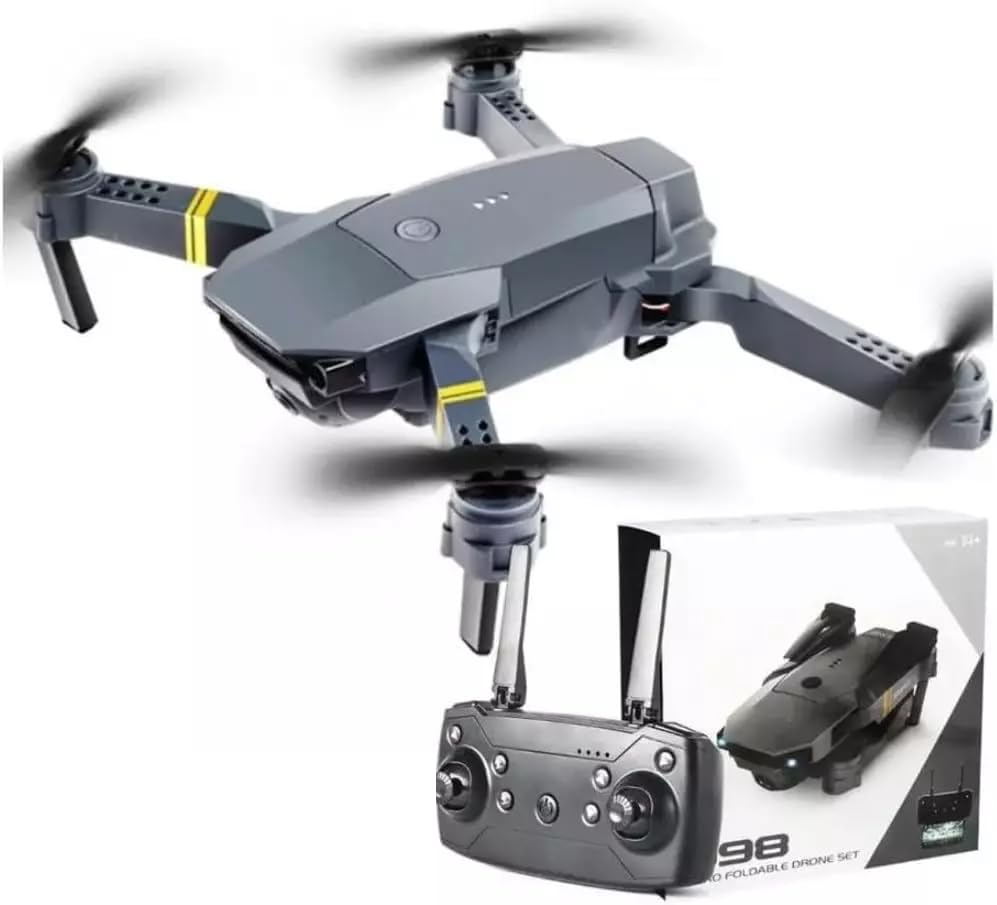
Image: The Generico 998 PRO drone in its unfolded state, a folded view of the drone, and the remote control with a smartphone attached, illustrating the FPV setup.
The image above displays the drone in both its unfolded flight configuration and its compact, folded state for transport. It also shows the remote control, which includes a mount for a smartphone to utilize the First Person View (FPV) feature. Key components include the drone's body, four propellers, landing gear, and the integrated 4K camera. The remote control features joysticks for flight control and various buttons for functions like take-off, landing, and camera operation.
Setup
1. Unfolding the Drone
- Gently unfold the drone arms until they lock into position. Ensure all four arms are fully extended.
2. Battery Installation
- Drone Battery: Insert the provided battery into the drone's battery compartment. Ensure it clicks securely into place.
- Remote Control Batteries: Open the battery compartment on the back of the remote control. Insert the required batteries (not included for remote control, typically AA/AAA) according to the polarity markings. Close the compartment.
3. Propeller Protectors Installation
- Attach the propeller protectors to the drone's arms. These help prevent damage to the propellers during collisions.
4. App Installation and Wi-Fi Connection
- Download the dedicated drone control app on your smartphone (refer to the product packaging or instructions for the specific app name).
- Turn on the drone.
- On your smartphone, go to Wi-Fi settings and connect to the drone's Wi-Fi network (usually named something like "WIFI_DRONE_XXXX").
- Open the app to establish the FPV connection.
5. Remote Control Pairing
- Place the drone on a flat, level surface.
- Turn on the drone.
- Turn on the remote control.
- Push the left joystick up and then pull it down. The drone's indicator lights should stop flashing and become solid, indicating successful pairing.
Operating
1. Pre-Flight Checklist
- Ensure drone and remote control batteries are fully charged.
- Check that propellers are securely attached and undamaged.
- Verify that the drone is on a flat surface and clear of obstacles.
- Confirm successful pairing between drone and remote control.
- Check FPV connection on your smartphone (if using).
2. Basic Flight Controls
- Take-off/Landing: Use the dedicated one-key take-off/landing button on the remote, or push both joysticks diagonally outwards to start motors, then gently push the left joystick up to ascend.
- Ascend/Descend: Left joystick up/down.
- Forward/Backward: Right joystick up/down.
- Left/Right Sideways Flight: Right joystick left/right.
- Turn Left/Right (Yaw): Left joystick left/right.
3. 4K Camera and FPV Function
- Once the FPV connection is established via the app, you can view the drone's camera feed in real-time on your smartphone.
- Use the app or designated buttons on the remote control to capture 4K photos and videos. Refer to the app interface for specific controls.
4. Safety Guidelines
- Always fly in open areas, away from people, animals, and obstacles.
- Do not fly in strong winds or adverse weather conditions.
- Maintain visual line of sight with the drone at all times.
- Be aware of local regulations regarding drone operation.
- The drone is equipped with advanced safety features to help prevent collisions and signal loss. However, always exercise caution and good judgment during flight.
- Land the drone immediately if you experience any control issues or low battery warnings.
Maintenance
1. Cleaning
- Wipe the drone body with a soft, dry cloth after each use.
- Ensure the camera lens is clean for clear image capture.
- Remove any debris from the motors and propellers.
2. Battery Care
- Charge the drone battery using only the provided charging cable.
- Do not overcharge or completely discharge the battery.
- Store batteries in a cool, dry place when not in use.
3. Propeller Replacement
- If a propeller is damaged, replace it with a spare propeller from the package.
- Use the screwdriver to carefully remove the damaged propeller and install the new one, ensuring it is securely fastened.
Troubleshooting
| Problem | Possible Cause | Solution |
|---|---|---|
| Drone does not power on | Battery not charged or incorrectly installed. | Ensure battery is fully charged and correctly inserted. |
| Remote control not responding | Remote control batteries low or not installed. Drone and remote not paired. | Replace remote control batteries. Re-pair the drone and remote control. |
| Drone unstable during flight | Propellers damaged or incorrectly installed. Drone not calibrated. | Check and replace damaged propellers. Perform a drone calibration (refer to app or remote instructions for specific steps). |
| No FPV feed on smartphone | Wi-Fi not connected. App not open or crashed. | Ensure smartphone is connected to the drone's Wi-Fi. Restart the app and drone. |
| Short flight time | Battery not fully charged. Old or damaged battery. | Fully charge the battery before each flight. Consider replacing the battery if performance degrades significantly. |
Specifications
- Model Name: 998 PRO
- Brand: Generico
- Video Capture Resolution: 4K
- Connectivity Technology: Wi-Fi
- Control Type: Remote Control
- Maximum Range: 500 Meters (1640 feet)
- Special Features: FPV Wi-Fi, Advanced Safety Functions
- Material: Plastic
- Dimensions (Folded): Approximately 20 x 15 x 5 cm (7.9 x 5.9 x 2 inches)
- Weight: Approximately 500 g (1.1 lbs)
- Flight Autonomy: Approximately 20 minutes
- Age Range Description: Kid
- Components Included: Drone, 1 Battery, Charging Cable, Screwdriver, 4 Propeller Protectors, 4 Spare Propellers, Remote Control, Instructions
Warranty and Support
For any issues or questions not covered in this manual, please refer to the contact information provided at the point of purchase or on the product packaging. Keep your purchase receipt as proof of purchase for any warranty claims. Specific warranty details may vary by region and retailer.
Ask a question about this manual
Ask about setup, troubleshooting, compatibility, parts, safety, or missing instructions. Manuals+ will review the question and use this page’s manual context to help answer it.