
Introduction
Thank you for choosing the LEEMC TP03 Wireless Earbuds. These earbuds are designed to provide a high-quality audio experience with advanced features such as a touchscreen charging case, Active Noise Cancellation (ANC), and a secure, waterproof fit. This manual will guide you through the setup, operation, and maintenance of your new earbuds to ensure optimal performance.
What's in the Box
- TP03 Sport Earbuds (Left and Right)
- Wireless Touchscreen Charging Case
- Silicone Ear Tips (Sizes S, M, L - M-size pre-installed)
- USB-C Charging Cable
- User Manual
Product Overview
The LEEMC TP03 Wireless Earbuds combine innovative technology with user-friendly design. Key features include:
- Revolutionary Touchscreen Charging Case: Control music, volume, noise modes, EQ presets, camera remote, and more directly from the case's intuitive interface.
- Secure, Waterproof Fit: Flexible over-ear hooks ensure stability during intense activities, complemented by IPX7 waterproof protection against sweat and rain.
- Premium Hi-Fi Sound: Enjoy rich audio with a 13mm dynamic driver and customizable sound profiles via 5 EQ modes.
- Smart Noise Control: Seamlessly switch between Active Noise Cancellation (ANC) for immersive listening and Transparency Mode for environmental awareness.
- Extended Playtime: Up to 9 hours of listening on a single charge, extended to 40 hours with the charging case.
- Advanced Connectivity: Bluetooth 6.0 ensures a stable and rapid connection up to 15 meters.

Image: LEEMC TP03 Wireless Earbuds and their touchscreen charging case.
Setup
1. Initial Charge
Before first use, fully charge the earbuds and the charging case.
- Connect the provided USB-C charging cable to the charging port on the case and to a compatible USB power source.
- The touchscreen on the case will display the charging status. A full charge typically takes about 75 minutes.
2. Ear Tip Selection and Fit
Choosing the correct ear tip size is crucial for comfort, sound quality, and effective noise cancellation.
- Experiment with the included S, M, and L silicone ear tips to find the size that creates a snug seal in your ear canal.
- The earbuds feature flexible over-ear hooks for a secure fit. Gently place the earbud into your ear and adjust the hook over your ear until it feels stable and comfortable.

Image: A person wearing the LEEMC TP03 earbuds, demonstrating the secure and comfortable fit with the over-ear hook.
Image: The LEEMC TP03 earbuds shown with different sizes of silicone ear tips (S, M, L) for a customized fit.
3. Power On and Bluetooth Pairing
The earbuds will automatically power on and enter pairing mode when the charging case lid is opened.
- Open the lid of the charging case. The earbuds' indicator lights will flash, indicating they are ready to pair.
- On your smartphone or other Bluetooth-enabled device, go to the Bluetooth settings.
- Search for "LEEMC TP03" in the list of available devices and select it to connect.
- Once connected, a voice prompt will confirm successful pairing, and the indicator lights on the earbuds will turn off or show a steady light.
Operating Instructions
Touchscreen Charging Case Controls
The smart touchscreen on the charging case provides comprehensive control over your earbuds' functions without needing your phone.
- Music Playback: Swipe left/right to navigate to the music control screen. Tap to play/pause, or use the forward/backward arrows to skip tracks.
- Volume Adjustment: Swipe to the volume control screen and tap the '+' or '-' icons to adjust the volume.
- Noise Control (ANC/Transparency): Navigate to the noise reduction screen to toggle between Active Noise Cancellation (ANC), Transparency Mode, and Normal mode.
- EQ Presets: Access the equalizer screen to select from 5 preset sound modes: Normal, Rock, Classic, Pop, or Jazz.
- Camera Remote: Use the camera icon to remotely trigger your phone's camera for hands-free photos.
- Find My Earbud: If an earbud is misplaced, select 'Find My Earphone' and choose L or R to make the earbud emit a beeping sound.
- Language Interface: Select your preferred language from the 16 available options.
- Light Level: Adjust the brightness of the touchscreen display.
- Timer: Set a timer for workouts or other activities.
- Wallpapers: Customize the touchscreen with 5 preset wallpapers.
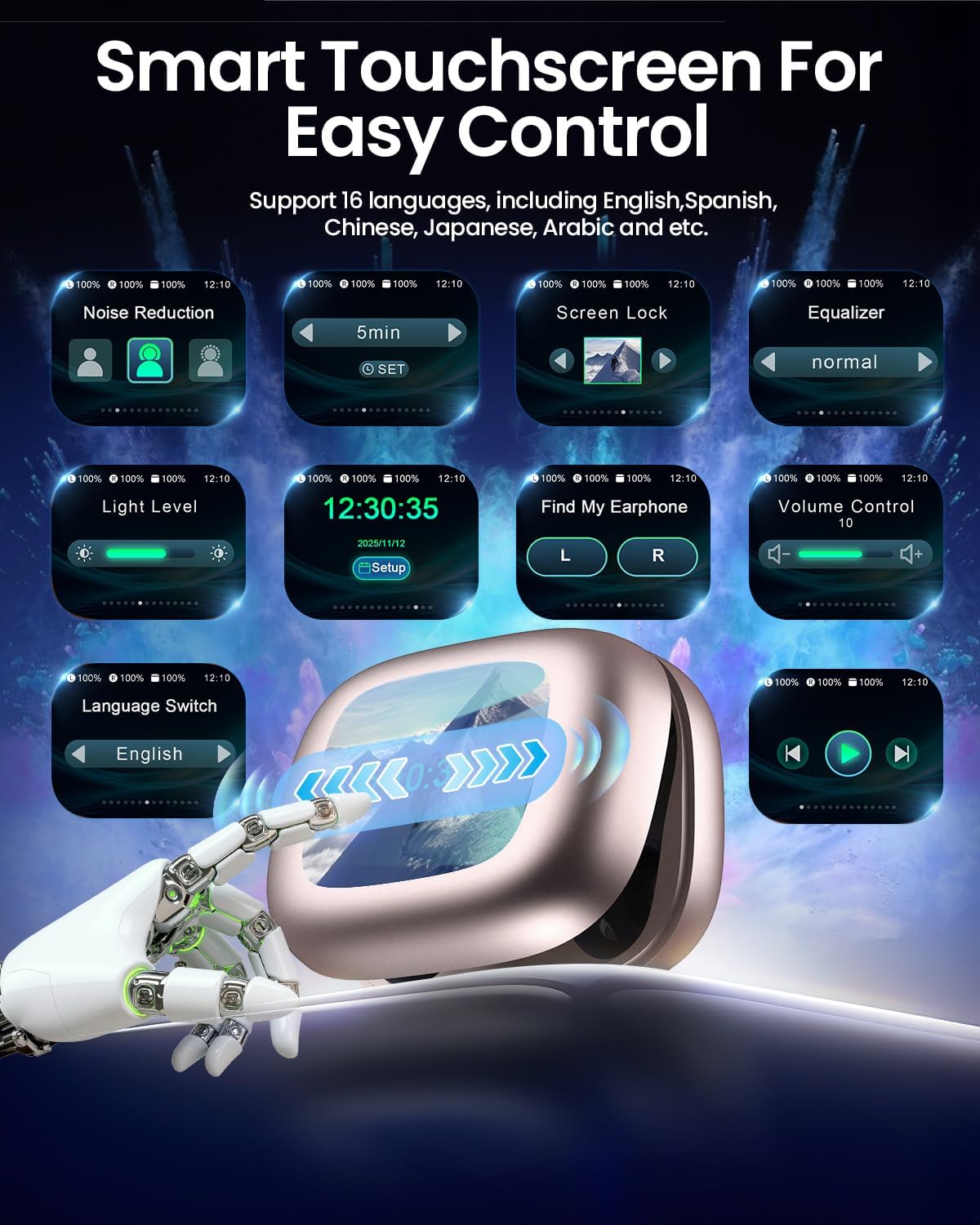
Image: The LEEMC TP03 touchscreen charging case showing various control options.

Image: A close-up of the LEEMC TP03 touchscreen interface, highlighting options like noise reduction, equalizer, and 'Find My Earphone'.

Image: The 'Find My Earphone' feature on the touchscreen case, indicating a lost earbud's location.

Image: The timer function displayed on the LEEMC TP03 touchscreen charging case.

Image: The camera remote control feature shown on the LEEMC TP03 touchscreen case, connected to a smartphone.
Earbud Touch Controls
The earbuds themselves feature touch-sensitive panels for quick control during activities.
- Play/Pause: Single tap (Left or Right earbud).
- Volume Up: Press and hold (Right earbud).
- Volume Down: Press and hold (Left earbud).
- Next Song: Double tap (Right earbud).
- Previous Song: Double tap (Left earbud).
- Answer/End Calls: Double tap (Left or Right earbud).
- Reject Calls: Press and hold for 3 seconds (Left or Right earbud).
- Voice Assistant: Tap four times (Left or Right earbud).
- ANC/Transparency Mode Switch: Triple tap (Left or Right earbud).

Image: A visual guide to the intuitive touch controls on the LEEMC TP03 earbuds.
Noise Control
The TP03 earbuds offer versatile noise control options to suit your environment:
- Active Noise Cancellation (ANC): Reduces ambient noise, allowing for focused listening. Ideal for travel or noisy environments.
- Transparency Mode: Allows you to hear your surroundings while still enjoying your audio, enhancing situational awareness. Useful for urban environments or conversations.
- Normal Mode: Standard audio experience without active noise cancellation or transparency.
Switch between modes using the touchscreen charging case or by triple-tapping either earbud.

Image: Visual representation of Active Noise Cancellation (ANC) and Transparency Mode functionality.

Image: A cyclist wearing LEEMC TP03 earbuds, illustrating the use of Transparency Mode for safety.
Sound Quality
The TP03 earbuds are equipped with a large 13mm dynamic driver, delivering powerful bass and clear, crisp highs. Customize your listening experience with 5 preset equalizer (EQ) modes available through the touchscreen case:
- Normal
- Rock
- Classic
- Pop
- Jazz

Image: A visual representation of the 13mm dynamic driver and the five available EQ modes.
Battery Life
Enjoy extended listening sessions with the TP03 earbuds:
- Single Charge: Up to 9 hours of continuous playback.
- With Charging Case: Total playtime extends to approximately 40 hours.
- Quick Charge: A 10-minute charge provides up to 1 hour of playback.

Image: An illustration highlighting the 9-hour single charge and 40-hour total battery life with the charging case.
Connectivity
The TP03 earbuds utilize advanced Bluetooth 6.0 technology for a reliable and efficient wireless connection.
- Stable Connection: Experience an unbreakable connection with enhanced signal stability.
- Instant Pairing: Earbuds pair quickly with your device upon opening the charging case.
- Range: Maintain a stable connection up to 15 meters (approximately 49 feet).
- Low Latency: Enjoy synchronized audio and video with a low latency of 55 milliseconds.

Image: A diagram illustrating the advanced Bluetooth 6.0 technology within the LEEMC TP03 earbuds.

Image: An illustration demonstrating the low latency feature of the LEEMC TP03 earbuds, ideal for gaming.
Maintenance
Proper care will extend the lifespan and performance of your earbuds.
- Cleaning: Regularly wipe the earbuds and charging case with a soft, dry, lint-free cloth. Avoid using abrasive materials or harsh chemicals.
- Ear Tips: Remove the silicone ear tips and clean them with mild soap and water. Ensure they are completely dry before reattaching them to the earbuds.
- Storage: Always store the earbuds in their charging case when not in use to protect them from dust, damage, and to keep them charged.
- Water Resistance: The earbuds are IPX7 waterproof, making them resistant to sweat and rain. However, they are not designed for swimming or submersion in water. Ensure the earbuds are dry before placing them back into the charging case to prevent damage.

Image: A person exercising, highlighting the sweat and water-resistant features of the LEEMC TP03 earbuds with an IPX7 rating.
Troubleshooting
If you encounter any issues with your LEEMC TP03 Wireless Earbuds, please refer to the following common solutions:
- Earbuds not pairing: Ensure both earbuds are charged and the charging case lid is open. Turn your device's Bluetooth off and on, then try re-pairing. If issues persist, forget the device from your Bluetooth list and attempt to pair again.
- No sound from one earbud: Check if both earbuds are sufficiently charged. Place both earbuds back into the charging case, close the lid, wait a few seconds, then reopen to reset the connection.
- Charging case not charging: Verify that the USB-C cable is securely connected to both the case and the power source. Ensure the power source is active.
- Touch controls unresponsive: Make sure your fingers are clean and dry. Try restarting the earbuds by placing them in the case and closing the lid, then reopening.
- Poor sound quality: Confirm that the ear tips provide a proper seal in your ear canal. Clean any debris from the earbud nozzles. Ensure your device is within the 15-meter Bluetooth range.
For more detailed troubleshooting or persistent issues, please contact customer support.
Specifications
| Feature | Detail |
|---|---|
| Brand | LEEMC |
| Model Number | TP03 |
| Ear Placement | Over Ear |
| Form Factor | In Ear |
| Impedance | 32 Ohms |
| Connectivity Technology | Wireless (Bluetooth 6.0) |
| Bluetooth Range | 15 Meters |
| Noise Control | Active Noise Cancellation (ANC) |
| Frequency Response | 50 KHz |
| Sensitivity | 107 dB |
| Audio Driver Type | Dynamic Driver |
| Audio Driver Size | 13mm |
| Audio Latency | 55 Milliseconds |
| Battery Life (Earbuds) | Up to 9 Hours (single charge) |
| Battery Life (with Case) | Up to 40 Hours |
| Battery Charge Time | 75 minutes |
| Water Resistance Level | IPX7 Water Resistant |
| Control Type | Touch Control (Earbuds and Case) |
| Item Weight | 72.8 Grams (total) |
| Carrying Case Dimensions | 8 cm (Length) x 6.08 cm (Width) x 3.56 cm (Height) |
| Enclosure Material | Acrylonitrile Butadiene Styrene (ABS), Silicone |
Warranty & Support
Your LEEMC TP03 Wireless Earbuds come with a 12-month manufacturer's warranty from the date of purchase, covering defects in materials and workmanship.
For any questions, technical support, or warranty claims, please contact our dedicated online customer service team. We are committed to providing prompt assistance and ensuring your satisfaction.
Product Videos
Video: An overview of the TP03 wireless earbuds, highlighting their design and suitability for workouts.
Video: Demonstrating the Active Noise Cancellation and touchscreen features of the wireless earbuds.