
Introduction
Thank you for purchasing the Fenamx Mjx Hyper Go 18208 1/18 Scale 4WD Off-Road RC Truck. This manual provides essential information for the safe operation, setup, maintenance, and troubleshooting of your new RC vehicle. Please read this manual thoroughly before use to ensure proper function and longevity of the product.
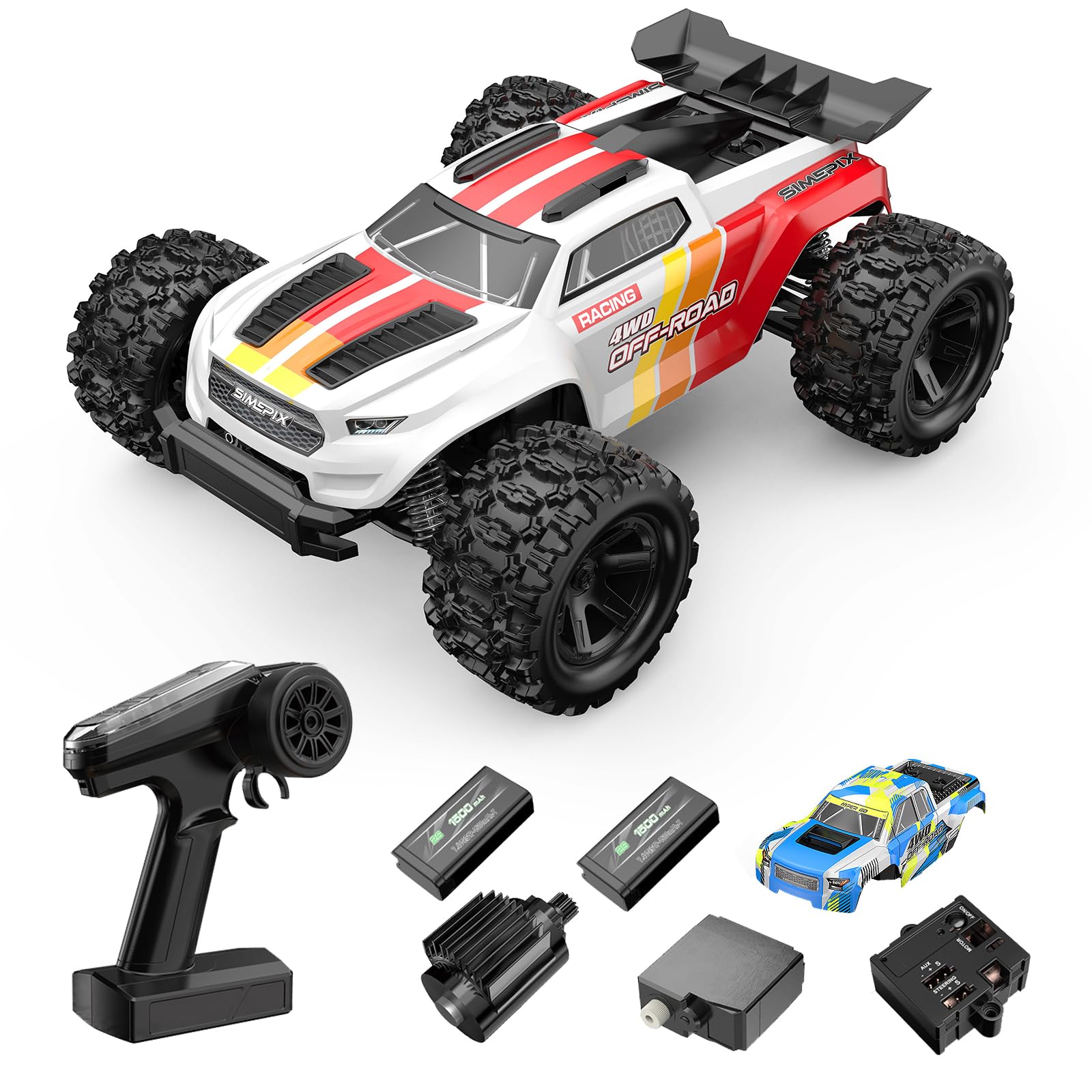
Image: The Fenamx Mjx Hyper Go 18208 RC Truck, a 1/18 scale 4WD off-road vehicle.
Safety Precautions
- Always operate the RC truck in open areas away from people, pets, and obstacles.
- Do not operate near public roads or in crowded areas.
- Keep hands, hair, and loose clothing away from moving parts.
- Ensure batteries are charged correctly and handled safely.
- Avoid exposing the RC truck to extreme temperatures or direct sunlight for extended periods.
- This product is recommended for users aged 14 years and older. Adult supervision is advised for younger users.
Package Contents
Please check the package contents to ensure all items are present:
- Fenamx Mjx Hyper Go 18208 RC Truck
- 2.4 GHz Remote Control
- Two 7.4V 1500mAh LiPo Batteries
- USB Charging Cable
- Two Car Bodies (one installed, one spare)
- Product Manual

Image: The Fenamx Mjx Hyper Go 18208 RC Truck with its included accessories, including two batteries and two car bodies.
Setup
1. Battery Installation (RC Truck)
- Ensure the RC truck is powered off.
- Locate the battery compartment on the underside of the truck.
- Open the battery compartment cover.
- Insert one of the provided 7.4V 1500mAh LiPo batteries, ensuring correct polarity.
- Securely close the battery compartment cover. The compartment is designed to resist impact.
2. Battery Installation (Remote Control)
- Locate the battery compartment on the back of the remote control.
- Open the battery cover.
- Insert 1 AA battery (included), observing the correct polarity markings.
- Close the battery cover.
3. Charging the LiPo Batteries
- Connect the USB charging cable to a power adapter (not included).
- Connect the LiPo battery to the USB charging cable.
- The indicator light on the USB charger will show charging status. Refer to the charger's specific instructions for light indications.
- Do not leave batteries unattended while charging.
- Always use the provided USB charging cable for safe charging.
4. Remote Control Pairing
The RC truck and remote control are typically pre-paired. If re-pairing is necessary:
- Ensure both the RC truck and remote control are powered off.
- Turn on the RC truck.
- Turn on the remote control. The indicator light on the remote should flash and then become solid, indicating a successful connection.

Image: An overhead view of the RC truck chassis, highlighting the motor, ESC, servo, and battery compartments.
Operating Your RC Truck
Remote Control Functions
Familiarize yourself with the remote control layout:
- Steering Wheel: Controls left and right steering.
- Throttle Trigger: Pull to accelerate forward, push to brake/reverse.
- ST. TRIM (Steering Trim): Adjusts the steering neutral position.
- TH. TRIM (Throttle Trim): Adjusts the throttle neutral position.
- ST. D/R (Steering Dual Rate): Adjusts the maximum steering angle.
- TH. D/R (Throttle Dual Rate): Adjusts the maximum throttle output.
- Power Switch: Turns the remote control on/off.

Image: Diagram showing the remote control with labeled functions, alongside various metal components of the truck.
Driving Tips
- Start with slow speeds to get accustomed to the controls.
- The truck features a new chassis design with adjustable shocks and independent suspension, making it suitable for dirt, gravel, and grass.
- The RC system includes overheat protection, anti-jam cut-off, and a splash-proof design, allowing for operation in various conditions.
- Practice steering and throttle control in an open area before attempting more complex maneuvers.
Video: The Mjx Hyper Go 18208 RC Truck demonstrating its off-road capabilities and splash-proof design by driving through various terrains and puddles.

Image: Two Fenamx Mjx Hyper Go RC Trucks navigating a dusty off-road environment, showcasing their agility and terrain handling.
Maintenance
Cleaning
- After each use, especially in dusty or wet conditions, clean the truck to remove dirt and debris.
- Use a soft brush or compressed air to clean hard-to-reach areas.
- Wipe down the body and chassis with a damp cloth. Avoid using harsh chemicals.
- Ensure the truck is completely dry before storing.
Component Inspection
- Regularly inspect the wheels, tires, and suspension components for damage or wear.
- Check the metal drive shafts, differentials, and shocks for proper function and lubrication.
- Ensure all screws and fasteners are tight.
- The truck is built with strong PA materials and a reinforced design for better impact resistance, but regular checks are still important.
Storage
- Store the RC truck and remote control in a cool, dry place away from direct sunlight.
- Remove batteries from both the truck and remote control if storing for an extended period.

Image: An underside view of the RC truck chassis, showing the independent suspension, drive shafts, and battery compartment.
Troubleshooting
| Problem | Possible Cause | Solution |
|---|---|---|
| Truck does not respond to remote. | Low battery in truck or remote; Not paired; Power switch off. | Charge/replace batteries; Re-pair remote; Ensure power switches are ON. |
| Reduced range or intermittent control. | Interference; Low battery in remote. | Move to an area with less interference; Replace remote batteries. |
| Truck pulls to one side. | Steering trim needs adjustment. | Adjust ST. TRIM on the remote control. |
| Motor stops or overheats. | Overuse; Obstruction; Overheat protection activated. | Allow motor to cool down; Check for obstructions; Reduce continuous high-speed operation. |
Specifications
| Feature | Detail |
|---|---|
| Brand Name | Fenamx |
| Model Name | 18208 |
| Scale | 1/18 Scale |
| Drive System | 4WD |
| Motor | RC 380 Motor |
| Servo | 3-wire 17g Servo |
| Remote Control Frequency | 2.4GHz |
| Battery (Truck) | Two 7.4V 1500mAh LiPo batteries |
| Battery (Remote) | 1 AA battery (included) |
| Material Type | Plastic (Durable PA materials) |
| Waterproof Features | Splash-proof design |
| Age Range Description | Adult (Manufacturer Minimum Age: 168 months) |
Warranty and Support
For warranty information or technical support, please refer to the contact details provided with your purchase documentation or visit the official Fenamx website. Keep your purchase receipt as proof of purchase.