
YVAAASIYC 8208
YVAAASIYC 8208 Portable Hot Air Gun Instruction Manual
Model: 8208
Introduction
This manual provides detailed instructions for the safe and effective use of your YVAAASIYC 8208 Portable Hot Air Gun. Please read this manual thoroughly before operation and retain it for future reference.
The YVAAASIYC 8208 is a 750W portable hot air gun with an LCD display, designed for rework station applications, including BGA soldering. It features adjustable temperature control from 100°C to 480°C and a maximum airflow of 150 liters per minute.
Important Safety Instructions
Always follow basic safety precautions when using electrical appliances to reduce the risk of fire, electric shock, and personal injury.
- Ensure the power supply matches the voltage specified on the tool.
- Do not touch the hot nozzle or heated air stream. Allow the tool to cool completely before storing.
- Use in a well-ventilated area to avoid inhaling fumes.
- Keep children and unauthorized persons away from the work area.
- Do not use in damp or wet conditions.
- Always wear appropriate personal protective equipment, including safety glasses.
- Unplug the tool when not in use or before performing maintenance.
- Do not direct the hot air stream at people or animals.
- Do not block the air intake or exhaust vents.
Product Overview
The YVAAASIYC 8208 Hot Air Gun is designed for precision heating tasks. Key features include:
- Portable handheld design with digital LED display.
- Adjustable airflow and temperature via keypad.
- Automatic rotation stop when temperature drops below 70°C for safety and extended lifespan.
- Suitable for soldering temperature-sensitive components like QFP, PLCC, and BGA.
- Intelligent guide function and cold air flow.
- Durable silicone body with excellent heat dissipation.
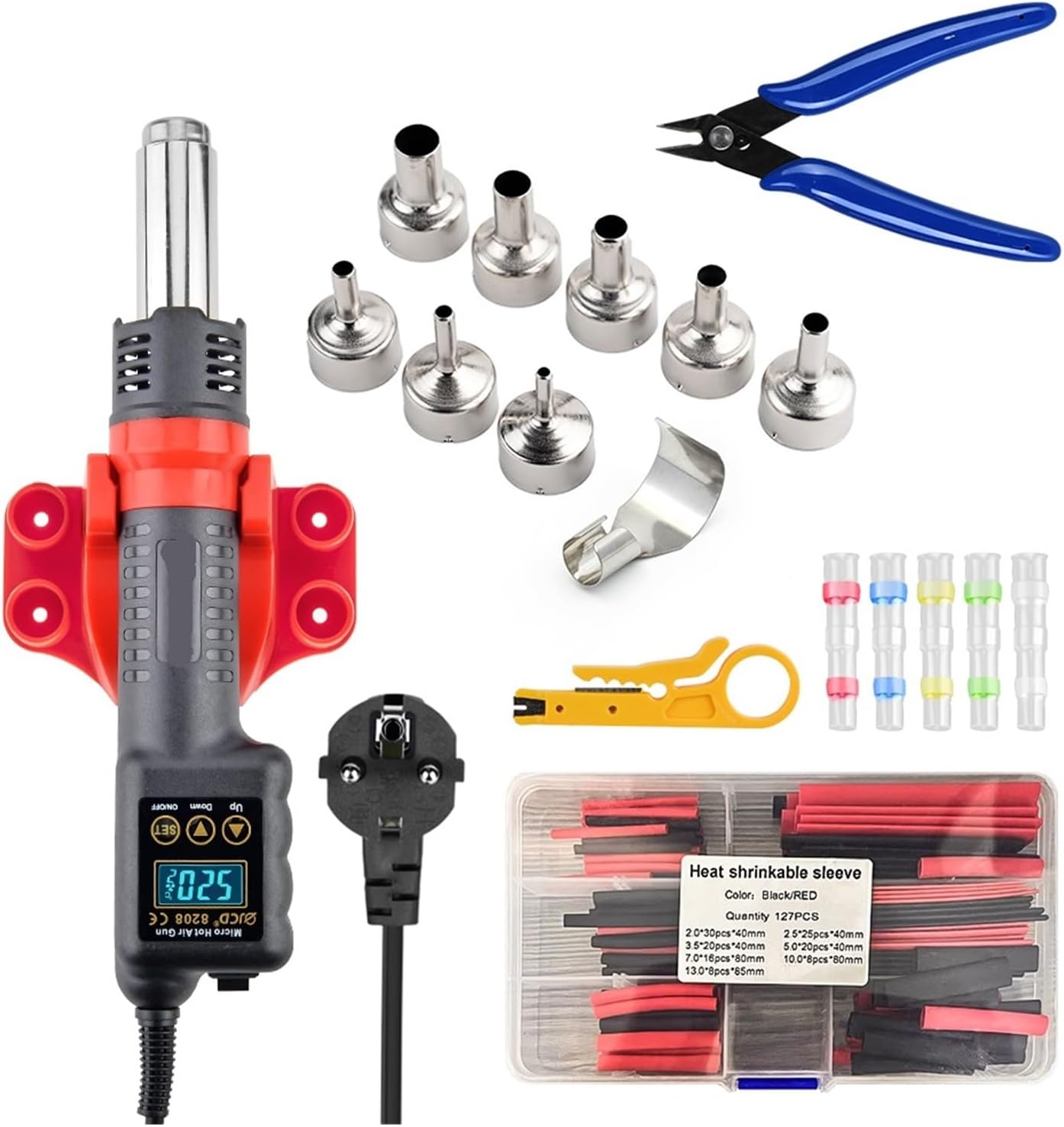
Image 1: YVAAASIYC 8208 Hot Air Gun with various nozzles, wire stripper, heat shrink tubing, and pliers.

Image 2: Overview of the 8208 Hot Air Gun highlighting 220V voltage, 750W wattage, 100°C-500°C temperature range, digital display, and 1-second heat-up time.

Image 3: Detailed view of the 8208 Hot Air Gun's control panel, showing the power switch, temperature/air volume toggle, temperature display, and silicone sleeves.
Setup
- Unpacking: Carefully remove all components from the packaging. Verify that all items listed in the "Package Contents" section are present.
- Nozzle Attachment: Select the appropriate nozzle for your task. Align the nozzle with the hot air gun's outlet and secure it. The product includes four types of nozzles (large, medium, small, and a specialized nozzle).
- Placement: Place the hot air gun on a stable, heat-resistant surface using the provided heat gun stand. Ensure adequate ventilation around the work area.
- Power Connection: Connect the power plug to a suitable electrical outlet (AC 220-240V or AC 100-130V, 50Hz/60Hz).

Image 4: Close-up of the 8208 Hot Air Gun's LCD digital display, showing intuitive and real-time temperature monitoring, digital display, and press-button control.
Operating Instructions
Hot Air Gun Operation:
- Power On: Press the "ON/OFF" button to power on the hot air gun. The LCD display will illuminate.
- Temperature Adjustment:
- Press the (+) button once to increase the temperature by 1°C. Press and hold the (+) button to continuously increase the temperature.
- Press the (-) button once to decrease the temperature by 1°C. Press and hold the (-) button to continuously decrease the temperature.
- The newly set temperature will be saved after 3 seconds and maintained for the next power-on.
- Airflow Adjustment: Use the "SET" button to toggle between temperature and air volume adjustment modes. Once in air volume adjustment mode, use the (+) and (-) buttons to adjust the airflow (1-10 levels).
- Temperature Stabilization Indicator: When the symbol (F) or (C) flashes on the display, it indicates that the heating core has not yet reached the set temperature.
- Automatic Shutdown: If the temperature drops below 70°C, the hot air gun will automatically stop rotation, enhancing safety and extending the unit's lifespan.
- Power Off: Press the "ON/OFF" button to turn off the hot air gun. Allow the unit to cool down completely before storing.

Image 5: Illustration of the 8208 Hot Air Gun's strong air volume (120 L/min) and various nozzle dimensions (10mm, 8mm, 5mm, 3mm internal diameter).
908U Soldering Iron Operation (if included in set):
The 908U electric soldering iron features an LCD backlit digital display for precise temperature control.
- Power On: Connect the soldering iron to a suitable power outlet.
- Temperature Adjustment:
- Press the (+) button once to increase the temperature by 1°C. Press and hold the (+) button to continuously increase the temperature.
- Press the ((-) button once to reduce the temperature by 1°C. Press and hold the (-) button to continuously reduce the temperature.
- The newly set temperature will be saved after 3 seconds and maintained for the next power-on.
- Usage: Allow the soldering iron to reach the set temperature. Use for soldering tasks as required. Always place the soldering iron in its stand when not actively soldering.
- Power Off: Unplug the soldering iron from the power outlet when finished. Allow it to cool completely before storing.
Maintenance
- Cleaning: Ensure the hot air gun and soldering iron are unplugged and completely cool before cleaning. Wipe the exterior with a soft, dry cloth. Do not use abrasive cleaners or solvents.
- Nozzle Care: Periodically inspect nozzles for blockages or damage. Clean any residue from the nozzles. Replace damaged nozzles.
- Air Vents: Keep the air intake and exhaust vents clear of dust and debris to ensure proper airflow and prevent overheating.
- Soldering Iron Tip: Clean the soldering iron tip regularly using a damp sponge or steel wool cleaner (if included). Re-tin the tip with solder after cleaning to prevent oxidation.
- Storage: Store the hot air gun and accessories in a dry, safe place, away from direct sunlight and extreme temperatures.
Troubleshooting
| Problem | Possible Cause | Solution |
|---|---|---|
| Hot air gun does not power on. | No power supply; faulty power cord; internal fault. | Check power connection and outlet. Inspect power cord for damage. If problem persists, contact support. |
| No heat or insufficient heat. | Incorrect temperature setting; heating element fault. | Verify temperature setting on LCD. Ensure the (F) or (C) symbol is not flashing for an extended period. If problem persists, contact support. |
| Weak or no airflow. | Air vents blocked; fan fault; incorrect airflow setting. | Check and clear air intake/exhaust vents. Verify airflow setting. If problem persists, contact support. |
| Soldering iron not heating. | Not plugged in; heating element fault; tip not making proper contact. | Ensure soldering iron is plugged in. Check tip connection. If problem persists, contact support. |
Specifications
8208 Hot Air Gun:
- Voltage: AC 220-240V / AC 100-130V
- Frequency: 50Hz / 60Hz
- Output Power: 750W
- Temperature Range: 100°C to 480°C
- Temperature Stability: ±2°C
- Airflow: 150 liters per minute (maximum)
- No-load Speed: 2800 rpm
- Weight: 570g (approx.)
- Dimensions: Approx. 266mm / 10.47 inches (length)
- Display: LCD Digital
908U Soldering Iron (if included):
- Voltage: AC 220-240V or AC 100-130V
- Power: 80W
- Frequency: 50Hz / 60Hz
- Temperature Range: 180°C to 500°C (356°F to 932°F)
- Temperature Stability: ±5°C
- Heating Type: Wmore Ceramic Element
- Soldering Iron Tips: 900M-B1.2
- Cable Length: 1.4m / 55.12 inches
- Soldering Iron Size: Approx. 242 x 25 x 25 mm / 9.6 x 0.98 x 0.98 inches
- Soldering Iron Weight: Approx. 96g / 3.4 oz
Package Contents (8208 Set 5):
- 8208 Hot Air Gun x1 (with four types of nozzles, heat gun stand)
- 908U Electric Soldering Iron (with LCD backlit digital display) x1
- Tin Wire x1
- Desoldering Pump x1
- Tweezers x2
- Heat Gun Nozzles x8 (Note: The description mentions 4 types of nozzles with the gun, and then 8 additional nozzles. This refers to 8 total nozzles for the gun, including the initial 4 types.)
- Soldering Iron Stand x1
- Steel Ball Cleaner x1
- RMA686 Flux x1
Warranty and Support
For warranty information or technical support, please refer to the contact details provided with your purchase documentation or contact the seller directly.
Seller: All-category professional stores
Please retain your proof of purchase for any warranty claims.
Ask a question about this manual
Ask about setup, troubleshooting, compatibility, parts, safety, or missing instructions. Manuals+ will review the question and use this page’s manual context to help answer it.