
1. Introduction
Thank you for choosing the SMETA Countertop Microwave Oven. This manual provides essential information for the safe and efficient operation of your new appliance. Please read it thoroughly before use and retain it for future reference.
This compact 0.7 cubic feet microwave oven delivers 700 watts of cooking power, making it ideal for small spaces such as apartments, dorms, or offices. It features 10 power levels, 6 auto menus, one-touch express cooking, a glass turntable for even heating, and a child safety lock for added peace of mind.

Image: The SMETA Countertop Microwave highlighting its key features: Child Safety Lock, Easy Defrost, Kitchen Timer, and 10 Power Levels.
2. Important Safety Instructions
When using electrical appliances, basic safety precautions should be followed, including the following:
- Read all instructions before using the appliance.
- Do not operate the microwave if the cord or plug is damaged, if it is not working properly, or if it has been damaged or dropped.
- Do not heat liquids or other foods in sealed containers as they are liable to explode.
- Do not attempt to tamper with or make any adjustments or repairs to the door, control panel, safety interlock switches, or any other part of the microwave.
- Ensure proper ventilation around the microwave. Do not block any ventilation openings.
- Always use microwave-safe cookware. Metal containers or dishes with metallic trim are not suitable for microwave use.
- Supervise children closely when the microwave is in use. This appliance is not intended for use by persons (including children) with reduced physical, sensory or mental capabilities, or lack of experience and knowledge, unless they have been given supervision or instruction concerning use of the appliance by a person responsible for their safety.
- Do not use the microwave for purposes other than heating food.
- Always ensure the turntable and roller ring are correctly positioned before operation.
3. Package Contents
Please check the package contents upon unpacking. If any items are missing or damaged, contact customer support.
- SMETA Countertop Microwave Oven Unit
- Glass Turntable
- Roller Ring
- Instruction Manual (this document)
4. Setup and Installation
4.1 Choosing a Location
Place the microwave on a flat, stable surface that can support its weight and the heaviest food item likely to be cooked. Ensure there is adequate ventilation around the unit:
- Leave at least 4 inches (10 cm) of space at the rear.
- Leave at least 8 inches (20 cm) of space on the top.
- Leave at least 2 inches (5 cm) of space on the sides.
4.2 Turntable Installation
- Place the roller ring in the center of the microwave oven cavity.
- Place the glass turntable on top of the roller ring, ensuring it sits securely in the center support.
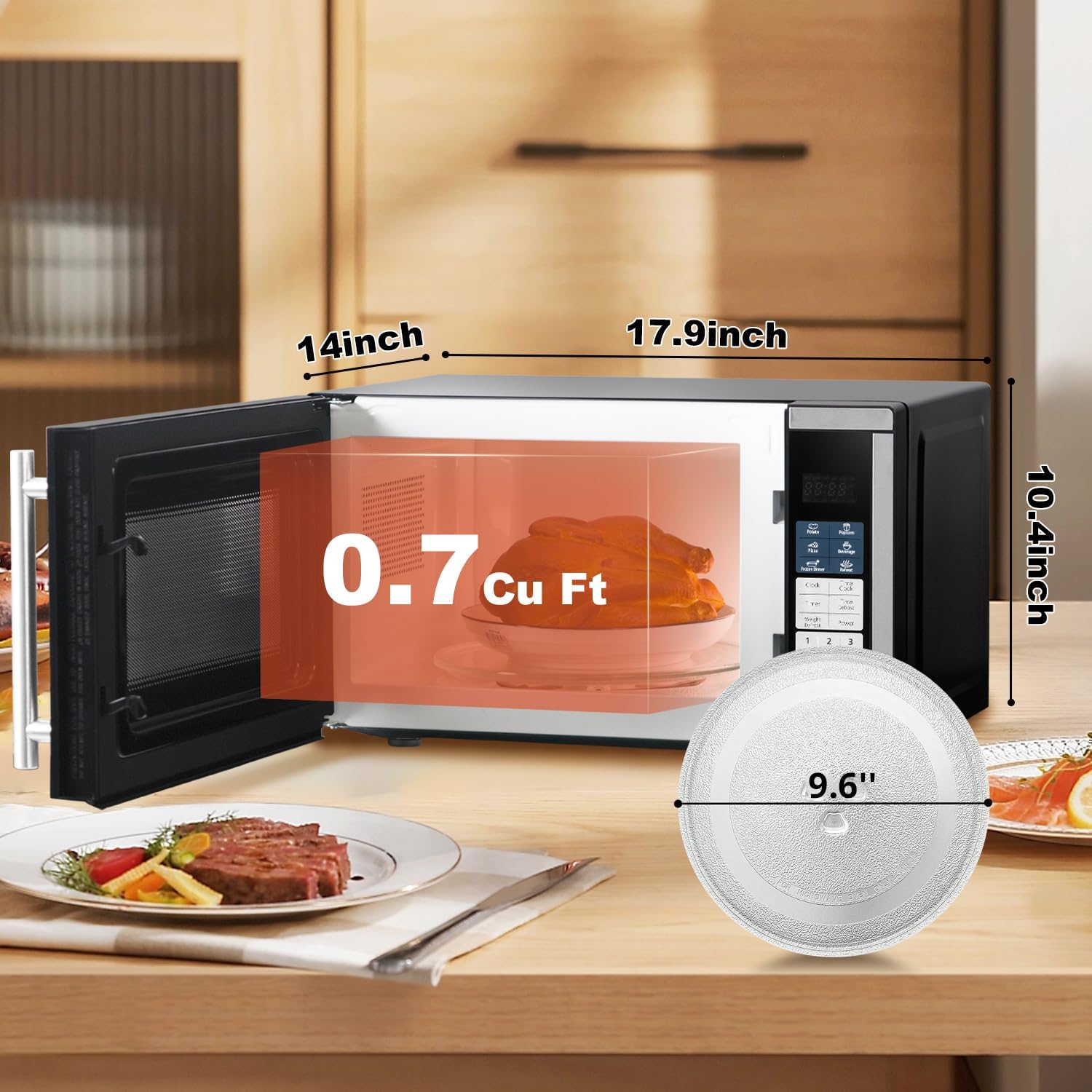
Image: The SMETA Countertop Microwave showing its external dimensions (17.9"W x 14"D x 10.4"H) and the 9.6" diameter glass turntable.
4.3 Power Connection
Plug the microwave into a grounded 120V AC, 60Hz power outlet. Do not use extension cords or adapters.
5. Operating Instructions
5.1 Control Panel Overview
The control panel features a digital display, numeric keypad, and function buttons for various cooking modes.

Image: Close-up of the SMETA microwave control panel, showing the numeric keypad, auto menu buttons, and the child lock feature.
5.2 Basic Cooking (Time Cook)
- Place food in a microwave-safe dish on the turntable. Close the door.
- Press the Time Cook button.
- Enter the desired cooking time using the numeric keypad.
- Press the Power button to adjust power level (default is 100%). Press repeatedly to cycle through 10 power levels (P10 to P01).
- Press Start/+30 sec. to begin cooking.
5.3 One-Touch Express Cooking
For quick heating, simply press the Start/+30 sec. button to start cooking at 100% power for 30 seconds. Each subsequent press adds 30 seconds to the cooking time.
5.4 Auto Menus
The microwave includes 6 pre-programmed auto menus for common food items:
- Potato: For cooking potatoes.
- Popcorn: For popping popcorn.
- Pizza: For reheating pizza.
- Beverage: For heating drinks.
- Frozen Dinner: For heating frozen meals.
- Reheat: For general reheating of food.
To use an auto menu:
- Place food in the microwave.
- Press the desired auto menu button (e.g., Popcorn).
- Press Start/+30 sec. to begin. Some menus may require selecting quantity by pressing the button multiple times.

Image: The SMETA microwave displaying its 6 Auto-Cook Programs, each with an illustrative icon and food item.
5.5 Defrosting
The microwave offers two defrost modes: Weight Defrost and Time Defrost.
5.5.1 Weight Defrost
- Press the Weight Defrost button.
- Enter the weight of the food in pounds (e.g., 1.0 for 1 pound) using the numeric keypad.
- Press Start/+30 sec. to begin defrosting.
5.5.2 Time Defrost
- Press the Time Defrost button.
- Enter the desired defrosting time using the numeric keypad.
- Press Start/+30 sec. to begin defrosting.

Image: A visual representation of the microwave's Multiple Defrost Mode, showing a piece of meat partially frozen and partially defrosted.
5.6 Child Lock
To prevent unintended operation, especially by children, activate the child lock feature.
- To Activate: Press and hold the Stop/Cancel button for 3 seconds. A lock indicator will appear on the display.
- To Deactivate: Press and hold the Stop/Cancel button for 3 seconds again. The lock indicator will disappear.
5.7 Setting the Clock
- Press the Clock button.
- Enter the current time using the numeric keypad (e.g., 12:30 for 12:30 PM).
- Press the Clock button again to confirm.
5.8 Using the Kitchen Timer
- Press the Timer button.
- Enter the desired time using the numeric keypad.
- Press Start/+30 sec. to begin the countdown. This function does not activate microwave cooking.
5.9 Operational Video
Video: This official SMETA video demonstrates the basic operation of the 0.7 cu ft Countertop Microwave Oven, including placing food, setting time, and starting the cooking process.
6. Care and Maintenance
6.1 Cleaning the Exterior
Wipe the exterior surface with a soft, damp cloth. Do not use abrasive cleaners or harsh chemicals, as they may damage the finish.
6.2 Cleaning the Interior
Clean the interior cavity regularly. For stubborn food splatters, place a bowl of water with lemon slices inside and microwave for 2-3 minutes. The steam will loosen the residue, making it easier to wipe clean with a damp cloth. Ensure the microwave is unplugged before cleaning.
6.3 Turntable and Roller Ring
The glass turntable and roller ring can be removed for cleaning. Wash them in warm, soapy water or in the dishwasher. Ensure they are completely dry before placing them back in the microwave.
7. Troubleshooting Guide
If you encounter issues with your microwave, refer to the following common problems and solutions:
| Problem | Possible Cause | Solution |
|---|---|---|
| Microwave does not start | Power cord unplugged; Door not closed properly; Child lock activated; Blown fuse/tripped circuit breaker. | Ensure power cord is securely plugged in; Close door firmly; Deactivate child lock (hold Stop/Cancel for 3s); Check household fuse/circuit breaker. |
| Food not heating | Incorrect cooking time/power level; Microwave-safe dish not used. | Adjust cooking time and power level; Use appropriate microwave-safe cookware. |
| Turntable not rotating | Turntable or roller ring not positioned correctly; Obstruction under turntable. | Reposition turntable and roller ring; Remove any obstructions. |
| Sparking or arcing inside | Metal objects inside; Damaged waveguide cover. | Remove all metal objects; Contact customer support if waveguide cover is damaged. |
8. Product Specifications
| Feature | Detail |
|---|---|
| Brand | SMETA |
| Model Number | TMD70-20LBSGU-B7 |
| Capacity | 0.7 cubic feet |
| Wattage | 700 watts |
| Power Levels | 10 |
| Product Dimensions (D x W x H) | 14"D x 17.9"W x 10.4"H |
| Item Weight | 20 pounds |
| Turntable Diameter | 9.6 inches |
| Material | Stainless Steel |
| Color | Black |
| Voltage | 120 volts AC |
| Control Type | Button |
| Special Features | Auto Cook, Defrost, Digital Control, Timer, Child Lock |
9. Warranty Information
This SMETA microwave oven is covered by a one-year warranty from the date of purchase. This warranty covers defects in materials and workmanship under normal use. It does not cover damage resulting from misuse, accident, alteration, or unauthorized repair.
Please retain your proof of purchase for warranty claims.
10. Customer Support
For technical assistance, troubleshooting beyond this guide, or warranty inquiries, please contact SMETA customer support. Refer to the contact information provided with your product packaging or visit the official SMETA website for the most up-to-date support details.
When contacting support, please have your model number (TMD70-20LBSGU-B7) and purchase date readily available.