
1. Introduction
Thank you for choosing the SOLIDEE Tilt Out Trash Cabinet. This manual provides essential information for the safe assembly, operation, and maintenance of your new cabinet. Please read these instructions carefully before use and retain them for future reference.
This cabinet is designed to discreetly store a trash can, offering a clean and organized appearance for your kitchen or other living spaces. It features a convenient tilt-out mechanism and an additional storage drawer.
2. Safety Information
- Always assemble the cabinet on a soft, clean surface to prevent scratches.
- Ensure all screws and fasteners are securely tightened before use. Periodically check and re-tighten as necessary.
- Do not overload the cabinet or drawer. Refer to specifications for weight limits.
- Keep small parts and packaging materials away from children and pets during assembly to prevent choking hazards.
- Place the cabinet on a level surface to ensure stability and prevent tipping.
- This product is intended for indoor use only.
3. Package Contents
Verify that all components are present before beginning assembly. If any parts are missing or damaged, please contact customer service.
- Trash Cabinet components (engineered wood panels, drawer parts, tilt-out door)
- Assembly hardware (screws, dowels, hinges, drawer slides, handles)
- Instruction manual
4. Specifications
| Feature | Detail |
|---|---|
| Brand | SOLIDEE |
| Model Number | 14 |
| Color | Oak Grey |
| Material | Engineered Wood |
| Product Dimensions | 20.5"L x 13.2"W x 35.4"H |
| Item Weight | 41.5 pounds (18.87 Kilograms) |
| Capacity | Accommodates trash cans up to 10 Gallons (trash can not included) |
| Opening Mechanism | Tilt-Out |
| Special Feature | Heavy Duty, Adjustable Angle (35 degrees) |

Figure 1: Dimensions of the SOLIDEE Tilt Out Trash Cabinet.
This image illustrates the overall dimensions of the cabinet: 20.5 inches (L) x 13.2 inches (W) x 35.5 inches (H). It also details the internal dimensions of the drawer and the tilt-out compartment, including the maximum trash can height.
5. Setup and Assembly
Assembly of the SOLIDEE Tilt Out Trash Cabinet typically requires basic household tools such as a screwdriver. Follow the step-by-step instructions provided in the separate assembly guide included with your product. Ensure all parts are correctly oriented and securely fastened.
- Step 1: Unpack all components and verify against the parts list.
- Step 2: Assemble the main frame of the cabinet.
- Step 3: Install the drawer slides and assemble the drawer.
- Step 4: Attach the tilt-out door hinges and secure the door to the cabinet.
- Step 5: Install handles on the drawer and tilt-out door.
- Step 6: Place the assembled cabinet in its desired location, ensuring it is stable and level.

Figure 2: Key components of the cabinet.
This image highlights key features such as the drawer, stainless steel handle, metal hinge, and the elegant design of the tilt-out panel, which are crucial for assembly.
6. Operating Instructions
6.1 Using the Tilt-Out Mechanism
To access the trash can, gently pull the handle on the front panel. The panel will tilt forward and down, revealing the interior compartment. The tilt mechanism allows for an adjustable angle of up to 35 degrees for convenient access. To close, push the panel back into its upright position until it is flush with the cabinet.
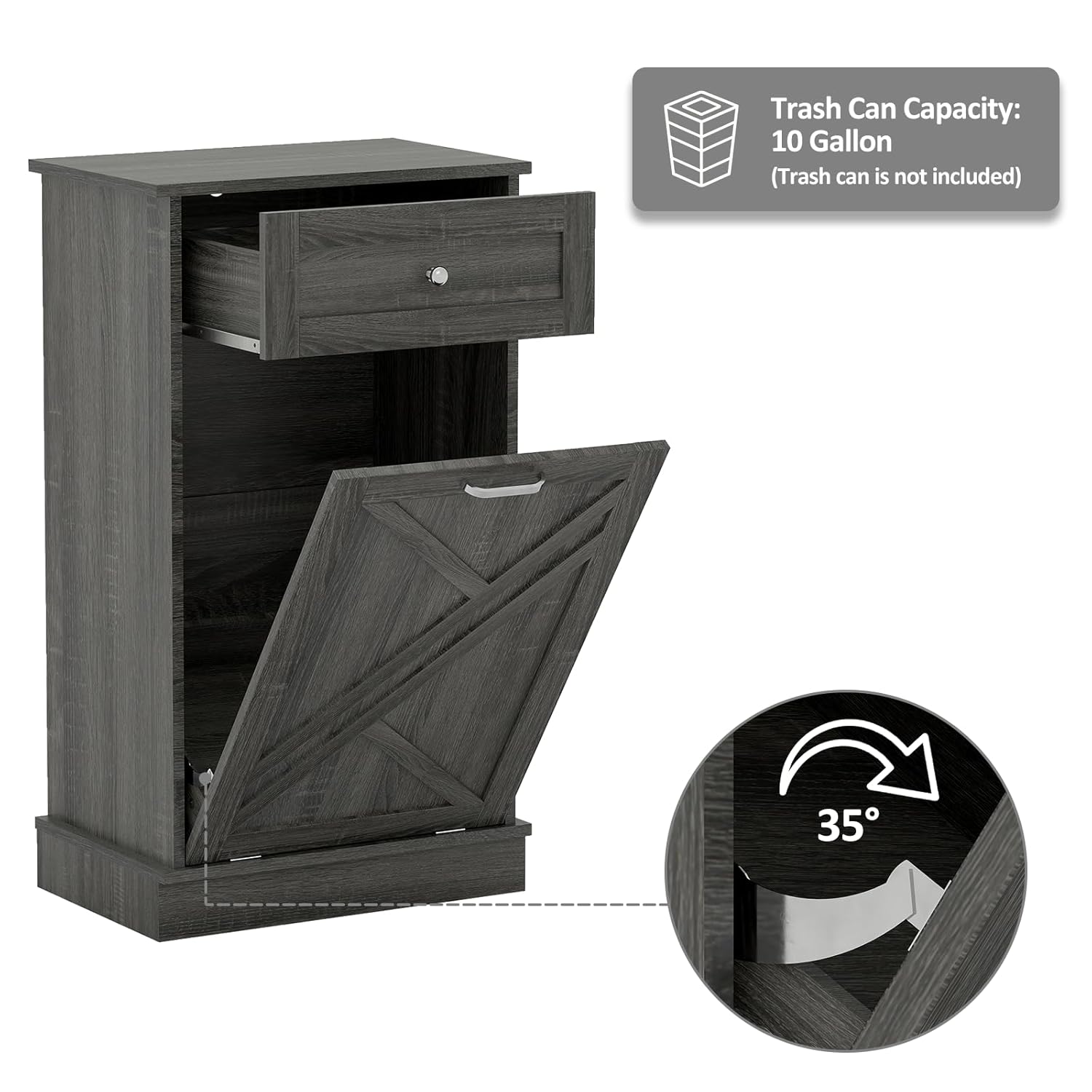
Figure 3: Tilt-out mechanism and capacity.
This image demonstrates that the cabinet accommodates a trash can up to 10 gallons (not included) and features a mechanism allowing the tilt-out door to adjust up to 35 degrees.
6.2 Inserting/Removing a Trash Can
Open the tilt-out panel. Place a trash can (up to 10 gallons) into the designated space within the cabinet. Ensure the trash can fits securely and does not obstruct the closing mechanism. To remove, simply tilt the panel open and lift the trash can out.
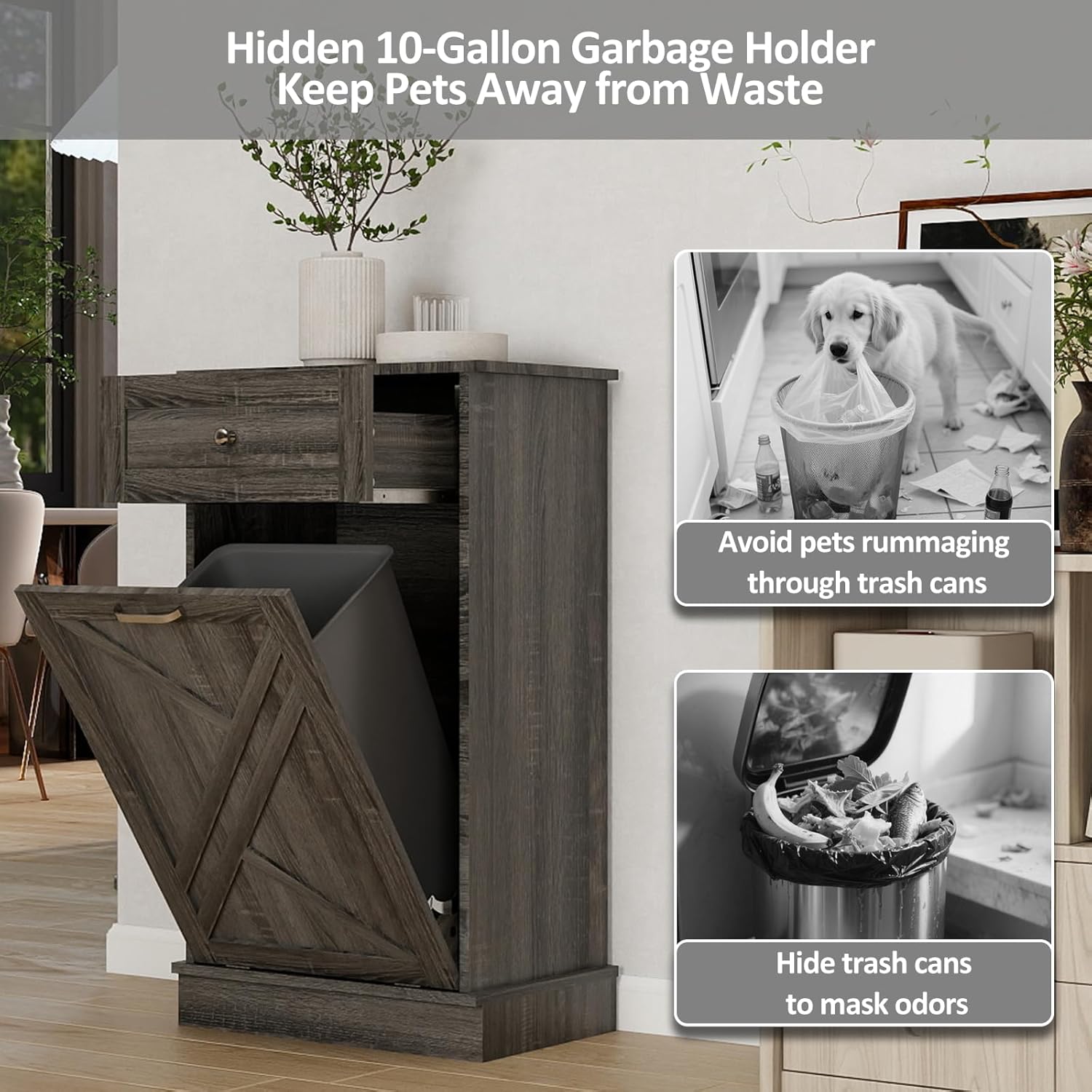
Figure 4: Hidden trash can feature.
This image shows the cabinet with a trash can inside, illustrating how it conceals waste and helps prevent pets from rummaging through trash, thereby masking odors.
6.3 Using the Storage Drawer
The top drawer provides additional storage for items such as trash bags, cleaning supplies, or other small kitchen essentials. Pull the drawer handle to open and push to close.
7. Maintenance
7.1 Cleaning
- Wipe the cabinet surfaces with a soft, damp cloth. Avoid abrasive cleaners or harsh chemicals that may damage the finish.
- For spills, clean immediately to prevent staining or damage to the engineered wood.
- Ensure the interior of the cabinet is kept clean, especially if there are any spills from the trash can.
7.2 General Care
- Periodically check all screws and fasteners to ensure they remain tight. Re-tighten if necessary.
- Avoid exposing the cabinet to excessive moisture or direct sunlight, which can cause warping or fading.
- Do not place hot items directly on the cabinet surface without protection.
8. Troubleshooting
- Cabinet is unstable: Ensure the cabinet is placed on a flat, level surface. Check that all assembly screws are fully tightened.
- Drawer is sticking or difficult to open/close: Verify that the drawer slides are correctly installed and aligned. Ensure no objects are obstructing the drawer's movement.
- Tilt-out door is stiff or not closing properly: Check the hinges for any obstructions or damage. Ensure the trash can inside is not too large or positioned incorrectly, preventing the door from closing.
- Unpleasant odors: Ensure the trash can inside has a lid and is emptied regularly. Clean the interior of the cabinet if necessary.
9. Warranty Information
For information regarding the product warranty, please refer to the warranty card included with your purchase or contact SOLIDEE customer service directly. Keep your proof of purchase for any warranty claims.
10. Customer Support
If you have any questions, concerns, or require assistance with your SOLIDEE Tilt Out Trash Cabinet, please contact SOLIDEE customer service through the retailer where the product was purchased or visit the official SOLIDEE website for support options.