
1. Product Overview
The GHB Wireless Baby Car Camera and Home Monitor (Model ABM721) provides a reliable and portable solution for monitoring infants, children, and pets in various environments. This system features a 5-inch HD display monitor and a 720P camera, both equipped with long-lasting rechargeable batteries for true wireless operation. It utilizes 2.4GHz FHSS technology for a secure, non-WiFi connection, ensuring privacy and ease of use without internet dependency. Key functionalities include two-way audio, night vision, temperature alerts, VOX mode, and digital zoom, making it suitable for both in-car and home use.

Image: The GHB Wireless Baby Car Camera and Home Monitor system, showing the monitor, camera, and various accessories.
2. Package Contents
Verify that all items listed below are included in your package. If any items are missing or damaged, please contact customer support.
- 5-inch Monitor (1 unit)
- Camera Unit (1 unit)
- Power Adapter (1 unit)
- Car Charger Converter (1 unit)
- 6ft Charging Cable (2 units)
- Suction Mount (1 unit)
- Monitor Clip (1 unit)
- Strap Mount Base (1 unit)
- Straps (2 units)
- User Manual (1 unit)
- Screws (2 units)
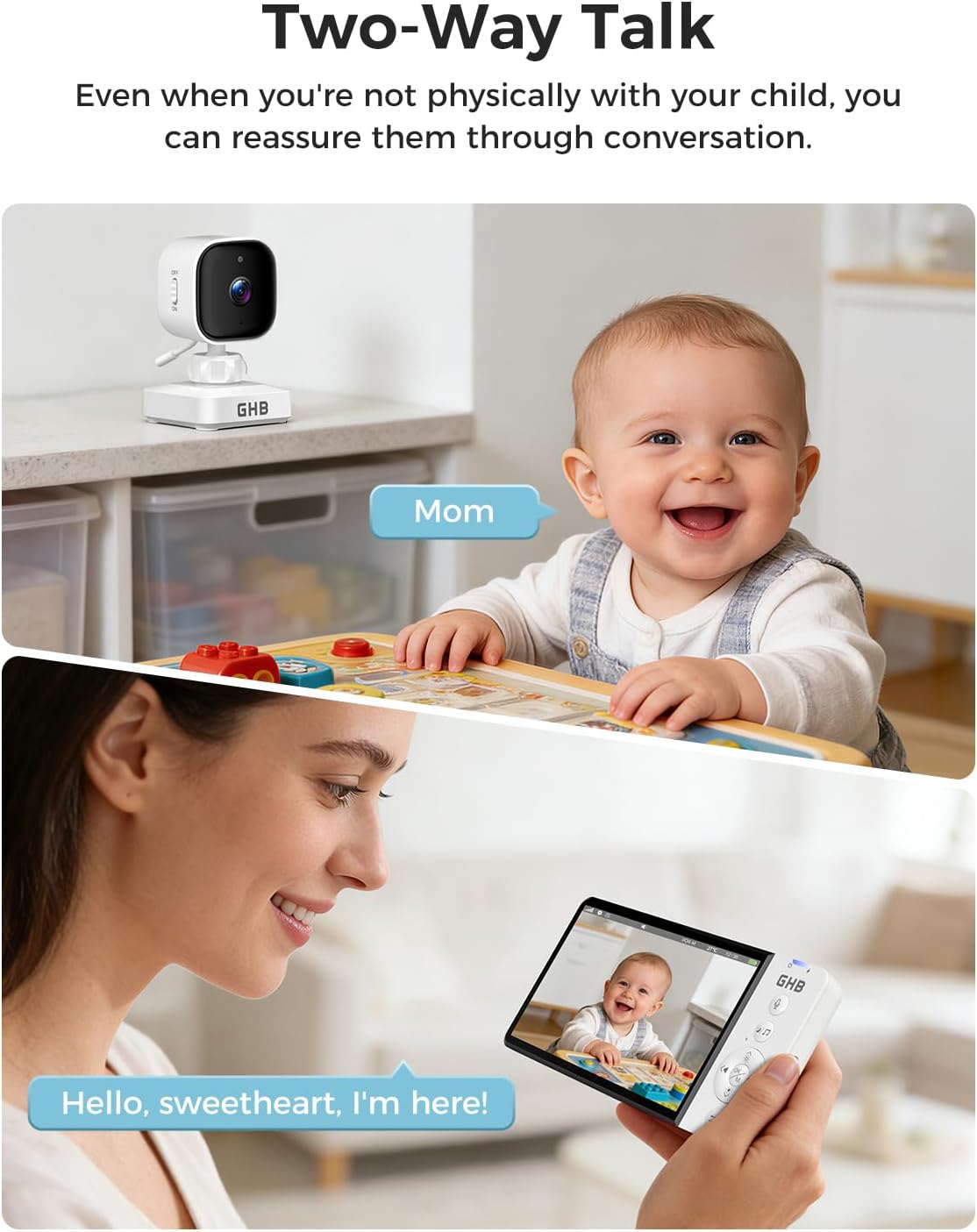
Image: A visual representation of all items included in the GHB Baby Monitor package, laid out neatly.
3. Setup Guide
3.1 Charging the Devices
Before initial use, fully charge both the monitor and camera units. The monitor has a 3500mAh battery, and the camera has a 2000mAh battery. Use the provided charging cables and power adapter or car charger.
- Connect one end of the charging cable to the monitor's charging port and the other end to the power adapter or car charger.
- Connect the second charging cable to the camera's charging port and the power adapter.
- Allow both units to charge until the battery indicator shows full.

Image: The monitor screen displaying battery life, indicating long screen battery life with VOX mode on or off.
3.2 Camera Installation (Car Seat Headrest)
The camera can be securely mounted on a car seat headrest to monitor a rear-facing infant or other passengers.
- Adjust the headrest: Raise the car seat headrest to an appropriate height.
- Install horizontal straps: Wrap the horizontal straps around the headrest and secure them.
- Install vertical straps: Attach the vertical straps, ensuring a snug fit.
- Attach camera: Secure the camera to the strap mount base. Adjust the camera angle as needed and tighten the fixing screw on the camera neck. The camera can be manually rotated 350 degrees for optimal viewing.

Image: Visual steps demonstrating how to install the camera unit onto a car seat headrest using the provided straps.
3.3 Monitor Installation (Suction Cup Mount)
The monitor can be mounted on your car's windshield or dashboard using the suction cup mount.
- Install the clip: Attach the monitor clip to the suction cup mount.
- Prepare surface: Remove the protective film from the suction cup and select a clean, flat glass surface (windshield) or dashboard area.
- Secure mount: Press the suction cup firmly against the chosen surface and lock it into place.
- Attach monitor: Secure the monitor to the clip on the mount.
- Connect power: Connect the monitor to the car charger using one of the 6ft charging cables.

Image: Visual steps illustrating the installation of the monitor using the suction cup mount on a car's windshield or dashboard.

Image: Examples of the monitor installed on both the windshield and the dashboard of a car.
4. Operating Instructions
4.1 Powering On/Off
- Monitor: Press and hold the power button on the monitor until the screen turns on/off.
- Camera: Use the independent power switch on the camera unit to turn it on or off.

Image: The camera unit highlighting its independent power switch and built-in 2000mAh battery.
4.2 VOX Mode (Sound Activated)
VOX mode conserves battery by automatically turning off the monitor screen in quiet environments. The screen will activate when sound is detected from the camera's vicinity.
- Activate VOX mode via the monitor's menu settings.
- Adjust the sensitivity level (3 levels available) to suit your environment and preferences.

Image: Illustration of VOX mode, showing the monitor screen in sleep mode and activating upon sound detection.
4.3 Two-Way Audio
Use the two-way audio feature to communicate with your baby or pet through the camera's speaker.
- Press and hold the microphone button on the monitor to speak.
- Release the button to listen.
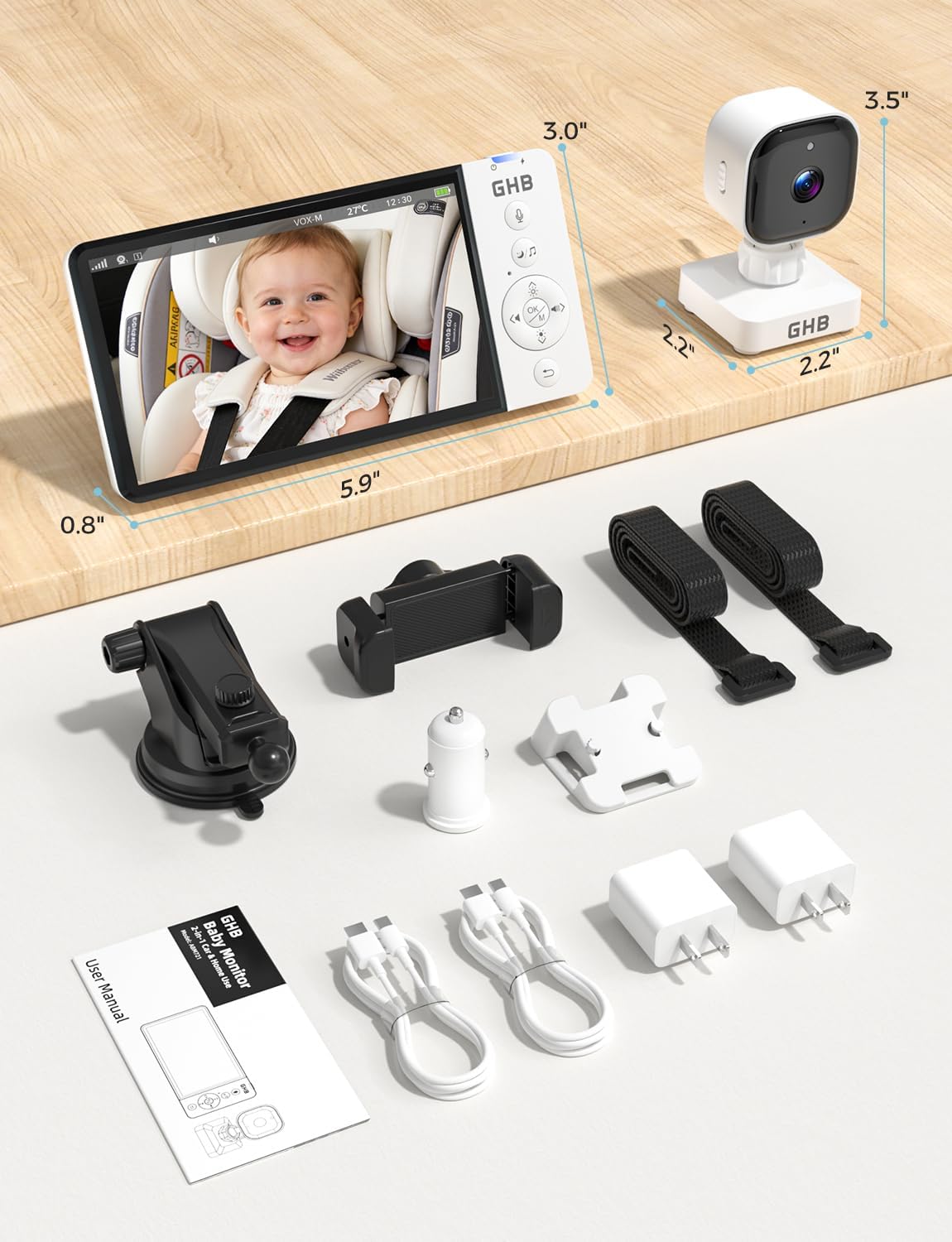
Image: A visual representation of the two-way talk feature, showing a parent speaking into the monitor and a baby reacting.
4.4 Digital Zoom
The monitor supports up to 4X digital zoom to view details more closely.
- Access the zoom function through the monitor's controls.
- Toggle between 2X and 4X zoom levels.

Image: The monitor screen displaying a normal view, 2X zoom, and 4X zoom of a baby in a car seat.
4.5 Lullabies and Temperature Monitoring
- Lullabies: Select from 8 built-in lullabies to soothe your baby. Control playback and volume through the monitor.
- Temperature: The monitor displays the room temperature detected by the camera. Set alerts for temperature deviations in the settings.

Image: Icons representing features like feeding reminder, temperature monitoring, lullaby function, and two-way intercom.
5. Key Features
- True Wireless Operation: Both monitor (3500mAh) and camera (2000mAh) are battery-powered, offering portability for travel and home use.
- Extended Battery Life: Up to 8 hours of continuous use or 30 hours in power-saving VOX mode.
- High-Definition Video: 5-inch 720P HD display for clear real-time monitoring.
- Secure Connection: 2.4GHz FHSS technology ensures a private, interference-free connection without requiring WiFi or apps.
- Night Vision: Clear infrared night vision for monitoring in low-light conditions.
- Two-Way Audio: Allows for clear communication between the monitor and camera units.
- VOX Mode: Sound-activated screen with adjustable sensitivity to conserve battery.
- Temperature Monitoring: Displays real-time room temperature with alert functionality.
- Lullaby Function: 8 built-in lullabies to help soothe your baby.
- Digital Zoom: 2X and 4X zoom levels for closer inspection.
- Versatile Mounting: Includes suction cup mount for car and strap mount for headrest, suitable for various vehicles and home setups.

Image: Comparison of day and night vision quality for both home and car use, highlighting 720P HD image clarity.

Image: The monitor and camera being used to monitor infants, children, and pets in different vehicle types like sedans, SUVs, and RVs.
6. Maintenance
- Cleaning: Use a soft, dry cloth to clean the monitor screen and camera lens. Do not use abrasive cleaners or solvents.
- Storage: When not in use for extended periods, store the device in a cool, dry place away from direct sunlight. Ensure both units are fully charged before storage.
- Battery Care: To prolong battery life, avoid fully discharging the batteries frequently. Recharge them regularly.
- Environmental Conditions: Avoid exposing the device to extreme temperatures, humidity, or dust. The device is not water-resistant.
7. Troubleshooting
| Problem | Possible Cause | Solution |
|---|---|---|
| No image on monitor. | Camera is off or out of range. Low battery on camera or monitor. | Ensure camera is powered on. Move camera closer to monitor. Charge both units. |
| No sound or poor audio quality. | Volume too low. Obstruction between units. Interference. | Increase monitor volume. Reduce distance between units. Move away from other electronic devices. |
| VOX mode not activating. | VOX sensitivity too low. | Adjust VOX sensitivity to a higher level in the settings. |
| Monitor not holding charge. | Battery degradation. Faulty charging cable/adapter. | Ensure charging cable and adapter are working correctly. Contact support if battery life significantly decreases. |
8. Technical Specifications
- Model Name: ABM721
- Brand: GHB
- Recommended Uses: Baby Monitoring
- Connectivity Technology: FHSS (2.4GHz)
- Monitor Display: 5-inch HD
- Video Capture Resolution: 720P (1280x720p)
- Frame Rate: 30 frames per second
- Viewing Angle: 75 Degrees
- Focus Type: Auto Focus
- Photo Sensor Technology: 1/4 CMOS, 1 MP
- Monitor Battery: 3500mAh
- Camera Battery: 2000mAh
- Power Source: Battery Powered, 5 Volts, 2.3 Watts
- Special Features: 2-Way Audio, Noise Reduction, Cry Detection, Feeding Reminder, 8 Lullabies, Infrared Night Vision, 4X Zoom, Temperature Alert
- Indoor/Outdoor Usage: Yes
- Mount Type: Suction Cup Mount, Strap Mount
- Material: Plastic
- Water Resistance Level: Not Water Resistant
- Item Dimensions: 5.9 x 2.9 x 0.79 inches (Monitor)
9. Warranty & Support
9.1 Manufacturer Warranty
This GHB product is covered by a 5-year manufacturer's warranty from the date of purchase. This warranty covers defects in materials and workmanship under normal use. It does not cover damage caused by misuse, accidents, unauthorized modifications, or normal wear and tear.
Please retain your proof of purchase for warranty claims.
9.2 Customer Support
For any questions, technical assistance, or warranty claims, please contact GHB customer support:
- Email: support@ghb-group.com
- Online Support: Visit the official GHB website for FAQs and additional resources.
Our support team is dedicated to providing prompt and helpful assistance.