
Introduction
This instruction manual provides detailed information for the safe and effective use of your NBD S205D 8K 64MP Digital Camera. Please read this manual thoroughly before operating the device and retain it for future reference. The NBD S205D is designed for high-quality photo and video capture, featuring 8K video recording, a 64MP sensor, autofocus, 16x digital zoom, and Wi-Fi connectivity.
Safety Information
- Do not expose the camera to water or excessive moisture.
- Avoid dropping the camera or subjecting it to strong impacts.
- Keep the camera away from strong magnetic fields.
- Do not attempt to disassemble or modify the camera. This will void the warranty.
- Use only NBD-approved accessories and power adapters.
- Store the camera in a cool, dry place when not in use.
- Keep out of reach of children.
Package Contents
Verify that all items are present in your package:
- NBD S205D Digital Camera
- 2 x Lithium-ion Batteries (2000 mAh each)
- 64GB Micro SD Card
- USB Charging Cable
- User Manual (this document)
- Camera Strap
- Microphone (if included in kit)
Product Overview
Familiarize yourself with the camera's components.
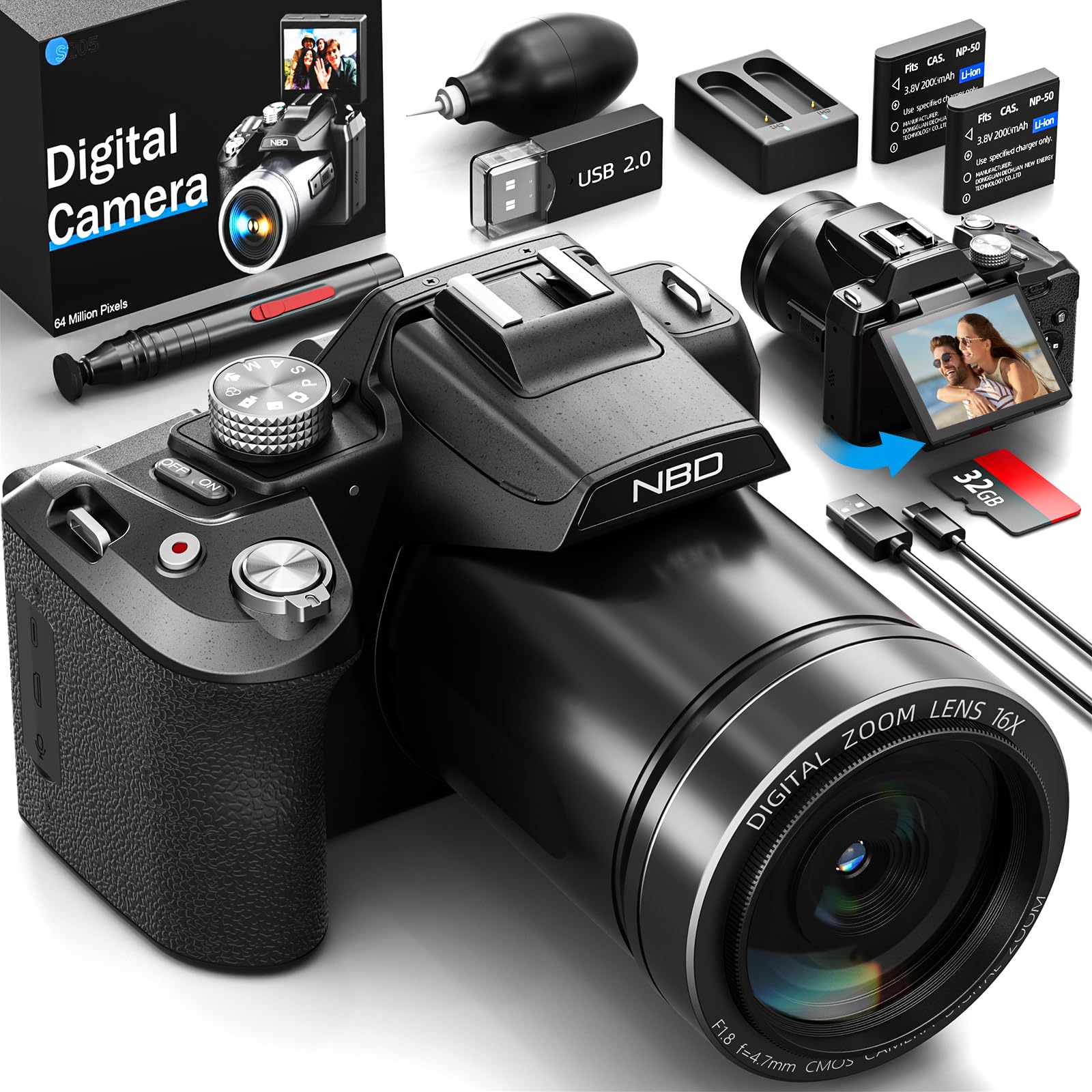
Image: Front view of the NBD S205D Digital Camera, showing the lens, flash, and the 3-inch 180-degree rotatable screen in an open position. The camera body is deep black.
Key Components:
- Lens: Captures images and videos. Features F1.8 night vision.
- Flash: Provides illumination in low-light conditions.
- 3" 180° Rotatable Screen: For framing shots, reviewing content, and vlogging.
- Power Button: Turns the camera on/off.
- Shutter Button: Press halfway to focus, fully to capture a photo.
- Mode Dial: Selects shooting modes (e.g., Photo, Video, Playback).
- Zoom Lever: Controls digital zoom (up to 16x).
- Navigation Buttons: For menu navigation and setting adjustments.
- Microphone Input: For external microphone connection.
- USB Port: For charging and data transfer.
- SD Card Slot: For inserting the Micro SD card.
- Battery Compartment: Houses the Lithium-ion batteries.
Setup
1. Charging the Batteries
- Open the battery compartment cover.
- Insert the two provided Lithium-ion batteries, ensuring correct polarity.
- Close the battery compartment cover.
- Connect the camera to a power source using the USB charging cable. The charging indicator will illuminate.
- Charge until the indicator light changes or turns off, indicating a full charge.
2. Inserting the Micro SD Card
- Locate the SD card slot on the side of the camera.
- Insert the 64GB Micro SD card with the gold contacts facing down, until it clicks into place.
- To remove, gently press the card until it springs out.
- Note: Ensure the camera is powered off before inserting or removing the SD card to prevent data corruption.
3. Initial Power On
- Press and hold the Power button until the screen illuminates.
- Follow the on-screen prompts to set the language, date, and time.
Operating Instructions
1. Taking Photos
- Turn the Mode Dial to Photo Mode.
- Frame your shot using the rotatable screen.
- Press the Shutter button halfway down to activate autofocus. The focus frame will turn green when focused.
- Press the Shutter button fully to capture the photo.
- Use the Zoom Lever to adjust the 16x digital zoom.
2. Recording Videos
- Turn the Mode Dial to Video Mode.
- Press the Shutter button to start recording. A red indicator will appear on the screen.
- Press the Shutter button again to stop recording.
- The camera supports resolutions up to 8K/30FPS and 4K/60FPS. Adjust video resolution in the camera settings menu.
3. Playback Mode
- Turn the Mode Dial to Playback Mode.
- Use the Navigation buttons to browse through your photos and videos.
- Press the OK/Enter button to view a photo or play a video.
4. Wi-Fi Connectivity
- Enable Wi-Fi in the camera's settings menu.
- Download the NBD camera app on your smartphone or tablet.
- Connect your smart device to the camera's Wi-Fi network (SSID and password displayed on camera screen).
- Use the app to remotely control the camera, transfer files, and share content.
5. Night Vision (F1.8 Lens)
The camera's F1.8 lens is designed to capture significantly more light in low-light conditions, enhancing image clarity and detail without requiring additional settings. Simply use the camera as normal in dim environments.
Maintenance
- Cleaning the Lens: Use a soft, lint-free cloth specifically designed for camera lenses. Do not use abrasive materials or harsh chemicals.
- Cleaning the Screen: Wipe the screen gently with a microfiber cloth.
- Body Cleaning: Use a soft, dry cloth to wipe the camera body. For stubborn dirt, slightly dampen the cloth with water.
- Storage: When not in use for extended periods, remove the batteries and store the camera in a dry, dust-free environment.
- Battery Care: Recharge batteries regularly, even if not fully depleted, to maintain battery health.
Troubleshooting
| Problem | Possible Cause | Solution |
|---|---|---|
| Camera does not power on. | Battery is depleted or incorrectly inserted. | Charge the batteries fully. Ensure batteries are inserted with correct polarity. |
| Cannot take photos/videos. | SD card is full, locked, or not inserted. | Insert a formatted SD card. Check if the SD card's write-protect switch is off. Delete unnecessary files or replace the card. |
| Images are blurry. | Lens is dirty, camera shake, or focus issue. | Clean the lens. Hold the camera steady or use a tripod. Ensure autofocus locks before shooting. |
| Wi-Fi connection fails. | Incorrect password, camera Wi-Fi not enabled, or app issue. | Verify Wi-Fi is enabled on the camera. Re-enter password. Restart camera and smart device. Reinstall the app if necessary. |
| Short battery life. | Frequent use of flash, Wi-Fi, or high-resolution recording. | Reduce use of power-intensive features. Carry spare charged batteries. |
Specifications
| Model Number | NBD-EU-S205D (S205D) |
| Sensor Technology | CMOS, 1/2-inch |
| Max Image Resolution | 64 Megapixels (via interpolation) |
| Video Capture Resolution | 8K/30FPS, 5K, 4K/60FPS, 2K, 1080P, 720P |
| Lens Aperture | F1.8 (Night Vision) |
| Zoom Type | 16x Digital Zoom |
| Display | 3-inch 180° Rotatable OLED Screen (360 x 640 resolution) |
| Focus Type | Automatic, Manual |
| Image Stabilization | Digital |
| Connectivity | Wi-Fi, USB |
| Storage Media | Micro SD Card (up to 128GB, 64GB included) |
| File Formats | MP4 (Video), JPEG (Photo) |
| Battery Type | Lithium-ion (2 x 2000 mAh included) |
| Dimensions (L x W x H) | 12.7 x 12.5 x 8.5 cm |
| Weight | Approx. 500g |
| Color | Deep Black |
Warranty and Support
The NBD S205D Digital Camera comes with a lifetime warranty, covering manufacturing defects and malfunctions under normal use. For warranty claims or technical assistance, please contact NBD customer support.
NBD offers 24/7 customer support to assist you with any questions or issues you may encounter. Please refer to the contact information provided on the NBD official website or your product packaging for support channels.
Note: The warranty does not cover damage caused by misuse, accidents, unauthorized repairs, or normal wear and tear.


