
Introduction
The Electrolux PureEssence 800GPD Tankless Reverse Osmosis System is an advanced all-in-one water filtration solution designed for under-sink installation. This system integrates RO purification, built-in remineralization, and smart Wi-Fi monitoring to provide clean, great-tasting water with essential minerals.
It features an 800 GPD (Gallons Per Day) high-speed flow rate, ensuring a steady supply of purified water for various household needs. The 10-stage filtration process, including a 0.0001 micron RO membrane, effectively reduces a wide range of contaminants, including PFOA, PFOS, chlorine, fluoride, lead, heavy metals, and unpleasant odors. The system also boasts an efficient 3:1 pure-to-waste water ratio, minimizing water waste and reducing long-term utility costs.
With smart Wi-Fi monitoring, users can track filter life, water usage, and real-time TDS levels directly from their smartphone, ensuring optimal performance and timely maintenance.
Setup and Installation
Proper installation is crucial for the optimal performance of your Electrolux PureEssence RO System. Please follow these steps carefully.
Unboxing and Components
Carefully unpack the system and ensure all components are present.

Image: Contents of the Electrolux PureEssence RO System package, showing the main unit, faucet, 3/8" blue PE tubing, 3/8" red PE tubing, 3/8" white PE tubing, and 3/8" clips.
- Reverse Osmosis System Unit
- Faucet with LED indicator
- 3/8" White PE Tubing (Raw Water)
- 3/8" Blue PE Tubing (Pure Water)
- 3/8" Red PE Tubing (Drain Water)
- Angle Stop Valve
- Power Adapter
- Drain Connector
- 3/8" Clips
Installation Steps
Refer to the detailed installation video for visual guidance.
Video: Official installation guide for the Electrolux PureEssence RO System, demonstrating each step from unboxing to final connections.
- Prepare the Faucet Hole: Drill a 1-inch hole in the sink or countertop at the desired faucet location. Ensure the area is clean of debris.
- Install the Faucet: Insert the faucet into the drilled hole. From underneath the sink, secure it with the provided washer and nut. Ensure the faucet is oriented correctly before tightening.
- Install the Drain Connector: Identify the drain outlet location on your sink's drain pipe. Use the foam seal as a template to mark and drill a 1/4-inch hole through one side of the drain tubing. Attach the drain connector, ensuring the hole aligns, and secure it with screws and nuts.
- Install the Angle Stop Valve: Turn off the cold water supply. Disconnect the cold water hose from the cold water valve. Install the angle stop valve onto the cold water valve and tighten it with an adjustable wrench. Ensure the gasket is in place.
- Connect Tubing to System:
- Connect the 3/8" white PE tubing from the angle stop valve to the "Raw Water" port on the RO system.
- Connect the 3/8" blue PE tubing from the faucet to the "Pure Water" port on the RO system.
- Connect the 3/8" red PE tubing from the drain connector to the "Drain Water" port on the RO system.
- Ensure all PE tubing connections are fully inserted and secured with the blue clips.
- Connect Power: Insert the faucet power cord into the "FAUCET" connector and the power adapter cord into the "POWER" connector at the back of the RO system. Plug the power adapter into a suitable electrical outlet.

Image: Diagram illustrating the connections for the Electrolux PureEssence RO System, including hot/cold water valves, angle stop valve, drain connector, water inlet/outlet tubing, faucet, and power adapter.
Operating Instructions
First-Time Use
- Turn on the cold water supply and ensure the supply adapter valve is open.
- Connect the system to power. You will hear a long beep, and all indicators will light up for 3 seconds. The system will automatically flush for 30 seconds.
- After the auto-flush is completed, turn on the faucet to allow water to run for 30 minutes to flush any trapped air and carbon fines through the filters.
- Initially, the water may appear cloudy due to air trapped in the RO filter. This is harmless and will clear up over time (up to a week).
Smart Wi-Fi Monitoring (LetSmart App)
The Electrolux PureEssence system can be controlled and monitored via the LetSmart App.

Image: A smartphone displaying the LetSmart App interface, showing filter life remaining, water quality, and consumption report for the PureEssence RO System.
- Download the LetSmart App from your smartphone's app store.
- Open the app, sign in, and enable Bluetooth and Wi-Fi permissions.
- Make the device ready for pairing (Wi-Fi icon flashing on the device display).
- Add the device in the app. The app allows you to track filter life, monitor water usage, and check real-time TDS levels directly from your smartphone.
Faucet LED Indicator
The faucet features an LED indicator to provide real-time status updates:

Image: Close-up of the faucet base showing the LED indicator lights. Flashing red indicates filter replacement soon, solid red means replace now. Flashing blue indicates system flushing, solid blue means filter lifetime is normal.
- Solid Blue Light: Filter lifetime is normal.
- Flashing Blue Light: System is flushing.
- Flashing Red Light: Replace filter soon.
- Solid Red Light: Replace filter now.
Maintenance
Filter Replacement
The Electrolux PureEssence system uses quick-twist filter cartridges for easy replacement. The system's indicators and the LetSmart App will notify you when it's time to change filters.

Image: Diagram showing the recommended filter replacement intervals: PCF filter up to 12 months, RO filter up to 36 months.
- PCF Filter (Pre-Carbon Filter): Recommended replacement every 12 months or 1,000 gallons.
- RO Filter (Reverse Osmosis Membrane): Recommended replacement every 36 months or 3,000 gallons.
Note: Actual filter lifespan depends on local tap water quality and daily usage.

Image: Visual guide for 3-second filter replacement: 1. Lift the handle, 2. Twist anticlockwise, 3. Pull out the old filter. Insert new filter and twist clockwise to align lock icon.
- Turn off the power and water supply to the system.
- Open the front cover of the RO system.
- Lift the handle of the filter cartridge you wish to replace.
- Twist the cartridge anticlockwise and pull it out.
- Insert the new cartridge into the system.
- Twist the new cartridge clockwise to align the lock icon and secure it.
- Close the front cover.
- Turn on the water supply and reconnect the power.
- Reset the filter lifespan by pressing and holding the corresponding reset button for 3 seconds. The indicator will flash blue, confirming the reset.
- After replacement, turn on the faucet and allow water to flush for 10 minutes for the PCF filter and 30 minutes for the RO filter to remove air and carbon fines.
Extended Inactivity
- For 1 week or longer: Remove the filter, seal it with plastic wrap, and store it in the refrigerator to prevent microbial growth. To restart, flush for at least 10 minutes or replace the filter.
- For 2 weeks or longer: Disconnect the water supply, drain the system, and disconnect the power. Follow the recommended filter replacement schedule before resuming use.
Troubleshooting
If you encounter issues with your Electrolux PureEssence RO System, refer to the following common troubleshooting tips:
- No Water Flow / Slow Flow:
- Check if the cold water supply valve is fully open.
- Ensure the supply adapter valve is open.
- Verify that the system is powered on and connected correctly.
- Check filter lifetime indicators. Clogged filters can restrict flow and require replacement.
- Cloudy Water:
- This is often due to trapped air in new filters. It is harmless and will clear up over time (up to a week).
- Ensure initial flushing procedures were followed correctly.
- Leaks:
- Carefully inspect all tubing connections and fittings. Ensure they are fully inserted and secured with clips.
- Check the angle stop valve and drain connector for proper installation and tightness.
- Ensure all filter cartridges are correctly seated and twisted into place.
- Wi-Fi Connection Issues:
- Confirm that Wi-Fi and Bluetooth permissions are enabled for the LetSmart App on your smartphone.
- Ensure your Wi-Fi network supports 2.4 GHz. The device automatically connects to 2.4 GHz if both 2.4 GHz and 5 GHz are available.
- Verify that your Wi-Fi network name consists of English characters and numbers only.
- Double-check that the Wi-Fi password entered is correct.
- To unlink the system, press and hold the Wi-Fi button for 5 seconds until the Wi-Fi icon starts flashing.
Specifications
| Feature | Detail |
|---|---|
| Brand | Electrolux |
| Model Name | EWP800A0W |
| Model Number | EWP800 |
| Product Dimensions (L x W x H) | 16"L x 5.2"W x 13.7"H |
| Capacity | 800 Gallons Per Day (GPD) |
| Maximum Flow Rate | 0.58 Gallons Per Minute |
| Installation Type | Under Sink |
| Purification Method | Alkaline, Reverse Osmosis |
| Special Features | Alkaline Mineral, Reduce TDS, Self Cleaning, Tankless, App Monitor |
| Power Source | Corded Electric (100-240VAC) |
| UPC | 850078152138 |
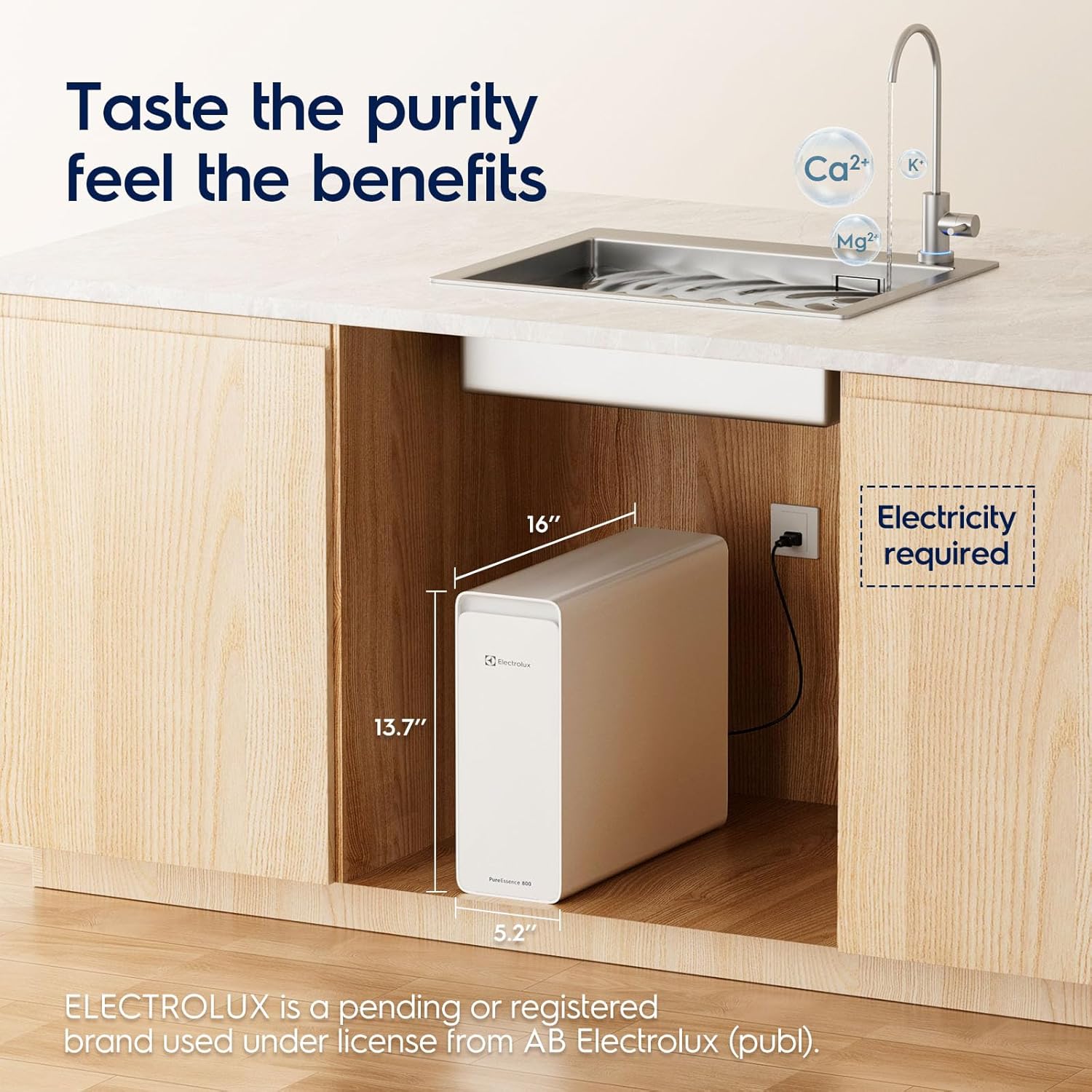
Image: The Electrolux PureEssence RO System unit with key dimensions (16"L x 5.2"W x 13.7"H) and a note indicating electricity is required.
Support
For further assistance, please contact Electrolux customer support:
- Email: service@electrolux-water.com
- Telephone Number: 1-539-252-8865
Electrolux is committed to providing comprehensive support, including pre-sale inquiries, after-sales service, and assistance from local water experts.


