
Introduction
The VEHLIVE V880 MOTO is an advanced diagnostic tool designed for motorcycle enthusiasts and professionals. It offers comprehensive OBDII/EOBD diagnostic functions, including fault code reading, real-time data monitoring, and battery voltage testing. This manual provides detailed instructions to help you effectively use your device.
Key Features
- 2026 Upgraded Version Motorcycle Scanner: Engine system support, complete OBDII/EOBD diagnostic functions, 12V battery testing.
- Voltage Testing: Monitors motorcycle battery status and displays current voltage digitally.
- Quick Test: Scans, identifies, and reads codes from all systems, clears fault codes with one click, one-click I/M readiness.
- Easy to Use: 98,963 DTC codes built-in, plug-and-play, 2.8-inch color screen, durable silicone keys and heavy-duty diagnostic cable.
- Wide Compatibility: Supports multi-brand motorcycles in Asia, Europe, and America (Yamaha, Honda, KTM, Kawasaki, Harley-Davidson, BMW, Delphi, Suzuki, Ducati, Chunfeng, OBD2 motorcycles). Supports 8 languages.
- Free Software Upgrade: Connects to PC via USB for updates. Supports data playback and printing.
- Free Universal Jumper Cables: Includes universal jumper cables and instructions. Note: Adapter cables for specific motorcycle models may need separate purchase.
Compatibility
The VEHLIVE V880 MOTO supports a wide range of motorcycle brands and OBD2 protocols:
- Supported Brands: Yamaha, Honda, KTM, Kawasaki, Harley-Davidson, BMW, Delphi, Suzuki, Ducati, Chunfeng, KYMCO, SYM, and other OBD2 compliant motorcycles.
- Supported OBD2 Protocols: SAE J1850 PWM (41.6Kbaud), SAE J1850 VPW (10.4Kbaud), ISO9141-2 (5 baud init, 10.4Kbaud), ISO14230-4 KWP (5 baud init, 10.4 Kbaud), ISO14230-4 KWP (fast init, 10.4 Kbaud), ISO15765-4 CAN (11bit ID, 500 Kbaud), ISO15765-4 CAN (29bit ID, 500 Kbaud), ISO15765-4 CAN (11bit ID, 250 Kbaud), ISO15765-4 CAN (29bit ID, 250 Kbaud).
- Language Support: Chinese, English, French, German, Spanish, Russian, Italian, Polish.

Image: Global motorcycle brand compatibility for the VEHLIVE V880 MOTO.
Setup and Software Installation
1. Software Download and Installation
To ensure your VEHLIVE V880 MOTO is up-to-date and functions optimally, download and install the latest software from the official VEHLIVE website.
Video: This video demonstrates the process of downloading and installing the V880 MOTO software from the official VEHLIVE website, unzipping the files, and installing the setup.
2. Device Connection for Updates
Connect the V880 MOTO to your computer using the provided USB cable. Ensure the device is in update mode by pressing and holding the 'Down' button while connecting.

Image: The VEHLIVE V880 MOTO diagnostic tool, featuring a color screen and various function buttons.

Image: The V880 MOTO displaying a 'Clear DTC' prompt, illustrating its one-click check engine code clearing capability.
Operating Instructions
1. Basic Diagnostic Functions
- Read Diagnostic Trouble Codes (DTCs): Connect the device to your motorcycle's OBD2 port. Navigate to "Read DTC" to view current, pending, and permanent fault codes.
- Clear Diagnostic Trouble Codes (DTCs): After addressing a fault, select "Clear DTC" to erase the codes and turn off the Malfunction Indicator Lamp (MIL).
- Live Data Stream: Access real-time data parameters from the motorcycle's ECU. This includes engine RPM, vehicle speed, sensor readings, and more. Data can be viewed numerically or graphically.
- Freeze Frame Data: View a snapshot of operating conditions at the moment a fault code was set.
- I/M Readiness Status: Check the status of emission-related monitoring systems to ensure the vehicle is ready for an emissions test.
2. Voltage Testing
The V880 MOTO includes an integrated battery testing function. Select "Voltage Test" to monitor the motorcycle's battery status and view the current voltage digitally.

Image: The V880 MOTO performing an I/M Readiness Test, showing the status of various emission monitors.
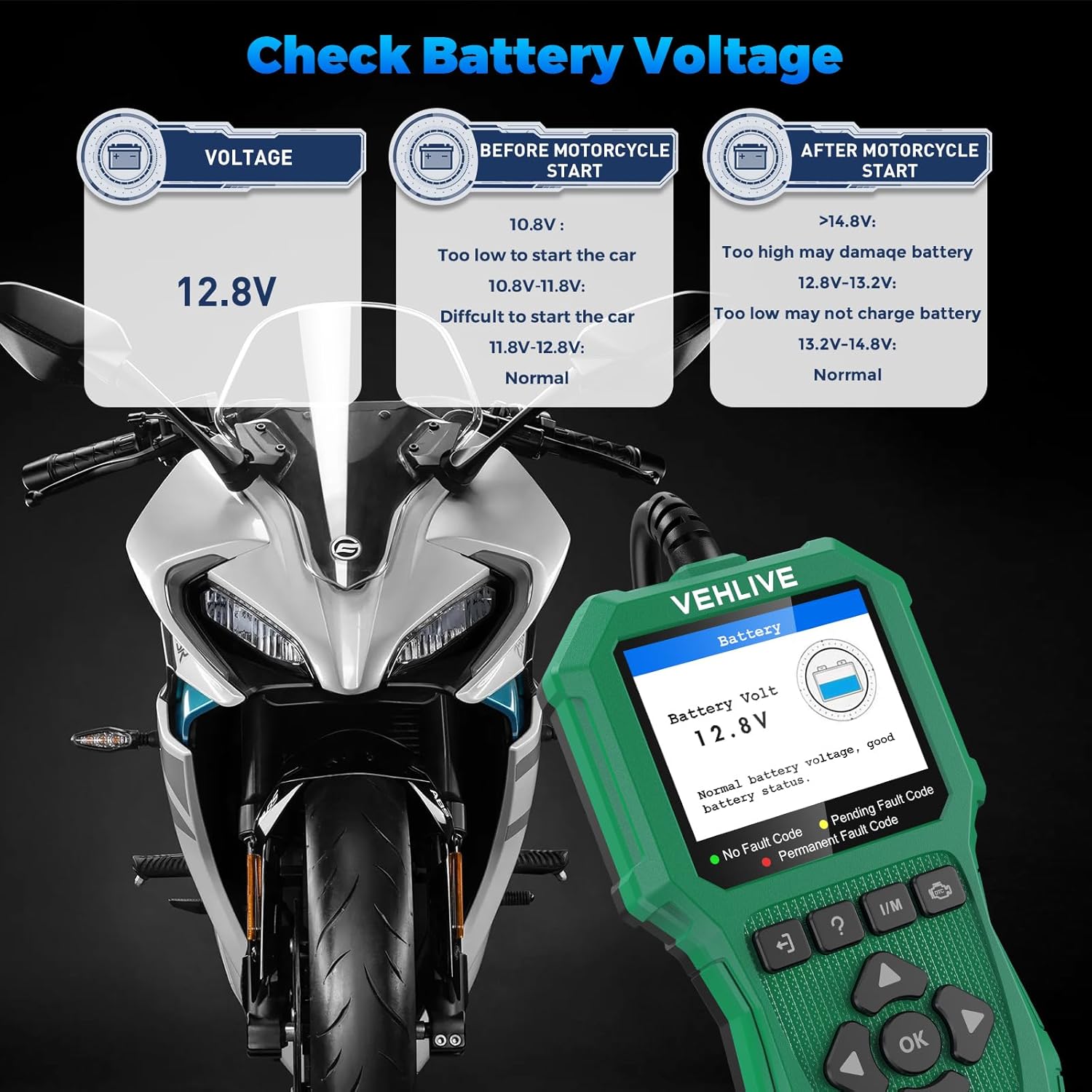
Image: The V880 MOTO displaying battery voltage readings, indicating normal voltage before and after motorcycle start.
3. DTC Lookup
Utilize the built-in DTC library to quickly identify and understand fault codes without needing an internet connection. The device contains over 98,000 DTC definitions.
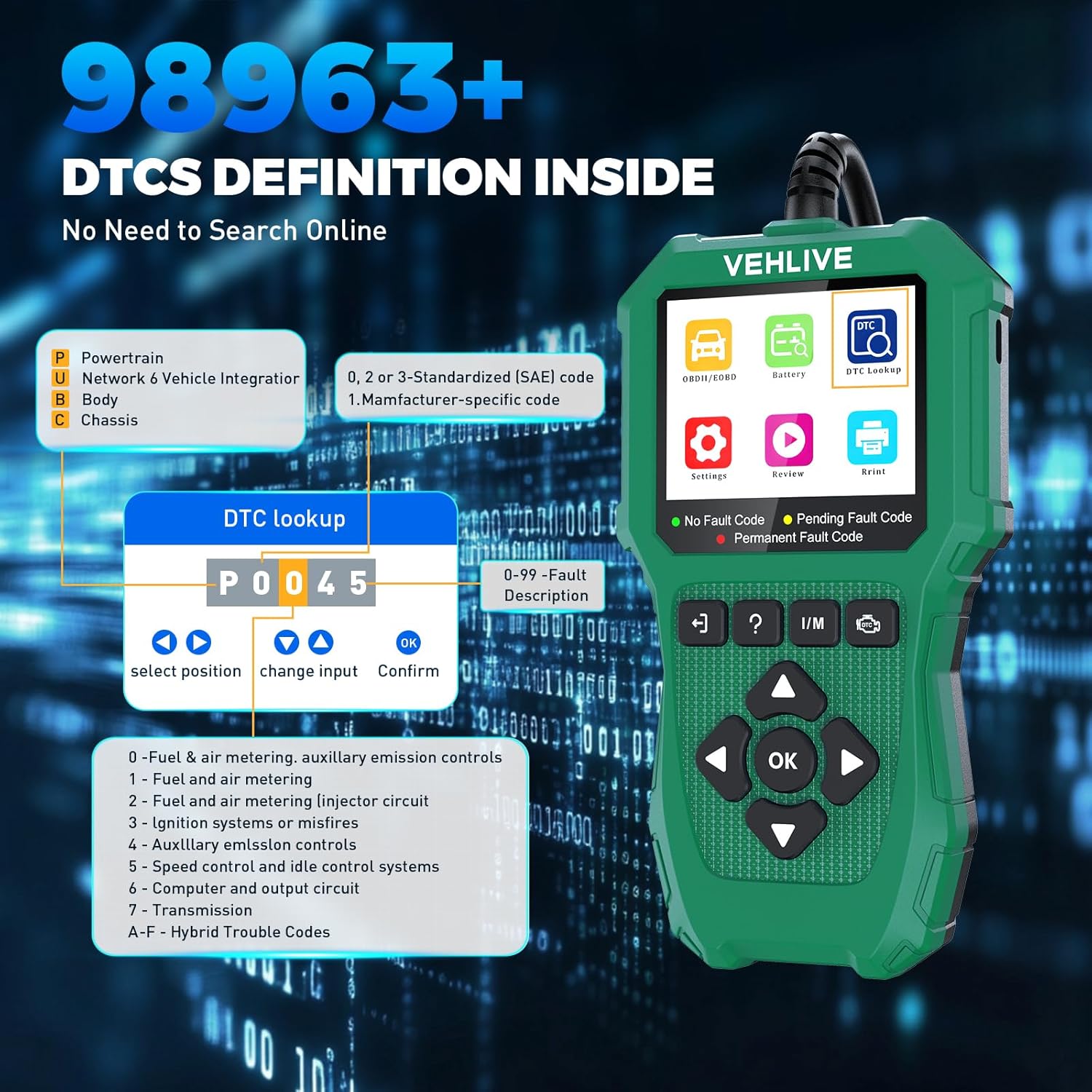
Image: The V880 MOTO's DTC Lookup function, showing a fault code (P0045) and its description.
4. Printing Data
Connect the V880 MOTO to a computer with the software installed. Select the data you wish to print from the device, then use the "Print" function in the software to generate a report.
Video: This video illustrates how to connect the V880 MOTO to a computer and use the software's print function to generate diagnostic reports.
Maintenance
Software Updates
Regularly update the device software to ensure compatibility with new motorcycle models and access the latest diagnostic features. Connect the device to a computer via USB and follow the update instructions provided on the VEHLIVE website.
Troubleshooting
Common Issues and Solutions
- Device Not Powering On: Ensure the device is correctly connected to the motorcycle's OBD2 port or the computer via USB. Check the vehicle's battery voltage.
- Communication Error: Verify that the diagnostic cable is securely connected to both the device and the motorcycle. Ensure the motorcycle's ignition is on (engine off).
- Incorrect Readings: Confirm that the correct motorcycle model and system are selected in the diagnostic menu. Ensure the software is up-to-date.
- Check Engine Light Remains On After Clearing Codes: This indicates that the underlying issue causing the fault code has not been resolved. Address the mechanical or electrical problem before attempting to clear codes again.
- "The vehicle does not support" message for Permanent DTCs: This message indicates that the specific function for permanent DTCs is not supported by the vehicle's ECU, not necessarily a device malfunction.
Specifications
- Screen Size: 2.8 Inches
- Power Source: Corded Electric
- Operating System: OBD2 scanner + battery tester, Easy to Use, One-click I/M Readiness
- Manufacturer: VEHLIVE
- Model Reference: V880 MOTO-12
- Parcel Dimensions: 20.09 x 13.89 x 4.6 cm; 381 g
Warranty and Support
For warranty information, technical support, or any questions regarding your VEHLIVE V880 MOTO, please refer to the official VEHLIVE website or contact their customer service directly. Free software upgrades are available via the manufacturer's website.