
Hac Sa Beach 10.8" Android Car Stereo
Hac Sa Beach 10.8" Android Car Stereo User Manual
Model: 10.8" Android Car Stereo for Toyota Corolla Axio 2 Fielder 3 E160 (2012-2021)
1. Introduction
This manual provides detailed instructions for the installation, operation, and maintenance of your Hac Sa Beach 10.8-inch Android Car Stereo. This unit is designed to enhance your driving experience with advanced features such as wireless Apple CarPlay, Android Auto, GPS navigation, Bluetooth connectivity, and a backup camera. Please read this manual thoroughly before use to ensure proper functionality and safety.

Image 1.1: Hac Sa Beach 10.8" Android Car Stereo main interface.
2. Package Contents
Verify that all items are present in the package:
- 1 × Hac Sa Beach 10.8" Android Car Stereo Head Unit
- 1 × ISO Wiring Harness
- 1 × RCA Cable
- 1 × Camera Cable
- 1 × Original USB Adapter
- 2 × USB Cables
- 1 × Radio Antenna Cable
- 1 × CANbus Cable
- 1 × GPS Antenna
- 1 × CANbus Box
- 1 × User Manual (this document)
- 1 × 720P HD Rear View Camera
3. Setup Instructions
3.1 General Installation
Professional installation is recommended for car electronics. Ensure the vehicle's power is disconnected before beginning installation. Connect the provided wiring harness, RCA cables, and other necessary cables to their corresponding ports on the head unit and your vehicle's system. Refer to your vehicle's specific wiring diagram if needed.
3.2 Backup Camera Connection
The unit includes a 720P HD rear view camera. Connect the camera cable to the designated camera input on the head unit. The system is designed to automatically display the reversing image when the vehicle is shifted into reverse gear. This connection is compatible with the original vehicle's reversing line for direct installation.

Image 3.1: Example of backup camera display on the car stereo.
4. Operating Instructions
4.1 Wireless CarPlay & Android Auto
To use Wireless Apple CarPlay or Android Auto, ensure Bluetooth and Wi-Fi are enabled on both your mobile phone and the car stereo. Tap the 'ZLink5' icon on the stereo's interface to access the connectivity menu. Pair your phone via Bluetooth. Once paired, the system will automatically connect to CarPlay or Android Auto. For wired connection, use the provided 4-pin or 6-pin USB cable.

Image 4.1: Wireless CarPlay and Android Auto functionality.
4.2 GPS Navigation & WiFi Connection
The head unit supports GPS navigation. Connect to a Wi-Fi network or mobile hotspot to download applications and offline maps. The included GPS antenna provides accurate positioning for navigation. Pre-installed navigation apps like Google Maps and Waze are supported.

Image 4.2: GPS Navigation interface.
4.3 Bluetooth Connectivity
Utilize the built-in Bluetooth for hands-free calling and audio streaming. The unit includes a built-in microphone and supports an external microphone for clear communication. Pair your phone via Bluetooth settings on the head unit.
4.4 Steering Wheel Control
The car stereo is compatible with your vehicle's original steering wheel control buttons. This allows you to manage functions like answering calls, adjusting volume, and changing tracks directly from your steering wheel. The system supports learning these controls for customization.

Image 4.3: Steering Wheel Control learning interface.
4.5 Audio System (DSP & EQ)
The unit features a built-in Digital Sound Processor (DSP) and a 36-band Equalizer (EQ) for optimizing audio output. Adjust sound settings to your preference for various seating positions and music genres.

Image 4.4: DSP and EQ settings interface.
4.6 Touchscreen Calibration
If the touchscreen response is inaccurate, calibration may be required. This process involves pressing specific points on the screen in sequence to re-align touch input. Refer to the video below for a visual guide.
Video 4.5: Instructions on how to fix touchscreen issues and perform calibration.
5. Features Overview
- Operating System: Android 15 with 8-core processor, 4GB RAM, and 64GB ROM for smooth operation and ample storage.
- Display: 10.8-inch capacitive touch screen with QLED 1280*720 HD resolution.
- Connectivity: Wireless Apple CarPlay & Android Auto (via Bluetooth and Wi-Fi), Bluetooth for hands-free calls and music, Wi-Fi for internet access.
- Navigation: Built-in GPS with support for online and offline maps.
- Audio: Built-in DSP and 36-band EQ for customizable sound. FM/RDS radio.
- Camera Support: Includes a 720P HD AHD backup camera with automatic display.
- Control: Compatible with original steering wheel controls.
- Ports: Two USB cables for charging and data transfer.
- Customization: Colorful button lights with seven selectable colors.

Image 5.1: Key display and performance specifications.

Image 5.2: Customizable colorful button lights.
6. Troubleshooting
If you encounter issues with your car stereo, please refer to the following common solutions:
- No Power: Check all power connections and fuses. Ensure the ACC and BATT wires are correctly connected.
- No Sound: Verify speaker connections and audio settings. Check if the volume is muted or too low.
- Touchscreen Unresponsive/Inaccurate: Perform a touchscreen calibration as shown in Video 4.5.
- Bluetooth/CarPlay/Android Auto Connection Issues: Ensure Bluetooth and Wi-Fi are enabled on both devices. Try restarting both the phone and the car stereo. For first-time connection, ensure proper pairing as shown in the video below.
- GPS Signal Loss: Ensure the GPS antenna is properly installed and has a clear view of the sky.
Video 6.1: Guide on how to connect to CarPlay/Android Auto.
If the issue persists, please contact customer support.
7. Specifications
| Feature | Specification |
|---|---|
| Operating System | Android 15 |
| Processor | 8 Cores |
| RAM | 4 GB |
| Internal Storage (ROM) | 64 GB |
| Screen Size | 10.8 Inches |
| Display Resolution | 1280*720 (QLED HD) |
| Touch Screen Type | Capacitive |
| Connectivity | Bluetooth, USB, Wi-Fi |
| Special Features | Bluetooth, Touchscreen, Apple CarPlay, Android Auto |
| Map Type Support | Australia, Europe, North America, Worldwide |
| Audio Output Mode | Stereo |
| Item Weight | 3.5 pounds |
| Package Dimensions | 14 x 11 x 3 inches |
| Model Number | 4GB RAM+64GB ROM |
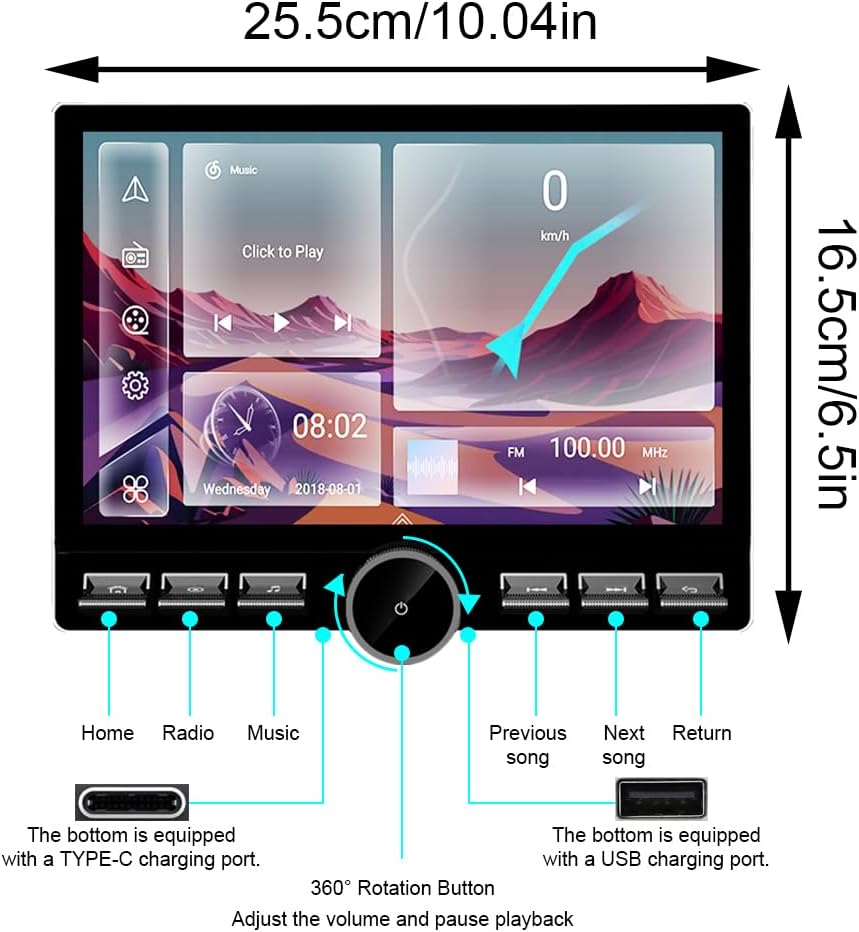
Image 7.1: Product dimensions and button/port layout.
8. Warranty and Support
This Hac Sa Beach car stereo unit comes with a 1-year warranty from the date of purchase. For technical support, troubleshooting assistance, or warranty claims, please contact your retailer or the manufacturer directly. Keep your purchase receipt as proof of purchase.
Ask a question about this manual
Ask about setup, troubleshooting, compatibility, parts, safety, or missing instructions. Manuals+ will review the question and use this page’s manual context to help answer it.