
Samsung Galaxy A07 (SM-A075/DS)
Samsung Galaxy A07 4G Smartphone User Manual
Model: SM-A075/DS
Introduction
The Samsung Galaxy A07 4G is designed to offer a balanced smartphone experience, combining essential features with a user-friendly design. This manual provides detailed instructions for setting up, operating, and maintaining your device.
Key features include an immersive 6.7-inch display with a 90 Hz refresh rate for smooth visuals, a sleek 7.6 mm thin design, and a powerful 6 nm octa-core processor for efficient multitasking. The device also boasts a 50 MP Pro-Grade camera for capturing detailed photos and an IP54 rating for dust and water splash protection, ensuring durability for everyday use.

Figure 1: Front and back view of the Samsung Galaxy A07 4G smartphone, showcasing its sleek design and camera module.
Getting Started: Setup
1. Package Contents
Before you begin, ensure all items are present:
- Samsung Galaxy A07 4G Smartphone
- USB Cable (Charger not included)
- SIM Ejection Pin
- Quick Start Guide (if applicable)
2. Inserting SIM Cards and MicroSD Card
- Locate the SIM card tray on the side of your device.
- Insert the SIM ejection pin into the small hole on the tray to open it.
- Place your Nano-SIM cards (up to two) and an optional MicroSD card (up to 1TB) into the designated slots on the tray. Ensure the gold contacts face downwards.
- Gently push the tray back into the slot until it clicks into place.

Figure 2: Side view of the device, highlighting the SIM card tray location and physical buttons.
3. Charging the Battery
Your device is equipped with a 5000 mAh battery. For optimal performance, fully charge the battery before first use.
- Connect the USB cable to the charging port on your phone.
- Connect the other end of the USB cable to a compatible USB power adapter (sold separately).
- The charging indicator will appear on the screen.
4. Powering On/Off
- To power on: Press and hold the Power key until the Samsung logo appears.
- To power off: Press and hold the Power key, then tap Power off on the screen.
Operating Your Device
1. Display and Navigation
The Galaxy A07 features a 6.7-inch HD+ PLS LCD display with a 90 Hz refresh rate, providing a smooth visual experience for scrolling and media consumption.
- Touchscreen Gestures: Use standard Android gestures such as tap, swipe, pinch-to-zoom, and long-press to navigate the interface.
- Home Screen: Customize your home screen with widgets, app shortcuts, and wallpapers.
- Notifications Panel: Swipe down from the top of the screen to access quick settings and notifications.

Figure 3: Front view of the Samsung Galaxy A07, showcasing its large 6.7-inch display.
2. Camera Features
Capture high-quality photos and videos with the versatile camera system.
- Rear Camera: The 50 MP main camera with f/1.8 aperture and Optical Image Stabilization (OIS) ensures clear and stable shots. A 2 MP depth camera assists with portrait effects.
- Front Camera: An 8 MP front camera is available for selfies and video calls.
- Camera Modes: Explore various modes such as Photo, Video, Portrait, Pro, and more through the camera application.
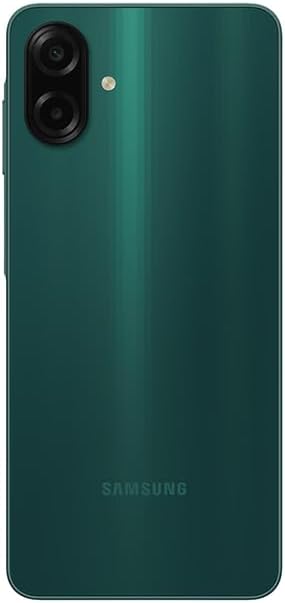
Figure 4: Rear view of the device, highlighting the 50 MP dual camera setup.
3. Connectivity
Your Galaxy A07 supports a range of connectivity options:
- Cellular Network: Compatible with 4G LTE networks (FDD and TDD bands) and 3G/2G networks. This device is unlocked for use with various carriers, including T-Mobile, Mint, and Metro PCS in the USA, and global GSM networks.
- Wi-Fi: Connect to wireless networks using 802.11a/b/g/n/ac (2.4GHz+5GHz, VHT80).
- Location Services: Utilize GPS, Glonass, Beidou, Galileo, and QZSS for accurate location tracking.
- Bluetooth: Connect to wireless accessories (e.g., headphones, speakers).
4. Security and Updates
The Samsung Galaxy A07 receives regular software and security updates to ensure your device remains protected and performs optimally. Expect up to 6 major OS updates and 6 years of security updates.
- Fingerprint Sensor: Use the integrated fingerprint sensor for quick and secure unlocking.
- Software Updates: Check for and install updates via Settings > Software update.
Care and Maintenance
- Dust and Water Protection: The device has an IP54 rating, meaning it is protected against dust ingress and splashing water from any direction. Avoid submerging the device in water or exposing it to high-pressure water jets.
- Cleaning: Use a soft, lint-free cloth to clean the screen and body. Avoid abrasive materials or harsh chemicals.
- Temperature: Operate the device within recommended temperature ranges to prevent damage to the battery and internal components.
- Software Maintenance: Regularly clear cache, uninstall unused apps, and restart your device to maintain performance.
Troubleshooting
If you encounter issues with your device, try the following basic troubleshooting steps:
- Device Unresponsive: Press and hold the Power key for about 10 seconds to force a restart.
- App Crashing: Close and reopen the app. If the issue persists, clear the app's cache or reinstall it.
- Network Issues: Toggle Airplane Mode on and off. Check your SIM card insertion.
- Battery Draining Quickly: Reduce screen brightness, disable unused features (Wi-Fi, Bluetooth, GPS), and close background apps.
- Storage Full: Delete unnecessary files, photos, and videos. Consider using a MicroSD card for additional storage.
For more complex issues, refer to Samsung's official support website or contact customer service.
Specifications
| Feature | Detail |
|---|---|
| Model Number | SM-A075/DS (TSGA07VDE) |
| Display | 6.7-inch PLS LCD, HD+ (720 x 1600 pixels), 90 Hz Refresh Rate |
| Processor | Octa-core (2x2.2 GHz Cortex-A76 & 6x2.0 GHz Cortex-A55), 6nm |
| GPU | Mali-G57 MC2 |
| RAM | 4 GB |
| Internal Storage | 64 GB (Expandable up to 1TB via MicroSD) |
| Rear Camera | 50 MP (wide, f/1.8, PDAF, OIS), 2 MP (depth, f/2.4) |
| Front Camera | 8 MP (wide, f/2.0) |
| Battery | 5000 mAh (Non-removable) |
| Operating System | Android |
| SIM Card | Dual SIM (Nano-SIM) |
| Connectivity | 4G LTE, Wi-Fi 802.11a/b/g/n/ac, Bluetooth, GPS, Glonass, Beidou, Galileo, QZSS |
| Ports | USB Type-C, 3.5mm Earjack |
| Sensors | Accelerometer, Fingerprint Sensor, Light Sensor, Proximity Sensor |
| Dimensions | Approximately 2 x 2 x 2 inches (50.8 x 50.8 x 50.8 mm) |
| Weight | 8.8 ounces (249.5 grams) |
| Color | Green (SM-A075MZGDGTO) |
Warranty and Support
Warranty Information
This Samsung Galaxy A07 (SM-A075/DS) is a Latin American Version and comes with a 1-year warranty valid in South, Central, Latin America, and the Caribbean. Please verify your device's model number (SM-A075/DS) to ensure local warranty coverage in these regions. Warranty terms and conditions may vary by region.
For detailed warranty information, please refer to the warranty card included with your product or visit the official Samsung website for your region.
Customer Support
For technical assistance, troubleshooting, or service inquiries, please contact Samsung Customer Service through their official website or support hotlines available in your country. Have your device's model number and serial number ready when contacting support.
You can find additional resources, FAQs, and software downloads on the official Samsung Support Website.
Related documentsGalaxy A07 (SM-A075/DS)


Ask a question about this manual
Ask about setup, troubleshooting, compatibility, parts, safety, or missing instructions. Manuals+ will review the question and use this page’s manual context to help answer it.